
SENTRY HPXBTA1000
SENTRY BT Pro Sq Headset User Manual
Model: HPXBTA1000
1. Introdución
Welcome to the user manual for your new SENTRY BT Pro Sq Headset with Active Noise Canceling. This manual provides essential information on setting up, operating, maintaining, and troubleshooting your headset to ensure optimal performance and longevity. Please read this manual thoroughly before using the product.
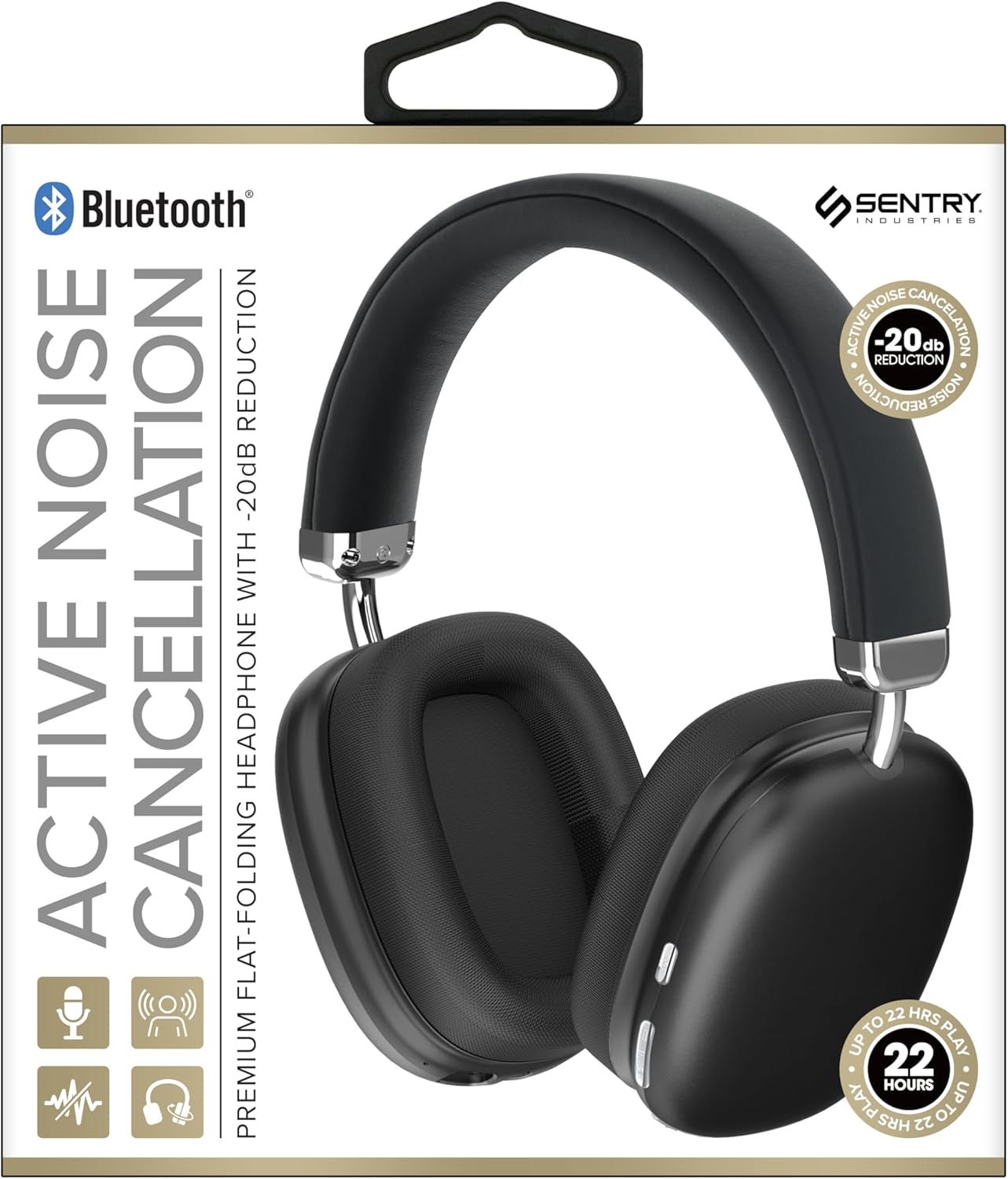
This image displays the SENTRY BT Pro Sq Headset in black, highlighting its over-ear design, adjustable headband, and the control buttons located on the earcups. The packaging indicates features such as Bluetooth connectivity, Active Noise Cancellation with -20dB reduction, and up to 22 hours of play time.
2. Información importante de seguridade
Para garantir un funcionamento seguro e axeitado, siga as seguintes pautas:
- Non expoñas os auriculares a temperaturas extremas, humidade nin substancias corrosivas.
- Evite deixar caer os auriculares nin someterlos a impactos fortes.
- Non desmontes nin intentes reparar os auriculares ti mesmo. Isto anulará a garantía.
- Limpa os auriculares só cun pano suave e seco. Non empregues produtos de limpeza líquidos.
- Prolonged listening at high volume levels can cause hearing damage. Adjust volume to a safe level.
- Do not use the headset in situations where inability to hear ambient sounds could be dangerous (e.g., driving, cycling, walking in traffic).
3. Contido do paquete
Comprobe se o paquete contén os seguintes elementos:
- SENTRY BT Pro Sq Headset
- Cable de carga USB
- Manual de usuario
4. Produto rematadoview
The SENTRY BT Pro Sq Headset features an over-ear design with soft ear pads for comfort and noise isolation. It includes an adjustable folding headband for portability. Key components include:
- Arcadas: House the audio drivers and provide passive noise isolation.
- Diadema: Adjustable for a comfortable fit, designed to fold for compact storage.
- Botóns de control: Located on the earcups for power, volume, track control, and Active Noise Cancellation (ANC).
- Micrófono: Integrado para chamadas mans libres.
- Porto de carga: Para conectar o cable de carga USB.
Refer to the product image in the Introduction section for visual identification of these components.
5. Configuración
5.1 Carga dos auriculares
- Conecta o extremo pequeno do cable de carga USB ao porto de carga dos auriculares.
- Conecta o extremo máis grande do cable de carga USB a un adaptador de corrente USB (non incluído) ou ao porto USB dun ordenador.
- The LED indicator on the headset will illuminate to show charging status. It will change color or turn off when fully charged.
- Unha carga completa adoita tardar aproximadamente de 2 a 3 horas.
5.2 Emparellamento con dispositivos Bluetooth
Before using the headset wirelessly, you must pair it with your Bluetooth-enabled device (smartphone, laptop, tablet, smart speaker, gaming console).
- Asegúrese de que os auriculares estean completamente cargados.
- With the headset powered off, press and hold the Power button for approximately 5-7 seconds until the LED indicator flashes rapidly, indicating pairing mode.
- On your Bluetooth device, enable Bluetooth and search for new devices.
- Select "SENTRY BT Pro Sq" (or similar name) from the list of available devices.
- Once paired, the LED indicator on the headset will stop flashing and may turn solid blue or off, depending on the model.
- Os auriculares tentarán reconectarse automaticamente co último dispositivo emparellado ao acendelos.
6. Instrucións de funcionamento
6.1 Encendido/apagado
- Encendido: Press and hold the Power button for 2-3 seconds. The LED indicator will light up.
- Apagado: Press and hold the Power button for 3-4 seconds. The LED indicator will turn off.
6.2 Cancelación activa de ruído (ANC)
The headset features Active Noise Cancellation to reduce ambient noise.
- Activar ANC: Locate the ANC button (if separate) or press the designated control. The ANC indicator light will turn on.
- Desactivar ANC: Prema de novo o botón ANC. O indicador luminoso ANC apagarase.
6.3 Media Control (Touch Control)
Control your audio playback directly from the headset:
- Reproducir/Pausa: Single tap the multi-function button.
- Subir volume: Tap the Volume Up button.
- Baixar volume: Tap the Volume Down button.
- Próxima pista: Double tap the multi-function button.
- Pista anterior: Triple tap the multi-function button.
6.4 Xestión de chamadas
Manage phone calls with the built-in microphone:
- Responder chamada: Single tap the multi-function button when a call comes in.
- Finalizar a chamada: Single tap the multi-function button during a call.
- Rexeitar a chamada: Manteña premido o botón multifunción durante 2 segundos cando entre unha chamada.
7. Mantemento e coidados
- Limpeza: Wipe the headset with a soft, dry, lint-free cloth. Do not use abrasive cleaners, alcohol, or chemical solvents.
- Almacenamento: When not in use, store the headset in a cool, dry place, away from direct sunlight and extreme temperatures. Utilize the folding headband feature for compact storage.
- Coidado da batería: To preserve battery life, charge the headset regularly, even if not used for extended periods. Avoid fully discharging the battery frequently.
- Evitar auga: The headset is not waterproof. Keep it away from water and moisture.
8 Solución de problemas
Se tes problemas cos teus auriculares, consulta os seguintes problemas e solucións comúns:
| Problema | Posible Solución |
|---|---|
| Os auriculares non se acende. | Ensure the headset is fully charged. Connect to a power source and allow it to charge for at least 30 minutes before attempting to power on again. |
| Non se pode sincronizar co dispositivo Bluetooth. | Ensure the headset is in pairing mode (LED flashing rapidly). Make sure Bluetooth is enabled on your device and it is within range (10 meters). Try restarting both the headset and your device. |
| Non hai son dos auriculares. | Check the volume level on both the headset and your connected device. Ensure the headset is properly paired and connected. Try playing audio from a different application or device. |
| Active Noise Cancellation (ANC) is not effective. | Ensure ANC is activated. Make sure the earcups are properly sealed around your ears. ANC is most effective against low-frequency, constant noise. |
| O micrófono non funciona. | Ensure the headset is connected and selected as the input device on your computer or smartphone. Check privacy settings on your device that might restrict microphone access. |
9. Especificacións
| Característica | Detalle |
|---|---|
| Nome do modelo | HPXBTA1000 |
| Tecnoloxía de conectividade | Sen fíos (Bluetooth) |
| Control de ruído | Cancelación activa de ruído |
| Colocación do oído | Sobre orella |
| Factor de forma | Sobre orella |
| Tipo de control | Control multimedia, táctil |
| Rango de frecuencias | 20 Hz a 20,000 Hz |
| Tipo de controlador de audio | Driver dinámico |
| Dispositivos compatibles | Smartphones, Laptops, Tablets, Smart Speakers, Gaming Consoles |
| Cor | Negro |
| Peso do elemento | 1.2 libras |
| UPC | 080068501503 |
| Fabricante | SENTIRÍA |
10. Garantía e soporte
SENTRY products are designed and manufactured to the highest quality standards. For information regarding warranty coverage, technical support, or service inquiries, please refer to the warranty card included with your product or visit the official SENTRY websitio. Garde o comprobante de compra para reclamacións de garantía.
Ask a question about this manual
Ask about setup, troubleshooting, compatibility, parts, safety, or missing instructions. Manuals+ will review the question and use this page’s manual context to help answer it.