
Chasing M2 S
Chasing M2 S Professional Underwater Drone
Manual de usuario
1. Introdución
This user manual provides essential information for the safe and effective operation, maintenance, and troubleshooting of your Chasing M2 S Professional Underwater Drone. Please read this manual thoroughly before using the product to ensure optimal performance and longevity.
2. Información de seguridade
Operating the Chasing M2 S requires adherence to specific safety guidelines to prevent injury or damage to the device. Always prioritize safety during use.
- Profundidade da auga: Do not exceed the maximum operating depth of 100 meters (328 feet).
- Seguridade da batería: Use only the provided charger and cables. Do not expose batteries to extreme temperatures or puncture them.
- Seguridade da hélice: Keep hands, hair, and loose clothing clear of propellers when the drone is powered on.
- Sensibilización ambiental: Avoid operating in strong currents, near marine life, or in areas with potential entanglement hazards.
- Supervisión: Always operate the drone under direct supervision.
3. Contido do paquete
Verifique que todos os elementos que se indican a continuación estean presentes no seu paquete:
- (1) M2 S ROV Underwater Drone
- (1) M2 S Remote Control
- (1) 100m Tether
- (1) Winder
- (1) Power Cord & 3-in-1 Charger
- (1) Adapter Case (US)
- (1) EPP Case
- (1) M2 S Charging Adapter Cable
- (1) Towel
- (1) GoPro Mount
- (1) ROV Maintenance Manual (General Edition)
- (1) RC3 Controller User Manual (General Edition)
- (1) Tarxeta de garantía
4. Produto rematadoview
O Chasing M2 S is an advanced underwater ROV designed for professional use, featuring an open-body design and 8 vectored thrusters for superior maneuverability.

Figura 4.1: O Chasing M2 S Underwater Drone, its remote control, and the 100-meter tether with winder.
4.1. M2 S ROV Underwater Drone
The main unit, equipped with a camera, lights, and multiple thrusters for precise underwater movement.

Figura 4.2: Fronte view do Chasing M2 S Underwater Drone, showcasing its camera lens and integrated LED lights.
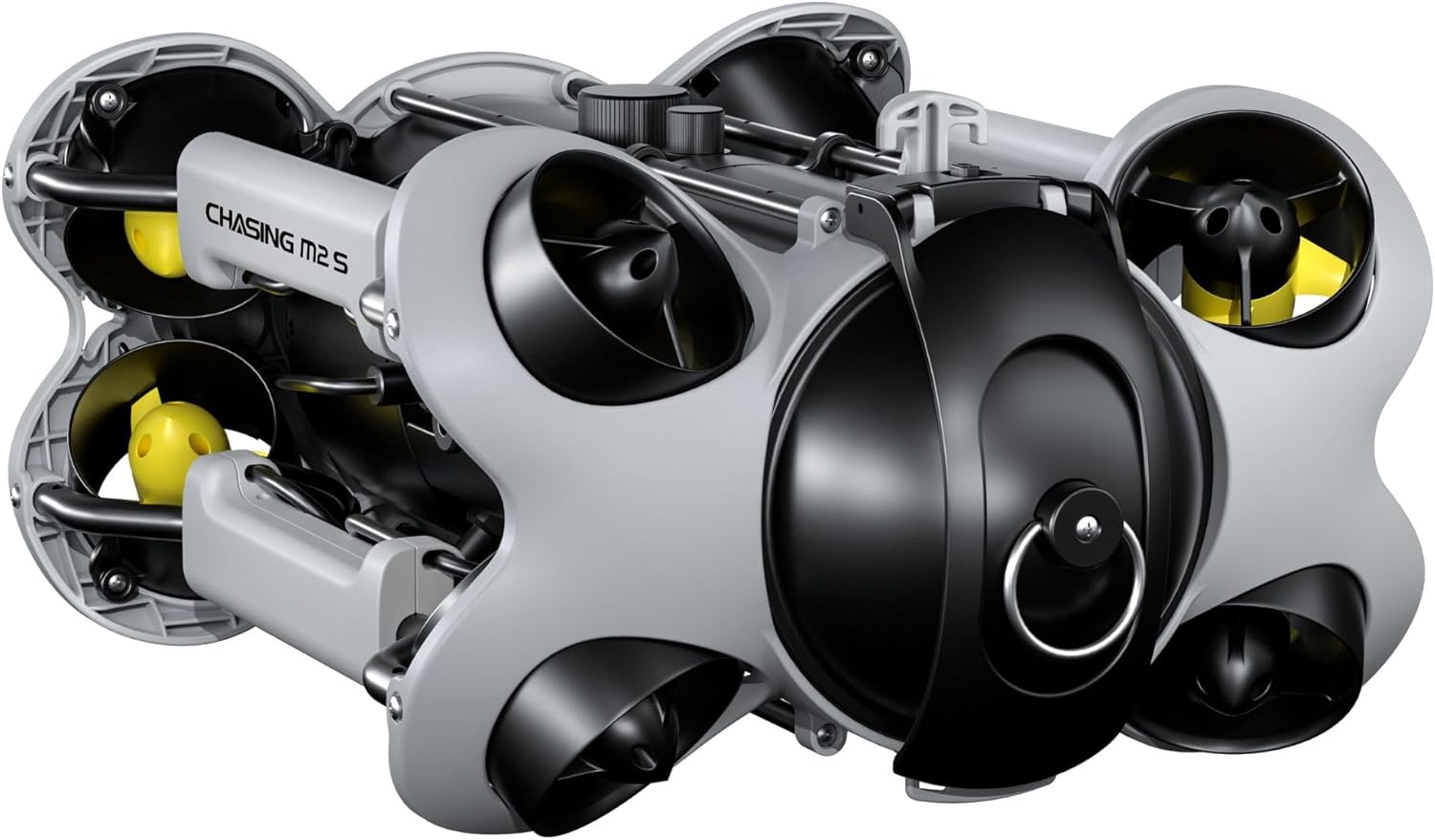
Figura 4.3: Traseira view do Chasing M2 S Underwater Drone, highlighting the tether connection port and rear thrusters.

Figura 4.4: De arriba abaixo view do Chasing M2 S Underwater Drone, showing the overall chassis and thruster placement.

Figura 4.5: Abaixo view do Chasing M2 S Underwater Drone, revealing the underside components and additional thrusters.

Figura 4.6: Lateral view do Chasing M2 S Underwater Drone, illustrating its compact and streamlined design.
4.2. M2 S Remote Control
The primary interface for controlling the drone, featuring joysticks, buttons, and a mount for a smartphone or tablet.

Figura 4.7: O Chasing M2 S Remote Control, designed for ergonomic handling and precise drone operation, shown with a mounted smartphone.
4.3. 100m Tether & Winder
The tether provides communication and power to the ROV from the surface, managed by a convenient winder for deployment and retrieval.
5. Configuración
Follow these steps to prepare your Chasing M2 S for operation:
- Carga de baterías: Connect the ROV and Remote Control to the 3-in-1 charger using the provided cables. Ensure both devices are fully charged before use. The indicator lights will show charging status.
- Connect Tether: Securely connect one end of the 100m tether to the ROV and the other end to the winder. Ensure the connection points are clean and dry before mating.
- Instalar aplicación: Download the official Chasing GO app from your device's app store (iOS/Android).
- Connect to Remote Control: Place your smartphone or tablet into the remote control holder. Power on the remote control, then power on the ROV. Open the Chasing GO app and follow the on-screen instructions to establish a connection.
6. En funcionamento
Once setup is complete, you can begin operating your Chasing M2 S. Familiarize yourself with the controls before deployment.
6.1. Controis básicos
- Movemento: Use the left joystick on the remote control to control forward, backward, left, and right movement.
- Depth & Rotation: Use the right joystick to control ascent, descent, and yaw (rotation).
- Luces: Press the dedicated light button on the remote control to adjust LED brightness.
6.2. Funcións da cámara
- Foto: Press the photo button on the remote control or within the app to capture still images.
- Vídeo: Press the video button to start/stop video recording.
- En directo View: O Chasing GO app provides a real-time video feed from the drone's camera.
6.3. Deployment and Retrieval
Carefully lower the ROV into the water. Ensure the tether is free of tangles. When retrieving, pull the ROV slowly and steadily, winding the tether as you go.
7. Mantemento
Regular maintenance ensures the longevity and optimal performance of your Chasing M2 S.
- Limpeza: After each use, rinse the ROV, remote control, and tether with fresh water. Dry thoroughly with the provided towel or a soft cloth.
- Coidado da batería: Store batteries in a cool, dry place. For long-term storage, charge batteries to approximately 50-60%.
- Inspección da hélice: Regularly check propellers for any debris, damage, or entanglement. Clean or replace as necessary.
- Aneis tóricos e selos: Inspect all O-rings and seals for cracks or wear. Keep them clean and lightly lubricated with silicone grease if needed.
- Almacenamento: Store the drone and accessories in the EPP case in a dry, temperature-controlled environment.
8 Solución de problemas
Consulta esta sección para ver os problemas comúns e as súas solucións.
| Problema | Causa posible | Solución |
|---|---|---|
| O drón non se acende. | Batería baixa; Conexión solta. | Charge the ROV battery; Ensure all connections are secure. |
| No video feed in app. | App not connected; Tether issue. | Restart app and remote control; Check tether connections. |
| Drone not responding to controls. | Remote control battery low; Interference; Tether damage. | Charge remote control; Move to an area with less interference; Inspect tether for damage. |
| Propellers not spinning correctly. | Debris in thrusters; Motor malfunction. | Clean thrusters of any debris; Contact support if issue persists. |
9. Especificacións
| Característica | Detalle |
|---|---|
| Marca | Chasing |
| Nome do modelo | M2 S |
| Franxa de idade (descrición) | Adulto |
| Tipo de control | Control remoto |
| Tipo de medios | SD |
| Pilas incluídas | Si |
| Control remoto incluído? | Si |
| UPC | 843722101927 |
| Peso do elemento | 33 libras |
| Dimensións do paquete | 19.7 x 18.2 x 12.6 polgadas |
| ASIN | B0CYK617VT |
| Data de primeira dispoñibilidade | 19 de marzo de 2024 |
10. Garantía e soporte
O teu Chasing M2 S Professional Underwater Drone comes with a Warranty Card included in the package. Please refer to this card for detailed warranty terms and conditions.
For technical support, service, or additional inquiries, please visit the official Chasing websitio web ou póñase en contacto co seu departamento de atención ao cliente. Pode atopar máis información e recursos no Chasing Store on Amazon.
Ask a question about this manual
Ask about setup, troubleshooting, compatibility, parts, safety, or missing instructions. Manuals+ will review the question and use this page’s manual context to help answer it.