
1. Introdución
Thank you for choosing the TD Systems 24-inch Smart TV. This television combines a compact design with advanced smart features, powered by Google TV and Android 11. It offers a high-definition viewing experience, integrated digital tuners, and a wide range of connectivity options to enhance your entertainment.
This manual provides essential information for setting up, operating, and maintaining your new television. Please read it thoroughly before use to ensure proper functionality and safety.
2. Información de seguridade
Observe sempre as seguintes precaucións de seguridade para evitar descargas eléctricas, incendios ou danos no dispositivo:
- Non expoña o televisor á choiva nin á humidade.
- Non bloquee as aberturas de ventilación.
- Asegúrese de que o cable de alimentación non estea pisado nin pisado.
- Desconecte o enchufe de alimentación durante tormentas eléctricas ou cando non o use durante períodos prolongados.
- Encargue toda a reparación a persoal de servizo cualificado.
- Manteña as pilas fóra do alcance dos nenos.
3. Contido do paquete
Verifica que todos os elementos estean presentes na caixa:
- TD Systems 24-inch Smart TV
- Control remoto
- 2 pilas AAA (para o mando a distancia)
- 2 x Legs (Left, Right)
- Manual de usuario (este documento)

Image: The TD Systems 24-inch Smart TV, showcasing its sleek design and included stand.
4. Configuración
4.1 Colocación do soporte
- Coloque con coidado a pantalla do televisor sobre unha superficie suave e plana para evitar rabuñaduras.
- Identify the left and right legs.
- Align each leg with the corresponding screw holes on the bottom of the TV.
- Secure each leg using the provided screws. Do not overtighten.
4.2 Conexión de enerxía
Conecta o cable de alimentación á entrada de alimentación do televisor e despois a unha toma de corrente. Asegúrate de que a toma de corrente sexa facilmente accesible.
4.3 Encendido inicial
Press the power button on the TV or the remote control. Follow the on-screen instructions to complete the initial setup, including language selection, network connection, and channel scanning.

Image: The 24-inch TD Systems Smart TV seamlessly integrated into a modern kitchen environment, demonstrating its compact size and versatile placement options.

Image: Detailed dimensions of the TD Systems 24-inch Smart TV, including width, height, and depth, useful for planning placement.
5. Instrucións de funcionamento
5.1 Control remotoview
The included remote control allows you to navigate the TV's features. Insert the 2 AAA batteries into the remote control, ensuring correct polarity.

Image: The remote control for the TD Systems Smart TV, highlighting the dedicated buttons for popular streaming services and the voice assistant.
5.2 Funcións básicas
- Potencia: Preme o Poder botón para acender ou apagar o televisor.
- Volume: Usa o Volume +/- botóns para axustar o nivel do son.
- Canle: Usa o Canle +/- botóns para cambiar de canle.
- Entrada: Preme o Entrada button to select different input sources (HDMI, AV, etc.).
- Navegación: Use the directional Frecha botóns e OK botón para navegar polos menús.
6. Conectividade
Your TD Systems Smart TV offers a variety of ports for connecting external devices:
- HDMI (x2): Para conectar dispositivos de alta definición como reprodutores de Blu-ray, consolas de xogos ou descodificadores.
- USB: Para conectar dispositivos de almacenamento USB para reproducir contido multimedia files.
- AV Composite Input: For connecting older devices using RCA cables.
- Saída de auriculares: Para conectar auriculares ou altofalantes externos.
- Saída de audio dixital óptico: For connecting to a soundbar or home theater system for high-quality audio.
- CI+ Port: For inserting a Conditional Access Module (CAM) to access encrypted channels.
- Ethernet (RJ45): Para unha conexión a internet por cable.
- Wi-Fi: Para conexión a internet sen fíos.
- Bluetooth: Para conectar accesorios sen fíos como auriculares ou altofalantes.

Image: A visual representation of the various input and output ports available on the TD Systems Smart TV, including HDMI, USB, DVB-T2/C/S2, AV, Optical, and Headphone Jack.
7. Funcións da televisión intelixente
Your TD Systems Smart TV runs on Android 11 with Google TV, providing a personalized and intuitive user experience.
7.1 Interface de Google TV
Google TV organizes your favorite content from various streaming services into one central hub. It offers personalized recommendations based on your viewing hábitos.

Image: The vibrant Google TV interface displayed on the TD Systems Smart TV, showing various streaming app icons and content recommendations.
7.2 Aplicacións compatibles
Access a wide range of popular streaming applications directly from your TV, including:
- YouTube
- Netflix
- Disney+
- HBO Max
- Prime Video
You can download thousands of additional applications from the Google Play Store.

Image: The Google TV ecosystem on the TD Systems Smart TV, illustrating access to over 5000 apps via Google Play, including popular streaming services.
7.3 Control por voz co Asistente de Google
Usa a túa voz para controlar a televisión, buscar contido, obter respostas e xestionar dispositivos domésticos intelixentes. Simplemente preme o botón do Asistente de Google no teu mando a distancia e di a túa orde.

Image: The TD Systems remote control with a microphone icon and sound waves, demonstrating the voice control capability powered by Google Assistant.
7.4 Chromecast integrado
Easily cast movies, shows, photos, and more from your phone, tablet, or laptop directly to your TV screen using the built-in Chromecast feature.
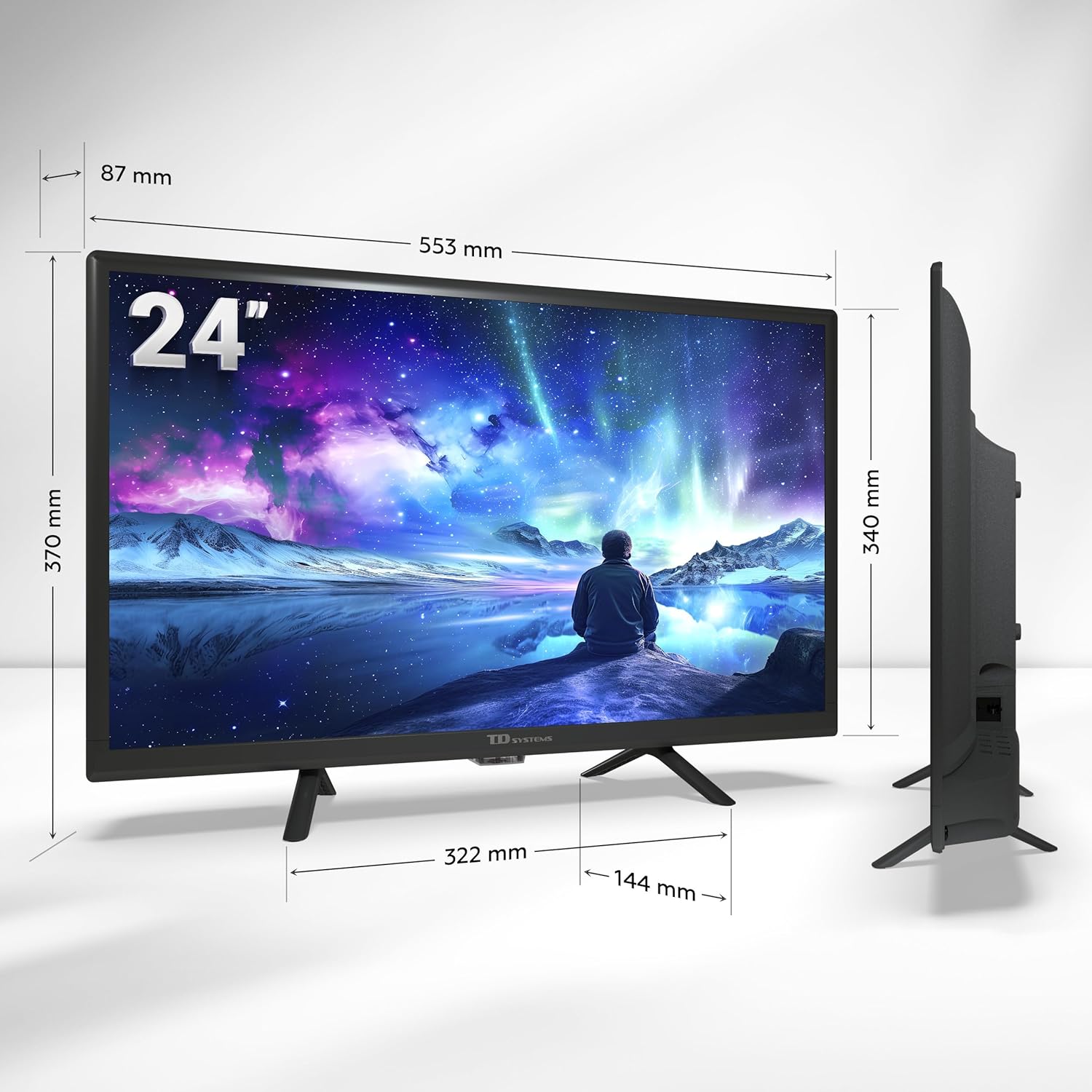
Image: A smartphone displaying content being wirelessly cast to the TD Systems Smart TV, illustrating the Chromecast built-in functionality.
8. Mantemento
Proper care ensures the longevity of your TV:
- Limpeza da pantalla: Limpa a pantalla con suavidade cun pano suave e sen pelusa. Para as marcas difíciles, usa unha solución de limpeza específica para pantallas aplicada ao pano, non directamente á pantalla.
- Limpeza de armarios: Limpa o moble do televisor cun pano suave e seco. Non empregues produtos de limpeza abrasivos nin disolventes.
- Ventilación: Asegúrate de que as aberturas de ventilación da parte traseira do televisor non estean bloqueadas para evitar o sobrequecemento.
- Cable de alimentación: Comprobe regularmente o cable de alimentación para ver se está danado.
9 Solución de problemas
Se tes problemas co teu televisor, consulta os seguintes problemas e solucións comúns:
| Problema | Causa posible | Solución |
|---|---|---|
| Sen Poder | Cable de alimentación desconectado; non hai corrente na toma de corrente. | Comprobe a conexión do cable de alimentación; probe a toma de corrente con outro dispositivo. |
| Sen imaxe, pero hai son | Fonte de entrada incorrecta seleccionada; problema co dispositivo externo. | Preme o Entrada button to select the correct source; check external device connection. |
| Sen son, pero hai imaxe | Volume silenciado ou demasiado baixo; problema co sistema de son externo. | Unmute volume or increase level; check connections to external audio devices. |
| Non se pode conectar á wifi | Contrasinal incorrecto; problema co enrutador; televisor demasiado lonxe do enrutador. | Re-enter password; restart router; move TV closer to router or use Ethernet. |
| O control remoto non funciona | Pilas esgotadas ou inseridas incorrectamente; obstrución. | Substitúa as pilas; asegúrese de que a polaridade sexa correcta; retire as obstrucións entre o mando a distancia e o televisor. |
Se o problema persiste despois de probar estas solucións, póñase en contacto co servizo de atención ao cliente.
10. Especificacións
| Característica | Descrición |
|---|---|
| Marca | TD Systems |
| Número de modelo | PRIME24C19GLE |
| Tamaño da pantalla | 24 polgadas (60 cm) |
| Tecnoloxía de visualización | LED |
| Resolución | 1366 x 768 píxeles (HD) |
| Taxa de actualización | 60 Hz |
| Sistema Operativo | Android TV (Android 11) with Google TV |
| Audio | Dolby Digital Plus |
| Sintonizadores | DVB-T2/C/S2 (Digital Terrestrial, Cable, Satellite) |
| Conectividade | 2x HDMI, 1x USB, AV Composite, Headphone Out, Optical Digital Audio Out, CI+, Ethernet (RJ45), Wi-Fi, Bluetooth |
| Características especiais | Google Assistant (Voice Control), Chromecast Built-in, Access to Google Play Store |
| Power Consumption (Energy Efficiency) | Clase E |
| Compoñentes incluídos | TV, Remote Control, 2x AAA Batteries, 2x Legs |
11. Garantía e soporte
11.1 Garantía do fabricante
This TD Systems Smart TV comes with a Garantía do fabricante de 24 meses desde a data de compra. Esta garantía cobre defectos de materiais e fabricación en condicións de uso normal. Conserve o comprobante de compra para reclamacións de garantía.
11.2 Atención ao cliente
TD Systems is committed to providing high-quality products and exceptional customer service. If you have any questions, require technical assistance, or need to report an issue, please contact our support team. Your satisfaction is our priority.
Image: A customer service representative, symbolizing the dedicated support available for TD Systems products.