
1. Introdución
The Reyke Slim Rechargeable Wallet Tracker Card is a thin, lightweight device designed to help you locate your personal items. Measuring only 2.8mm thick, its curved design allows it to fit seamlessly into wallets, ID holders, luggage tags, passports, and other electronic devices. This tracker card integrates with Apple's 'Find My' network, providing a convenient way to keep track of your valuables.

Image 1.1: The Reyke Smart Tracker Card, highlighting its ultra-thin design (2.6mm thick) and key features like loud sound, Bluetooth range, rechargeable battery, and durability.

Imaxe 1.2: Ex.amples of how the Reyke Smart Card can be used, including in a camera bag, as an ID card, in a wallet, with a laptop, in a backpack, and with luggage.
2. Configuración e emparellamento
Follow these steps to pair your Reyke Wallet Tracker Card with your Apple iOS device:
- Paso 1: Press the power button on the tracker card once to activate pairing mode.
- Paso 2: On your iPhone or iPad, ensure Bluetooth is enabled and open the 'Find My' application.
- Paso 3: Navigate to the 'Items' tab within the 'Find My' app and tap 'Add Other Item'.
- Paso 4: Select your Reyke Tracker Card (it may appear as 'HB12-B' or a similar identifier) from the list of detected devices and follow the on-screen prompts to connect and name your item.
Nota: This device is compatible with Apple iOS devices only. Android devices are not supported.

Image 2.1: Visual guide demonstrating the four steps to connect the Reyke Smart Card to the Apple Find My app.
3. Instrucións de funcionamento
3.1 Localizar elementos próximos
When your Reyke Tracker Card is within Bluetooth range (up to 164 feet or 50 meters), you can use the 'Find My' app to trigger an audible alert from the card's integrated speaker. This helps you pinpoint the exact location of your item, such as a wallet hidden under a couch cushion.

Image 3.1: An iPhone displaying the Find My app map, showing a wallet icon and a 'Play Sound' option, with a visual representation of sound waves emanating from a wallet.
4. Cargando
The Reyke Wallet Tracker Card features wireless charging for convenience. A full charge can provide up to 5 months of battery life. An LED indicator light on the card changes color to show its charging status.

Image 4.1: The Reyke Smart Card placed on a wireless charging pad, illustrating its wireless charging capability.
Important Charging Tip: When placing the card on a wireless charger, ensure the side with the charging icon is facing downwards for proper contact and efficient charging.

Image 4.2: A visual guide showing the correct (icon facing down) and incorrect (icon facing up) orientation for wireless charging the Reyke Smart Card.
5. Sharing Feature
The Reyke Tracker Card supports sharing its location with up to five other Apple users through the 'Find My' app. This allows multiple individuals to track the item on a map. Note that tracking notifications are muted for shared users when the item is moving with them. This feature requires your iPhone, iPad, or Mac to be updated to iOS 17 or later.
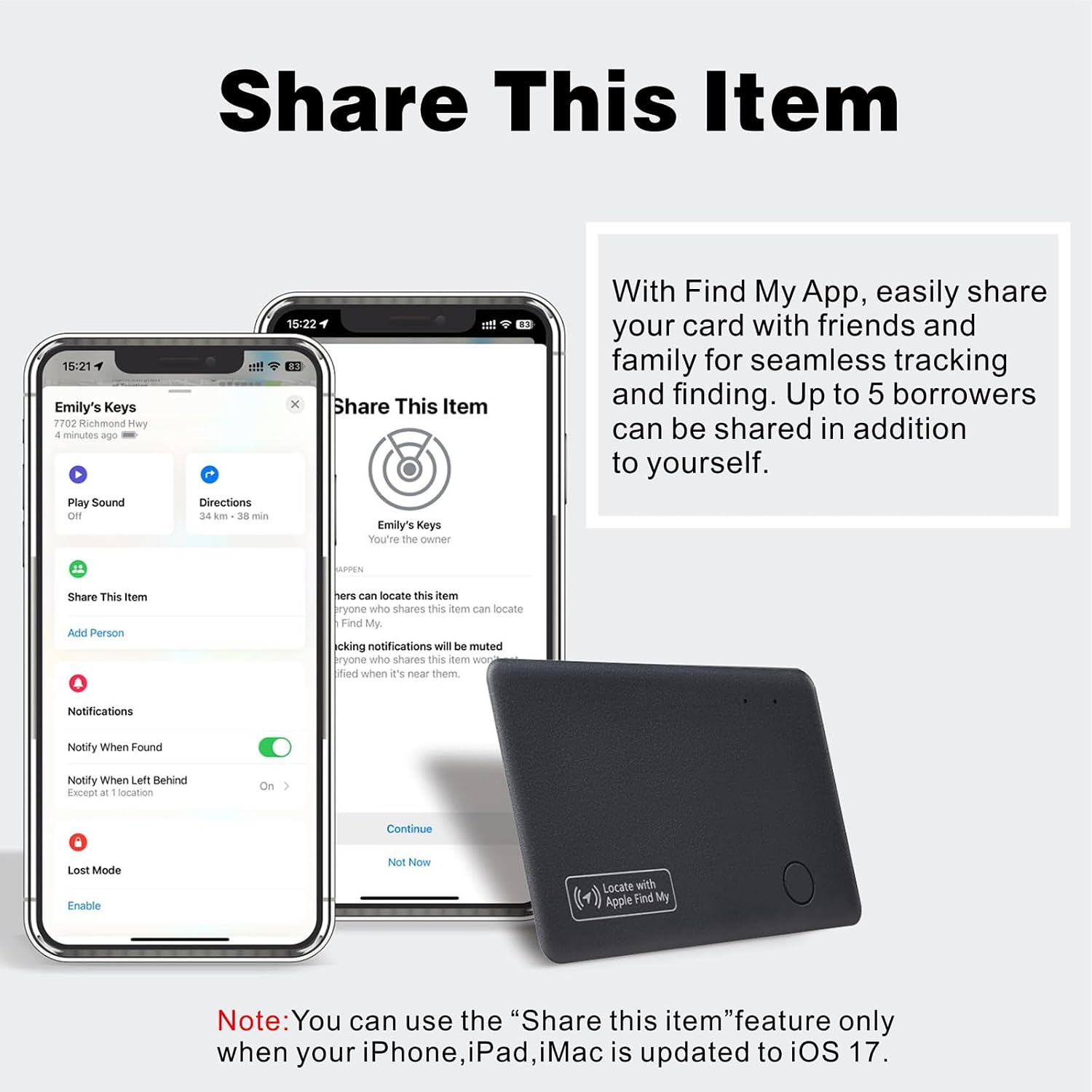
Image 5.1: An iPhone screen showing the 'Share This Item' interface within the Find My app, detailing how to share the tracker card with others.
6. Modo perdido
If your Reyke Tracker Card is misplaced, activate 'Lost Mode' in the 'Find My' app. The extensive network of Apple devices can help locate your item. You will receive an automatic notification when your tracker card is detected by any Apple device on the network, providing its last known location. You can also leave a contact message for anyone who finds your item.

Image 6.1: An iPhone screen displaying the 'Lost Mode' options within the Find My app, including 'Notify When Found' and leaving a message.
7. Left-Behind Alerts
Receive immediate notifications on your iPhone if your Reyke Tracker Card moves out of Bluetooth range. These 'Left-Behind Alerts' will inform you of the last known location before disconnection, which can be viewed in the 'Find My' app. This feature is part of the free 'Find My' app and requires no subscription fees.

Image 7.1: An iPhone screen showing a 'TIME SENSITIVE' notification indicating that an item (e.g., 'Emily's Wallet') has been left behind, along with its last detected location.
8 Solución de problemas
- Dispositivo sen emparellamento: Ensure the tracker card is sufficiently charged. Press the power button once to enter pairing mode. Verify that Bluetooth is enabled on your iOS device and the 'Find My' app is open.
- No sound from tracker: Check if the tracker is within Bluetooth range. Ensure your phone's volume is up and the 'Play Sound' function is activated in the 'Find My' app.
- Localización incorrecta: Location accuracy depends on the density of Apple devices in the vicinity. In areas with fewer devices, location updates may be less precise.
- A batería non se carga: Confirm the wireless charger is functioning correctly and the tracker card is placed with the charging icon facing downwards.
- Left-Behind Alerts not working: Ensure 'Notify When Left Behind' is enabled for the item in the 'Find My' app settings. Check your iPhone's notification settings for the 'Find My' app.
9. Especificacións
| Número de modelo | HB12-B |
| Marca | Reyke |
| Tecnoloxía de conectividade | Bluetooth |
| Dispositivos compatibles | Apple iOS devices only |
| Método de control | Application (Apple Find My) |
| Duración da batería | Up to 5 months (on a single charge) |
| Cargando | Carga sen fíos |
| Rango | Up to 164 feet (50 meters) Bluetooth |
| Material | Acrilonitrilo Butadieno Estireno (ABS) |
| Usos recomendados | Wallets, keychains, luggage tags, passports, electronic devices |
10. Información de seguridade
Lea e siga estas pautas de seguridade:
- Non intente desmontar, reparar nin modificar o dispositivo. Isto podería anular a garantía e causar danos.
- Keep the device away from extreme temperatures, direct sunlight, and liquids.
- Desfágase do dispositivo e da súa batería de forma responsable segundo a normativa local.
- The device contains small parts and is not a toy. Keep out of reach of children.
- Data security is guaranteed. The Reyke tracker does not store your data or location history publicly. All location information is anonymous and encrypted.
11. Garantía e soporte
For warranty information or technical support, please refer to the documentation included with your purchase or contact Reyke customer service through the retailer where the product was purchased. Please have your model number (HB12-B) and purchase details ready when contacting support.