
Introdución
The Science Can Speed Number Games is a versatile 3-in-1 handheld console designed to enhance cognitive skills through engaging play. This STEM toy offers 100 challenges across three distinct modes: Schulte Mode, Memory Mode, and Graphic Mode. It is suitable for children aged 5 and up, providing an interactive way to improve concentration, memory, and observation skills. Its compact and portable design makes it an ideal companion for both indoor play and travel.

O que hai na caixa
Your Science Can Speed Number Games package includes:
- 1 x Speed Number Games Handheld Console
- 40 x Game Cards (ranging from basic to advanced levels)

Configuración
Instalación de baterías
The Speed Number Games console requires 3 AAA batteries (not included). To install the batteries:
- Localice o compartimento da batería na parte traseira do dispositivo.
- Usando un pequeno destornillador, abra a tapa do compartimento da batería.
- Insira 3 pilas AAA novas, asegurándose de manter a polaridade correcta (+/-).
- Coloque a tapa do compartimento da batería e fíxaa co parafuso.
Encendido/apagado
To power on the device, slide the ON/OFF switch located on the side of the console to the 'ON' position. To power off, slide the switch to the 'OFF' position.
Modos de funcionamento
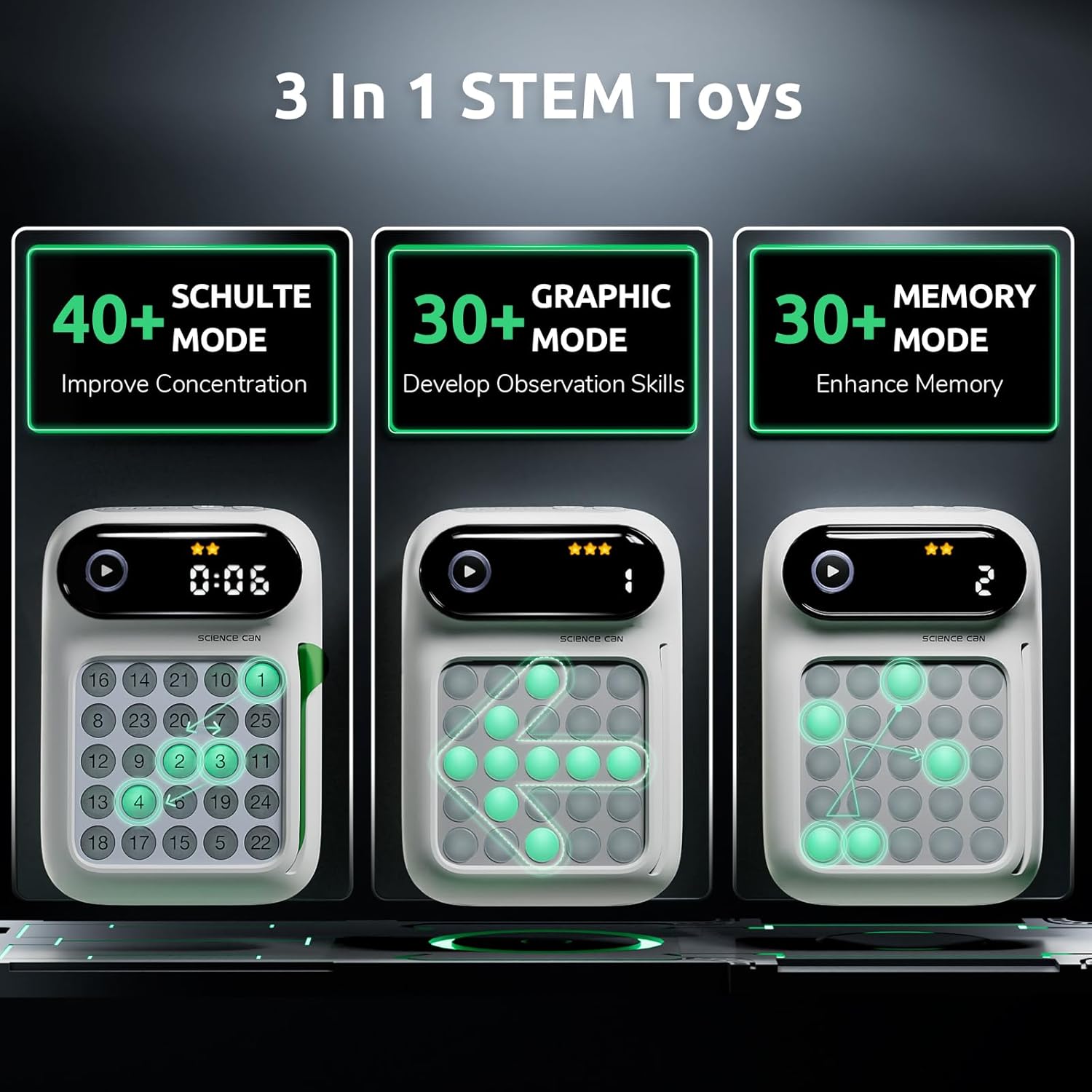
The Science Can Speed Number Games offers three engaging modes to challenge and educate:
-
1. Schulte Mode
This mode is designed to improve concentration. Players are challenged to press numbered buttons in sequential order (e.g., 1 to 25) as quickly as possible within a 5x5 grid. The faster the completion, the higher the attention level achieved.
-
2. Modo de memoria
Memory Mode enhances children's memory by presenting a sequence of randomly illuminated buttons. Players must remember and replicate the sequence accurately.
-
3. Graphic Mode
This mode helps develop observation skills through interactive graphic challenges. Players identify patterns or specific button arrangements.
Gameplay Instructions
Operación Xeral
- Seleccione un modo: Use the mode select button to choose between Schulte, Memory, or Graphic modes.
- Insert a Card: For modes requiring specific challenges, insert the appropriate game card into the card slot.
- Comezar o xogo: Press the Start button to begin the selected game.
- Interactive Feedback: The console provides interactive sound effects and illuminated buttons. Correct presses are typically indicated by a green light, while incorrect presses may show a red light momentarily, guiding the child in real-time.
- Temporizador automático: Many challenges include an auto-timer to track performance and encourage speed.
- Bright Level Stars: Progress and achievements are often displayed using bright level stars on the console's screen.

Using Game Cards
The game includes 40 cards that range from basic to advanced. These cards define the specific challenges for each mode. Ensure the correct card is inserted for the desired game difficulty and type.
Demostracións de produtos
Video: Science Can Handheld Game Console Overview
Este vídeo ofrece unha visión xeralview of the Science Can Handheld Game Console, showcasing its design and basic functionalities. It highlights the interactive elements and the overall user experience.
Video: Share the Joy of Receiving a Speed Number
This short video captures the excitement of unboxing and the initial reaction to the Speed Number Games console, demonstrating its appeal as a gift.
Video: STEM Toy from Science Can
A brief demonstration highlighting the educational aspects of the Science Can handheld game as a STEM toy, emphasizing its learning benefits.
Video: Need to Get This for Our Travels!
This video showcases the portability of the game, illustrating its suitability for keeping children entertained during travel and on the go.
Especificacións
| Característica | Detalle |
|---|---|
| Nome da marca | A ciencia pode |
| Nome do modelo | Schulte Grid |
| Número de modelo | 1602062023ig0001 |
| Descrición do intervalo de idade | 5 anos en diante |
| Tipo de material | Plástico |
| Número de xogadores | Single player |
| Obxectivo Educativo | Concentration Skills |
| Modo de operación | Manual with automatic assistance |
| Fonte de enerxía | Funciona con pilas (requírense 3 pilas AAA, non incluídas) |
| Dimensións do elemento | 5.35 x 1.77 x 3.86 polgadas |
| Cor | Branco |
| Compoñentes incluídos | Tarxetas |

Mantemento
- Limpeza: Limpe o dispositivo cun pano suave e seco. Evite o uso de produtos químicos agresivos ou produtos de limpeza abrasivos.
- Almacenamento: Store the console and game cards in a cool, dry place away from direct sunlight and extreme temperatures.
- Coidado da batería: Retire as pilas se non vai usar o dispositivo durante un período prolongado para evitar fugas.
Resolución de problemas
- O dispositivo non se acende: Check if the batteries are correctly installed and are not depleted. Replace with fresh batteries if necessary. Ensure the ON/OFF switch is in the 'ON' position.
- Sen son/Volume baixo: Adjust the volume settings on the device. If still no sound, check batteries.
- Botóns que non responden: Ensure the device is powered on and batteries are sufficient. If a game card is used, ensure it is properly inserted.
- Game Malfunction: Try turning the device off and then on again to reset it.