
1. Introdución
Thank you for choosing the Inkbird Cordless Rechargeable Vacuum Sealer Machine, Model INK-VS06. This innovative device is designed to extend the freshness of your food by removing air from specially designed bags and containers, preventing spoilage and freezer burn. Its cordless design offers unparalleled portability, making it ideal for use at home, during outdoor activities like camping and fishing, or while traveling. This manual provides essential information for safe and efficient operation of your new vacuum sealer.

Image: The Inkbird Cordless Rechargeable Vacuum Sealer Machine, showcasing its compact design and included accessories, such as vacuum bags, a bag roll, and an air suction hose. A salmon fillet is shown freshly vacuum-sealed, highlighting the product's primary function.
2. Información de seguridade
Lea atentamente todas as instrucións de seguridade antes de usar o aparello. O incumprimento destas instrucións pode provocar descargas eléctricas, incendios ou lesións graves.
- Non mergulle o aparello, o cable de alimentación nin o enchufe en auga ou outros líquidos.
- Manteña o aparello fóra do alcance dos nenos.
- Non faga funcionar o aparello cun cable ou enchufe danados, nin despois de que o aparello funcione mal ou teña dano dalgún xeito.
- Empregue só os accesorios recomendados polo fabricante.
- Non empregue o aparello para fins distintos do seu uso previsto.
- Desenchufe sempre o aparello antes da limpeza ou mantemento.
- Avoid touching the sealing strip immediately after use, as it may be hot.
3. Configuración
3.1 Carga do dispositivo
The Inkbird INK-VS06 features a built-in 2000mAh lithium battery, providing cordless operation. Fully charge the device before first use. A full charge takes approximately 3 hours and allows for continuous vacuuming for up to 60 minutes or 110 sealing cycles.
- Connect the included USB charging cable to the charging port on the device.
- Plug the other end of the USB cable into a compatible USB power adapter (not included).
- The battery level indicator lights on the control panel will illuminate to show charging progress.
- Once fully charged, all indicator lights will remain solid.
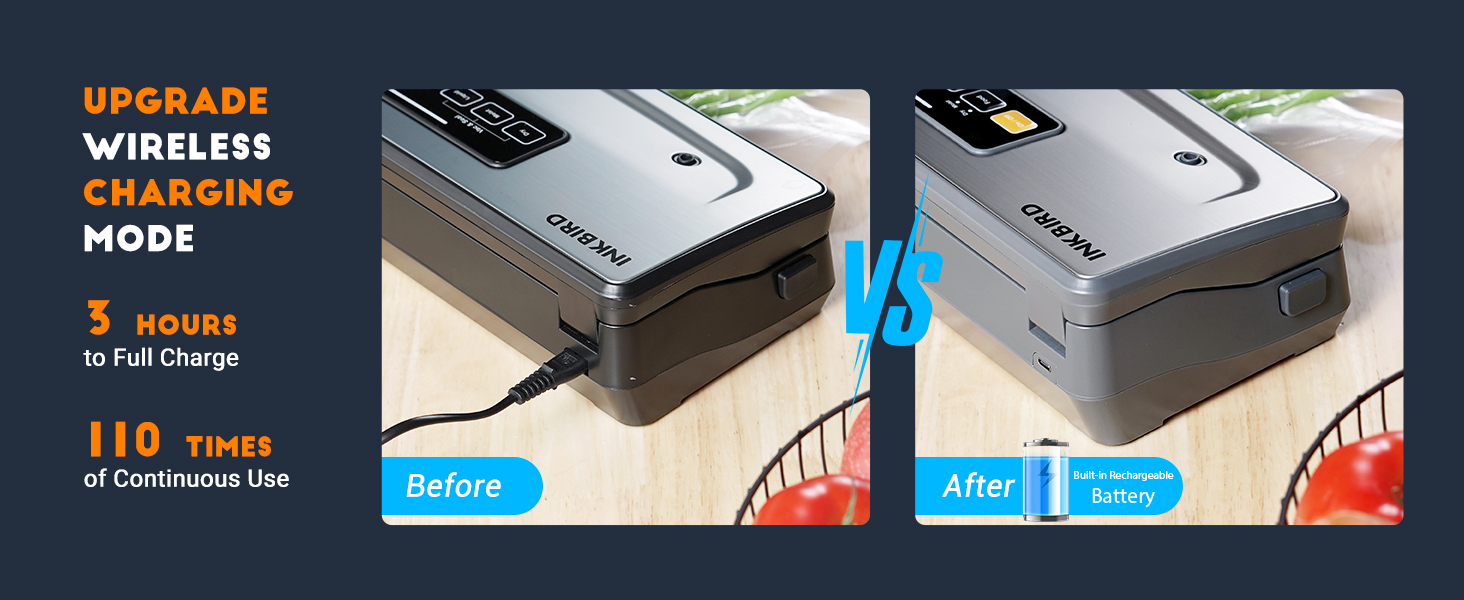
Image: A visual comparison highlighting the convenience of the wireless charging mode, showing the USB-C charging port and the device's battery indicator lights.
3.2 Understanding Battery Level Indicators
The control panel features LED lights to indicate the current battery capacity:
- One light flashing: 10% to 30% battery capacity.
- Two lights flashing: 30% to 50% battery capacity.
- Three lights flashing: 50% to 95% battery capacity.
- Four lights solid: 95% to 100% battery capacity.
When the battery capacity is lower than 10%, the LED light will flash, indicating it's time to recharge.

Imaxe: Unha detallada view of the control panel illustrating how to interpret the battery level indicator lights, from low to full charge.
3.3 Preparing a Bag from the Roll
The device includes a built-in 20-foot bag storage and an 11.8-inch cutter, allowing you to create custom-sized bags.
- Abra a tapa da seladora ao baleiro.
- Pull out the desired length of bag material from the internal roll.
- Use the integrated 11.8-inch cutter to create a clean cut.
- Place one end of the cut bag into the sealing area and press the 'Seal only' button to create the bottom seal of your custom bag.

Image: A close-up of the vacuum sealer's interior, highlighting the built-in bag roll storage and the integrated 11.8-inch cutter for convenient bag customization.
4. Instrucións de funcionamento
The Inkbird INK-VS06 offers 5 operable modes for various food types, all with one-press easy operation.
4.1 Vacuum Sealing Process
- Preparar a bolsa: Place the food item into a vacuum sealer bag, ensuring the open end is clean and dry. Leave at least 2-3 inches of space between the food and the top of the bag.
- Colocar a bolsa: Open the lid of the vacuum sealer. Place the open end of the bag into the vacuum chamber, ensuring it lies flat across the sealing strip. Close the lid firmly until both sides click into place.
- Seleccionar o modo de comida: Press the 'Food' button to toggle between 'Dry' and 'Moist' settings based on your food type.
- Start Vacuum & Seal: Press the 'Vac&Seal' button. The machine will automatically vacuum the air from the bag and then seal it. The process typically completes in 15 seconds or less.
- Lanzamento: Once the indicator lights stop flashing, the process is complete. Press the release buttons on the sides to open the lid and remove your sealed bag.

Image: A step-by-step visual guide demonstrating the vacuum sealing process, from inserting the bag to pressing the food mode button and checking the final seal.
4.2 Comprensión dos modos de alimentación
The device features 5 distinct food modes to optimize preservation for various items:
- Modo húmido: Ideal for wet or juicy foods like fresh meat, seafood, or fruits.
- Modo seco: Best for dry foods such as nuts, cereals, or dried fruits.
- Modo de pulso: Allows manual control over the vacuum pressure, perfect for fragile or delicate foods like cookies, chips, or soft bread, preventing crushing.
- Só selo: Creates a seal without vacuuming, useful for making custom-sized bags from a roll or sealing bags that do not require vacuuming.
- Modo de recipiente: Used with the included air suction hose to vacuum seal jars and canisters.

Image: A visual representation of the five food modes (Moist, Dry, Pulse, Seal, Canister) and exampmenos tipos de alimentos axeitados para cada modo.
4.3 Official Product Video: Cordless Vacuum Sealer INK-VS06
Video: An official product video demonstrating the features and operation of the Inkbird Cordless Vacuum Sealer INK-VS06, including its various modes and ease of use.
5. Mantemento
5.1 Limpeza do aparello
The Inkbird INK-VS06 is designed for easy cleaning with its high-end stainless steel cover and ABS material.
- Always ensure the appliance is turned off and unplugged before cleaning.
- Limpe as superficies exteriores cun suave, damp pano.
- Limpar a cámara de baleiro e a tira de selado con adamp cloth and mild soap if necessary. Ensure these areas are completely dry before closing the lid or using the appliance again.
- Do not use abrasive cleaners or scrubbers, as they may damage the surface.

Image: A visual guide demonstrating the ease of cleaning the vacuum sealer's exterior and the internal vacuum chamber.
5.2 Replacing Accessories
The package includes replacement accessories to maintain optimal performance:
- Tira de selado: Replace the heat-resistant sealing strip if it shows signs of wear or damage to ensure a consistent seal.
- Junta de escuma: Replace the foam sealing gasket if it becomes compressed or damaged, as this can affect vacuum performance.
Refer to the detailed diagram below for the location of these components.

Imaxe: Unha explosión view diagram of the vacuum sealer, clearly labeling key components such as the heat-resistant sealing strip, foam sealing gasket, and vacuum chamber.
6 Solución de problemas
If you encounter issues with your Inkbird INK-VS06, please refer to the following common troubleshooting steps:
- Sen enerxía: Ensure the device is charged. Check the battery indicator lights. If low, recharge the unit.
- Poor Vacuum/No Seal:
- Check that the bag is properly placed in the vacuum chamber and the lid is firmly closed and latched on both sides.
- Ensure the open end of the bag is clean, dry, and free of wrinkles or food debris.
- Inspect the sealing strip and foam gaskets for any damage or wear. Replace if necessary.
- Ensure you are using compatible vacuum sealer bags.
- Bag Melts During Sealing: The sealing time might be too long. For delicate bags or thinner materials, try using the 'Seal only' function with manual control if available, or ensure the bag is not left in the sealing area for excessive periods.
- Sobrequentamento do dispositivo: Allow the device to cool down between multiple sealing cycles. Continuous heavy use can trigger an overheating protection system.
7. Especificacións
| Marca | Inkbird |
| Número de modelo | TINTA-VS06 |
| Material | Acrilonitrilo butadieno estireno (ABS), plástico |
| Dimensións do produto | 15.15 cm de longo x 3.35 cm de ancho x 5.7 cm de alto |
| Peso do elemento | 4.33 libras (1.97 quilogramos) |
| Fonte de enerxía | Battery Powered (Built-in 2000mAh Lithium Ion battery) |
| Modo de operación | Automático |
| Wattage | 80 vatios |
| Voltage | 120 V |
| Ancho de selado | 11.8 polgadas |
| Potencia de succión | -80KPA |
| Certificacións | Certificado ETL |
7.1 Contido do paquete
- Inkbird Cordless Vacuum Sealer Machine (INK-VS06) x1
- Vacuum Sealer Bags (8"x11.8") x5
- Rolo de bolsa (11 cm x 118 cm) x1
- Manguera de succión de aire x1
- Cable de carga USB x1
- Sticky Note x1
- Heat-Resistant Sealing Strip x1 (replacement)
- Foam Gasket x1 (replacement)

Imaxe: Unha completa view of the Inkbird vacuum sealer's dimensions and a detailed list of all items included in the package, such as bags, roll, hose, and replacement parts.
8. Garantía e soporte
Inkbird provides a lifetime technical consultation for the INK-VS06. For any issues or inquiries, please contact Inkbird customer support. All problems will be addressed within 24 hours.
For further assistance, please visit the official Inkbird websitio web ou póñase en contacto directamente co servizo de atención ao cliente.