
1. Introdución
Grazas pola compraasing the ELECTROPRIME K22T Multifunctional Rotatable Clock Night Light Wireless Fast Charger. This device combines a digital clock, an adjustable night light, and a 15W wireless fast charger into one compact unit. This manual provides essential information for safe operation, setup, and maintenance of your new device. Please read it thoroughly before use and retain it for future reference.
2. Información de seguridade
- Non expoñas o dispositivo á auga, á humidade nin a temperaturas extremas.
- Evite deixar caer ou someter o dispositivo a fortes impactos.
- Use only the provided or a certified power adapter (9V/2A recommended) to prevent damage.
- Do not disassemble, repair, or modify the device yourself. Contact qualified service personnel for assistance.
- Manteña o dispositivo lonxe de nenos e animais.
- Asegúrate de ventilar axeitadamente ao cargar para evitar o sobrequecemento.
- Remove any metal objects or magnetic cards from the charging area before placing a device for wireless charging.
3. Produto rematadoview
3.1 Compoñentes
The ELECTROPRIME K22T features a sleek design integrating multiple functions:
- Visualización do reloxo dixital: LED display for time.
- Pad de carga sen fíos: Top surface for wireless charging compatible devices.
- Rotatable Night Light: Adjustable light source for ambient illumination.
- Botóns de control: Touch-sensitive buttons for operating the clock and light functions.
- USB-C/Type-C Input Port: Para a conexión de enerxía.
- Base de silicona: Provides stability and prevents slipping.
3.2 Características principais
- Carga rápida sen fíos de 15 W: Supports 5W, 7.5W, 10W, and 15W output.
- Deseño multifuncional: Combines alarm clock, night light, and wireless charger.
- Rotatable Night Light: Adjustable angle for optimal lighting.
- Pantalla LED: Clear time display with three levels of brightness adjustment.
- Control táctil: Intuitive operation for various functions.
- Múltiples funcións de protección: Built-in overcurrent, overtemperature, and short circuit protection for safe charging.
- Luz branca cálida: 3500K color temperature for comfortable illumination.
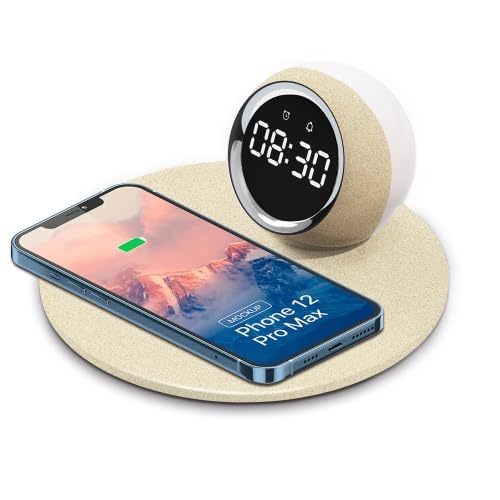
Image 1: The ELECTROPRIME K22T device, showcasing its digital clock, wireless charging pad, and night light.
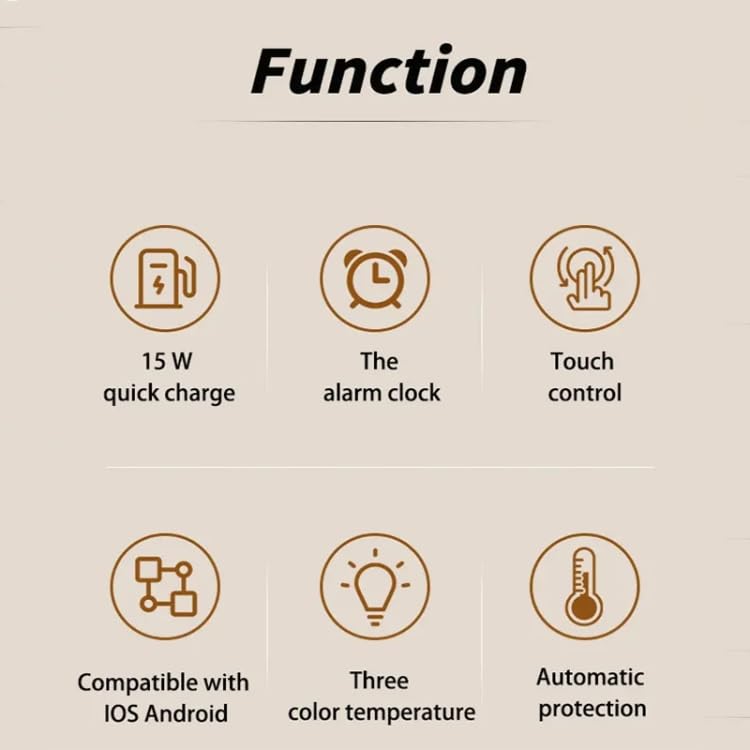
Image 2: Visual representation of the key functions including 15W quick charge, alarm clock, touch control, compatibility, adjustable color temperature, and automatic protection.
4. Configuración
- Desempaquetar o dispositivo: Carefully remove the ELECTROPRIME K22T from its packaging.
- Conectar enerxía: Insert the USB-C connector of the power cable into the input port on the back of the device. Connect the other end of the cable to a compatible power adapter (9V/2A recommended) and plug it into a wall outlet.
- Encendido inicial: The digital clock display will illuminate, indicating the device is powered on and ready for use.
5. Instrucións de funcionamento
5.1 Axustar o reloxo
The device typically features touch-sensitive buttons for time adjustment. Refer to the icons near the display for specific functions (e.g., 'M' for Mode, '+' for Increase, '-' for Decrease).
- Entrar no modo de configuración da hora: Press and hold the 'Mode' button (or similar icon) for a few seconds until the hour digits start blinking.
- Axustar a hora: Use the '+' and '-' buttons to set the correct hour.
- Axustar minuto: Press the 'Mode' button again to switch to minute adjustment. Use the '+' and '-' buttons to set the correct minutes.
- Saír do modo de configuración: Press the 'Mode' button once more, or wait a few seconds for the display to stop blinking, to save the time.
5.2 Using the Night Light
The night light offers adjustable brightness and a rotatable design.
- Activar/Desactivar: Tap the light icon button (or similar) to turn the night light on or off.
- Axustar o brillo: With the light on, tap the light icon button repeatedly to cycle through brightness levels: 100% > 50% > 10% > Off.
- Axustar ángulo: Gently rotate the night light component to direct the illumination as desired.
5.3 Carga sen fíos
The device supports 15W wireless fast charging for compatible smartphones and other devices.
- Colocación: Place your wireless charging compatible device (e.g., smartphone) centrally on the charging pad.
- Indicador de carga: The device's display or a dedicated LED indicator (if present) may show a charging status. Your phone will also indicate that it is charging.
- Carga óptima: Ensure your device is properly aligned on the charging pad for efficient charging. Remove phone cases thicker than 3mm or those containing metal.
6. Mantemento
- Limpeza: Disconnect the power before cleaning. Use a soft, dry cloth to wipe the surface of the device. Do not use abrasive cleaners, solvents, or harsh chemicals.
- Almacenamento: Cando non o use durante períodos prolongados, garde o dispositivo nun lugar fresco e seco, lonxe da luz solar directa.
- Evitar obstáculos: Keep the charging pad clear of dust and debris to ensure optimal performance.
7 Solución de problemas
| Problema | Causa posible | Solución |
|---|---|---|
| O dispositivo non se acende. | Sen conexión á corrente ou adaptador defectuoso. | Ensure the power cable is securely connected and the adapter is working. Try a different power outlet. |
| A carga sen fíos é lenta ou non funciona. | Misalignment, phone case, or incompatible device. | Reposition the device on the charging pad. Remove thick or metallic phone cases. Ensure your device supports wireless charging. Use a 9V/2A power adapter. |
| Night light is not working. | Light is off or device is not powered. | Tap the light button to turn it on. Check if the device is powered on. |
| A pantalla do reloxo está escura ou apagada. | Brightness setting or power issue. | Adjust the display brightness using the control buttons. Ensure the device is powered on. |
8. Especificacións
| Parámetro | Valor |
|---|---|
| Nome do modelo | K22T |
| Número de modelo | TBD0604275402 |
| Entrada | 9 V/2 A |
| Saída | 9 V/1.67 A |
| Potencia de carga sen fíos | 5W / 7.5W / 10W / 15W |
| Poder luminoso | 0.5 W |
| Temperatura da cor | 3500K (Branco Cálido) |
| Modos de iluminación | 100% - 50% - 10% Brightness |
| Interfaz de carga | USB-C / Tipo-C |
| Distancia de carga | 3-8 mm |
| Charge Conversion Rate | 75 % |
| Material | ABS + PP (Acrylonitrile Butadiene Styrene, Polypropylene, Silicone) |
| Tamaño do produto | 180 x 180 x 84 mm |
| Peso neto | 270 g |
9. Garantía e soporte
Para obter información sobre a garantía ou asistencia técnica, consulte a documentación incluída coa súa compra ou póñase en contacto co seu vendedor. Garde o comprobante de compra para calquera reclamación de garantía.
Manufacturer Contact Information: ELECTROGADGETSSTORE