1. Introdución
This manual provides instructions for the safe and effective use of your Anykit Visual Ear Wax Removal Camera, Model AKE390i. This device is a digital otoscope designed to visualize the ear canal and assist in earwax removal. It features a camera with LED illumination and connects to compatible mobile devices for real-time viewing.
Lea este manual detidamente antes de operar o dispositivo e gárdeo para futuras consultas.

Figure 1: Anykit Visual Ear Wax Removal Camera with accessories.
2. Avisos de seguridade importantes
- WARNING: THIS IS NOT A TOY. Manteña o produto lonxe dos nenos menores de 12 anos.
- This otoscope camera is not intended to diagnose, treat, cure, or prevent any disease or health condition. Consult a medical professional for any health concerns.
- Do not insert the device too deeply into the ear canal. Excessive force or improper use can cause injury.
- Always use the provided specula and protective covers to prevent direct contact of the camera tip with the ear canal walls.
- Clean the device and accessories thoroughly before and after each use as described in the Maintenance section.
- If you experience pain, discomfort, or bleeding during use, discontinue immediately and seek medical advice.
3. Contido do paquete
Verifica que todos os elementos estean presentes no teu paquete:
- Anykit Visual Ear Wax Removal Camera (Otoscope)
- USB Type-C Cable (integrated)
- Soft Silicone Earpicks
- Adjustable Protection Covers
- Replacement Specula
- Manual de usuario
- Storage Bag (may vary by package)

Figura 2: Compoñentes incluídos no paquete do produto.
4. Configuración e primeiro uso
4.1 Compatibilidade
The Anykit Visual Ear Wax Removal Camera is compatible with:
- Android 8.0+ devices (must support OTG functionality).
- iPhone 15/15 Pro/15 Plus/15 Pro Max.
- iPad (12th generation and newer).
Non compatible con: PCs, iPad Pro (4th generation), iPad 4, or iPad 2. This otoscope does not include a Type-C to Lightning adapter. If using your own adapter, ensure it supports OTG.
4.2 Instalación da aplicación
- Download "Xscope" App: Busca "Xscope" in the Google Play Store (for Android) or Apple App Store (for iOS) and download the application.
- Conceder permisos: After installation, open the app. When prompted, click "Allow" to grant necessary permissions for the device to function.

Figura 3: Pasos de descarga e conexión da aplicación.
4.3 Conexión do dispositivo
- Connect Otoscope: Plug the USB Type-C connector of the otoscope into your compatible smartphone or tablet.
- Executar a aplicación: Open the "Xscope" application. The device should automatically connect, and you will see a live view dende a cámara.
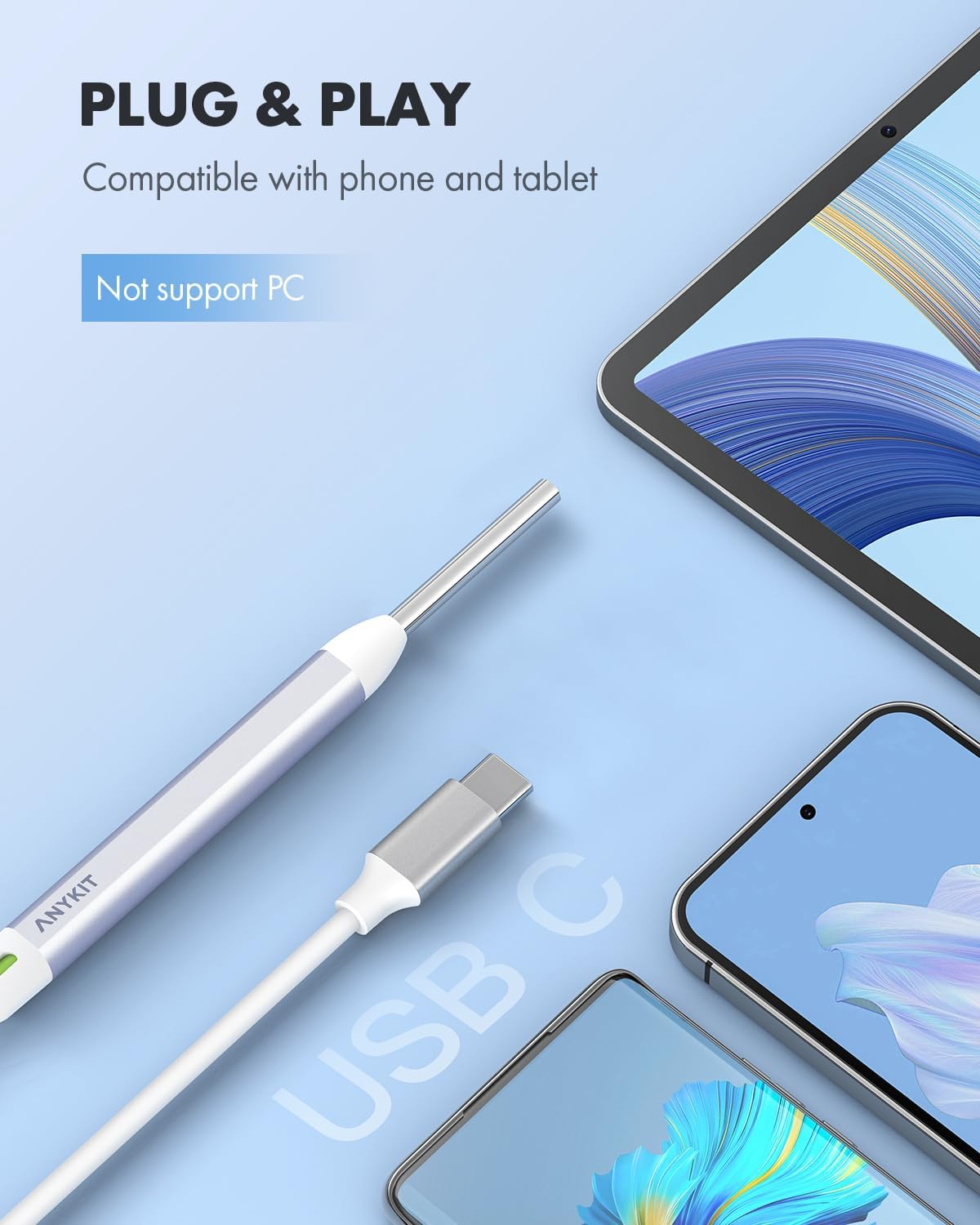
Figure 4: Connecting the otoscope to a mobile device.
5. Instrucións de funcionamento
5.1 Instalación de accesorios
Before use, attach a clean speculum and an adjustable protection cover to the tip of the otoscope. These accessories ensure safe insertion and prevent over-insertion into the ear canal.
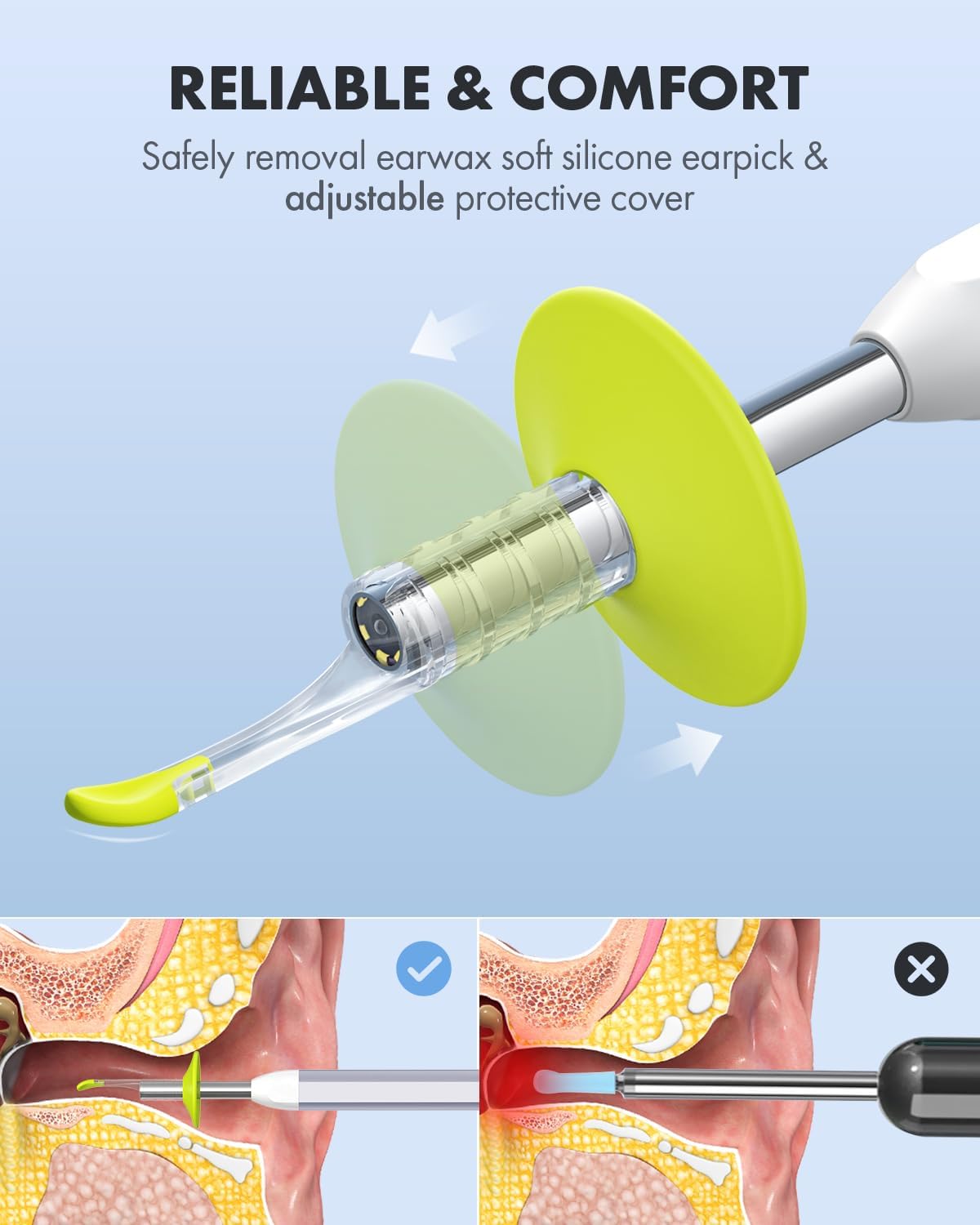
Figure 5: Attaching the protective cover and earpick.

Figure 6: Importance of using specula for safe operation.
5.2 Viewing and Navigation
Once connected and the app is running, you will see a live feed from the otoscope camera on your device screen. The device features a 1080p HD camera lens with 6 illumination LED lights for clear visualization.

Figure 7: High-definition camera lens and LED illumination.
5.3 View Modos
The "Xscope" app offers different view modes for enhanced monitoring:
- Modo de pantalla completa: Displays the real-time image from the otoscope across the entire screen.
- Modo de pantalla dividida: Allows for a clear comparison between a previously captured image and the real-time view. This is useful for tracking changes or progress.

Figure 8: Split-screen mode for ear health tracking.
5.4 Captura de imaxes e vídeos
The app allows you to capture still images and record videos of your ear canal. These can be saved to your device's gallery.
- Sacar a foto: Tap the camera icon within the app to capture a still image.
- Gravar vídeo: Tap the video icon to start and stop video recording.
Captured media can be shared with healthcare professionals for remote consultation, saving time and facilitating quick advice.

Figure 9: Sharing images and videos for remote consultation.
6. Mantemento e coidados
6.1 Cleaning the Otoscope
- Lente da cámara: Gently wipe the camera lens with a soft, dry cloth or a cotton swab lightly dampened with rubbing alcohol. Ensure no liquid enters the device.
- Corpo do dispositivo: Wipe the main body of the otoscope with a clean, damp cloth. Do not submerge the device in water or any cleaning solutions.
6.2 Accesorios de limpeza
- Earpicks and Specula: Wash reusable earpicks and specula with mild soap and water. Rinse thoroughly and allow them to air dry completely before storage or next use. Disposable accessories should be discarded after a single use.
6.3 Almacenamento
Store the otoscope and its accessories in the provided storage bag in a clean, dry place, away from direct sunlight and extreme temperatures.

Figure 10: Storage bag for organizing the otoscope and accessories.
7 Solución de problemas
| Problema | Causa posible | Solución |
|---|---|---|
| No image on screen / Device not recognized |
|
|
| A imaxe está borrosa ou non é clara |
|
|
| A aplicación falla ou conxélase |
|
|
8. Especificacións do produto
| Característica | Detalle |
|---|---|
| Número de modelo | AKE390i |
| Marca | Anykit |
| Resolución da cámara | 1080p HD |
| Iluminación | 6 luces LED |
| Conectividade | USB Type-C (Wired) |
| Compatibilidade | Android 8.0+ (OTG support), iPhone 15 series, iPad (12th Gen+) |
| Dimensións do paquete | 6.02 x 2.56 x 1.65 polgadas |
| Peso do elemento | 3.53 onzas |
| ASIN | B0D2D8CT8X |
9. Garantía e soporte
Specific warranty information is not provided in this manual. For details regarding warranty coverage, please refer to the product packaging or contact Anykit customer support directly.
For technical support, troubleshooting assistance, or inquiries about your Anykit Visual Ear Wax Removal Camera, please visit the official Anykit websitio web ou póñase en contacto co seu departamento de atención ao cliente. A información de contacto adoita atoparse na embalaxe do produto ou na ficha do fabricante. websitio.
10. Exención de responsabilidade legal
Statements regarding dietary supplements have not been evaluated by the FDA and are not intended to diagnose, treat, cure, or prevent any disease or health condition. This product is not a medical device intended for diagnosis or treatment of medical conditions.