
1. Introdución e finalview
This manual provides essential information for setting up, operating, and maintaining your Xiaomi POCO F6 Pro smartphone. Please read it carefully to ensure optimal performance and longevity of your device.
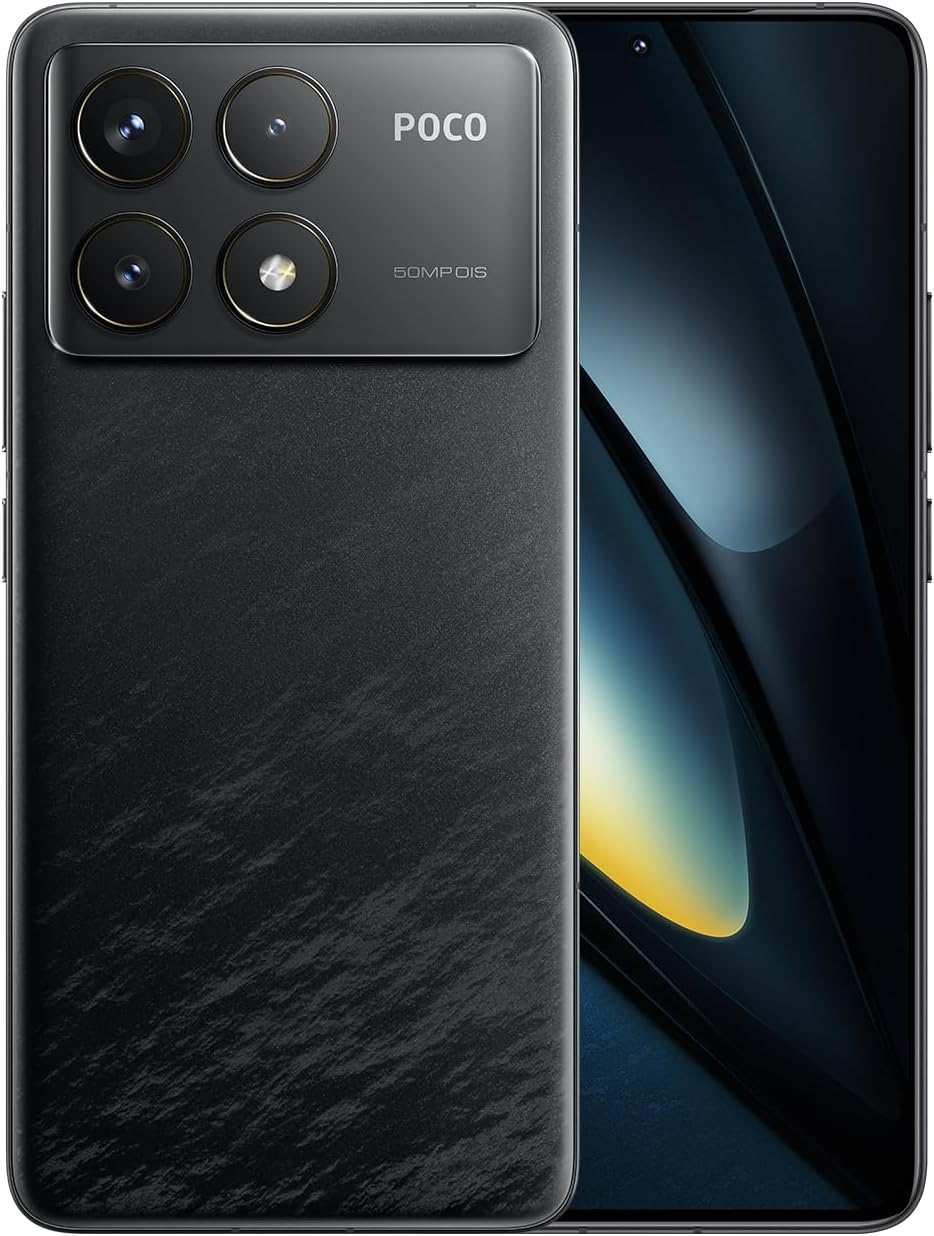
Figure 1.1: Xiaomi POCO F6 Pro device overview.
Características principais:
- Procesador de alto rendemento: Equipped with the Qualcomm Snapdragon 8 Gen 2, a 4nm flagship processor offering approximately 20% improvement in CPU and GPU performance for a superior user experience.
- Sistema de refrigeración avanzado: Features LiquidCool Technology 4.0 with a large stainless steel IceLoop system (approx. 5000mm²) for efficient heat dissipation, maintaining peak performance during intensive tasks.
- Carga rápida e longa duración da batería: A 5000mAh battery combined with 120W Xiaomi HyperCharge technology allows for a 100% charge in approximately 19 minutes.
- Impresionante exhibición: A WQHD+ (3200x1440) 1-120Hz LTPO C8 OLED display with a peak brightness of 4000 nits, offering high light efficiency, low power consumption, and hardware-level low blue light protection.
- Sistema de cámara avanzado: A triple camera setup with a 50MP main sensor, Optical Image Stabilization (OIS), and Light Fusion 800 image sensor for professional-quality photos in various lighting conditions.
2. Guía de configuración
2.1 Contido do paquete
Antes de comezar, comproba que todos os elementos estean presentes no paquete:
- Teléfono intelixente Xiaomi POCO F6 Pro
- AC Adapter (120W HyperCharge)
- Cable USB Tipo-C
- Ferramenta de expulsión da SIM
- Funda blanda
- Guía de inicio rápido
2.2 Inserción da tarxeta SIM
- Localiza a bandexa da tarxeta SIM no lateral do teu dispositivo.
- Introduza a ferramenta de expulsión da tarxeta SIM no pequeno orificio que hai xunto á bandexa e prema suavemente ata que esta saia.
- Coloca a(s) tarxeta(s) nano-SIM na bandexa cos contactos dourados cara abaixo. Asegúrate de que estean correctamente asentadas.
- Empurre con coidado a bandexa de volta na ranura ata que quede ao mesmo nivel que o dispositivo.
2.3 Acendido e configuración iniciais
- Mantén premido o botón de acendido/apagado ata que apareza o logotipo de Xiaomi.
- Sigue as instrucións en pantalla para seleccionar o teu idioma e rexión e conectarte a unha rede wifi.
- Inicia sesión coa túa conta de Google ou crea unha nova.
- Set up your screen lock method (PIN, pattern, password, fingerprint, or face unlock).
- Review e aceptar os termos e condicións.
- O dispositivo xa está listo para o seu uso.
3. Instrucións de funcionamento
3.1 Pantalla e navegación
The POCO F6 Pro features a WQHD+ 120Hz LTPO OLED display. Navigate the interface using gestures or traditional navigation buttons, configurable in the settings.

Figura 3.1: Especificacións e características da pantalla.
- Frecuencia de actualización: The adaptive refresh rate (1-120Hz) optimizes smoothness and power consumption.
- Brillo: Adjust brightness manually or enable adaptive brightness for automatic adjustment based on ambient light.
- Confort ocular: The hardware-level low blue light design helps reduce eye strain. Enable Reading Mode in settings for a more comfortable viewexperiencia ing.
- Sensor de impresión dixital: The in-display fingerprint sensor provides quick and secure unlocking. Ensure your finger is clean and dry for optimal performance.
3.2 Rendemento e xogos
The Snapdragon 8 Gen 2 processor and LiquidCool Technology 4.0 ensure high performance, especially for gaming.

Figure 3.2: WildBoost Optimization 3.0 for enhanced gaming.
- Game Turbo: Access Game Turbo by swiping from the left edge during gameplay to optimize performance, manage notifications, and record screen.
- Optimización WildBoost 3.0: This feature enhances performance scheduling and game control for an improved overall gaming experience.
3.3 Características da cámara
The POCO F6 Pro features a versatile triple camera system for high-quality photography.

Figure 3.3: POCO F6 Pro triple camera system.
- Cámara principal: 50MP with OIS for stable, high-resolution photos.
- Cámara ultra gran angular: 8MP para capturar escenas máis amplas.
- Cámara macro: 2MP para tomas detalladas en primeiro plano.
- Características da IA: Utilize AI for image enhancement, object removal, and smart search within your gallery.
3.4 Batería e carga
The device is equipped with a 5000mAh battery and supports 120W Xiaomi HyperCharge.

Figure 3.4: 120W HyperCharge technology.
- Carga rápida: Use the provided 120W charger and cable for optimal charging speeds.
- Optimización da batería: The POCO battery management system, featuring Surge P2 charging chipset and Surge G1 battery chipset, provides smart and safe management.
- Modo de hibernación: The device can enter hibernation mode to conserve battery when not in use for extended periods.
3.5 Conectividade
The POCO F6 Pro offers various connectivity options.

Figure 3.5: Connectivity and audio features.
- Wi-Fi 7: Supports the latest Wi-Fi standard for faster and more reliable wireless connections.
- Bluetooth 5.3: Para conectar accesorios sen fíos como auriculares e altofalantes.
- NFC: Multifunctional NFC for contactless payments and data transfer.
- Blaster IR: Use your phone as a universal remote control for compatible devices.
- GNSS: High-precision Global Navigation Satellite System for accurate location services.
4. Mantemento
Proper maintenance ensures the longevity and optimal performance of your POCO F6 Pro.
- Limpeza: Usa un pano suave e sen fiapos para limpar a pantalla e a carcasa. Evita materiais abrasivos ou produtos químicos agresivos.
- Actualizacións de software: Comproba e instala regularmente actualizacións do sistema para asegurarte de que o teu dispositivo teña as últimas funcións e parches de seguridade.
- Xestión de almacenamento: Limpar periodicamente o innecesario fileaplicacións para liberar espazo de almacenamento e manter o rendemento.
- Coidado da batería: Avoid exposing the device to extreme temperatures. While fast charging is convenient, occasional slower charging can help prolong battery health.
- Protección: Use a screen protector and the provided soft case to guard against scratches and minor impacts.
5 Solución de problemas
Se tes problemas co teu dispositivo, consulta os seguintes pasos comúns para a resolución de problemas:
- O dispositivo non responde: Mantén premido o botón de acendido/apagado durante uns 10-15 segundos para forzar un reinicio.
- Esgotando a batería rapidamente: Check background app usage in battery settings. Reduce screen brightness or disable unnecessary features like GPS, Bluetooth, or Wi-Fi when not in use.
- Problemas de conectividade de rede: Toggle Airplane Mode on and off. Restart your device. Check if your SIM card is properly inserted. Contact your network provider if the issue persists.
- Aplicacións que se bloquean/conxelan: Clear the cache and data for the problematic app in App Info settings. If the issue continues, uninstall and reinstall the app.
- Sobrequecemento: Close background applications, reduce screen brightness, and avoid using the device while charging for extended periods. If gaming, ensure the device has adequate ventilation.
- Problemas co sensor de impresión dixital: Ensure your finger and the sensor area are clean and dry. Re-register your fingerprints if recognition is inconsistent.
Para problemas máis complexos, consulta o soporte oficial de Xiaomi. websitio ou póñase en contacto co servizo de atención ao cliente.
6. Especificacións
| Característica | Especificación |
|---|---|
| Sistema Operativo | Android 14 |
| Procesador | Qualcomm Snapdragon 8 de 2.ª xeración |
| Velocidade da CPU | 3.2 GHz |
| Tamaño da memoria RAM instalada | 12 GB |
| Capacidade de almacenamento da memoria | 256 GB |
| Tecnoloxía de visualización | OLED |
| Resolución de lectura | 3200 x 1440 (WQHD+) |
| Potencia nominal da batería | 5000 mAh |
| Tecnoloxía de comunicación sen fíos | Cellular, Wi-Fi 7, Bluetooth 5.3 |
| Tecnoloxía de conectividade | USB, NFC, IR Blaster |
| GPS | Si |
| Factor de forma | Lousa |
| Cor | Negro |
| Número de modelo do produto | MZB0HEJJP |
| Peso do elemento | 580 g |
| Dimensións do paquete | 18.7 x 9.4 x 6.1 cm |
7. Garantía e soporte
Your Xiaomi POCO F6 Pro is covered by a standard manufacturer's warranty. For detailed warranty terms and conditions, please refer to the warranty card included in your product packaging or visit the official Xiaomi support websitio.
For technical support, service, or inquiries, please contact Xiaomi customer service through their official channels. Keep your proof of purchase handy when seeking support.
Official Xiaomi Support: https://www.mi.com/global/support