
1. Introdución
The ELECTROPRIME Hishell M9 Translator is a portable, intelligent device designed for multi-language simultaneous translation, facilitating communication across language barriers. It supports both online and offline translation modes, along with photo and recording translation functionalities. This manual provides essential information for the proper setup, operation, and maintenance of your device.
2. Información de seguridade
- Non expoñas o dispositivo a temperaturas extremas, luz solar directa nin humidade elevada.
- Evite deixar caer ou someter o dispositivo a fortes impactos.
- Keep the device away from water and other liquids. If it gets wet, power it off immediately and allow it to dry completely before use.
- Use only the provided or approved charging cable and adapter.
- Non intente desmontar, reparar nin modificar o dispositivo vostede mesmo. Póñase en contacto co servizo de atención ao cliente para obter axuda.
- Desfágase do dispositivo e da súa batería segundo a normativa local.
3. Contido do paquete
Comprobe se o paquete contén os seguintes elementos:
- ELECTROPRIME Hishell M9 Translator Device
- Cable de carga USB
- Manual de usuario (este documento)
4. Dispositivo rematadoview
Familiarize yourself with the physical components of your Hishell M9 Translator.
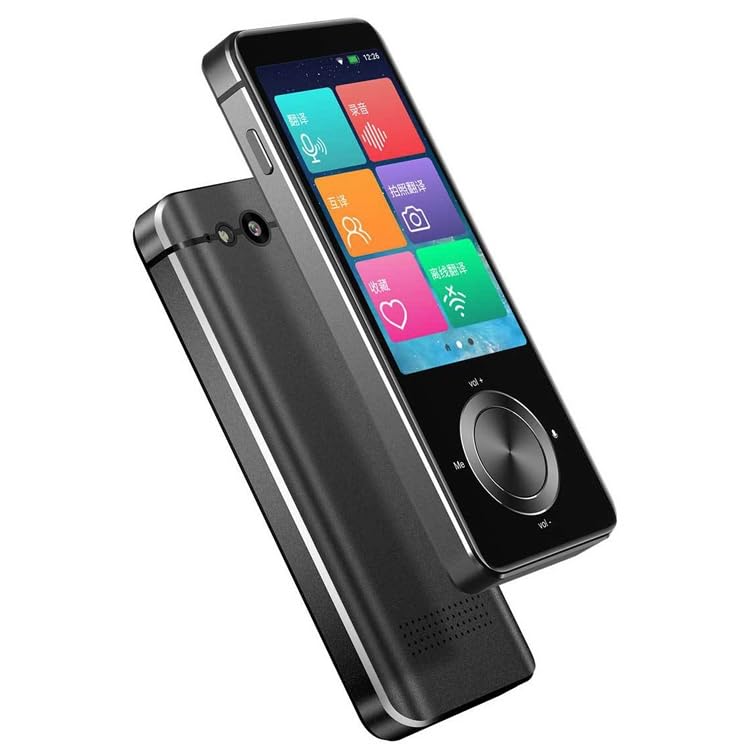
Imaxe 1: Fronte e lateral view of the ELECTROPRIME Hishell M9 Translator. This image shows the device's screen, volume buttons, and power button on the side, along with the speaker grille at the bottom.
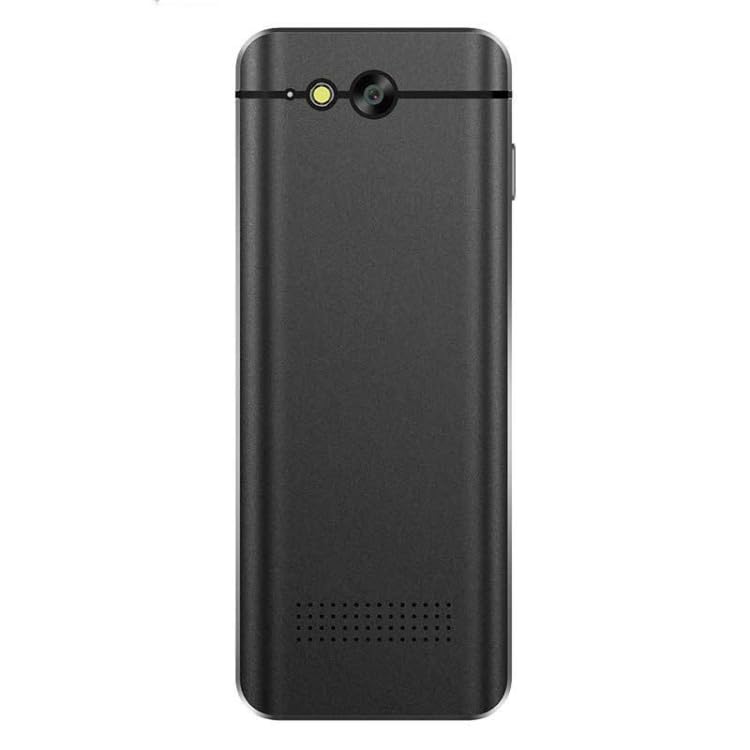
Imaxe 2: De volta view of the ELECTROPRIME Hishell M9 Translator. This image highlights the rear camera and flash, along with the microphone and speaker perforations.
- Pantalla táctil: Main interface for interaction.
- Botón de encendido: Located on the side, used for powering on/off and screen lock.
- Botóns de volume: Axustar o nivel de saída de son.
- Micrófono: Captures spoken language for translation.
- Relator: Outputs translated audio.
- Cámara: Usado para a tradución de fotos.
- Porto USB: Para cargar o dispositivo.
5. Configuración
5.1. Cargando o dispositivo
- Conecta o cable de carga USB ao porto USB do dispositivo.
- Conecta o outro extremo do cable a un adaptador de corrente USB compatible (non incluído) ou a un porto USB do ordenador.
- The device will indicate charging status on the screen. Allow the device to fully charge before first use.
5.2. Acendido/apagado
- Para acender: Press and hold the Power button on the side of the device until the screen lights up.
- Para apagar: Press and hold the Power button until a power-off menu appears on the screen. Select 'Power Off'.
- Para bloquear/desbloquear a pantalla: Preme brevemente o botón de acendido.
5.3. Initial Language Settings
Upon first power-on, you may be prompted to select the device's system language and your preferred translation languages. Follow the on-screen instructions.
5.4. Conexión de rede (Wi-Fi)
For online translation features, a Wi-Fi connection is required.
- From the main screen, navigate to 'Settings'.
- Selecciona "Wi-Fi" e actívaa.
- Escolle a rede Wi-Fi desexada da lista.
- Introduza o contrasinal se se lle solicita e conéctese.
6. Instrucións de funcionamento
6.1. Real-time Online Translation
This mode requires an active Wi-Fi connection.
- From the main menu, select the 'Real-time Translation' or 'Voice Translation' icon.
- Select the source language (the language you will speak) and the target language (the language you want to translate to).
- Press and hold the designated button (often marked 'Me' or a microphone icon) and speak clearly into the device's microphone.
- Release the button. The device will process your speech and display/speak the translation in the target language.
6.2. Offline Translation
The Hishell M9 supports offline translation for certain language pairs. Ensure necessary language packs are downloaded in advance via Wi-Fi in the 'Settings' menu.
- Select 'Offline Translation' from the main menu.
- Choose the downloaded source and target language packs.
- Proceed with voice input as described in section 6.1.
6.3. Tradución de fotografías
This feature translates text from images using the device's camera.
- Select 'Photo Translation' from the main menu.
- Point the camera at the text you wish to translate. Ensure good lighting and clear focus.
- Toca a pantalla para capturar a imaxe.
- The device will analyze the text and display the translation.
6.4. Recording Translation
This function allows you to record longer conversations and translate them.
- Select 'Recording Translation' from the main menu.
- Tap the 'Record' button to start recording.
- Tap 'Stop' when finished.
- Select the recorded audio file and choose the desired translation language. The device will process and display the translated text.
6.5. Configuración
Access the 'Settings' menu to adjust various device parameters:
- Wi-Fi: Xestionar as conexións de rede.
- Brillo: Axusta o brillo da pantalla.
- Volume: Controla o volume do altofalante.
- Configuración de idioma: Change system language and download offline language packs.
- Actualización do sistema: Check for and install software updates.
- Acerca do dispositivo: View información do dispositivo.
7. Mantemento
7.1. Limpeza
- Usa un pano suave, seco e sen fiapos para limpar a pantalla e a carcasa do dispositivo.
- Non empregue produtos de limpeza abrasivos, alcol nin disolventes químicos.
7.2. Almacenamento
- Garde o dispositivo nun lugar fresco e seco, lonxe da luz solar directa e de temperaturas extremas.
- If storing for an extended period, ensure the battery is charged to approximately 50% to prolong its lifespan.
7.3. Coidado da batería
- Evite descargar completamente a batería con frecuencia.
- Do not leave the device connected to a charger for excessively long periods after it is fully charged.
8 Solución de problemas
| Problema | Causa posible | Solución |
|---|---|---|
| O dispositivo non se acende. | Batería baixa; dispositivo conxelado. | Charge the device for at least 30 minutes. If still unresponsive, perform a hard reset (refer to device-specific instructions if available, usually holding power button for 10-15 seconds). |
| Translation is inaccurate or not working. | Poor internet connection; incorrect language selection; unclear speech. | Ensure stable Wi-Fi connection. Verify source and target languages. Speak clearly and at a moderate pace. For offline mode, ensure language packs are downloaded. |
| Problemas coa conexión wifi. | Contrasinal incorrecto; fóra de alcance; problema co enrutador. | Re-enter Wi-Fi password. Move closer to the Wi-Fi router. Restart the device and the router. |
| A pantalla non responde. | Fallo de software; dispositivo conxelado. | Reinicia o dispositivo. Se non responde, realiza un reinicio completo. |
9. Especificacións
- Modelo: Hishell M9
- Marca: ELECTROPRIME
- Conectividade: Sen fíos
- Peso do paquete: 0.23 kg / 0.51 lb
- Dimensións do paquete: 18 cm x 12 cm x 3 cm / 7.09 inches x 4.72 inches x 1.18 inches
- Fabricante: ELECTROPRIME
10. Garantía e soporte
For warranty information and customer support, please refer to the warranty card included with your purchase or contact ELECTROPRIME customer service directly. Keep your proof of purchase for any warranty claims.
For further assistance, visit the official ELECTROPRIME websitio web ou póñase en contacto cos seus canais de asistencia.