
1. Introdución
Thank you for choosing the SMATAR Universal Remote Control. This remote is designed to provide seamless control for a wide range of smart televisions, including popular brands such as Samsung, Sony, LG, Sanyo, Hisense, Panasonic, Insignia, Sharp, Toshiba, Seiki, Magnavox, and TCL. It features backlit buttons for enhanced visibility in low-light conditions. This manual provides detailed instructions for setup, operation, and troubleshooting to ensure optimal performance.
2. Produto rematadoview
The SMATAR Universal Remote Control is engineered for ease of use and broad compatibility. Its ergonomic design and intuitive button layout make navigating your TV's functions straightforward.
2.1 Características principais
- Compatibilidade universal: Works with numerous TV brands.
- Botóns retroiluminados: Illuminates buttons for visibility in dark environments.
- Direct Use: Ready to use with many popular TV brands without initial setup.
- Fácil programación: Simple brand setting method for other TV models.
2.2 Deseño do control remoto
Below are images illustrating the remote control's design and its backlit feature, along with examples of compatible televisions and brands.

Imaxe 1: Fronte view of the SMATAR Universal Remote Control, demonstrating the appearance of buttons when unlit and when illuminated by the backlight.

Imaxe 2: The universal remote control displayed next to a selection of smart TVs, illustrating its broad compatibility with different television brands.

Imaxe 3: The remote control positioned next to a graphic listing many compatible TV brands, including Samsung, Sony, LG, Hisense, and others.
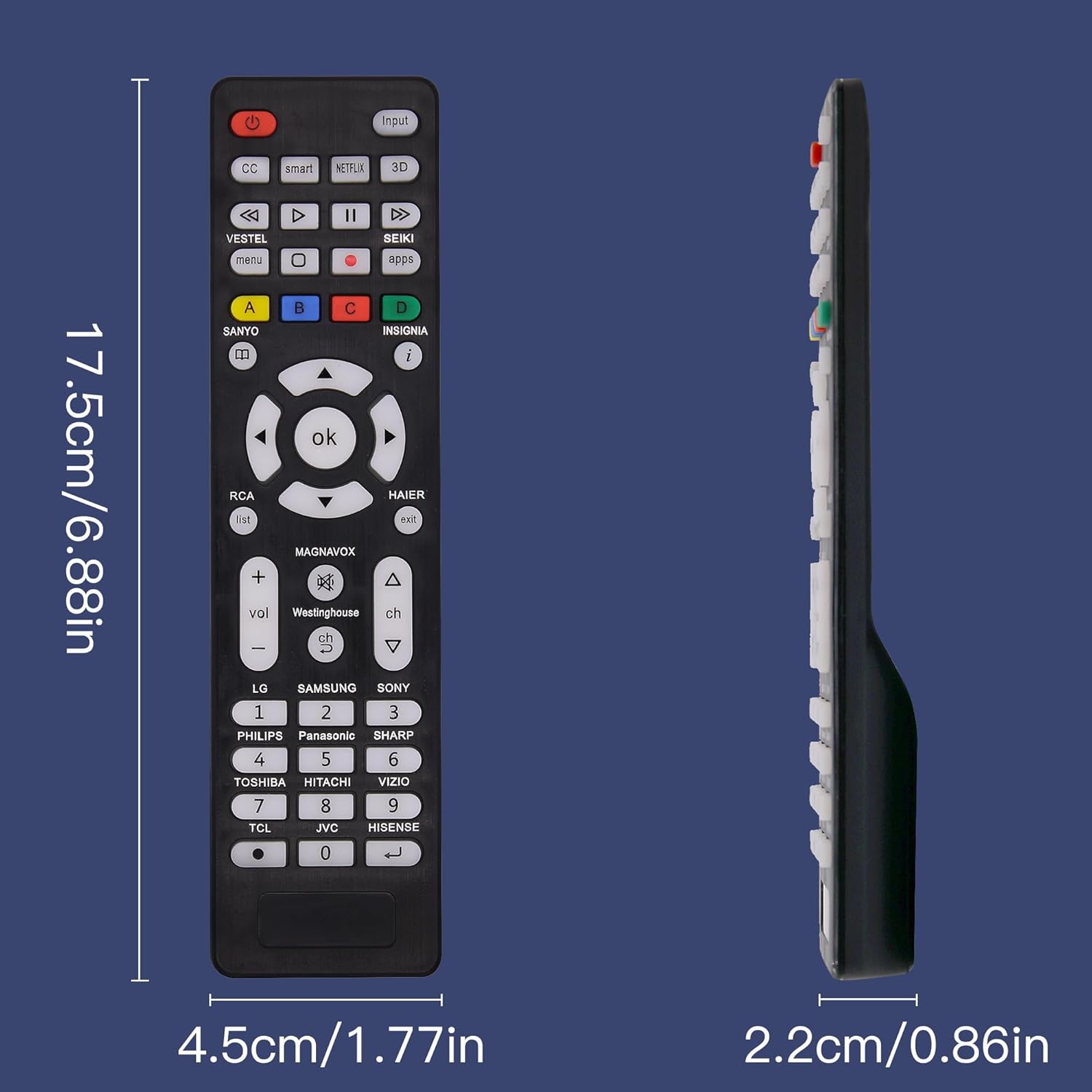
Imaxe 4: A diagram showing the physical dimensions of the remote control, indicating its length (17.5cm/6.88in), width (4.5cm/1.77in), and thickness (2.2cm/0.86in).
3. Configuración
3.1 Instalación da batería
O control remoto require dúas pilas AAA (non incluídas).
- Abra a tapa do compartimento da batería na parte traseira do mando a distancia.
- Introduza dúas pilas AAA, asegurándose de manter a polaridade correcta (+ e -).
- Pecha a tapa do compartimento da batería de forma segura.

Imaxe 5: Un primeiro plano view of the remote control's battery compartment, showing the correct orientation for inserting AAA batteries.
3.2 Initial Use (Direct Compatibility)
For many popular TV brands, the SMATAR Universal Remote Control can be used directly without any programming. This includes TVs from LG, SONY, SAMSUNG, PANASONIC, PHILIP, e SHARP. Simply insert the batteries and begin using the remote.
4. Instrucións de funcionamento
4.1 Brand Setting Method (For Other Brands)
If your TV brand is not among those directly compatible, or if the remote does not function correctly, follow these steps to program it:
- Point the remote control directly at your television.
- Press and hold the button corresponding to your TV's brand (e.g., VESTEL, SANYO, RCA, HAIER, MAGNAVOX, WESTINGHOUSE, TCL, HISENSE, JVC, HITACHI, TOSHIBA, PHILIPS, PANASONIC, SHARP, SONY, SAMSUNG, LG) for approximately 5 seconds.
- Continue holding the button until your TV turns off. The LED indicator on the remote will flash three times to confirm the setting is complete.
- Release the button. The remote is now programmed for your TV.

Imaxe 6: A visual guide detailing the brand setting method, showing the remote and instructions to press and hold the corresponding brand button until the TV turns off.
4.2 Restoring to Initial Setting
To reset the remote control to its factory default settings, follow these steps:
- Manteña premido o [OK] botón e o [0] button simultaneously for approximately 3 seconds.
- The LED indicator on the remote will blink four times, confirming that the remote has been restored to its initial settings.
4.3 Función de retroiluminación
The remote control is equipped with backlit buttons to assist with operation in dimly lit environments. Simply press any button on the remote control, and the buttons will illuminate, making them easy to see.

Imaxe 7: A hand holding the remote control, demonstrating the backlit buttons glowing in a dark setting, enhancing visibility.
5 Solución de problemas
If you encounter issues with your SMATAR Universal Remote Control, please refer to the following common solutions:
- O control remoto non responde:
- Asegúrese de que as pilas estean inseridas correctamente coa polaridade correcta.
- Substitúa as pilas vellas ou gastadas por pilas AAA novas.
- Asegúrate de que non haxa obstáculos entre o mando a distancia e o receptor de infravermellos do televisor.
- O mando a distancia non controla a televisión:
- If your TV is not one of the directly compatible brands (LG, SONY, SAMSUNG, PANASONIC, PHILIP, SHARP), perform the Brand Setting Method (Section 4.1).
- If the remote was previously working but stopped, try performing the Brand Setting Method again.
- Consider restoring the remote to its initial settings (Section 4.2) and then re-programming it.
- Buttons Performing Incorrectly (e.g., double input):
- This can sometimes occur with universal remotes. Try resetting the remote to initial settings (Section 4.2) and then re-programming it.
- For specific issues like navigation buttons (e.g., back button) not working on certain LG TVs, some users have reported success by pressing and holding the Silenciar e Poder buttons for 3-4 seconds, then entering the code 023 using the number buttons. This may vary by TV model.
- A luz de fondo non funciona:
- The backlight activates when any button is pressed. Ensure batteries have sufficient power.
6. Especificacións
| Característica | Detalle |
|---|---|
| Número de modelo | SM* |
| Dimensións do paquete | 6.97 x 1.73 x 0.87 polgadas |
| Peso do elemento | 1.76 onzas |
| Característica especial | Botóns retroiluminados |
| Cor | Negro |
| Número máximo de dispositivos compatibles | 1 |
| Dispositivos compatibles | Televisión |
7. Garantía e soporte
The SMATAR Universal Remote Control comes with a FIVE YEAR free quality warranty. If you experience any quality-related issues with your product, please contact our customer support team. We are committed to providing a satisfactory solution and ensuring your peace of mind.
For support, please refer to the contact information provided with your purchase or visit the SMATAR official websitio.