
Introdución
The JBL Soundgear Frames are innovative Bluetooth audio glasses designed to provide an immersive audio experience while allowing you to remain aware of your surroundings. Equipped with ultra-slim speakers, an integrated microphone, and touch controls, these frames offer seamless connectivity for music, calls, and video conferences. This manual provides essential information for setting up, operating, and maintaining your Soundgear Frames.
O que hai na caixa
Carefully unpack your JBL Soundgear Frames and ensure all items are present:
- JBL Soundgear Frames (Onyx)
- Cable de carga
- Pano de limpeza
- Maletín de transporte
Nota: É posible que se vendan accesorios adicionais por separado.
Configuración
1. Cargando o dispositivo
Before first use, fully charge your JBL Soundgear Frames. Connect the provided charging cable to the charging port on the frames and to a USB power source. The LED indicator will show charging status.

Imaxe: Lateral view of the JBL Soundgear Frames, highlighting the charging port and internal electronics within the temple arms.
- Tempo de carga: Aproximadamente 2 horas para unha carga completa.
- Duración da batería: Up to 8 hours of audio playback on a full charge.
2. Emparellamento Bluetooth
To connect your Soundgear Frames to a Bluetooth-enabled device:
- Ensure the Soundgear Frames are charged and powered off.
- Press and hold the power button (usually located on one of the temple arms) until the LED indicator flashes blue, indicating pairing mode.
- No teu dispositivo (teléfono intelixente, tableta, ordenador), vai á configuración de Bluetooth e activa Bluetooth.
- Select "JBL Soundgear Frames" from the list of available devices.
- Unha vez conectado, o indicador LED volverá azul fijo.
The frames support Bluetooth 5.2 for stable and efficient wireless connectivity.
Instrucións de funcionamento
Encendido/apagado
- Encendido: Press and hold the power button for 2 seconds. The LED will light up.
- Apagado: Manteña premido o botón de acendido durante 3 segundos. O LED apagarase.
Reprodución de música
Use the touch controls located on the temple arms to manage your audio:
- Reproducir/Pausa: Single tap on either temple arm.
- Próxima pista: Double tap on the right temple arm.
- Pista anterior: Double tap on the left temple arm.
- Subir volume: Swipe forward on the right temple arm.
- Baixar volume: Swipe backward on the right temple arm.
Xestión de chamadas
The integrated microphone allows for clear hands-free calls:
- Responder/Finalizar chamada: Single tap on either temple arm.
- Rexeitar a chamada: Press and hold either temple arm for 2 seconds.
Asistente de voz
Activate your device's voice assistant (e.g., Siri, Google Assistant) by triple-tapping on either temple arm.

Image: A person wearing the JBL Soundgear Frames outdoors, demonstrating their use in a real-world setting.
Mantemento
Limpeza
To maintain the clarity of your lenses and the integrity of the frames:
- Use o pano de limpeza fornecido para limpar suavemente as lentes e a montura.
- Para manchas difíciles, use un spray de limpeza de lentes deseñado especificamente para lentes.
- Avoid using abrasive materials or harsh chemicals, as these can damage the lenses and frame finish.
Almacenamento
When not in use, store your Soundgear Frames in the provided carrying case to protect them from scratches and impacts.
Coidado da batería
To prolong battery life, avoid exposing the frames to extreme temperatures. If storing for an extended period, charge the battery to approximately 50% before storage.
Resolución de problemas
| Problema | Solución |
|---|---|
| Frames do not power on. | Asegúrate de que a batería estea cargada. Conéctaa a unha fonte de alimentación e inténtao de novo. |
| Non se pode conectar por Bluetooth. | Make sure the frames are in pairing mode (flashing blue LED). Check your device's Bluetooth settings and forget previous connections if necessary. Restart both devices. |
| Sen son ou volume baixo. | Check the volume level on both the frames and your connected device. Ensure the frames are properly paired. |
| Os controis táctiles non responden. | Ensure the touch surface is clean and dry. Restart the frames. |
Especificacións
| Característica | Detalle |
|---|---|
| Número de modelo | JBLSNDGEARFMSRONX |
| UPC | 050036399845 |
| Cor | Onix |
| Forma do elemento | Redondo |
| Cor da lente | Negro |
| Tipo de lente | Non polarizado |
| Material do marco | Termoplástico |
| Cobertura de cadros | Fotograma completo |
| Conectividade | Bluetooth 5.2 |
| Altofalantes | Ultra-slim 25mm x 9mm |
| Micrófono | Integrado |
| Controis | Toca |
| Duración da batería | Ata 8 horas |
| Tempo de carga | Aproximadamente 2 horas |
| Resistencia á auga | IP54 (Splash and dust resistant) |
| Uso recomendado | Escoitando música |
| Rango de idade | Adulto |
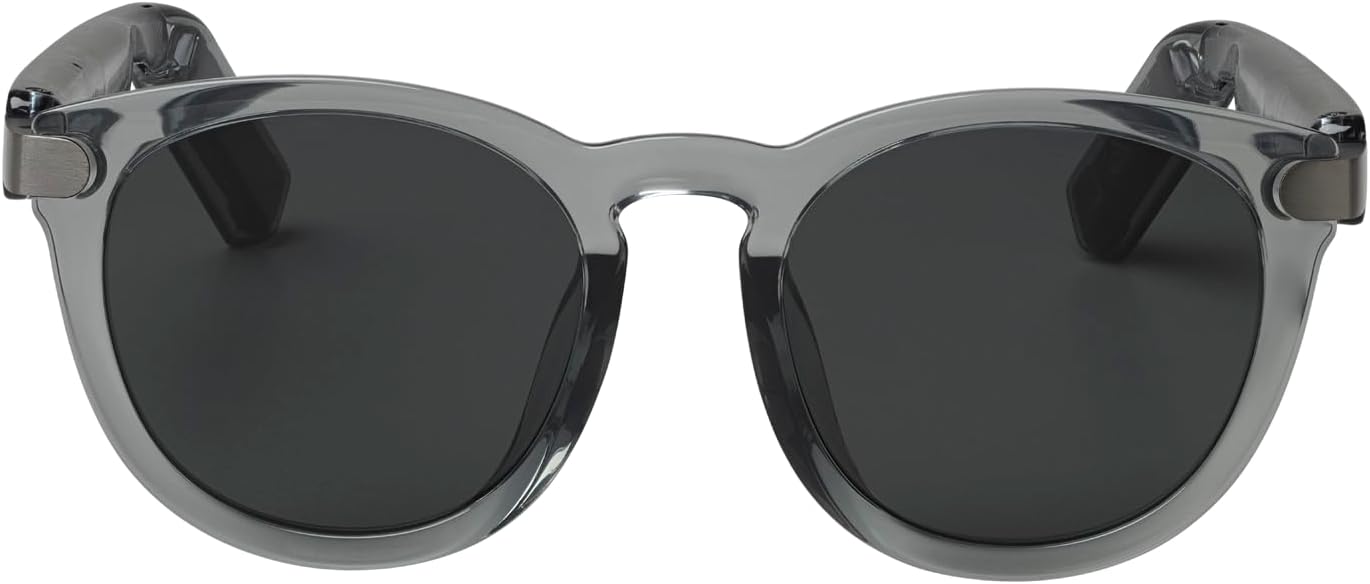
Imaxe: Fronte view of the JBL Soundgear Frames, showcasing the round, full-frame design and black non-polarized lenses.

Imaxe: Costas view of the JBL Soundgear Frames, showing the overall structure from the rear.
Garantía e Soporte
JBL products are designed for reliability and performance. For warranty information and customer support, please refer to the warranty card included with your product or visit the official JBL website. You can also find FAQs and additional support resources online.
Soporte en liña: www.jbl.com/asistencia