
Introdución
The Shokz OpenSwim Pro is a versatile bone conduction headphone designed for both land and water activities. It seamlessly integrates two distinct modes: Bluetooth and MP3, allowing you to choose your listening experience based on your environment. Engineered with PremiumPitch 2.0+ bone conduction technology, these headphones deliver clear audio, powerful volume, and rich bass. Its open-ear design prioritizes safety by keeping your ears open to ambient sounds, making it ideal for outdoor sports and activities.
The OpenSwim Pro boasts an IP68 waterproof rating, ensuring durability and performance in various conditions, including submersion up to 2 meters for 2 hours. Physical buttons are optimized for easy control during intense workouts or while wet, preventing accidental touches. Enjoy your favorite music and stay connected without compromise.
O que hai na caixa
- Shokz OpenSwim Pro Headphones
- 4-pin Magnetic Charging Cable
- Tapóns para oídos de natación
- Funda de transporte de goma de silicona
- Manuais de usuario
- Tarxeta de garantía
Produto rematadoview
Familiarize yourself with the components of your OpenSwim Pro headphones.
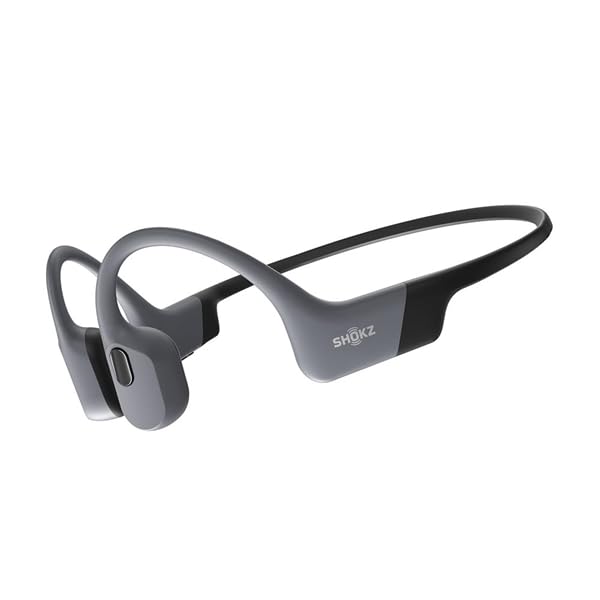
Figure 1: Shokz OpenSwim Pro Headphones (Grey)

Figure 2: Control Buttons and Charging Port
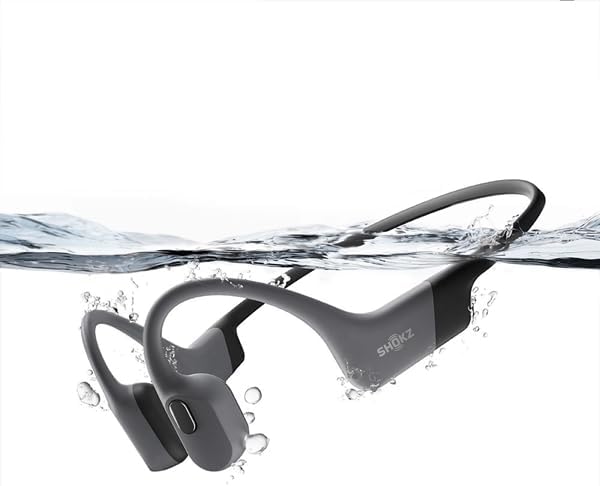
Figura 3: Deseño impermeable
Configuración
1. Cargando os auriculares
Before first use, fully charge your OpenSwim Pro headphones.
- Connect the 4-pin magnetic charging cable to the charging port on your headphones.
- Conecta o extremo USB do cable a un adaptador de corrente USB (non incluído) ou ao porto USB dun ordenador.
- O indicador LED mostrará o estado de carga. Unha carga completa adoita tardar aproximadamente 1.5 horas.
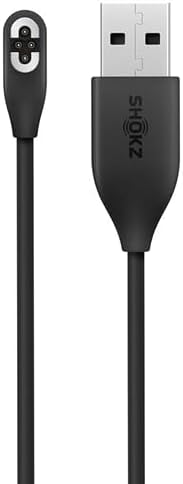
Figure 4: Magnetic Charging Cable
2. Transferring Music (MP3 Mode)
The OpenSwim Pro has internal storage for music playback without a connected device. It supports various audio formats including MP3, FLAC, WAV, AAC, M4A, APE, and WMA. You can store approximately 4,000 high-quality songs.
- Connect your OpenSwim Pro to a computer using the magnetic charging cable. The headphones will appear as a removable disk drive.
- Arrastra e solta o audio que queiras files na carpeta de almacenamento dos auriculares.
- Safely eject the device from your computer once the transfer is complete.
3. Emparellamento Bluetooth
To use the OpenSwim Pro with your smartphone or other Bluetooth-enabled devices:
- Asegúrese de que os auriculares estean apagados.
- Press and hold the Power/Mode button until the LED indicator flashes red and blue, indicating pairing mode.
- On your device, go to Bluetooth settings and select "OpenSwim Pro" from the list of available devices.
- Once connected, the LED will flash blue, and you will hear a voice prompt.
Instrucións de funcionamento
Encendido/apagado
- Encendido: Manteña premido o botón de acendido/modo durante 2 segundos.
- Apagado: Manteña premido o botón de acendido/modo durante 3 segundos.
Cambiar entre os modos Bluetooth e MP3
The OpenSwim Pro allows for easy switching between its two modes:
- Press and hold the Mode button (often integrated with the Power button) for 2 seconds while the device is on to switch between Bluetooth and MP3 modes. A voice prompt will confirm the current mode.
Controis de reprodución de música
- Reproducir/Pausa: Prema o botón multifunción unha vez.
- Próxima pista: Press and hold the Volume + button for 2 seconds.
- Pista anterior: Press and hold the Volume - button for 2 seconds.
- Subir volume: Preme o botón Volume +.
- Baixar volume: Prema o botón de Volume -.
Call Controls (Bluetooth Mode Only)
- Responder/Finalizar chamada: Prema o botón multifunción unha vez.
- Rexeitar a chamada: Manteña premido o botón multifunción durante 2 segundos.
Using for Swimming
When swimming, it is recommended to use the MP3 mode for optimal performance as Bluetooth signals do not transmit well through water. Insert the included swimming earplugs to enhance sound quality underwater.
- Switch to MP3 mode before entering the water.
- Insert the swimming earplugs into your ears.
- Ensure the headphones are securely fitted.
Mantemento
Proper care ensures the longevity and performance of your OpenSwim Pro headphones.
- Limpeza: After use, especially after swimming or heavy sweating, rinse the headphones with clean fresh water. Wipe them dry with a soft cloth. Ensure the charging port is completely dry before charging.
- Almacenamento: Store the headphones in the silicone rubber carrying case in a cool, dry place away from direct sunlight and extreme temperatures.
- Cargando: Only use the provided magnetic charging cable. Avoid using damaged cables or chargers.
- Exposición á auga: While IP68 rated, avoid prolonged submersion beyond specified limits (2 meters for 2 hours). Do not expose to saltwater or chemicals without immediate rinsing.
Resolución de problemas
If you encounter issues with your OpenSwim Pro, refer to the following common solutions:
| Problema | Posible Solución |
|---|---|
| Sen son | Check volume levels. Ensure headphones are powered on and in the correct mode (Bluetooth or MP3). If in Bluetooth mode, ensure it's paired and connected to your device. If in MP3 mode, ensure music files are loaded. |
| Non se pode emparellar por Bluetooth | Ensure headphones are in pairing mode (red and blue flashing LED). Turn off and on your device's Bluetooth. Move closer to your device. Clear previous pairings on your device and try again. |
| Os auriculares non se cargan | Ensure the charging cable is securely connected to both the headphones and the power source. Check if the charging port is clean and dry. Try a different USB port or power adapter. |
| Sound quality issues underwater | Ensure you are in MP3 mode. Use the included swimming earplugs to improve sound clarity underwater. |
| Os botóns non responden | Ensure the headphones are not locked. If wet, dry the buttons thoroughly. Try restarting the headphones. |
If the issue persists, please refer to the official Shokz support websitio ou póñase en contacto co servizo de atención ao cliente.
Especificacións
| Característica | Detalle |
|---|---|
| Marca | SHOKZ |
| Nome do modelo | OpenSwim Pro (S710) |
| Cor | Gris |
| Colocación do oído | Open-Ear (Bone Conduction) |
| Factor de forma dos auriculares | True Wireless |
| Control de ruído | Ningún |
| Tecnoloxía de conectividade | Sen fíos (Bluetooth) |
| Clasificación impermeable | IP68 (Sumerxible ata 2 metros durante 2 horas) |
| Almacenamento interno | Supports approximately 4,000 high-quality songs |
| Formatos de audio admitidos | MP3, FLAC, WAV, AAC, M4A, APE, WMA |
| Micrófono | Incluído |
Garantía e Soporte
Información da garantía
The Shokz OpenSwim Pro comes with a 2 anos de garantía do fabricanteEsta garantía cobre defectos de materiais e fabricación en condicións normais de uso. Conserve o comprobante de compra para reclamacións de garantía.
Atención ao cliente
For further assistance, technical support, or warranty claims, please visit the official Shokz website or contact their customer service department. Contact details can typically be found on the Shokz websitio web ou na tarxeta de garantía incluída co produto.