1. Produto rematadoview
The Dafit ZL02CPRO Smart Watch is a versatile wearable device designed for health monitoring, fitness tracking, and smart notifications. It features a 1.28-inch round TFT screen, Bluetooth call functionality, and multi-sport modes. This manual provides detailed instructions for setup, operation, and maintenance of your smart watch.
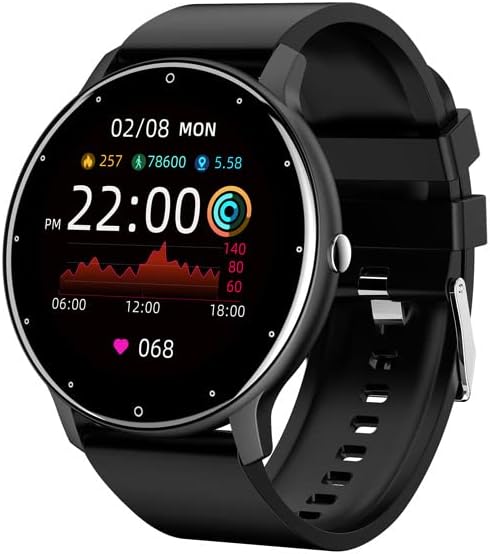
Figure 1.1: Dafit ZL02CPRO Smart Watch (Black Silicone Strap)
This image shows the main view of the Dafit ZL02CPRO Smart Watch in black with a silicone strap. The watch face displays the current time, date, step count, distance, and heart rate data, illustrating its primary functions.
2. Que hai na caixa
Ao abrir a embalaxe do produto, comprobe que inclúa todos os seguintes elementos:
- Reloxo intelixente Dafit ZL02CPRO
- Manual de usuario
- Wristbands (Silicone or Steel, depending on model)
- Cable de carga
3. Guía de configuración
3.1 Carga do dispositivo
Before initial use, fully charge your smart watch. Connect the provided charging cable to the charging port on the watch and a standard USB power adapter (not included). A full charge typically takes approximately 2 hours. The watch can operate for 5-7 days on a single charge, depending on usage.
3.2 Instalación e emparellamento da aplicación
To unlock the full functionality of your smart watch, you need to install the companion application on your smartphone. The watch supports Android 5.0 and above, and Apple iOS 9.0 or later.
- Descarga a aplicación: Busca "Dafit" in your smartphone's app store (Google Play Store for Android or Apple App Store for iOS) and install the application.
- Activar Bluetooth: Asegúrate de que o Bluetooth estea activado no teu smartphone.
- Abre a aplicación: Launch the Dafit application and follow the on-screen instructions to create an account or log in.
- Emparellar o reloxo: Within the app, navigate to the device pairing section. The app will search for nearby devices. Select "ZL02CPRO" or the corresponding device name when it appears. Confirm the pairing request on both your phone and the watch if prompted.
- Maintain Connection: For optimal performance and to receive notifications, keep the Bluetooth distance between your watch and smartphone within 10 meters.
4. Instrucións de funcionamento
4.1 Navegación básica
The ZL02CPRO Smart Watch features a full touch screen for intuitive navigation. Swipe across the screen to access different functions and menus. Press the side button to return to the main watch face or to power on/off the device.
4.2 Funcións de monitorización do estado
The watch is equipped with sensors to track various health and fitness metrics:
- Seguidor de actividades: Monitors daily steps, calories burned, and distance traveled.
- Monitorización da frecuencia cardíaca: Provides continuous or on-demand heart rate readings.
- Monitorización do sono: Rexistra os patróns e a calidade do sono.
- Modos multideporte: Supports various exercise modes to record specific workout data, including exercise time, heart rate tracking, and mileage. GPS movement track data is available when connected to your smartphone's GPS.
4.3 Funcións do asistente intelixente
Your smart watch acts as a personal assistant, keeping you connected and organized:
- Notificacións: Receive alerts for incoming calls, SMS messages, and notifications from various applications directly on your wrist. You can reject calls from the watch.
- Control remoto: Control music playback and trigger your smartphone's camera remotely.
- Informe meteorolóxico: Obtén actualizacións meteorolóxicas en tempo real.
- Recordatorios: Set sedentary reminders and alarm clocks.
- Ferramentas: Access stopwatch functionality.
- Configuración da pantalla: Adjust screen brightness and activate power-saving mode.

Figure 4.1: Customizable Watch Faces and On-Wrist View
This image illustrates the variety of customizable watch faces available for the ZL02CPRO Smart Watch, allowing users to personalize their device. It also shows the watch being worn on a wrist, demonstrating its comfortable fit and display visibility during use.
4.4 Apoio lingüístico
The watch supports multiple languages, including Chinese, English, German, Spanish, French, Russian, Arabic, Ukrainian, Italian, and Portuguese. Language settings can typically be adjusted within the companion app.
5. Water Resistance and Care
The ZL02CPRO Smart Watch is IP68 waterproof, meaning it is resistant to dust and can withstand immersion in water up to 1.5 meters for 30 minutes. It can be worn when washing hands or in the rain. However, it is important to note that the watch is non suitable for use in showers, saunas, or during diving activities, as steam and high water pressure can damage the device.
To maintain the watch's condition, regularly clean the device and straps with a soft, dry cloth. Avoid exposing the watch to extreme temperatures or harsh chemicals.
6. Especificacións
| Característica | Detalle |
|---|---|
| Tipo de pantalla de visualización | Pantalla TFT |
| Tamaño da pantalla | 1.28 Inches (Round) |
| Material do caso | Plástico PC |
| Material da correa | Anti-static Silicone or Steel (depending on model) |
| Peso do elemento | 80 gramos (2.82 onzas) |
| Capacidade da batería | 230 millónsamp Horario |
| Tempo de carga | Aprox. 2 horas |
| Duración da batería | 5-7 días (uso típico) |
| Clasificación de resistencia á auga | IP68 |
| Tecnoloxía de conectividade | Bluetooth |
| Compatibilidade do sistema operativo | Android 5.0+ / iOS 9.0+ |
| GPS | Vía Smartphone |
| Número de modelo | cn101 |
7 Solución de problemas
Se tes problemas co teu reloxo intelixente Dafit ZL02CPRO, consulta as seguintes solucións habituais:
- O reloxo non se acende: Asegúrate de que o reloxo estea completamente cargado. Conéctao ao cable de carga e a unha fonte de alimentación durante polo menos 30 minutos.
- Non se pode emparellar co teléfono intelixente:
- Asegúrate de que o Bluetooth estea activado no teu teléfono intelixente e no reloxo.
- Make sure the watch is within 10 meters of your smartphone.
- Reinicia o reloxo e o teu smartphone.
- Try unpairing and re-pairing the device through the Dafit app.
- Check if the Dafit app is updated to the latest version.
- Notificacións non recibidas:
- Verify that the watch is successfully paired and connected via Bluetooth.
- Check notification permissions for the Dafit app in your smartphone's settings.
- Ensure notifications are enabled within the Dafit app for specific applications.
- Disable any "Do Not Disturb" or "Power Saving" modes on your phone or watch that might block notifications.
- Datos sanitarios inexactos:
- Asegúrate de levar o reloxo ben axustado ao pulso, pero non demasiado axustado.
- Limpa o sensor que está na parte traseira do reloxo.
- For best results, ensure your profile information (height, weight) is accurate in the Dafit app.
- Autonomía curta da batería:
- Reduce o brillo da pantalla.
- Limit continuous heart rate monitoring.
- Desactivar as notificacións innecesarias.
- Activate power-saving mode if available.
Se os problemas persisten, póñase en contacto co servizo de atención ao cliente para obter máis axuda.
8. Garantía e soporte
This product comes with a standard manufacturer's warranty. For specific warranty terms and conditions, please refer to the documentation provided with your purchase or contact the seller directly. For technical support or any questions regarding the operation of your Dafit ZL02CPRO Smart Watch, please reach out to the customer service team via the contact information provided by your retailer or on the product packaging.