
1. Introdución
Grazas pola compraasing the Womier SK80 Wired Gaming Keyboard. This mechanical keyboard features a 75% compact layout, an integrated LCD screen, hot-swappable switches, and customizable RGB backlighting. Designed for both gaming and daily use, it offers a comfortable and responsive typing experience. This manual provides detailed instructions for setup, operation, maintenance, and troubleshooting to ensure optimal performance of your keyboard.

Figure 1: Womier SK80 Wired Gaming Keyboard (Black)
2. Configuración
2.1 Contido do paquete
- Womier SK80 Keyboard Unit
- Cable USB-C
- Tirador de chaves
- Manual de usuario
2.2 Conexión do teclado
- Localiza o porto USB-C na parte traseira do teclado.
- Conecta un extremo do cable USB-C fornecido ao teclado.
- Connect the other end of the USB-C cable to an available USB port on your computer (Windows PC or Mac).
- O teclado será recoñecido automaticamente polo teu sistema operativo.

Figura 2: Conexión do cable USB-C
2.3 Interruptor de compatibilidade do sistema
The keyboard features a switch to toggle between Windows and Mac operating system modes. Locate the switch on the back or side of the keyboard and set it to the appropriate position for your system.

Figure 3: Windows/Mac System Switch
2.4 Pés axustables
The keyboard is equipped with adjustable feet on the underside. You can extend these feet to change the typing angle for improved ergonomics and comfort.

Figura 4: Pés de teclado axustables
3. Funcionamento
3.1 LCD Multimedia Display
The Womier SK80 features a vibrant color multimedia display on the upper right side. This screen provides visual feedback for various settings and functions:
- Custom GIF Images: Display personalized GIF animations.
- Caps Lock Status: Indicates whether Caps Lock is active.
- Modo de conexión: Shows the current connection status.
- WIN/MAC System: Confirms the selected operating system mode.
- Brillo/velocidade da retroiluminación: Axustar e view current backlight settings.
- Modo/Cor RGB: Seleccionar e previamenteview RGB lighting effects and colors.
- Volume: Displays the current audio volume level.
- Idioma: Shows the selected language setting.
The display screen is designed with an 11° tilt angle for optimal viewing ergonomics.

Figure 5: LCD Screen Displaying Various Settings
3.2 Retroiluminación RGB
The keyboard offers extensive RGB backlighting customization:
- 19 Efectos de iluminación: Choose from a variety of pre-set lighting patterns.
- 9 cores de iluminación: Select your preferred color scheme.
- Brillo e velocidade axustables: Fine-tune the intensity and animation speed of the backlight.
- Modo de sincronización de música: In this mode, lighting patterns will dynamically respond to playing music.
All RGB backlight modes and settings can be customized using the dedicated keyboard driver software.
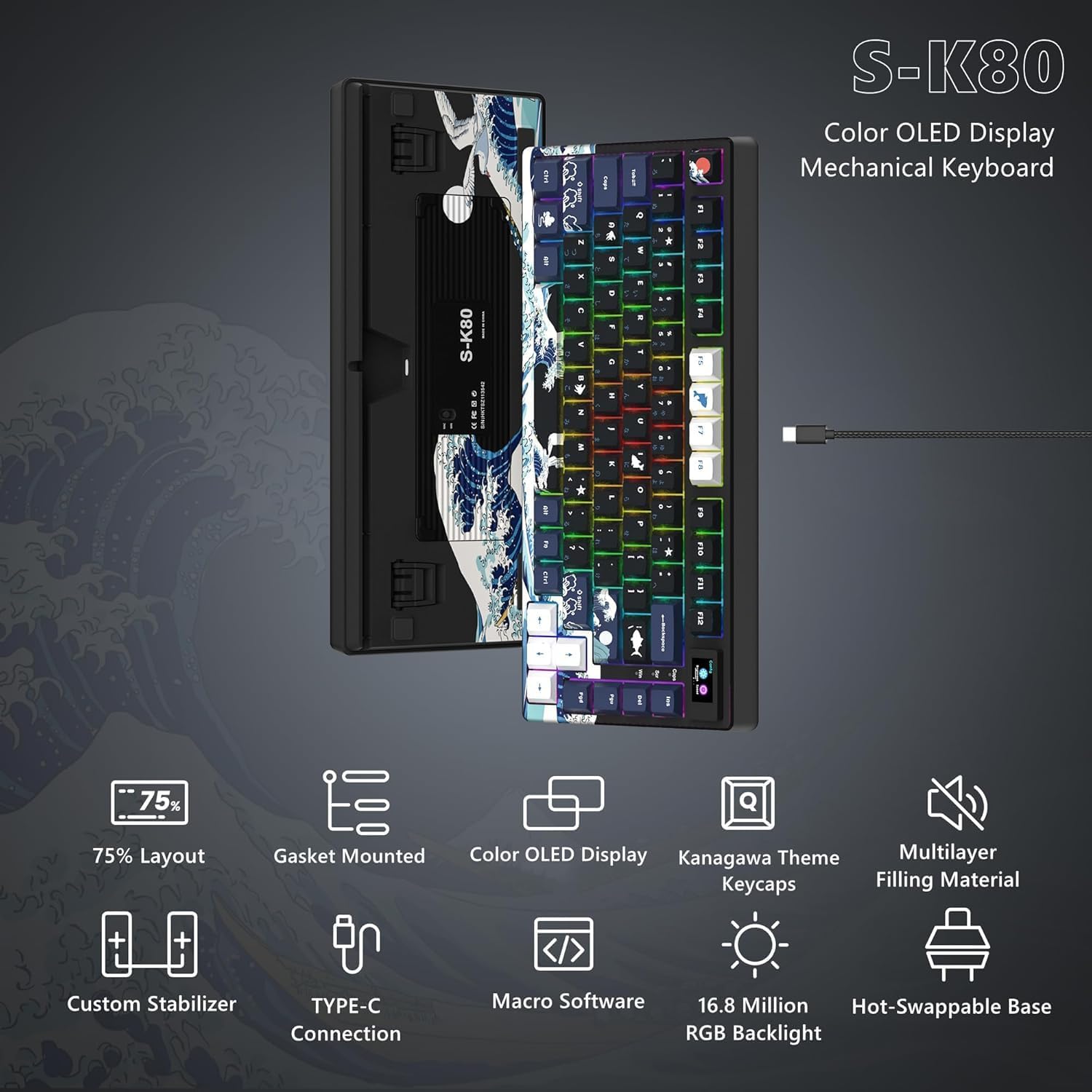
Figure 6: Customizable RGB Backlighting
3.3 Software programable
The Womier SK80 keyboard is fully customizable through its dedicated driver software. This software allows users to:
- Set dynamic GIF animations for the LCD screen.
- Define custom lighting effects.
- Program macro functions for individual keys.
Refer to the software's interface for detailed instructions on customization options.

Figure 7: Keyboard Driver Software Interface
3.4 Interruptores intercambiables en quente
The keyboard features a hot-swappable PCB, allowing you to easily change mechanical switches without soldering. It supports both 3-pin and 5-pin switches. This enables personalization of your typing feel and sound.
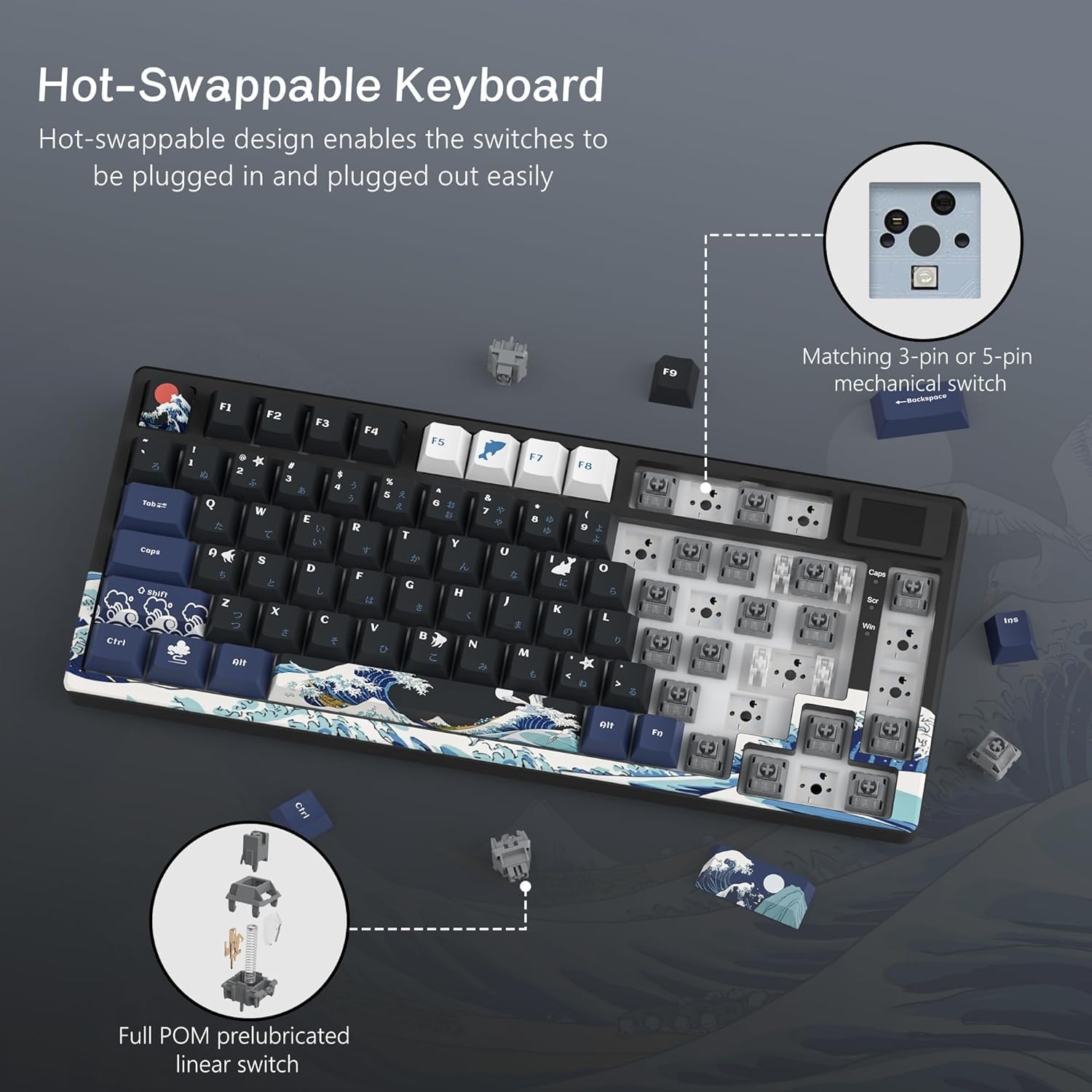
Figura 8: Mecanismo de conmutación intercambiable en quente
3.5 Gasket Mount Design and Keycaps
The SK80 utilizes a gasket mount design, which enhances typing stability and reduces noise, contributing to a more immersive experience. It comes with classic Cherry profile PBT keycaps, offering durability and a comfortable feel.

Figure 9: Gasket Mount Structure and Keycap Profile
4. Mantemento
4.1 Limpeza do teclado
- Desconecte o teclado do ordenador antes de limpalo.
- Use un pano suave e sen pelusa dampened with a small amount of water or a mild cleaning solution to wipe the keycaps and keyboard surface.
- Para o po e os residuos entre as teclas, use aire comprimido ou un cepillo pequeno.
- To clean under the keycaps, use the provided keycap puller to carefully remove them. Clean the switches and plate, then reattach the keycaps.
- Evita o uso de produtos químicos agresivos ou materiais abrasivos, xa que poden danar o acabado do teclado ou as lendas das teclas.
4.2 Substitución do interruptor (intercambiable en quente)
- Ensure the keyboard is disconnected from your computer.
- Use a keycap puller to remove the desired keycap.
- Use a switch puller (not included, but commonly available) to gently grip and pull the switch straight up from the PCB.
- Aliña os pines do novo interruptor cos orificios da placa de circuíto impreso e preme firmemente ata que encaixen no seu lugar. Asegúrate de que os pines non estean dobrados.
- Substitúa a tapa das teclas.
5 Solución de problemas
5.1 O teclado non responde
- Asegúrate de que o cable USB-C estea conectado correctamente tanto ao teclado como ao ordenador.
- Tenta conectar o teclado a un porto USB diferente do teu ordenador.
- Proba o teclado noutro ordenador para descartar un problema específico do ordenador.
- Verify that the Windows/Mac compatibility switch is set correctly for your operating system.
5.2 Backlight Not Working or Incorrect
- Check the backlight brightness settings via the LCD screen or the programmable software.
- Ensure no specific lighting profile is overriding your desired settings.
- If using the software, ensure it is up to date and correctly installed.
5.3 As teclas non se rexistran ou escriben dúas veces
- For hot-swappable switches, carefully remove the keycap and switch for the affected key. Reinsert the switch firmly to ensure proper contact.
- Clean any debris around the switch stem.
- Se o problema persiste, considere a posibilidade de substituír o interruptor.
6. Especificacións
| Característica | Descrición |
|---|---|
| Marca | Womier |
| Modelo | SK80 |
| Conectividade | Con cable (USB-C) |
| Descrición do teclado | Mecánica |
| Uso recomendado | Gaming, Office Work, Typing, Programming, Esports, General Computer Use |
| Características especiais | LCD Screen, Hot-Swappable, RGB Backlight, 75% Compact Layout, Wired Connection, Windows/Mac Compatible, Gaming/Office Compatible, Japanese Layout, Programmable Keys, Customizable Display |
| Cor | Negro |
| Backlight Color Support | RGB |
| Estilo | Xogos |
| Dimensións do produto (L x W x H) | 34 x 17 x 3.5 cm |
| Dispositivos compatibles | Windows PC, Mac, Desktop Computers, Laptops, Gaming PCs |
| Tipo de cambio | Mechanical Switch (Hot-Swappable) |
| Disposición do teclado | QWERTY (Japanese Layout) |
| Número de chaves | 80 (75% layout) |
| Waterproof Type | Non impermeable |
| Familia de sistemas operativos compatibles | Windows, Mac |
| Compoñentes incluídos | USB Cable, Keycap Puller, Keyboard Unit, User Manual |
| Product Exterior Material | ABS, Aluminum, Plastic, Polyethylene Terephthalate |
| Keyboard Plate Material | Aluminum Alloy, Polycarbonate |
7. Información da garantía
The Womier SK80 Wired Gaming Keyboard comes with a 1 anos de garantía do fabricante desde a data de compra. Esta garantía cobre defectos de materiais e fabricación en condicións de uso normal. Conserve o comprobante de compra para reclamacións de garantía.
A garantía non cobre:
- Danos causados por accidente, abuso, mal uso, inundación, incendio, terremoto ou outras causas externas.
- Damage caused by operating the product outside the permitted or intended uses described by Womier.
- Damage caused by service performed by anyone who is not a representative of Womier.
- Products or parts that have been modified to alter functionality or capability without the written permission of Womier.
8. Atención ao cliente
For technical assistance, warranty claims, or general inquiries, please contact Womier customer support through the following channels:
- Soporte en liña: Visit the official Womier websitio web con preguntas frecuentes e recursos de asistencia.
- Correo electrónico: Consulte a embalaxe do produto ou a ficha oficial websitio para o enderezo de correo electrónico de asistencia.
When contacting support, please have your product model (SK80) and proof of purchase readily available.


