
1. Introdución
Grazas pola compraasing the Edifier R990BT Bluetooth Computer Speakers. These 2.0 active bookshelf speakers are designed to provide high-quality audio for your PC, smartphone, tablet, and other compatible devices. Featuring Bluetooth V5.4 connectivity and dual RCA inputs, the R990BT offers versatile audio options in a classic MDF enclosure. Please read this manual thoroughly to ensure proper setup and optimal performance of your speakers.
2. Contido do paquete
Asegúrate de que todos os elementos estean presentes no paquete:
- Edifier R990BT Active Bookshelf Speakers (1 Pair)
- Cable de conexión do altofalante
- Cable de audio RCA a RCA
- Cable de audio de 3.5 mm a RCA
- Cable de alimentación
- Guía de inicio rápido
3. Configuración
3.1 Colocación de altofalantes
Place the speakers on a stable, flat surface such as a desk or shelf. For optimal stereo imaging, position the speakers equidistant from your listening position, forming an equilateral triangle. Ensure there is adequate space behind the speakers for cable connections and ventilation.

Image: Edifier R990BT speakers positioned on a desk, demonstrating typical placement for computer use.
3.2 Conexión dos altofalantes
- Conecta o altofalante pasivo: Use the included speaker connection cable to link the active speaker (with controls) to the passive speaker. Ensure the correct polarity (+ to + and - to -) for proper sound reproduction.
- Conectar á enerxía: Plug the power cable into the active speaker's power input and then into a wall outlet.
3.3 Conexión de fontes de son
The R990BT speakers support both wired (RCA) and wireless (Bluetooth) connections.
Wired Connection (RCA)
The speakers feature two sets of RCA input ports (Line In 1 and Line In 2) for connecting two different wired audio devices simultaneously.
- Use the RCA to RCA cable to connect devices with RCA outputs (e.g., CD player, turntable with pre-amp).
- Use the 3.5mm to RCA cable to connect devices with a 3.5mm audio jack (e.g., computer, smartphone, tablet).

Image: Close-up of the rear panel of the active speaker, highlighting the dual RCA input ports (Line In 1 and Line In 2) and the power input.
Conexión Bluetooth
The R990BT features Bluetooth V5.4 for wireless audio streaming.
- Turn on the speakers.
- Press the volume/input knob on the rear panel to select the Bluetooth input. The indicator light will flash blue.
- No teu dispositivo de son (teléfono intelixente, tableta, ordenador), activa o Bluetooth e busca os dispositivos dispoñibles.
- Select "EDIFIER R990BT" from the list to pair. The indicator light will turn solid blue once connected.

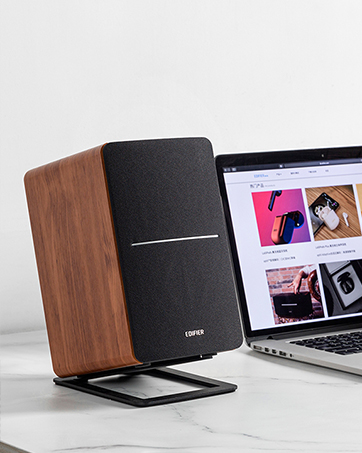
Image: A single Edifier R990BT speaker on a desk next to a laptop, symbolizing the ease of Bluetooth connectivity.
4. Instrucións de funcionamento
4.1 Encendido/apagado
The power switch is located on the rear panel of the active speaker. Flip the switch to the 'ON' position to power on the speakers. Flip to 'OFF' to power off.
4.2 Control de volume
The large knob on the rear panel of the active speaker controls the master volume. Rotate clockwise to increase volume and counter-clockwise to decrease volume.
Imaxe: Detallada view of the multi-function control knob on the rear of the speaker, used for volume adjustment and input selection.
4.3 Selección de entrada
Press the volume/input knob on the rear panel to cycle through the available audio inputs: Line In 1, Line In 2, and Bluetooth. The indicator light will change color or flash to indicate the selected input mode.
- Line In 1 / Line In 2: Solid green or red indicator (depending on model/firmware).
- Bluetooth: Flashing blue (pairing mode) or solid blue (connected).
4.4 Using the Edifier ConneX App
For enhanced control and customization, download the Edifier ConneX mobile application. The app allows you to adjust equalization settings and access additional features for your R990BT speakers.
- Download the Edifier ConneX app from your device's app store.
- Ensure your speakers are powered on and connected via Bluetooth to your mobile device.
- Open the app and follow the on-screen instructions to connect to your R990BT speakers.

Image: The official logo for the Edifier ConneX mobile application.
5. Mantemento
5.1 Limpeza
Para manter a aparencia e o rendemento dos seus altofalantes:
- Wipe the speaker cabinets with a soft, dry cloth.
- Non empregue produtos de limpeza líquidos, aerosois nin produtos químicos abrasivos, xa que poden danar o acabado ou os compoñentes internos.
- Gently brush dust from the speaker grilles using a soft brush or vacuum cleaner with a brush attachment.
5.2 Almacenamento
If storing the speakers for an extended period, ensure they are powered off and disconnected from the power source. Store them in a cool, dry place away from direct sunlight and extreme temperatures.
6 Solución de problemas
If you encounter any issues with your Edifier R990BT speakers, please refer to the following common problems and solutions:
| Problema | Causa posible | Solución |
|---|---|---|
| Sen son |
|
|
| Son distorsionado |
|
|
| Bluetooth not connecting/disconnecting |
|
|
| Difficulty switching inputs |
|
|
7. Especificacións
Detailed technical specifications for the Edifier R990BT speakers:
- Nome do modelo: R990BT
- Tipo de altofalante: Estante para libros
- Tipo de montaxe: Shelf Mount/Tabletop Mount
- Material: MDF (taboleiro de fibras de densidade media)
- Tecnoloxía de conectividade: Bluetooth V5.4, Wired (Dual RCA)
- Modo de saída de audio: Estéreo (2.0)
- Potencia de saída máxima do altofalante: 24 vatios (RMS)
- Diámetro do woofer: 4 polgadas
- Diámetro do tweeter: 1 polgadas
- Resposta en frecuencia: 18 KHz (Upper limit, typical for compact speakers)
- Relación sinal-ruído: 85 dB
- Método de control: Touch (via rear knob)
- Fonte de enerxía: Corded Electric (100-240V ~ 50/60Hz)
- Dimensións do produto: 11.5"D x 7.5"W x 17"H (per speaker, approximate)
- Peso do artigo: 7.94 Pounds (per speaker, approximate)
- Cor: Negro
- Dispositivos compatibles: Devices with Bluetooth technology, devices with RCA or 3.5mm audio output.
8. Garantía e soporte
8.1 Información da garantía
The Edifier R990BT speakers come with a Limited Warranty. Please refer to the warranty card included in your package or visit the official Edifier website for detailed terms and conditions regarding your product's warranty coverage.
8.2 Atención ao cliente
For technical assistance, troubleshooting, or general inquiries, please contact Edifier customer support. Contact details can typically be found on the official Edifier websitio web ou na Guía de inicio rápido do produto.
Soporte en liña: Visita www.edifier.com para preguntas frecuentes, recursos de asistencia e información de contacto.