
Introdución
Welcome to the user manual for your new TECNO Spark 20 Pro 5G smartphone. This guide provides essential information to help you set up, operate, maintain, and troubleshoot your device. Please read through this manual carefully to ensure optimal performance and longevity of your smartphone.

Imaxe: Anverso e reverso view of the TECNO Spark 20 Pro 5G smartphone, showcasino seu deseño e o módulo de cámara.
1. Configuración
1.1 Contido do paquete
Antes de comezar, asegúrate de que todos os elementos estean presentes no paquete:
- TECNO Spark 20 Pro 5G Smartphone
- Cable USB Tipo-C
- Adaptador de alimentación (33 W)
- Ferramenta de expulsión de SIM
- Guía de inicio rápido (se corresponde)
- Tarxeta de garantía (se procede)
1.2 Inserción da tarxeta SIM
- Localiza a bandexa da tarxeta SIM no lateral do teu dispositivo.
- Insira a ferramenta de expulsión da tarxeta SIM no pequeno orificio que hai xunto á bandexa e prema suavemente ata que esta saia.
- Place your Nano SIM card into the designated slot on the tray. Ensure the gold contacts face downwards.
- Empurre con coidado a bandexa de volta no teléfono ata que encaixe no seu lugar.

Imaxe: Lateral view of the smartphone showing the SIM card tray and power/volume buttons.
1.3 Carga inicial e acendido
Recoméndase cargar completamente o dispositivo antes do primeiro uso.
- Connect the USB Type-C cable to the phone's charging port and the power adapter.
- Enchufe o adaptador de alimentación a unha toma de corrente.
- Once sufficiently charged, press and hold the Power button (located on the side) until the TECNO logo appears.
- Siga as instrucións en pantalla para completar a configuración inicial, incluíndo a selección do idioma, a conexión wifi e a configuración da conta de Google.
Imaxe: Parte inferior view of the smartphone, highlighting the USB Type-C charging port and speaker grille.
2. Funcionamento do teu dispositivo
2.1 Navegación básica
Your TECNO Spark 20 Pro 5G runs on Android 14 with HiOS 14. Navigate using touch gestures:
- Toca: Selecciona un elemento ou abre unha aplicación.
- Pasar o dedo: Desprazarse por pantallas ou listas.
- Beliscar: Achegar ou afastar imaxes e web páxinas.
- Prensa longa: Acceder a menús contextuais ou mover iconas.
2.2 Funcións da cámara
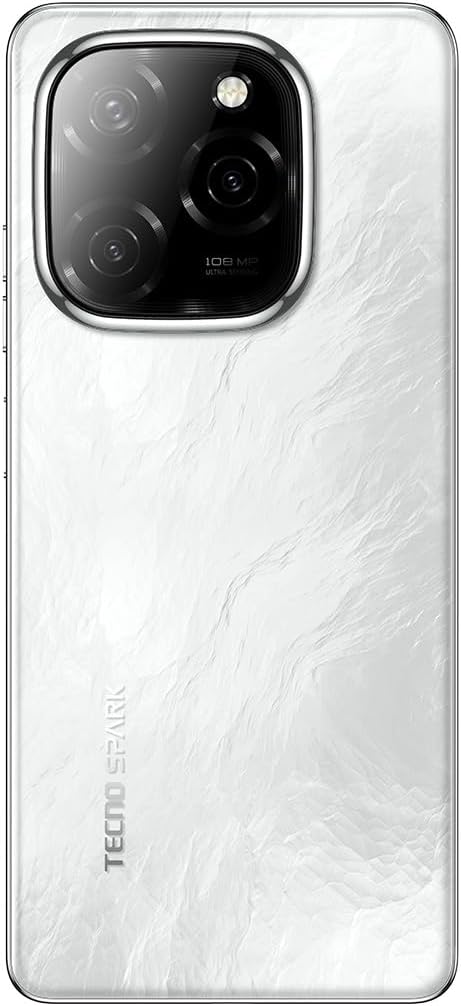
The device features a 108MP Ultra Clear rear camera and an 8MP front camera with dual LED flash.
- Cámara traseira: Open the Camera app, select "Photo" for standard shots, "Pro" for advanced settings, or "Macro" for close-up photography.
- Cámara frontal: Switch to the front camera for selfies. The dual LED flash assists in low-light conditions.
- Gravación de vídeo: Select "Video" mode to record in up to 4K resolution.

Imaxe: Traseira view of the smartphone, highlighting the 108MP camera system with its triple lens setup.
Conectividade 2.3 5G
Experience high-speed internet with 5G connectivity, supported by 10 5G bands, Linkbooming, and Smart 5G 3.0 technology for wider coverage and faster speeds.
- Ensure your SIM card supports 5G and your network provider offers 5G services in your area.
- Access network settings to manage 5G preferences.
2.4 Audio e pantalla
- Audio: Enjoy immersive sound with Dolby Atmos and dual stereo speakers, featuring Hi-Res Audio certification.
- Visualización: The 6.78-inch LTPS display offers a 120Hz adaptive refresh rate for smooth scrolling and gaming. The Dynamic Port 2.0 provides interactive notifications.
2.5 Características de seguridade
Unlock your device securely using the side-mounted fingerprint sensor.
- Ir a Settings > Security & Privacy > Fingerprint Unlock to set up your fingerprint.
3. Mantemento
3.1 Limpeza do dispositivo
- Usa un pano suave e sen fiapos para limpar a pantalla e a carcasa do teléfono.
- Evite o uso de produtos químicos agresivos ou materiais abrasivos.
- The device has an IP53 rating, meaning it is resistant to dust and splashing water, but it is not waterproof. Avoid submerging it in water.
3.2 Coidado coa batería
- Para prolongar a duración da batería, evite expoñer o teléfono a temperaturas extremas.
- Use the original 33W fast charger for optimal charging performance.
- Evita descargar completamente a batería con frecuencia.
3.3 Actualizacións de software
Comprobe e instale regularmente actualizacións de software para garantir que o seu dispositivo teña as últimas funcións e parches de seguridade.
- Ir a Configuración > Sistema > Actualización de software para comprobar se hai actualizacións dispoñibles.
4 Solución de problemas
| Problema | Posible Solución |
|---|---|
| O dispositivo non se acende. | Ensure the battery is charged. Connect to the charger for at least 10 minutes, then try powering on again. If it still doesn't work, perform a forced restart by holding the Power button for 10-15 seconds. |
| Non se pode conectar á wifi. | Check if Wi-Fi is enabled in settings. Restart your router and phone. Forget the network and reconnect. |
| Sinal 5G pobre. | Ensure you are in a 5G coverage area. Check your SIM card is properly inserted. Contact your network provider for assistance. |
| A cámara non funciona. | Restart the phone. Clear the cache and data of the Camera app (Settings > Apps > Camera > Storage > Clear Cache/Data). |
| A batería esgotarase rapidamente. | Close background apps. Reduce screen brightness. Disable unnecessary features like GPS, Bluetooth, or Wi-Fi when not in use. Check battery usage in settings to identify power-hungry apps. |
5. Especificacións
| Característica | Detalle |
|---|---|
| Marca | Tecno |
| Nome do modelo | Spark 20 Pro |
| Sistema Operativo | Android 14, HiOS 14 |
| Tamaño da RAM | 16 GB (8GB physical + 8GB memory fusion) |
| Capacidade de almacenamento | 256 GB (UFS 2.2) |
| Modelo de procesador | MediaTek Dimensity 6080 5G (6nm) |
| Velocidade da CPU | 2.4 GHz |
| Tamaño da pantalla | 6.78 polgadas |
| Resolución de visualización | 3840 x 2160 (4K) |
| Taxa de actualización | Adaptativo de 120 Hz |
| Tipo de visualización | LCD (LTPS) |
| Resolución da cámara traseira | 108 megapíxeles |
| Resolución cámara frontal | 8 megapíxeles |
| Características da cámara | Macro mode, Integrated Flash (Dual LED for front camera) |
| Resolución de captura de vídeo | 4K |
| Capacidade da batería | 5000 mAh (polímero de litio) |
| Cargando | Carga rápida de 33 W, carga inversa de 10 W |
| Tecnoloxía Celular | 5G |
| Conectividade | 5G, Wi-Fi, USB Type-C, 3.5mm Headphone Jack |
| Ranuras para tarxetas SIM | Single SIM (Nano) |
| Seguridade biométrica | Recoñecemento de pegadas dixitais |
| Nivel de resistencia á auga | IP53 (resistente a salpicaduras) |
| Compoñentes incluídos | USB Cable, Power Adapter |
| Dimensións do produto | 16.9 x 7.6 x 0.9 cm |
| Peso do elemento | 199 gramos |
| Ano de fabricación | 2024 |
6. Información da garantía
Your TECNO Spark 20 Pro 5G smartphone comes with a garantía limitada dun ano from the date of purchase. This warranty covers manufacturing defects under normal use. It does not cover damage caused by misuse, accidents, unauthorized repairs, or normal wear and tear.
Please retain your proof of purchase for warranty claims. For detailed terms and conditions, refer to the warranty card included in your product package or visit the official Tecno websitio.
7. Apoio
For further assistance, technical support, or service inquiries, please contact Tecno customer support through one of the following channels:
- Oficial Websitio: Visita o Tecno official websitio para preguntas frecuentes, recursos de asistencia e información de contacto.
- Soporte por correo electrónico: Consulte a súa tarxeta de garantía ou o formulario oficial website for specific email addresses.
- Centros de servizo: Locate authorized service centers in your region via the Tecno websitio.
When contacting support, please have your device model (Spark 20 Pro) and serial number ready.