
Introdución
This manual provides comprehensive instructions for the ARTIX CL750 On-Ear Headphones and Silent Wireless Mouse bundle. It covers setup, operation, maintenance, and troubleshooting to ensure you get the most out of your devices. Designed for productivity and comfort, this bundle is ideal for study, work, and everyday use.
O que hai na caixa
- ARTIX CL750 On-Ear Headphones
- Mouse sen fíos silencioso
- 3.5mm Audio Cable (for headphones)
- USB Receiver (for wireless mouse)
- Manual de usuario
Produto rematadoview
ARTIX CL750 On-Ear Headphones
The ARTIX CL750 headphones are designed for immersive audio with comfort and convenience. They feature 40mm drivers for rich bass and noise-blocking cushions for focused listening. A built-in microphone and inline controls allow for hands-free calls and easy volume adjustment.

Figure 1: ARTIX CL750 Headphones featuring a built-in microphone and inline volume controls on the cable.

Figure 2: The foldable design of the ARTIX CL750 Headphones allows for compact storage and portability.
Mouse sen fíos silencioso
The Silent Wireless Mouse offers a quiet clicking experience with an ergonomic design for comfortable, extended use. Its advanced optical sensors provide high-precision cursor control, and plug-and-play functionality ensures easy setup.
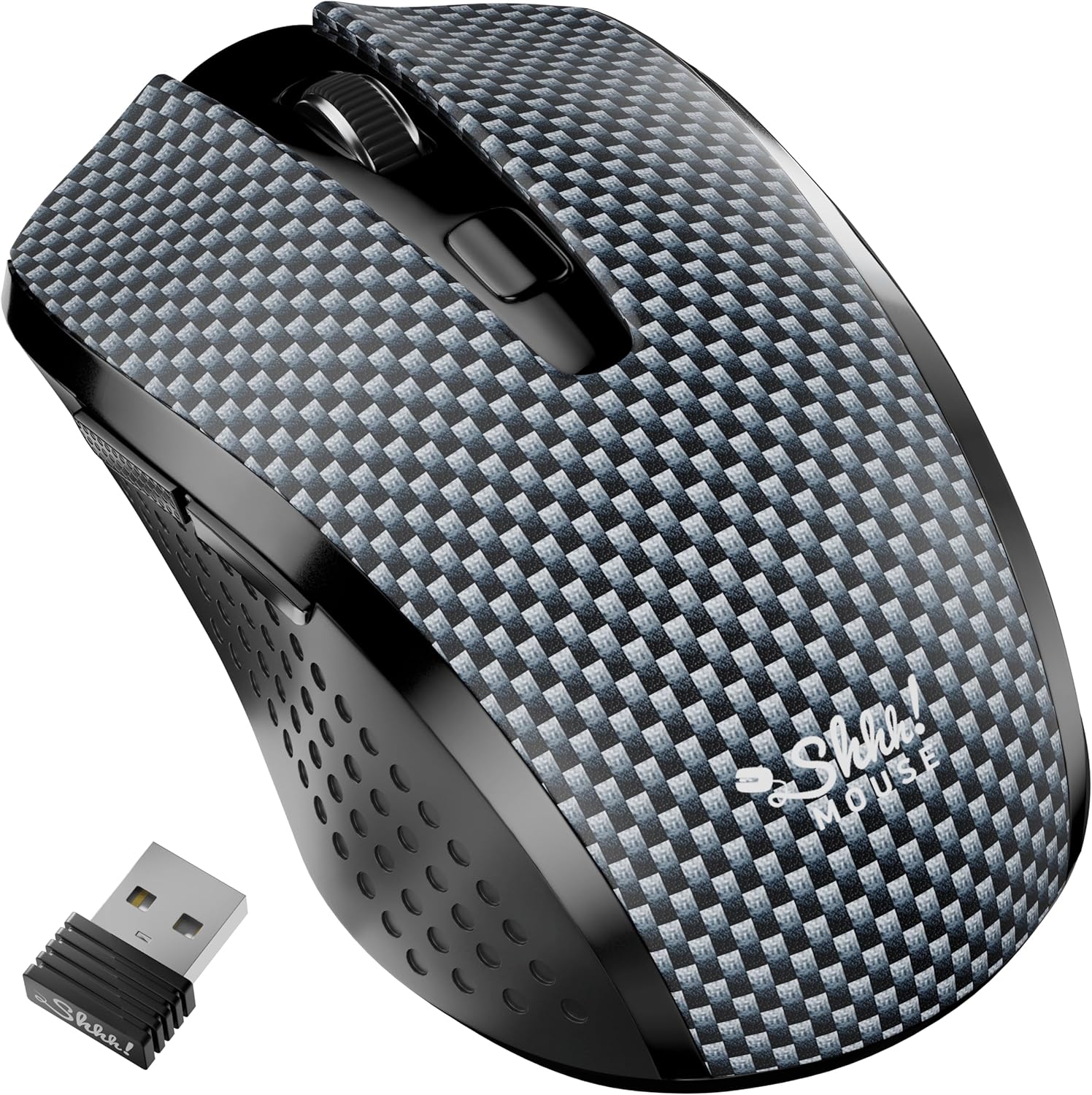
Figure 3: The Silent Wireless Mouse shown with its compact USB receiver for wireless connectivity.

Figure 4: An illustration highlighting the ambidextrous design and multi-function buttons of the Silent Wireless Mouse.
Configuración
Headphones Setup
- Desempaquetar: Remove the ARTIX CL750 headphones from their packaging.
- Conectar: Plug the 3.5mm audio jack into the audio port of your laptop, computer, tablet, or smartphone.
- Axustar: Extend or retract the headband to achieve a comfortable fit over your ears.
Wireless Mouse Setup
- Inserir batería: Open the battery compartment on the underside of the mouse and insert the included AA battery (if not pre-installed).
- Conectar o receptor USB: Conecte o receptor USB a un porto USB dispoñible no seu ordenador ou portátil.
- Encendido: Turn on the mouse using the power switch located on its underside. The mouse is plug-and-play and should connect automatically.
Instrucións de funcionamento
Using the ARTIX CL750 Headphones
- Reprodución de audio: Once connected, audio from your device will play through the headphones.
- Control de volume: Use the inline controls on the cable to adjust the volume (+ for increase, - for decrease).
- Micrófono: The built-in microphone allows for hands-free communication during calls or online meetings. Ensure your device's audio settings are configured to use the headphone microphone.
- Xestión de chamadas: Use the central button on the inline control to answer/end calls or play/pause music.
Using the Silent Wireless Mouse
- Movemento: Move o rato sobre unha superficie plana para controlar o cursor na pantalla.
- Premendo: The left and right buttons provide silent clicking for a quiet work environment.
- Roda de desprazamento: Usa a roda de desprazamento para o desprazamento vertical.
- Interruptor DPI: (If applicable) Some models may include a DPI switch to adjust cursor sensitivity. Refer to the mouse's specific markings for this feature.
- Auto-Sleep Feature: The mouse features an auto-sleep mode (e.g., after 13 minutes of inactivity) to conserve battery life. Move the mouse or click a button to wake it up.
Mantemento
- Cleaning Headphones: Use a soft, dry cloth to wipe down the ear cushions and headband. Avoid harsh chemicals or abrasive materials.
- Cleaning Mouse: Limpe a superficie do rato cun pano suave eamp pano. Asegúrese de que non entre líquido nos compoñentes internos.
- Almacenamento: When not in use, store the headphones folded in a protective bag to prevent damage. Store the mouse in a dry, cool place.
- Battery Replacement (Mouse): Replace the AA battery when the mouse performance degrades.
Resolución de problemas
Headphones Issues
- Sen son:
- Ensure the 3.5mm jack is fully inserted into both the headphones and your device.
- Check your device's volume settings and the inline volume control on the headphone cable.
- Proba os auriculares con outro dispositivo para descartar un problema específico do dispositivo.
- O micrófono non funciona:
- Verifica que a configuración de entrada de audio do teu dispositivo estea configurada para usar o micrófono externo.
- Ensure the microphone is not muted via the inline controls or device settings.
Wireless Mouse Issues
- O rato non responde:
- Comproba se o rato está acendido.
- Asegúrate de que o receptor USB estea conectado correctamente a un porto USB que funcione. Proba cun porto USB diferente.
- Substitúe a batería AA.
- If the mouse has an auto-sleep feature, move it or click a button to wake it up.
- Conexión intermitente:
- Achegue o rato ao receptor USB.
- Evita usar o rato en superficies moi reflectantes ou transparentes.
Especificacións
| Característica | Detalle |
|---|---|
| Marca | ARTIX |
| Nome do modelo | CL750 |
| Jack para auriculares | Jack de 3.5 mm |
| Tecnoloxía de conectividade | Wired (Headphones), Wireless (Mouse) |
| Tamaño do controlador de audio | 40 Millimeters (Headphones) |
| Características especiais | Microphone Included, Noise Isolation (Headphones), Silent Click, Ergonomic Design (Mouse) |
| Dispositivos compatibles | Laptops, Computers, Tablets, Smartphones |
| Duración da batería do rato | Ata 18 meses |
Garantía e soporte
For warranty information and customer support, please refer to the official ARTIX websitio web ou póñase en contacto co seu vendedor. Garde o recibo da compra para reclamacións de garantía.
Vídeos de produtos
ARTIX CL750 Wired Headphones Product Overview
Este vídeo ofrece unha breve introduciónview of the ARTIX CL750 Wired Headphones, showcasing their design and key features.
AILIHEN C8 Wired Headphones with Microphone and Volume Control
This video demonstrates the features of AILIHEN C8 Wired Headphones, including the microphone and volume controls, which are similar to the ARTIX CL750 model.