
T-Wolf GG-G530
Manual do usuario do rato de xogos competitivos T-Wolf RoboCop GG-G530
Model: GG-G530
Introdución
This manual provides essential information for the setup, operation, and maintenance of your T-Wolf RoboCop Competitive Gaming Mouse GG-G530. Please read this manual thoroughly before using the product to ensure optimal performance and longevity.
Contido do paquete
- 1 x T-Wolf RoboCop Competitive Gaming Mouse GG-G530
- 1 x Manual de usuario (este documento)
Características do produto
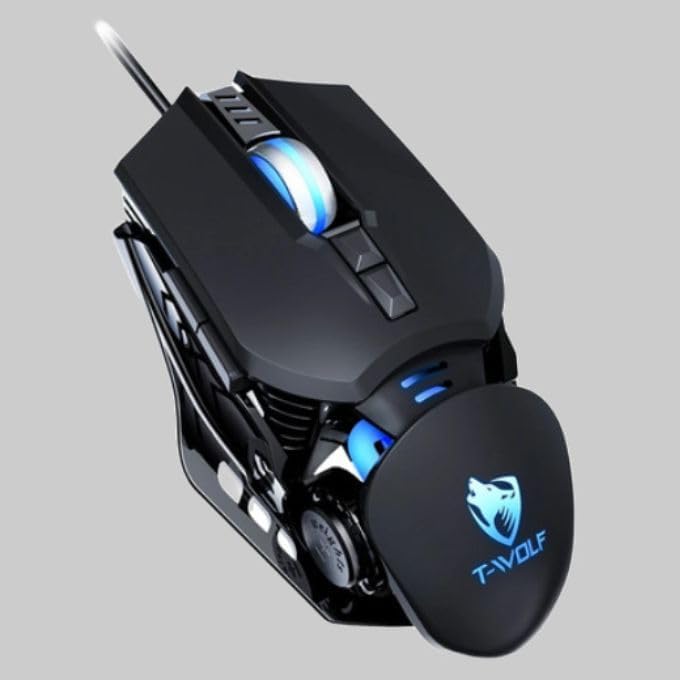
The T-Wolf RoboCop Competitive Gaming Mouse GG-G530 is designed for precision and comfort, suitable for both gaming and office use. Key features include:
- Optical Engine Design: Ensures stable operation and high sensitivity.
- Mechanical Armored Modeling: Distinctive and robust design.
- Symmetrical DIY Counterweight: Allows for adaptable weight adjustment.
- 7 Botóns: Includes left click, right click, scroll wheel, DPI switcher, and additional programmable buttons.
- Conectividade intelixente: Plug-and-play functionality with automatic driver installation.
- DPI axustable: Four levels of sensitivity (1200/2400/3200/6400 DPI) for precise control.
- Deseño ergonómico: Provides comfortable use for extended periods without fatigue.
- Four-Color Light Effect: Dynamic lighting for visual appeal.
- Conexión por cable: Reliable USB interface with a 150cm cable.
- Compatibilidade do sistema: Supports Windows and Mac operating systems.
Configuración
- Conecta o rato: Insert the USB connector of the T-Wolf RoboCop Gaming Mouse into an available USB port on your computer.
- Instalación automática do controlador: The operating system will automatically detect the mouse and install the necessary drivers. This process typically takes a few moments. No manual driver installation is required.
- Listo para usar: Unha vez instalados os controladores, o rato estará listo para o seu uso inmediato.
Instrucións de funcionamento
The T-Wolf RoboCop Gaming Mouse features 7 buttons for various functions. Familiarize yourself with their basic operations:
- Botón esquerdo para premer: Selección e interacción primarias.
- Botón dereito do rato: Accesses contextual menus and secondary functions.
- Roda de desprazamento: Desprázase polos documentos e web páxinas. Tamén pode funcionar como un botón central para premer.
- DPI Switcher Button: Axusta a sensibilidade do rato (DPI).
- Botóns adicionais: The remaining buttons can be assigned specific functions through your operating system's mouse settings or compatible third-party software (note: no macro programming is natively supported by the mouse hardware).

Axuste de DPI
The mouse features an adjustable DPI (Dots Per Inch) setting, allowing you to change the cursor sensitivity on the fly. This is particularly useful for different tasks, such as precise aiming in games or fast navigation in general use.
- Localiza o DPI Switcher Button, typically positioned behind the scroll wheel.
- Press the DPI Switcher Button to cycle through the available DPI settings: 1200 DPI, 2400 DPI, 3200 DPI, and 6400 DPI.
- Each press will change the sensitivity, allowing you to find the setting that best suits your current activity.

Mantemento
To ensure the longevity and optimal performance of your T-Wolf RoboCop Gaming Mouse, follow these simple maintenance guidelines:
- Limpeza: Usa un pano suave e seco para limpar a superficie do rato. Para a sucidade persistente, limpa lixeiramenteampEnxágüe o pano con auga ou unha solución de limpeza suave. Evite produtos químicos agresivos ou materiais abrasivos.
- Sensor óptico: Periodically clean the optical sensor on the underside of the mouse with a cotton swab to prevent dust buildup, which can affect tracking performance.
- Coidado do cable: Avoid sharply bending or pulling the USB cable to prevent internal damage.
- Almacenamento: Cando non o use, garde o rato nun ambiente limpo e seco, lonxe de temperaturas extremas.
Resolución de problemas
If you encounter issues with your T-Wolf RoboCop Gaming Mouse, refer to the following common solutions:
- O rato non responde:
- Asegúrate de que o cable USB estea conectado correctamente a un porto USB que funcione no teu ordenador.
- Tenta conectar o rato a un porto USB diferente.
- Reinicia o teu ordenador.
- O movemento do cursor é errático ou con saltos:
- Limpa o sensor óptico da parte inferior do rato.
- Ensure you are using the mouse on a clean, non-reflective, and uniform surface. Mouse pads are recommended.
- DPI Adjustment Not Working:
- Ensure you are pressing the correct DPI switcher button.
- The mouse cycles through fixed DPI settings; there is no visual indicator on the mouse itself for the current DPI level, only the change in cursor speed.
- Botóns que non funcionan:
- Check your operating system's mouse settings to ensure buttons are enabled and configured correctly.
- Test the mouse on another computer to rule out a software or system issue.
Especificacións
| Modelo | GG-G530 |
| Material | ABS + Electroplating |
| Sistema de seguimento | Óptica |
| Conexión | Con cable |
| Lonxitude do cable | 150 cm |
| Tipo de interface | USB |
| Configuración de DPI | 1200 / 2400 / 3200 / 6400 (axustable) |
| Número de botóns | 7 |
| Vida útil | Approximately three years |
| Método de traballo | Fotoeléctrico |
| Efecto de luz | Four-color cycling |
| Tamaño do elemento | 130 x 80 x 35 mm |
| Peso do elemento | 160 g |
| Sistemas Soportados | Windows, Mac |
Garantía e Soporte
Your T-Wolf RoboCop Competitive Gaming Mouse GG-G530 comes with a Garantía do fabricante de 6 meses desde a data de compra.
This warranty covers defects in materials and workmanship under normal use. It does not cover damage caused by accident, misuse, abuse, unauthorized modification, or external causes such as liquid damage.
For warranty claims or technical support, please contact your retailer or the point of purchase. Please retain your proof of purchase for warranty validation.

Ask a question about this manual
Ask about setup, troubleshooting, compatibility, parts, safety, or missing instructions. Manuals+ will review the question and use this page’s manual context to help answer it.