
Introdución
This manual provides detailed instructions for the installation, operation, maintenance, and troubleshooting of your Xiaomi Smart Doorbell 3S. Please read this manual thoroughly before using the product to ensure proper function and safety. The Xiaomi Smart Doorbell 3S features ultra-clear 2K resolution, AI human recognition, a 5200mAh battery, an electronic chime, and two-way audio communication.

Image: The Xiaomi Smart Doorbell 3S and its accompanying indoor chime unit.
O que hai na caixa
Comprobe que todos os compoñentes estean presentes na embalaxe:
- Xiaomi Smart Doorbell 3S (Main Unit)
- Unidade de timbre interior
- Soporte de montaxe
- Parafusos de montaxe e tacos de parede
- Cable de carga (Tipo C)
- Manual de usuario
Configuración
1. Instalación física
- Escolle unha localización: Select a suitable location near your door, ensuring a clear view e boa sinal wifi.
- Montar o soporte: Use the provided screws and wall plugs to securely attach the mounting bracket to the wall.
- Conexión de alimentación:
- Potencia da batería: Ensure the doorbell's internal 5200mAh battery is charged.
- Hardwired Power: If using hardwired power, connect the doorbell to your existing doorbell wiring according to local electrical codes.
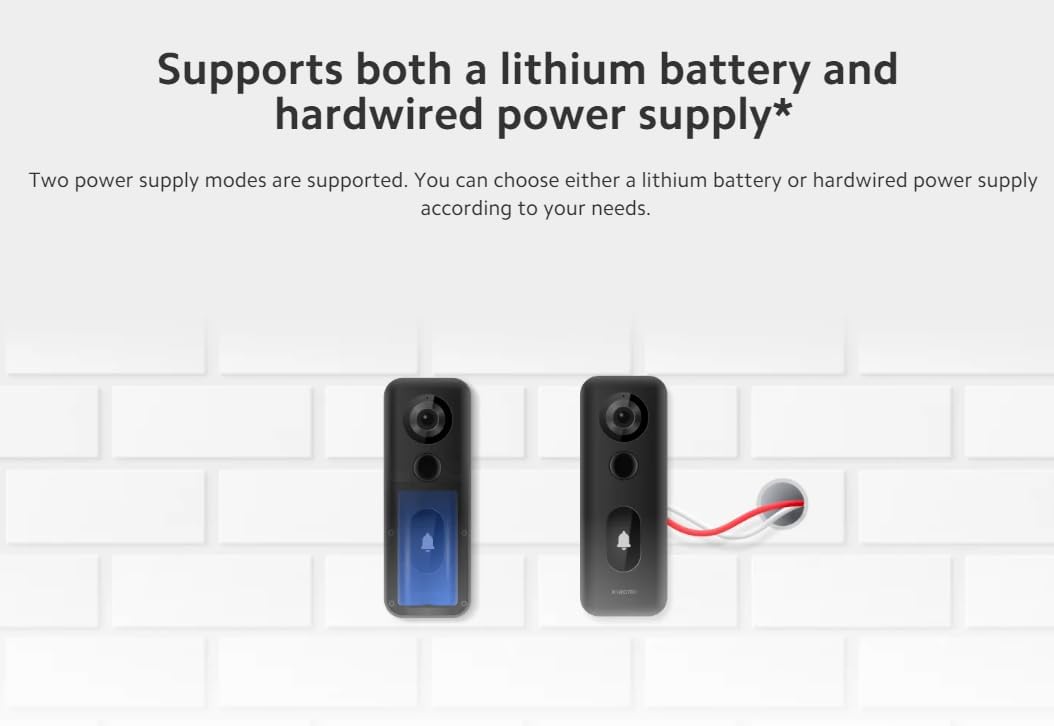
Image: Illustration showing the two power supply options for the doorbell: internal battery or hardwired connection.
- Conecta o timbre da porta: Slide the Xiaomi Smart Doorbell 3S onto the mounted bracket until it clicks into place.
2. Emparellamento de aplicacións
- Descarga a aplicación: Download the Xiaomi Home app from your device's app store.
- Create/Log In: Open the app and create a new account or log in to an existing one.
- Engadir dispositivo: Follow the in-app instructions to add the Xiaomi Smart Doorbell 3S. This typically involves scanning a QR code on the device or selecting it from a list of nearby devices.
- Conectar a wifi: Connect the doorbell to your home Wi-Fi network (supports Wi-Fi 6).
- Pair Chime: Follow the app's instructions to pair the indoor chime unit with the doorbell.
Instrucións de funcionamento
1. En directo View e audio bidireccional
Access the Xiaomi Home app to view a live feed from your doorbell. Use the two-way audio feature to communicate with visitors at your door.
2. Detección de movemento e notificacións
The doorbell features 24-hour smart motion detection with AI human recognition. When motion is detected, especially human presence, the doorbell will automatically record video and send notifications to your smartphone.

Image: A smartphone displaying a notification indicating motion detection by the Smart Doorbell 3S, showing a delivery person at the door.
3. Resolución de vídeo
The doorbell records in ultra-clear 2K resolution, providing clearer and more detailed images compared to 1080p, allowing for better identification of visitors.

Image: A visual comparison demonstrating the superior clarity and detail of 2K resolution over 1080p in a doorbell camera feed.
4. Almacenamento na nube
The device includes free, rolling 72-hour cloud storage for recorded events.
Mantemento
1. Carga da batería
The built-in 5200mAh lithium battery offers extended usage. When the battery level is low, charge the doorbell using the provided Type-C charging cable. The charging port is typically located on the back or bottom of the doorbell unit. Frequent charging is minimized due to the large battery capacity.

Image: An illustration showing the internal 5200mAh battery of the doorbell and its Type-C charging port.
2. Limpeza
To maintain optimal performance, periodically clean the doorbell's camera lens and body with a soft, dry cloth. Avoid using harsh chemicals or abrasive materials that could damage the device. The doorbell has an IP65 waterproof rating, providing protection against dust and water splashes.
Resolución de problemas
- Sen enerxía: Ensure the battery is charged or the hardwired connection is secure and providing power.
- Sen conexión wifi: Check your router and ensure the doorbell is within range. Re-pair the device through the Xiaomi Home app if necessary.
- Baixa calidade do vídeo: Asegúrate de que a lente da cámara estea limpa e libre de obstrucións. Comproba a intensidade do sinal wifi.
- Problemas de detección de movemento: Adjust the motion detection sensitivity and customizable monitoring area settings within the Xiaomi Home app.
- Chime Not Ringing: Verify the indoor chime is powered and properly paired with the doorbell via the app.
Especificacións

Image: A comparison table highlighting the specifications and features of the Xiaomi Smart Doorbell 3S against the previous Xiaomi Smart Doorbell 3.
| Característica | Especificación |
|---|---|
| Marca | XIAOMI |
| Número de modelo | 46068 |
| Dimensións do produto | 19.99 x 19.99 x 14 cm |
| Peso do elemento | 312 g |
| Resolución | 2K |
| Campo de View (FoV) | Diagonal 180 ° |
| Tipo de batería | Ion de litio |
| Capacidade da batería | 5200 mAh |
| Tipo de fonte de alimentación | Lithium battery + Hardwired |
| Resistencia ao po e á auga | IP65 * |
| Conectividade sen fíos | Wi-Fi 6 |
| Almacenamento na nube | Free, rolling 72-hour |

Image: Icons representing key features: 180° field of view, IP65 waterproof, two power supply modes, Xiaomi security chip, 2K resolution, 5200mAh battery, 72h cloud storage, and dedicated indoor chime.
Garantía e Soporte
Para obter información sobre a garantía e asistencia técnica, consulte a páxina oficial de Xiaomi. website or contact Xiaomi customer service. Keep your purchase receipt as proof of purchase for warranty claims. You can also visit the Tenda XIAOMI en Amazon para obter información adicional sobre o produto e recursos de asistencia.