
Introdución
Thank you for choosing FosPower Kids Bluetooth 5.2 Headphones with LED Cat Ears. These headphones are designed with comfort, safety, and fun in mind, featuring a safe volume limit, versatile connectivity, and a long-lasting battery. This manual provides essential information for setup, operation, and maintenance to ensure optimal performance and enjoyment.
O que hai na caixa
- 1x Wireless Cat Ears Headphones
- 1x cable de carga USB-C
- 1x cable de audio de 3.5 mm
- 1 x Manual de usuario
Características do produto
The FosPower Kids Bluetooth Headphones are engineered to provide a safe and enjoyable listening experience for children. Key features include:
- Comodidade e seguridade: Padded ear cushions and an adjustable headband ensure a comfortable fit. A dual safe volume setting allows you to choose between 85dB or 94dB maximum volume to protect young ears.
- Deseño elegante: Featuring vibrant LED cat ears and ear muffs that add a fun and playful touch.
- Conectividade versátil: Connect wirelessly via Bluetooth 5.2 for up to 100 hours of play time, or use the included 3.5mm audio cable for a wired connection.
- Micrófono incorporado: Enables clear communication for online learning or calls.
- Deseño plegable: For easy storage and portability, making them ideal for school or travel.

Image: The headphones highlighting padded ear cushions, an adjustable headband, and a foldable design for comfort and durability.

Image: A visual representation of the headphones with vibrant LED cat ears and ear muffs, cushioned padding, dual volume limits, wireless/wired options, built-in microphone, and 100 hours of listening time.
Máis controisview

Image: A detailed diagram illustrating the location and function of all control buttons and ports on the headphones, including the ON/OFF power button, volume controls, track skip buttons, light mode button, built-in microphone, 3.5mm audio port, and USB-C charging port.
Familiarize yourself with the headphone controls for seamless operation:
- Interruptor ON / OFF: Located on the ear cup, slide to power on/off.
- Botón M: Long press to turn off the LED flashing light.
- Botón Reproducir/Pausa: Play or pause music, answer or reject calls.
- Volume Up (+)/Next Song: Short press to increase volume, long press for next song.
- Volume Down (-)/Previous Song: Short press to decrease volume, long press for previous song.
- Porto de carga USB-C: Para cargar os auriculares.
- Porto de audio de 3.5 mm: Para conexión por cable.
Configuración
Emparejamento Bluetooth
- Asegúrate de que os auriculares estean completamente cargados.
- Slide the ON/OFF switch to the 'ON' position. The headphones will automatically boot into Bluetooth Mode.
- The LED indicator light will rapidly alternate between blue and green colors, and a voice prompt will announce "Bluetooth Mode".
- On your smart device (phone, tablet, laptop), open the Bluetooth settings and search for available devices.
- Select "CT-7S" from the list. No password is required.
- Upon successful pairing, a voice prompt will announce "Connected", and the LED indicator light will stay blue.
Conexión por cable
If Bluetooth is not available or the battery is low, you can use the included 3.5mm audio cable:
- Conecta un extremo do cable de audio de 3.5 mm ao porto AUX dos auriculares.
- Conecta o outro extremo á toma de son do teu dispositivo.
- The headphones will now function in wired mode.

Image: Two children wearing the headphones, demonstrating both wireless (Bluetooth) and wired (audio cable) connectivity options.
Instrucións de funcionamento
Volume Limit Adjustment
The headphones offer two safe volume limits (85dB or 94dB). To switch between them, refer to the detailed instructions in the included user manual or the product's online resources.

Image: A graphic illustrating the dual safe volume settings of 85dB and 94dB, emphasizing the hearing protection feature for children.
Control de luz LED
To turn the LED flashing lights on or off, long press the 'M' button on the ear cup. The lights will cycle through various colors when active.
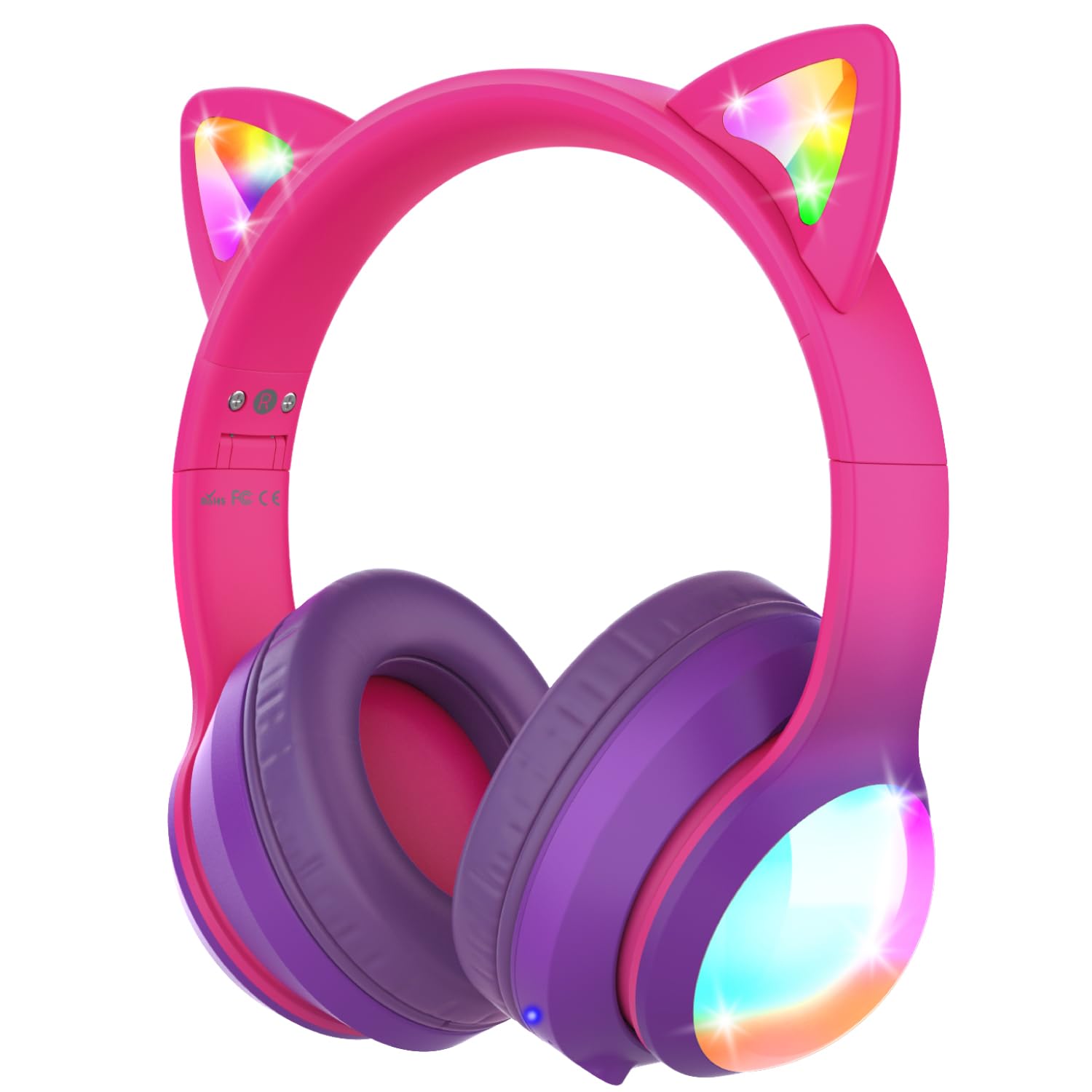
Image: The headphones showcasing their vibrant colored LED lights on the cat ears and earcups, making the listening experience fun and stylish.
Music and Call Management
Use the dedicated buttons on the ear cup to control music playback and manage calls as described in the 'Controls Overview' section.
Video: An official product video from FosPower demonstrating the features and usage of the Kids Bluetooth Headphones with LED Cat Ears.
Video: A seller-provided video highlighting the protective decibel limited volume, soft earcups, foldable design, and inline controls of the headphones.
Video: A short seller-provided video showcasing the light-up feature of the Kids Bluetooth Headphones.
Cargando
To charge your headphones, connect the included USB-C charging cable to the USB-C port on the headphones and to a compatible USB power source. Charging time is approximately 2 hours. The LED indicator will show charging status (e.g., red for charging, blue for fully charged).
Mantemento
- Clean the headphones with a soft, dry cloth. Avoid using harsh chemicals or abrasive materials.
- Garda os auriculares nun lugar fresco e seco cando non estes en uso.
- Evite expoñer os auriculares a temperaturas extremas ou á luz solar directa.
- Do not attempt to disassemble or repair the headphones yourself. This may void the warranty.
Resolución de problemas
No Power/Cannot Turn On
- Asegúrate de que os auriculares estean completamente cargados.
- Check that the ON/OFF switch is in the 'ON' position.
Non se pode emparellar por Bluetooth
- Ensure the headphones are in Bluetooth pairing mode (LED alternating blue/green).
- Make sure Bluetooth is enabled on your device and it's within range (up to 33 feet).
- Esquece/elimina os auriculares da lista Bluetooth do teu dispositivo e tenta emparellalos de novo.
- Tenta reiniciar tanto os auriculares como o dispositivo.
Sen son no modo con cable
- Ensure the 3.5mm audio cable is securely plugged into both the headphones and your device.
- Comprobe os niveis de volume tanto nos auriculares como no dispositivo conectado.
- Test with a different audio cable or device to rule out cable or device issues.
As luces LED non funcionan
- Asegúrese de que os auriculares estean acendidos.
- Press the 'M' button to cycle through or activate the LED light modes.
- Check battery level; low battery may affect LED functionality.
Especificacións
| Nome do modelo | FOSHP-2446PA |
| Versión Bluetooth | 5.2 |
| Alcance Bluetooth | 33 pés |
| Duración da batería | 100 horas |
| Tempo de carga | 2 horas |
| Control de ruído | Cancelación de ruído pasiva |
| Jack para auriculares | Jack de 3.5 mm |
| Material | Leather, Polycarbonate (PC) |
| Peso do elemento | 11.7 onzas |
Garantía e Soporte
FosPower offers a Garantía limitada de por vida for this product. For any support needs, please contact our experienced and dedicated USA-based customer service team. Refer to the included user manual for specific contact information or visit the official FosPower websitio.