
1. Introdución
The AiXun PF26 Intelligent Multi-Channel Fast Charger is a versatile charging station designed to efficiently power multiple devices simultaneously. Featuring 4 channels and 8 ports, it delivers a total power output of 260W, with each single port capable of up to 65W. This device supports various fast charging protocols and includes an intuitive 3.5-inch IPS display for monitoring charging status. Its intelligent design incorporates an automatic standby function for energy saving and a 1/4-inch standard screw hole for flexible installation.
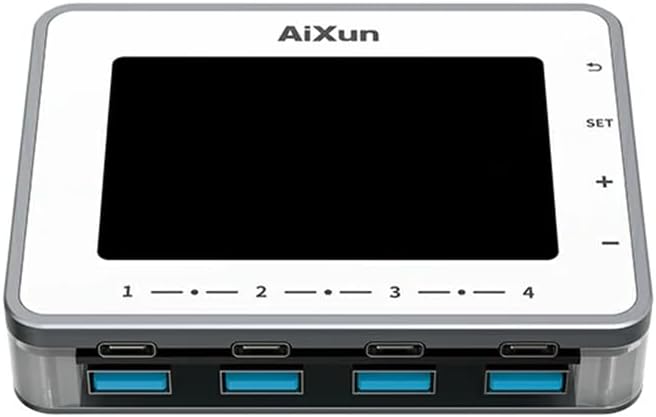
Imaxe 1.1: Fronte view of the AiXun PF26 Intelligent Multi-Channel Fast Charger, showing the display screen and the eight USB ports (four USB-C and four USB-A).
2. Información de seguridade
Lea todas as instrucións de seguridade antes de usar este produto para evitar lesións ou danos.
- Non expoñas o dispositivo á auga, á humidade nin a temperaturas extremas.
- Use only compatible power adapters. An external 24V power adapter is required and sold separately.
- Evite deixar caer o dispositivo nin someterlo a impactos fortes.
- Do not attempt to disassemble or modify the charger. This will void the warranty and may cause damage.
- Manter fóra do alcance dos nenos.
- Asegurar unha ventilación adecuada durante o funcionamento para evitar o sobrequecemento.
3. Contido do paquete
Verifica que todos os elementos estean presentes no teu paquete:
- 1x AiXun PF26 Intelligent Multi-Channel Fast Charger (Base Unit)
Note: The power adapter is not included and must be purchased separately. Refer to the specifications for compatible adapter requirements.
4. Características do produto
The AiXun PF26 charger offers advanced features for efficient and intelligent charging:
- Saída de alta potencia: Total 260W strong power across 4 channels and 8 ports. Each single port can achieve a peak power of 65W.
- Wide Protocol Compatibility: Supports various fast charging protocols including PPS, PD, QC, AFC, FCP, SCP, PE, and SFCP.
- Detección intelixente: Automatically detects and recognizes connected devices for optimal charging.
- Modo de espera automático: Built-in function to reduce energy consumption and prolong device lifespan. Standby time is adjustable from 1 to 60 minutes.
- Pantalla IPS de 3.5 polgadas: Proporciona unha clara view of charging status, voltage, current, and power parameters.
- Instalación flexible: Features a standard 1/4-inch BSP Thread Hole on the bottom, allowing adaptation to various brackets (brackets sold separately).
- Remote Upgrades: Supports firmware upgrades via PC connection.

Image 4.1: The AiXun PF26 charger in use, illustrating its 260W total power and 65W per port capability. An external power adapter is shown connected.
5. Especificacións
| Parámetro | Valor |
|---|---|
| Nome do produto | Intelligent Multi-channel Fast Charger |
| Marca | AiXun |
| Modelo | PF26 |
| Vol. De entradatage | 24V DC |
| Potencia total | 260 W |
| Max Single Port Power | 65 W |
| Max Dual Port Output (per channel) | 30 W |
| Número de portos | 8 (4 USB-C, 4 USB-A) |
| Tipo de visualización | IPS de 3.5 polgadas |
| Interface de comunicación | Cable tipo C. |
| Protocolos de carga rápida compatibles | PPS/PD/QC/AFC/FCP/SCP/PE/SFCP |
| Dimensións do produto | 102 x 78 x 7 mm (4.02 x 3.07 x 0.28 polgadas) |
| Peso do elemento | 4.4 libras |
| Característica de montaxe | 1/4-inch BSP Thread Hole |
Recommended Power Adapter Specifications:
The AiXun PF26 requires an external 24V DC power adapter with a 5.5*2.5mm DC port. The required current depends on the desired total power output:
| Poder | Voltage | Actual |
|---|---|---|
| 144 W | 24 V | 6A |
| 192 W | 24 V | 8A |
| 260 W | 24 V | 12A |

Image 5.1: Reference table for selecting a compatible charging power adapter, detailing DC port specifications and power output options.
6. Configuración
- Conectar o adaptador de alimentación: Connect a compatible 24V DC power adapter (purchased separately) to the DC input port on the AiXun PF26 charger. Ensure the adapter meets the power requirements listed in Section 5.
- Encendido: Once the power adapter is connected, the device will automatically power on, and the 3.5-inch IPS display will illuminate.
- Montaxe opcional: If desired, use the 1/4-inch BSP Thread Hole on the bottom of the unit to attach it to a compatible bracket or stand (sold separately).

Image 6.1: Bottom design of the AiXun PF26 charger, highlighting the 1/4-inch BSP Thread Hole for easy adaptation to various mounting brackets.
7. Instrucións de funcionamento
7.1 Dispositivos de carga
- Connect your devices (smartphones, tablets, laptops, etc.) to the available USB-C or USB-A ports using appropriate charging cables.
- The charger will automatically detect the connected device and initiate charging, utilizing compatible fast charging protocols.
- Monitor the charging status, voltage, current, and power for each port on the 3.5-inch IPS display.
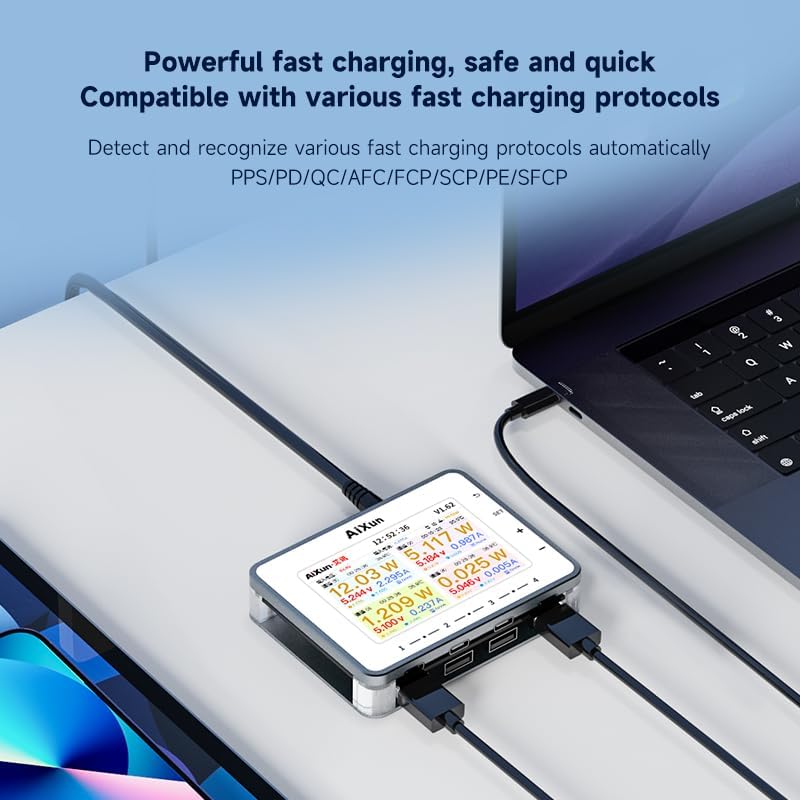
Image 7.1: The AiXun PF26 charger actively charging multiple devices, with its display showing detailed charging parameters for each port.
7.2 Display Navigation and Settings
The charger features a 3.5-inch IPS display and control buttons for navigation:
- Botón SET: Acceder ao menú de configuración.
- Botóns + / -: Navega polas opcións do menú ou axusta os valores.
- Botón de retorno: Volver á pantalla anterior ou saír dun menú.
Within the settings, you can customize parameters such as standby time (1-60 minutes) and view información do sistema.

Image 7.2: The AiXun PF26 charger's display showing intelligent features and a connected smartphone indicating 36% charge, demonstrating the energy-saving standby function.
7.3 Connecting to AiXun Platform (PC)
The device can be connected to a PC via a Type-C cable to the AiXun platform software. This allows for:
- Real-time monitoring of current and voltage curves.
- Performing remote firmware upgrades to ensure the device has the latest features and improvements.
8. Mantemento
- Limpeza: Usa un pano suave e seco para limpar o exterior do cargador. Non empregues produtos de limpeza líquidos nin aerosois.
- Almacenamento: Garde o dispositivo nun lugar fresco e seco, lonxe da luz solar directa e de temperaturas extremas cando non o estea a usar.
- Xestión de cables Ensure charging cables are not excessively bent or tangled to prevent damage.
9 Solución de problemas
- O dispositivo non se acende: Ensure the 24V DC power adapter is correctly connected and functioning. Verify the adapter meets the specified voltage e requisitos actuais.
- O dispositivo non se carga: Check if the charging cable is securely connected to both the charger and the device. Ensure the device supports the fast charging protocols offered by the AiXun PF26. Try a different port or cable.
- A pantalla non funciona: If the display is blank or unresponsive, try disconnecting and reconnecting the power adapter. If the issue persists, contact customer support.
- Carga lenta: Asegúrate de que o adaptador de corrente proporcione suficiente correntetage for the number of devices being charged. Some devices may not support the highest fast charging speeds.
10. Garantía e soporte
For warranty information and technical support, please refer to the documentation provided with your purchase or visit the official AiXun website. You may also contact AiXun customer service directly for assistance with product operation, troubleshooting, or warranty claims.