1. Introdución
This manual provides detailed instructions for the use and maintenance of your new Generic remote control, designed for seamless compatibility with the ONN ONA19SB003 Mini Soundbar Sound Bar Speaker. This remote is pre-programmed and requires no additional setup or coding. Simply insert batteries, and it is ready for immediate use.
2. Contido do paquete
Verifique que todos os elementos que se indican a continuación estean presentes no seu paquete:
- 1 x Unidade de control remoto
Note: Batteries are not included and must be purchased separately. No printed instruction manual is included in the package.
3. Configuración: Instalación da batería
To begin using your remote control, you must first install the required batteries. This remote typically uses a CR2025 coin cell battery.
- Localice o compartimento da batería na parte traseira do control remoto.
- Depending on the design, you may need to slide a cover or press a latch to open the compartment. Refer to the image below for guidance.
- Insert one new CR2025 coin cell battery, ensuring the positive (+) side is facing upwards as indicated inside the compartment.
- Pecha o compartimento da batería de forma segura ata que faga clic.

Figura 3.1: Traseira view of the remote control, illustrating the battery compartment for a CR2025 coin cell battery.

Figura 3.2: Traseira view of the remote control alongside a battery holder clip, indicating the battery type and insertion method.
Once batteries are installed, the remote is ready for use with your ONN ONA19SB003 Mini Soundbar. No programming is required.
4. Instrucións de funcionamento
This remote control provides full functionality for your ONN ONA19SB003 Mini Soundbar. Below is a description of each button's function:
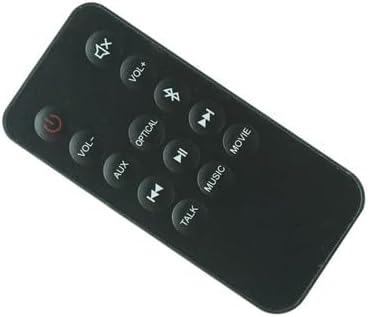
Figura 4.1: Fronte view do mando a distancia, mostrando todos os botóns funcionais.
| Botón | Función |
|---|---|
| Potencia (⏻) | Activa ou desactiva a barra de son. |
| Silenciar (🔇) | Silencia ou activa o son. |
| VOL+ | Aumenta o nivel de volume. |
| VOL- | Diminúe o nivel de volume. |
| Bluetooth (☋) | Switches the soundbar to Bluetooth input mode. |
| AUX | Switches the soundbar to Auxiliary input mode. |
| ÓPTICA | Switches the soundbar to Optical input mode. |
| Pista anterior (⏮) | Skips to the previous track (in supported modes like Bluetooth). |
| Reproducir/Pausa (⏯) | Plays or pauses audio playback (in supported modes like Bluetooth). |
| Seguinte pista (⏭) | Skips to the next track (in supported modes like Bluetooth). |
| PELÍCULA | Activates the Movie sound mode, optimizing audio for films. |
| MÚSICA | Activates the Music sound mode, optimizing audio for music playback. |
| FALAR | Activates the Talk sound mode, enhancing vocal clarity for dialogue. |
5 Solución de problemas
Se tes problemas co teu mando a distancia, consulta os seguintes problemas e solucións comúns:
- O mando a distancia non responde:
- Ensure new batteries are correctly installed with the correct polarity.
- Substitúe as pilas antigas por outras novas.
- Check for any obstructions between the remote and the soundbar's sensor.
- Ensure you are within the effective operating range of the soundbar.
- Botóns específicos que non funcionan:
- Clean the remote's surface and buttons with a soft, dry cloth to remove any dirt or debris.
- Verify that the soundbar is powered on and not in a standby mode that prevents remote interaction.
- Soundbar not responding to any remote:
- Power cycle the soundbar by unplugging it from the power outlet for a few minutes, then plugging it back in.
- Ensure the soundbar's own power button is functioning.
If problems persist after trying these steps, please refer to the "Warranty and Support" section for further assistance.
6. Especificacións
| Característica | Detalle |
|---|---|
| Marca | Xenérico |
| Compatibilidade de modelos | ONN ONA19SB003 Mini Soundbar Sound Bar Speaker |
| Característica especial | Non se require programación adicional |
| Cor | As shown (Black) |
| Número máximo de dispositivos compatibles | 1 (Soundbar) |
| Dispositivos compatibles | Barra de son |
| Tipo de batería | CR2025 Coin Cell (not included) |
7. Mantemento
Para garantir a lonxevidade e o rendemento óptimo do seu mando a distancia, siga estas pautas de mantemento:
- Limpeza: Use a soft, dry cloth to wipe the remote's surface. Do not use liquid cleaners or abrasive materials.
- Almacenamento: Garde o mando a distancia nun lugar fresco e seco, lonxe da luz solar directa e de temperaturas extremas.
- Substitución da batería: Replace batteries promptly when the remote's performance degrades. Remove batteries if the remote will not be used for an extended period to prevent leakage.
- Evita gotas: Protexa o mando a distancia de golpes e caídas, que poden danar os compoñentes internos.
8. Garantía e soporte
Specific warranty information for this Generic remote control is not provided in the product details. For any warranty claims, technical support, or further assistance, please contact the seller directly through your purchase platform.
Garde o seu recibo de compra como comprobante de compra para calquera consulta de soporte.
