
Introdución
This manual provides essential instructions for the safe and efficient use of your Aiwa AW-KF4 Portable Bluetooth Speaker. Please read this manual thoroughly before using the product and retain it for future reference.
The Aiwa AW-KF4 is a portable Bluetooth speaker designed for robust audio performance with dynamic LED lighting, a rechargeable battery, and resistance to water and dust (IPX6). It offers versatile connectivity options including Bluetooth, USB, and AUX input.
Contido do paquete
Carefully unpack your speaker and ensure all items are present and in good condition. If any items are missing or damaged, please contact your retailer.
- Aiwa AW-KF4 Portable Bluetooth Speaker
- Cable de carga USB-C
- Manual de instrucións

Image: The Aiwa AW-KF4 speaker in its retail packaging, showing the speaker and branding.
Produto rematadoview
The Aiwa AW-KF4 speaker features a compact, cylindrical design with integrated controls and dynamic LED lighting. It is built for portability and durability.
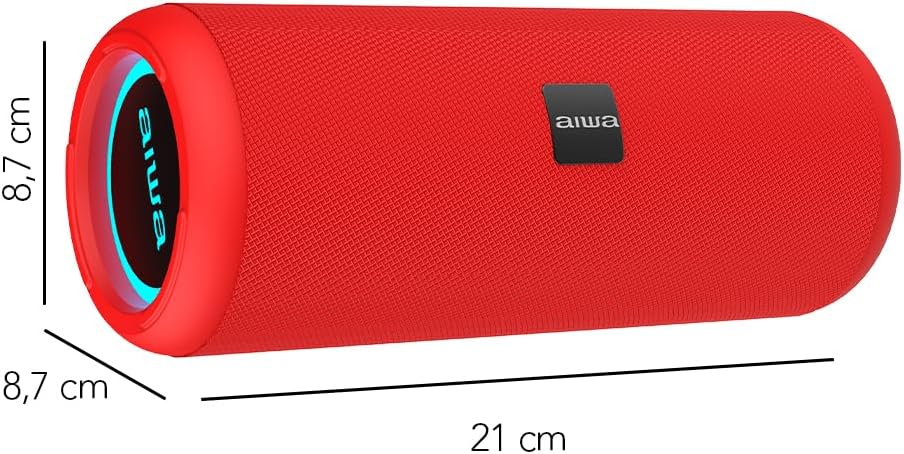
Image: A red Aiwa AW-KF4 speaker showing its approximate dimensions: 21 cm in length and 8.7 cm in diameter.

Image: Two Aiwa AW-KF4 speakers (red and black) illustrating key features: 20W output, LED lighting, TWS function, IPX6 water resistance, Bluetooth, USB, and SD card compatibility.

Image: A collage showing the Aiwa AW-KF4 speaker in various outdoor settings, emphasizing its IPX6 water resistance, up to 10 hours of battery life, and hands-free calling capability with an integrated microphone.
Configuración
1. Cargando o altofalante
Before first use, fully charge the speaker. Use the provided USB-C cable to connect the speaker to a compatible USB power adapter (not included) or a computer's USB port.
- A luz indicadora de carga acenderase durante a carga.
- Unha carga completa leva aproximadamente 3 horas.
- Unha vez cargada completamente, a luz indicadora pode cambiar ou apagarse.
A fully charged battery provides up to 10 hours of playback, depending on volume level and usage.
2. Acendido/apagado
- To power on: Press and hold the Power button for a few seconds until you hear an audible prompt and the LED lights activate.
- To power off: Press and hold the Power button for a few seconds until you hear an audible prompt and the LED lights turn off.
Instrucións de funcionamento
1. Emparellamento Bluetooth
O altofalante entrará automaticamente no modo de emparellamento Bluetooth ao acendelo por primeira vez ou se non hai ningún dispositivo conectado. O indicador LED parpadeará, indicando que está listo para emparellarse.
- Asegúrate de que o altofalante estea acendido e en modo de emparellamento.
- Activa o Bluetooth no teu teléfono intelixente, tableta ou outro dispositivo de son.
- Busca "AW-KF4" in the list of available Bluetooth devices.
- Select "AW-KF4" to connect. You will hear a confirmation sound once paired.
- The LED indicator will stop flashing and remain solid.
O altofalante ten un alcance Bluetooth de ata 10 metros (33 pés).
2. Función estéreo sen fíos verdadeiro (TWS)
The TWS function allows you to pair two Aiwa AW-KF4 speakers together for a stereo sound experience.

Image: A visual representation of the TWS (True Wireless Stereo) function, showing two Aiwa AW-KF4 speakers being used together for synchronized sound.
- Ensure both AW-KF4 speakers are powered on and not connected to any Bluetooth device.
- On one speaker (this will be the primary speaker), press and hold the TWS button (if available, or a designated button as per specific model instructions) until you hear a pairing tone.
- Os dous altofalantes conectaranse automaticamente entre si. Soará un ton de confirmación unha vez conectados.
- Now, connect your Bluetooth device to the primary speaker as described in the "Bluetooth Pairing" section.
Note: Refer to the specific button layout on your speaker for the exact TWS pairing button.
3. Reprodución USB e AUX
- Reprodución USB: Insira unha unidade flash USB que conteña audio files no porto USB. O altofalante detectará automaticamente e comezará a reproducir música desde a unidade.
- Reprodución AUX: Conecta un dispositivo de son cun cable AUX de 3.5 mm (non incluído) ao porto de entrada AUX. O altofalante cambiará ao modo AUX.
4. Luces LED
The speaker features dynamic LED lights. These lights typically activate automatically when the speaker is powered on. Specific controls for changing light modes or turning them off may be available via a dedicated button on the speaker (refer to your speaker's button layout).
5. Controis
The speaker features tactile controls for various functions:
- Botón de encendido: Mantén premido para acender/apagar.
- Botón Reproducir/Pausa: Preme para reproducir ou pausar a música.
- Subir volume / seguinte pista: Preme para aumentar o volume. Mantén premido para a seguinte pista.
- Baixar volume / pista anterior: Preme para baixar o volume. Mantén premido para volver á pista anterior.
- Botón de modo: Press to switch between Bluetooth, USB, and AUX modes.
- Call Button (if applicable): Prema para responder/finalizar chamadas. Manteña premido para rexeitar chamadas.
Note: Button functions may vary slightly. Consult the diagrams in your physical manual for precise button identification.
Mantemento
To ensure the longevity and optimal performance of your Aiwa AW-KF4 speaker, follow these maintenance guidelines:
- Limpeza: Usa un pano suave e seco para limpar o exterior do altofalante. Non empregues produtos de limpeza abrasivos, solventes nin produtos químicos agresivos.
- Resistencia á auga (IPX6): The speaker is resistant to strong water jets. It is not designed for submersion. Ensure all port covers are securely closed before exposing the speaker to water or dust. After exposure to water, wipe the speaker dry before charging.
- Almacenamento: Garde o altofalante nun lugar fresco e seco, lonxe da luz solar directa e de temperaturas extremas.
- Coidado da batería: To preserve battery life, charge the speaker regularly, even if not in frequent use. Avoid fully discharging the battery for extended periods.

Image: The Aiwa AW-KF4 speaker positioned near a pool, illustrating its IPX6 water resistance feature, suitable for outdoor and poolside use.
Resolución de problemas
Se tes problemas co teu altofalante, consulta os seguintes problemas e solucións comúns:
| Problema | Posible causa/solución |
|---|---|
| O altofalante non se acende. |
|
| Non se pode emparellar por Bluetooth. |
|
| Sen son. |
|
| Distorsión do son. |
|
| Fallou o emparellamento de TWS. |
|
Especificacións
| Nome do modelo | AW-KF4 (AWKF4B) |
| Marca | Aiwa |
| Potencia de saída do altofalante | 20 vatios RMS |
| Resposta en frecuencia | 80 Hz (minimum specified) |
| Tecnoloxía de conectividade | Bluetooth 5.0, USB, AUX |
| Modo de saída de audio | Estéreo |
| Material da vivenda | Plástico |
| Tipo de altofalante | Woofer |
| Nivel de resistencia á auga | IPX6 (Resistant to strong water jets) |
| Alcance Bluetooth | Ata 10 metros (33 pés) |
| Micrófonos | 1 (for hands-free calling) |
| Capacidade da batería | 2000 mAh de iones de litio |
| Duración da batería | Up to 10 hours (varies with volume and usage) |
| Tempo de carga | Aproximadamente 3 horas |
| Vol. De entradatage | 5 voltios |
| Impedancia | 4 ohmios |
| Método de control | Tactile Buttons |
| Dimensións (L x P) | Aprox. 21 cm x 8.7 cm |
| Dispositivos compatibles | Smartphones, Tablets |
| Orixe | China |
Garantía e Soporte
Your Aiwa AW-KF4 Portable Bluetooth Speaker comes with a 1 anos de garantía do fabricante desde a data de compra. Esta garantía cobre defectos de fabricación en condicións de uso normal.
A garantía non cobre:
- Damage caused by misuse, abuse, negligence, or accident.
- Danos por reparacións ou modificacións non autorizadas.
- Desgaste normal.
For warranty claims or technical support, please contact your retailer or the official Aiwa customer service in your region. Please have your proof of purchase and product model number (AW-KF4) ready when contacting support.