
1. Introdución
Thank you for choosing the KOFIRE Wireless Gaming Headset. This manual provides essential information for setting up, operating, and maintaining your headset to ensure an optimal gaming and audio experience. The XG ONE headset is designed for multi-platform compatibility, offering seamless connectivity and high-fidelity sound.
2. Que hai na caixa
- 1 x KOFIRE Wireless Gaming Headset
- 1 x USB & Type-C 2-in-1 Transmitter
- 1 x micrófono desmontable con cancelación de ruído
- 1 x cable de carga tipo C
- 1 cable de audio de 3.5 mm
- 1 x Manual de usuario

Image: KOFIRE Wireless Gaming Headset with its USB/Type-C transmitter and detachable microphone.
3. Configuración
3.1 Carga inicial
Before first use, fully charge the headset using the provided Type-C charging cable. A full charge takes approximately 2 hours.
3.2 Microphone Attachment
The headset comes with a detachable microphone. Align the microphone's 3.5mm jack with the port on the left earcup and firmly insert it until it clicks into place.
3.3 Modos de conectividade
The KOFIRE XG ONE supports three connection modes:
- 2.4GHz Wireless Mode (for Xbox Series X|S|One):
Insert the USB & Type-C 2-in-1 transmitter into the 3.5mm port of your Xbox controller. Ensure it is firmly inserted until you hear a click and see no gap to avoid noise or echoes from poor contact. This mode provides ultra-low latency wireless audio. - 2.4GHz Wireless Mode (for PC/PS5/Switch Docked):
Take the USB-A port out of the back of the transmitter and insert it into your PC, PS5, or Nintendo Switch dock. Long-press the microphone button on the headset for 3 seconds to switch to 2.4GHz dongle mode. The headset will then pair with the transmitter. - Bluetooth 5.4 Mode (for Mobile Devices/Switch Handheld):
Long-press the microphone button on the headset for 3 seconds to switch to Bluetooth mode. Busca "KOFIRE XG ONE" on your device's Bluetooth settings and pair. - Modo con cable de 3.5 mm:
Connect the provided 3.5mm audio cable to the headset and your gaming device for a wired connection. This mode is available even if the headset battery is depleted.

Image: Proper insertion of the 2.4GHz transmitter into an Xbox controller.

Image: Connecting the 2.4GHz transmitter to a PC or PS5.
Nota: Microphone is not supported on Nintendo Switch in any mode.
4. Instrucións de funcionamento
4.1 Controis
Os auriculares inclúen controis intuitivos situados nos auriculares:
- Control de volume: Use the volume dial to adjust audio levels.
- Silenciar o micrófono: Press the dedicated mic button for one-touch mute/unmute.
- Cambio de modo: Long-press the mic button for 3 seconds to toggle between 2.4GHz wireless and Bluetooth modes.
- Encendido/apagado: Use the power button to turn the headset on or off.
5. Características clave
5.1 Immersive Audio Experience
Equipped with super-large 53mm dynamic drivers, the KOFIRE XG ONE delivers cinematic 3D stereo sound. These speakers are designed to reproduce game audio effectively, capturing environmental sounds and enemy footsteps from all directions for an immersive gaming experience.

Imaxe: Detallada view of the 53mm dynamic speaker for enhanced audio.
5.2 Duración prolongada da batería
Enjoy prolonged gaming sessions with up to 60 hours of playtime in Bluetooth mode (microphone off) or 35-45 hours in 2.4GHz dongle mode. The headset supports simultaneous charging and use, ensuring uninterrupted gameplay. A low battery alert will notify you when recharging is needed.
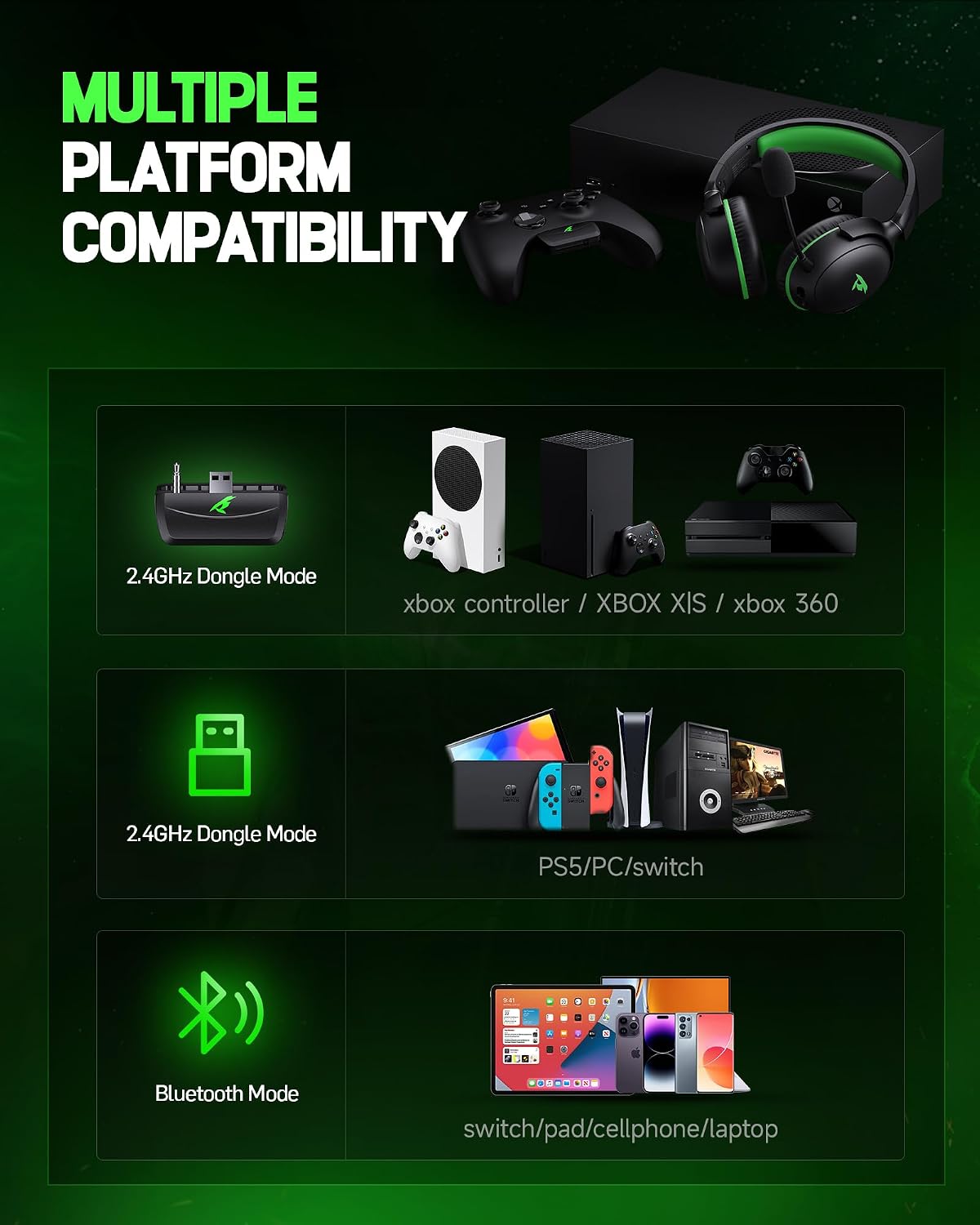
Image: Visual representation of the headset's long-lasting battery.
5.3 Detachable ENC Noise-Canceling Microphone
The 360° omnidirectional microphone features Environmental Noise Cancellation (ENC) to accurately capture your voice while minimizing background noise. This ensures clear communication with teammates. The microphone can be easily detached when not in use, making the headset versatile for various activities.

Image: Illustration of the detachable and omni-directional noise-canceling microphone.
5.4 Lightweight & Ergonomic Design
Weighing only 9.5 ounces, the headset is designed for long-term wear without causing head pressure or neck strain. It features rotatable and foldable ear cups, an adjustable headband, and soft memory sponge cushions with breathable leather for a customized and comfortable fit. Passive noise cancellation is achieved through the ear cup design, effectively isolating environmental noise.
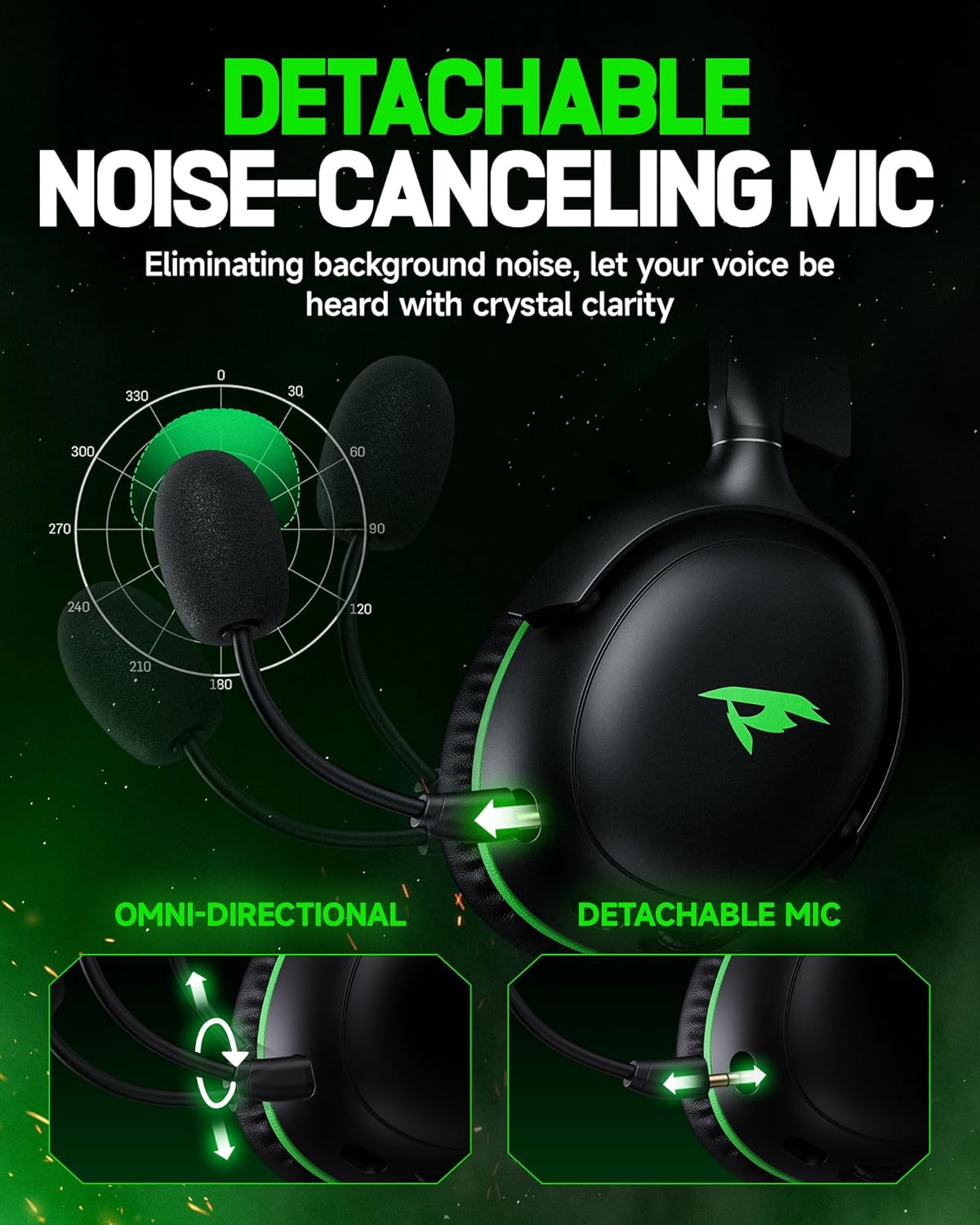
Image: User demonstrating the comfortable and adjustable fit of the headset.
6. Mantemento
- Limpa os auriculares e a diadema regularmente cun pano suave e seco.
- Avoid exposing the headset to extreme temperatures or direct sunlight.
- Store the headset in a cool, dry place. The foldable design allows for compact storage.
- Do not attempt to disassemble or repair the headset yourself.
7 Solución de problemas
- Sen son/audio intermitente:
- Ensure the headset is powered on and fully charged.
- Check the connection mode (2.4GHz, Bluetooth, or wired) and ensure it matches your device.
- For 2.4GHz Xbox connection, firmly insert the transmitter into the controller's 3.5mm port until it clicks. Poor contact can cause noise or echoes.
- Re-pair the headset with your device if using wireless modes. - O micrófono non funciona:
- Ensure the detachable microphone is securely attached.
- Check if the microphone is muted using the one-touch mute button.
- Remember that the microphone is not supported on Nintendo Switch. - Problemas de conectividade:
- Ensure your device's Bluetooth is enabled and discoverable.
- Move closer to your device to ensure you are within the Bluetooth range (10 meters) or 2.4GHz range (40 feet).
- Restart both the headset and your device.
8. Especificacións
| Característica | Especificación |
|---|---|
| Nome do modelo | XG ONE |
| Tecnoloxía de conectividade | Sen fíos de 2.4 GHz, Bluetooth 5.4, cable de 3.5 mm |
| Dispositivos compatibles | Xbox Series X|S|One, PS5/4, PC, Mac, Phone, Pad, Nintendo Switch (audio only) |
| Tamaño do controlador de audio | Controladores dinámicos de 53 mm |
| Resposta en frecuencia | 20 Hz - 20,000 Hz |
| Control de ruído | Cancelación pasiva de ruído, illamento acústico |
| Micrófono | Detachable ENC Noise-Canceling Omnidirectional Mic |
| Duración da batería | Up to 60 hours (Bluetooth), 35-45 hours (2.4GHz) |
| Tempo de carga | 2 horas |
| Peso | 9.5 onzas (aprox. 269 g) |
| Material | Soft Memory Sponge Cushions, Faux Leather, PC, ABS |
9. Garantía e soporte
KOFIRE is committed to providing excellent customer service. If you encounter any issues with your headset, our experienced engineers and professional support team are available to assist you. Please feel free to contact us; we aim to respond within 0-24 hours and provide comprehensive assistance to ensure your satisfaction.
For support, please refer to the contact information provided on the product packaging or the official KOFIRE websitio.


