
Introdución
The VTech KidiMagic Galaxy Light is a versatile 9-in-1 device designed for children aged 6 to 12 years. It functions as an alarm clock, FM radio, speaker, and features an aurora borealis projector, interactive light effects, and various games and activities. This manual provides instructions for proper setup, operation, and maintenance of your device.
Información de seguridade
- AVISO: Non apto para nenos menores de 36 meses debido ás pezas pequenas.
- Supervise sempre os nenos durante o uso.
- Do not immerse the device in water. Clean with a dry cloth only.
- Use only the recommended batteries or VTech power adapter (sold separately).
- Mantéñase lonxe das fontes de calor e da luz solar directa.
Contido do paquete
- 1 KidiMagic Galaxy Light unit
- 4 LR6-AA batteries (for demonstration purposes)
- 1 Audio cable (for external music player connection)
Produto rematadoview
Familiarize yourself with the main components and controls of your KidiMagic Galaxy Light.

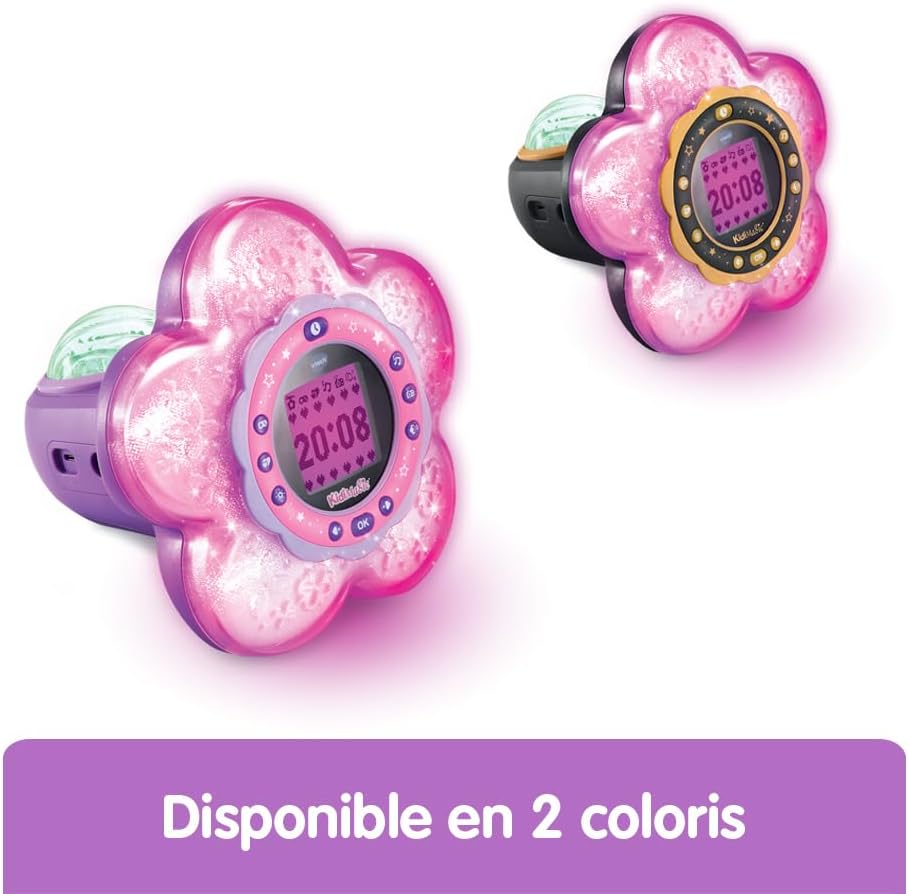
Imaxe: Fronte view of the KidiMagic Galaxy Light, illustrating the time display and the aurora borealis projection feature.

Imaxe: De volta view of the KidiMagic Galaxy Light, highlighting the battery compartment and various connection ports.
Controis e visualización:
- Pantalla LCD: Displays time, game information, and settings.
- Sensor: Located on top, detects hand movements for light effects.
- Botóns: Various buttons for navigation, settings, and game control.
- Relator: Altofalante integrado para saída de son.
- Jack de entrada de audio: For connecting external music players.
- Compartimento de batería: Located at the back.
Configuración
1. Instalación da batería
- Localice o compartimento da batería na parte traseira da unidade.
- Usando un desaparafusador, abra a tapa do compartimento da batería.
- Insira dúas pilas LR6-AA novas, asegurándose de manter a polaridade correcta (+/-).
- Volva colocar a tapa e aperte o parafuso.
Alternatively, the device can be powered by a VTech duo AC adapter (002181), sold separately.
2. Acendido inicial
Press the Power button to turn on the device. The screen will light up, and you may be prompted to set the time.
Operación básica
Axuste da hora
- Access the 'Settings' menu using the navigation buttons.
- Select 'Time' and adjust the hour and minute using the arrow buttons.
- Confirm your selection with the 'OK' button.
Establecer unha alarma
- Navigate to the 'Alarm' menu.
- Choose an alarm slot and set the desired wake-up time.
- Select an alarm melody from the available options.
- Confirm to activate the alarm.
Axuste de volume
Use the dedicated volume buttons (usually marked with '+' and '-') to increase or decrease the sound level.
Apagado automático
The device features an automatic shut-off timer to conserve battery life. You can set it to 60 minutes, 120 minutes, 240 minutes, or disable the sleep mode entirely through the settings menu.
Características
Aurora Borealis Projection
The KidiMagic Galaxy Light projects beautiful aurora borealis effects onto the ceiling, creating a celestial atmosphere in the room. This feature can be activated and customized through the light settings.

Imaxe: A child interacting with the KidiMagic Galaxy Light, demonstrating the dynamic light effects and color changes.
Interactive Light Effects and Color Changes
Wave your hand over the magic sensor on the device to change its color and activate 12 different light effects and 7 color variations. This allows for personalized ambiance.
Radio FM
Tune into your favorite FM radio stations. The device can store preferred stations for quick access.
External Music Player (MP3) Connection
Connect an external music player, such as an MP3 player, using the included audio cable. This transforms the KidiMagic Galaxy Light into a speaker, allowing you to play your own music.

Imaxe: Lado view of the KidiMagic Galaxy Light, emphasizing its capability to function as a musical speaker when connected to an external device.
Integrated Games
The device includes 4 enchanting games for entertainment:
- Buzzy Adventure
- Escondite
- Magic Mushroom
- Xardín Máxico
Imaxe: A child engaged in playing one of the integrated games on the KidiMagic Galaxy Light's screen.
Magic Activities
Explore 6 magical activities designed for fun and relaxation:
- Bola de cristal
- Magic Card
- Your Elf of the Day
- Emotion Management
- Positive Emotions
- Relaxación
Mantemento
- Limpeza: Limpe o dispositivo cun lixeiro damp pano. Non use produtos químicos agresivos ou produtos de limpeza abrasivos.
- Substitución da batería: Replace batteries when the device's performance diminishes or if the screen becomes dim. Follow the battery installation steps.
- Almacenamento: Store the device in a cool, dry place away from direct sunlight when not in use for extended periods. Remove batteries if storing for several months.
Resolución de problemas
O dispositivo non se acende:
- Comprobe se as pilas están inseridas correctamente coa polaridade axeitada.
- Substitúeo por baterías novas.
- If using an AC adapter, ensure it is properly connected and functional.
A pantalla está escura ou parpadea:
- Pode que as baterías estean baixas. Substitúeas.
- Asegúrate de que o dispositivo non estea exposto a temperaturas extremas.
Problemas de son:
- Comprobe a configuración do volume.
- If using an external music player, ensure the audio cable is fully inserted and the external device's volume is up.
Especificacións
| Número de modelo | 572705 |
| Dimensións (L x W x H) | 18.5 x 18 x 17.3 cm |
| Peso | 635 gramos |
| Idade recomendada | 6 - 10 years (Manufacturer's minimum: 72 months, maximum: 120 months) |
| Fonte de enerxía | 4 x LR6-AA batteries (included for demo) or VTech AC adapter (sold separately) |
| Material | Plástico |
| Linguaxe | French (Product content) |
| Características | Alarm Clock, FM Radio, Speaker, Aurora Projection, 12 Light Effects, 7 Colors, 6 Magic Activities, 4 Games |
Garantía e Soporte
Para obter información sobre a garantía e a atención ao cliente, consulte a documentación incluída coa súa compra ou visite o sitio web oficial de VTech. websitio. Garda o comprobante de compra para calquera reclamación de garantía.