Introdución
This manual provides essential information for the setup, operation, and maintenance of your new Tucus replacement remote control. This remote is designed to be compatible with various JVC Micro COMPACT COMPONENT Stereo Systems, including models RM-SUXQ30UW, RM-SUXQ30US, UX-Q30S, UX-Q30B, UX-Q30P, and UX-Q30W. While it is a replacement remote and not the original device's remote, common functions are expected to operate normally. Please review this guide thoroughly to ensure proper use and longevity of your remote control.
Configuración
1. Instalación da batería
The remote control requires two (2) AA batteries (not included) for operation. Follow these steps to install them:
- Localice o compartimento da batería na parte traseira do control remoto.
- Deslice a tapa do compartimento da batería cara abaixo ou cara a fóra para abrila.
- Insira dúas pilas AA, asegurándose de que os terminais positivo (+) e negativo (-) estean aliñados correctamente coas marcas do interior do compartimento.
- Deslice a tapa do compartimento da batería de volta ao seu lugar ata que faga clic de forma segura.

Figure 1: Back of the remote control showing the battery compartment cover.
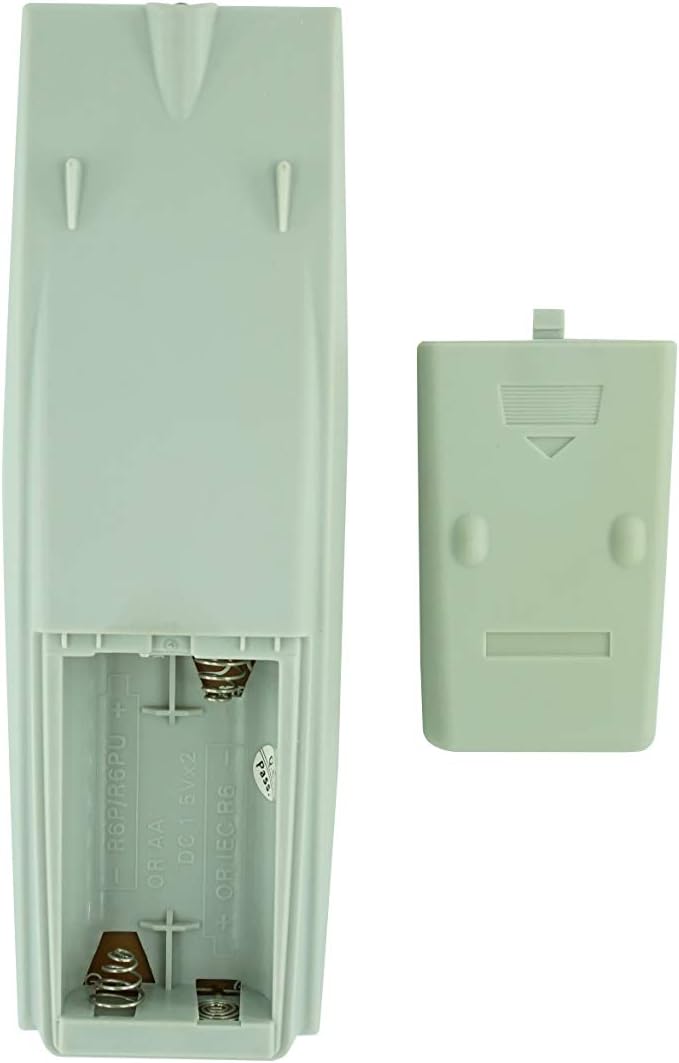
Figure 2: Battery compartment with cover removed, ready for battery insertion.
2. Uso inicial
Once batteries are installed, the remote control is ready for use. Point the remote directly at your JVC Micro COMPACT COMPONENT Stereo System. No additional programming is typically required for this replacement remote for the listed compatible models.
Instrucións de funcionamento
This remote control provides access to the primary functions of your JVC stereo system. Below is a general overview of common button functions. Please note that while the functionality is guaranteed, the exact button layout may differ slightly from your original remote.

Figura 3: Fronte view do mando a distancia coa disposición dos botóns.
Funcións clave:
- STANDBY/ON: Powers the stereo system on or off.
- MOSTRA: Changes or shows display information.
- RELOX / TEMPORIZADOR: Accesses clock and timer settings.
- DURMIR: Sets a sleep timer for automatic power off.
- Botóns numéricos (0-9, +10): Direct input for track numbers, radio frequencies, etc.
- GRAVES / AGUDOS: Axusta os niveis de graves e agudos.
- Navigation (UP, DOWN, LEFT, RIGHT, SET): Úsase para a navegación e selección de menús.
- Playback Controls (PLAY/PAUSE, STOP, FAST FORWARD, REWIND, SKIP): Controla a reprodución multimedia.
- Source Selection (CD, TAPE, FM/AM, AUX/MD): Selecciona a fonte de entrada de son.
- FM MODE / REV.MODE: Toggles FM stereo/mono or tape reverse mode.
- AUTO PRESET: Automatically scans and saves radio stations.
- PRGM / RANDOM / REPEAT: Controls program, random, and repeat playback modes.
- PTY SEARCH / PTY SELECT: For Program Type search and selection on radio.
- DISPLAY / TA/News / Info: Provides additional display information or traffic/news announcements.
- AHB PRO: Activates or deactivates Active Hyper-Bass PRO.
- VOLUME (+/-): Axusta o nivel de volume principal.
For specific advanced functions, please refer to the original instruction manual of your JVC Micro COMPACT COMPONENT Stereo System.
Mantemento
Limpeza do mando a distancia
Para manter o aspecto e a funcionalidade do mando a distancia, límpeo regularmente:
- Limpe a superficie cun pano suave e seco.
- Para a sucidade persistente, d lixeiramenteampEnxágüe o pano con auga ou cun limpador suave e non abrasivo. Non pulverice o limpador directamente sobre o mando a distancia.
- Evita usar produtos químicos agresivos, solventes ou estropajos de limpeza abrasivos, xa que poden danar o acabado ou os compoñentes internos do mando a distancia.
Substitución da batería
Replace batteries when the remote's response becomes sluggish or it stops functioning. Always replace both batteries at the same time with new ones of the same type (AA). Do not mix old and new batteries, or different types of batteries.
Almacenamento
Se non se vai usar o mando a distancia durante un período prolongado, retire as pilas para evitar fugas e posibles danos no mando a distancia.
Resolución de problemas
- O mando a distancia non responde:
- Comprobe se as pilas están inseridas correctamente coa polaridade correcta (+/-).
- Substitúe as pilas antigas por outras novas.
- Ensure there are no obstructions between the remote control and the stereo system's infrared receiver.
- Asegúrate de estar dentro do alcance efectivo do mando a distancia.
- Some buttons not working or unexpected behavior:
- This remote is a replacement and while common functions are supported, the button layout or specific advanced functions might not perfectly match your original remote. Refer to the button layout image in the Operating Instructions section.
- Ensure the stereo system is powered on and set to the correct input source.
- Remote appears damaged:
- If the remote has been dropped or exposed to liquids, internal damage may have occurred. In such cases, replacement may be necessary.
Especificacións
| Marca | Xenérico |
| Fabricante | TUCUS |
| Número de modelo | DVT-C9F24992D65E215A7DD6011D34514A46 |
| Modelos compatibles | JVC RM-SUXQ30UW, RM-SUXQ30US, UX-Q30S, UX-Q30B, UX-Q30P, UX-Q30W Micro COMPACT COMPONENT Stereo SYSTEM |
| Tipo de material | Outros |
| Fonte de enerxía | 2 pilas AA (non incluídas) |
| ASIN | B0D79958PW |
| Data de primeira dispoñibilidade | 17 de xuño de 2024 |
Información da garantía
This product comes with a 3-month warranty from the date of purchase. This warranty covers manufacturing defects and ensures the remote control functions as intended for compatible models. Please retain your proof of purchase for any warranty claims.
Atención ao cliente
If you have any questions regarding the compatibility or functionality of this remote control, or if your specific device model is not listed, please contact the seller directly for assistance. The seller stocks a wide range of remote controls and parts and can confirm suitability for your needs.
For general inquiries or to provide feedback, please refer to the contact information provided by your retailer or the seller.


