Introdución
Welcome to your new Studebaker SB3720 Portable Stereo Bluetooth CD Player. This manual provides detailed instructions for setup, operation, and maintenance to ensure optimal performance and longevity of your device. Please read this manual thoroughly before using the product.
Contido do paquete
- SB3720 CD Player
- Manual de usuario
- Type-C Charging Cable & USB-C Adaptor
The Type-C charging cable and USB-C power adapter that come with the Studebaker SB3720, used for charging the built-in battery and powering the device.
Características clave
- Bluetooth Connectivity for Streaming Music
- MP3 CD and CD-R/RW Compatible CD Player
- Radio estéreo FM
- Reproductor MP3 USB
- Batería recargable incorporada
- Pantalla LCD
- 2.0 Sistema de altofalantes
- Aux-In & Headphone Jacks
- Type-C Charging Cable & USB-C Adaptor (Included)
- Autoplay & Autostop upon CD Door Close and Open
Produto rematadoview

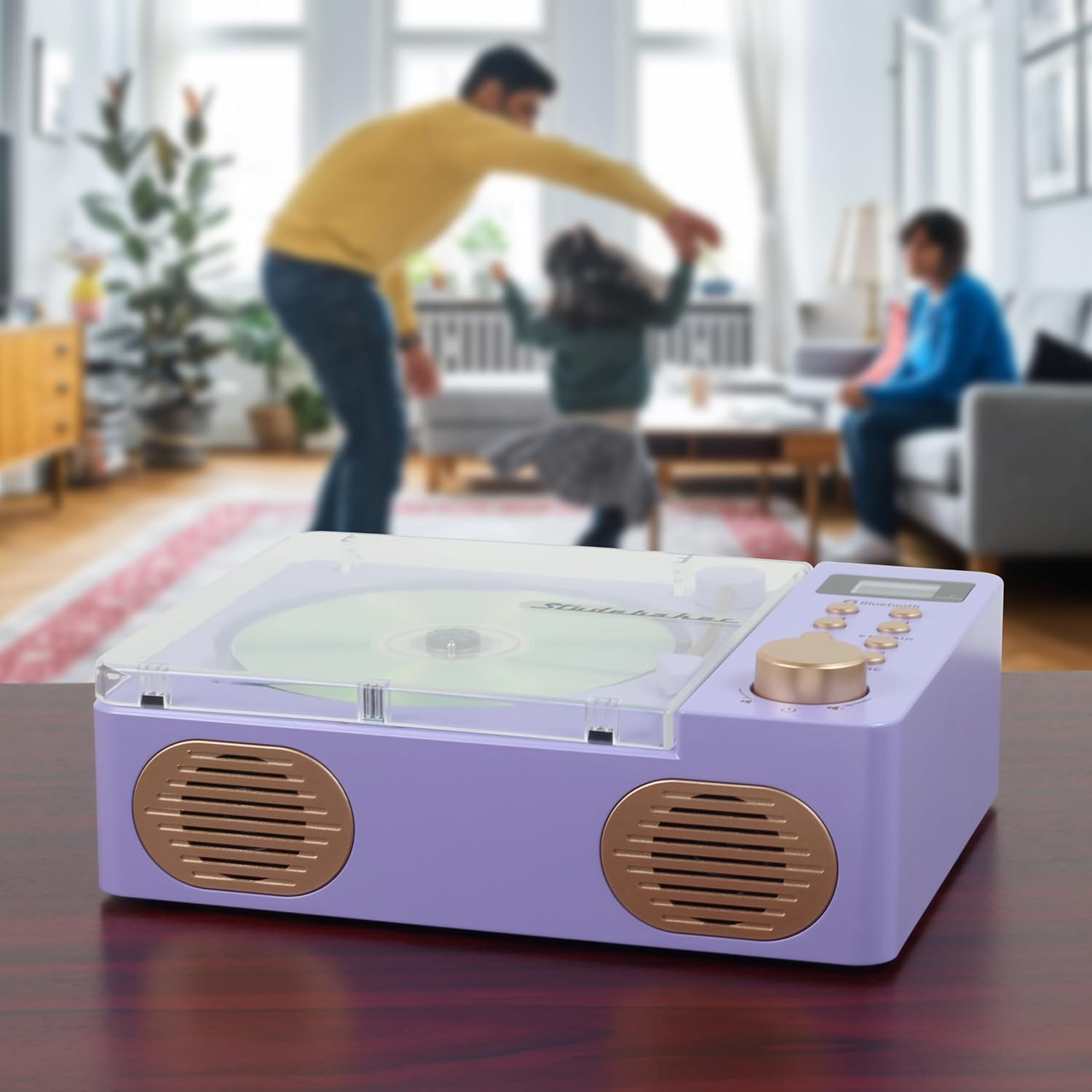
This image displays the Studebaker SB3720 Portable Stereo Bluetooth CD Player in its lilac color. The top-loading CD compartment is visible with a compact disc inserted, alongside the control panel featuring buttons for playback, mode selection, and a volume knob. The front-facing speakers are also visible.

A view of the Studebaker SB3720 CD Player with its transparent lid open, revealing the CD tray and the decorative tonearm. This illustrates how to insert or remove a CD.

The back panel of the Studebaker SB3720, showing the connectivity options: a USB-MP3 port for playing music from a USB drive, an AUX IN port for connecting external audio devices, and a DC IN 5V==1A port for power and charging. A small reset button is also visible.
Configuración e primeiro uso
Cargando a batería
Connect the provided Type-C charging cable to the DC IN port on the back of the unit and the USB-C adaptor to a standard power outlet. The unit has a built-in rechargeable battery. The charging indicator (if available) will show the charging status.
Encendido/apagado
Press and hold the Power button (often integrated with the volume knob) to turn the unit on or off. The LCD display will illuminate when the unit is powered on.
Instrucións de funcionamento
Reprodución de CD
- Gently open the transparent lid of the CD compartment.
- Place a CD (standard audio CD, MP3 CD, or CD-R/RW) onto the spindle with the label side facing up.
- Peche ben a tapa do compartimento do CD.
- Press the 'MODE' button repeatedly until 'CD' mode is selected on the LCD display.
- Press the 'PLAY/PAUSE' button to begin playback.
- Use the 'SKIP/SEARCH' buttons to navigate between tracks.
- Press the 'REPEAT' button to cycle through repeat options (e.g., repeat one, repeat all).
Conectividade Bluetooth
- Press the 'MODE' button repeatedly until 'Bluetooth' mode is selected. The unit will enter pairing mode, indicated by a flashing Bluetooth icon on the LCD display.
- On your Bluetooth-enabled device (e.g., smartphone, tablet), go to its Bluetooth settings and search for available devices.
- Select 'SB3720' from the list of devices to pair.
- Once paired, the Bluetooth icon on the SB3720's display will stop flashing, and you can stream audio from your device.
Radio FM
- Press the 'MODE' button repeatedly until 'FM' mode is selected.
- Use the 'SKIP/SEARCH' buttons to manually tune to a desired radio station.
- Press and hold the 'SKIP/SEARCH' buttons to automatically scan for the next available station.
Reproductor MP3 USB
- Inserir unha unidade flash USB que conteña son MP3 files into the USB-MP3 port on the back of the unit.
- Press the 'MODE' button repeatedly until 'USB' mode is selected.
- The unit will automatically begin playing MP3 files da unidade USB.
- Use the 'PLAY/PAUSE' and 'SKIP/SEARCH' buttons to control playback.
Auxiliary Input (AUX-In)
- Connect an external audio device (e.g., smartphone, MP3 player) to the 'AUX IN' port on the back of the unit using a 3.5mm audio cable (not included).
- Press the 'MODE' button repeatedly until 'AUX' mode is selected.
- Audio from your external device will now play through the SB3720 speakers. Control playback from your external device.
Controis e visualización
- Botón de potencia/volume: Turns the unit on/off and adjusts the volume level.
- Botón REPRODUCIR/PAUSA: Starts or pauses playback in CD, Bluetooth, or USB modes.
- Botóns SALTAR/BUSCAR: Skips to the next/previous track or station; press and hold to fast forward/rewind or auto-scan.
- Botón REPEAT: Cycles through repeat playback options for CDs or USB.
- Botón MODE: Switches between CD, Bluetooth, FM, USB, and AUX modes.
- Pantalla LCD: Shows current mode, track number, time, and other relevant information.
Coidados e Mantemento
To maintain the appearance and functionality of your SB3720, follow these guidelines:
- Limpe a unidade cun pano suave e seco. Non empregue produtos de limpeza abrasivos, ceras nin disolventes.
- Avoid exposing the unit to direct sunlight, extreme temperatures, or high humidity.
- Keep the CD compartment clean and free of dust. If necessary, use a CD lens cleaner disc.
- Do not attempt to disassemble or modify the unit, as this will void the warranty.
Resolución de problemas
| Problema | Causa posible | Solución |
|---|---|---|
| A unidade non se acende | Battery is depleted; Power cable not connected | Charge the unit using the provided cable and adapter; Ensure power cable is securely connected. |
| O CD non se reproduce | CD inserted incorrectly; CD is dirty or scratched; Incorrect mode selected | Ensure CD is inserted label-side up; Clean or replace CD; Select 'CD' mode. |
| Bluetooth non se conecta | Unit not in pairing mode; Device Bluetooth off; Already connected to another device | Ensure 'Bluetooth' mode is selected and flashing; Turn on Bluetooth on your device; Disconnect from other devices and try pairing again. |
| Non hai son dos altofalantes | Volume too low; Mute activated; Headphone jack in use | Increase volume; Check if unit is muted; Disconnect headphones. |
Especificacións técnicas
| Característica | Especificación |
|---|---|
| Dimensións do produto | 8.27 x 6.3 x 2.75 polgadas |
| Peso do elemento | 2.12 libras |
| Marca | Studebaker |
| Nome do modelo | Reproductor de CD retro con Bluetooth |
| Cor | Lila |
| Tecnoloxía de conectividade | Bluetooth |
| Característica especial | Auto Power-Off, Bluetooth, Lightweight, Portable, Rechargeable |
| Fabricante | Internacional de Merchandising Spectra |
Garantía e Atención ao Cliente
For warranty information, technical assistance, or to inquire about replacement parts, please refer to the contact details provided with your purchase documentation or visit the official Studebaker websitio. Garda o comprobante de compra para reclamacións de garantía.