
Introdución
This manual provides essential instructions for the setup, operation, and maintenance of your Carrera Wireless 2.0 Duo Controllers and Receiver. This system is designed to enhance your Carrera DIGITAL 132 and DIGITAL 124 slot car racing experience by providing wireless control.

Image: The Carrera Wireless 2.0 Duo Controllers and Receiver set, showing two controllers and one receiver unit.
The Wireless 2.0 system utilizes 2.4-GHz radio technology, ensuring an interruption-free connection and a range of up to 15 meters. This allows for greater freedom of movement around your racetrack. The controllers operate on standard AAA 1.5-V batteries (not included).
Configuración
1. Desembalaxe e compoñentes
Desembala con coidado todos os compoñentes. O paquete debe conter:
- 2 Wireless 2.0 Speed Controllers
- 1 Wireless 2.0 Receiver
2. Battery Installation (Controllers)
Each Wireless 2.0 Speed Controller requires one (1) AAA 1.5-V battery (not included).
- Locate the battery compartment on the back of each controller.
- Abra a tapa do compartimento da batería.
- Insira unha pila AAA, asegurándose de manter a polaridade correcta (+/-).
- Pecha a tapa do compartimento da batería de forma segura.
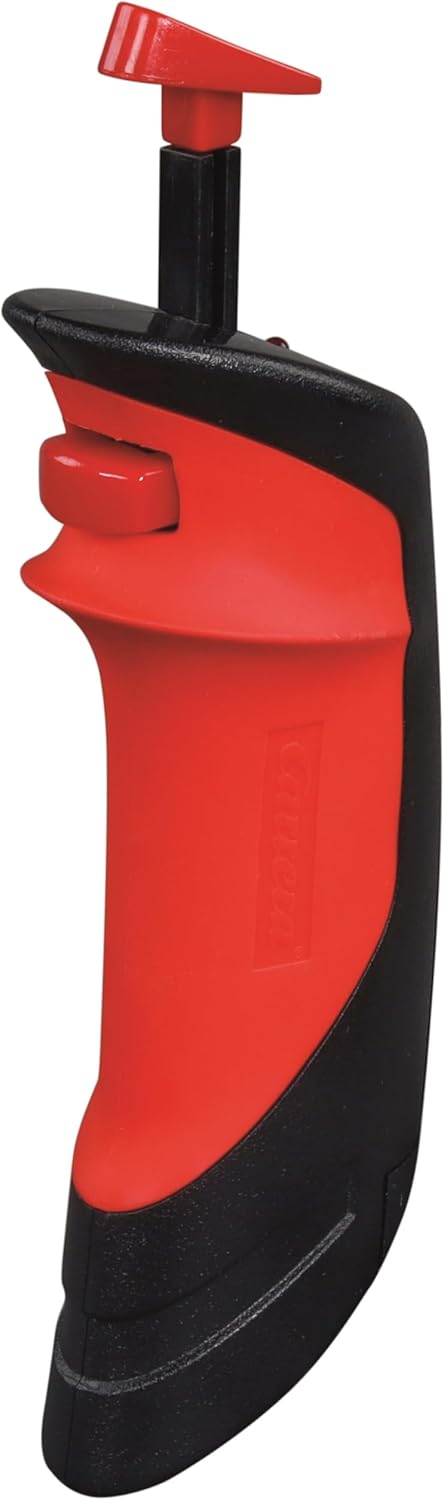
Image: A single Carrera Wireless 2.0 Speed Controller, showing its ergonomic design. The battery compartment is located on the underside/back.
3. Conexión do receptor
The Wireless 2.0 Receiver connects to your Carrera Digital Control Unit.
- Locate an available port on your Carrera Digital Control Unit.
- Insert the connector cable from the Wireless 2.0 Receiver into the designated port on the Control Unit.
- Asegúrate de que a conexión sexa firme.

Image: The Carrera Wireless 2.0 Receiver unit with its connection cable, displaying the 'CHANNEL' indicator and 'SET' button.
4. Pairing Controllers with Receiver
After connecting the receiver and installing batteries in the controllers, you must pair the controllers with the receiver. The specific pairing process is detailed in the instruction manual for your Carrera Digital Control Unit. Generally, this involves:
- Activating pairing mode on the Control Unit.
- Pressing a designated button on the Wireless 2.0 controller to initiate pairing.
- Confirming successful pairing via an indicator light or display on the Control Unit or receiver.
Importante: Ensure that vehicle addresses are not assigned twice if operating multiple wireless systems (e.g., Wireless 2.0 and Wireless+).
Instrucións de funcionamento
Operación básica
Once the controllers are paired and the system is powered on, you can control your slot cars wirelessly.
- Control do acelerador: Use the trigger on the controller to adjust the speed of your assigned vehicle.
- Lane Change: Utilize the lane change button (if applicable to your track system and vehicle) to switch lanes.
- Rango: The 2.4-GHz radio technology provides a reliable connection up to 15 meters from the receiver, allowing for flexible positioning around your track.
Notas de compatibilidade
The Carrera Wireless 2.0 system has specific compatibility requirements:
- Wireless 2.0 hand-held controllers are exclusively compatible with a Wireless 2.0 receiver.
- Previous Wireless+ hand-held controllers are only compatible with Wireless+ receivers.
- Operación en paralelo: It is possible to operate both Wireless 2.0 and Wireless+ systems simultaneously. To do this, both a Wireless 2.0 receiver (Model 20010122) and a Wireless+ receiver (Model 20010112) must be connected to the Carrera Digital Control Unit. Ensure that the addresses assigned to the vehicles are unique and not duplicated across the systems.
Mantemento
Substitución da batería
When the controller's performance diminishes or it fails to connect, it is likely time to replace the AAA battery. Follow the battery installation steps outlined in the Setup section. Always use fresh, high-quality AAA 1.5-V alkaline or rechargeable batteries.
Limpeza
To maintain the longevity and appearance of your controllers and receiver:
- Limpar as superficies cun pano suave e seco.
- Evite o uso de produtos de limpeza abrasivos, solventes ou produtos químicos agresivos.
- Do not immerse the controllers or receiver in water or any other liquid.
Resolución de problemas
| Problema | Causa posible | Solución |
|---|---|---|
| O controlador non responde |
|
|
| Receiver not recognized by Control Unit |
|
|
| Conexión intermitente |
|
|
| Cannot use Wireless 2.0 and Wireless+ simultaneously |
|
|
Especificacións
| Marca | Carreira |
| Número de modelo | 20010120 |
| Compoñentes incluídos | 2 Wireless 2.0 Speed Controllers, 1 Wireless 2.0 Receiver |
| Fonte de enerxía | Alimentado por batería |
| Tipo de batería | AAA 1.5-V Alkaline (2 required, not included) |
| Tecnoloxía radiofónica | 2.4 GHz |
| Rango de operación | Ata 15 metros (aproximadamente 49 pés) |
| Peso do elemento | 0.31 quilogramos (aprox. 0.68 libras) |
| Dimensións do artigo (L x W x H) | 11 x 7 x 2 polgadas (aprox. 27.9 x 17.8 x 5.1 cm) |
| Tipo de material | Plástico |
| Rango de idade recomendado | 8 anos en diante |
| UPC | 050227109246 |
Aviso: Contén pezas pequenas. Non apto para nenos menores de 3 anos.
Información da garantía
Specific warranty details for the Carrera Wireless 2.0 Duo Controllers and Receiver are typically provided with the product packaging or can be found on the official Carrera websitio. Garde o comprobante de compra para reclamacións de garantía.
Atención ao cliente
For further assistance, technical support, or to inquire about replacement parts, please visit the official Carrera websitio ou póñase en contacto co seu departamento de atención ao cliente.
Carreira oficial Websitio: www.carrera-toys.com