
1. Introdución
Thank you for choosing the GoHawk RD8-X45 Chrome Motorcycle Stereo System. This system is designed to provide high-quality audio for your motorcycle, ATV, 4-wheeler, or scooter. Featuring a robust waterproof design, Bluetooth 5.0 connectivity, FM radio, USB playback, and AUX input, it ensures an enjoyable audio experience on the road.
This manual provides detailed instructions for installation, operation, and maintenance to help you get the most out of your new audio system. Please read it thoroughly before use and keep it for future reference.
2. Información de seguridade
Always prioritize safety when installing and operating this device. Improper installation or use can lead to serious injury or damage to the product and vehicle.
- Ensure the vehicle's power is disconnected before installation to prevent electrical shock or short circuits.
- Connect the power cable correctly: Red wire to positive (+12V), Black wire to negative (ground). Incorrect wiring can damage the unit.
- Do not operate the system at excessively high volumes, as this can impair your ability to hear traffic sounds and emergency vehicles, leading to dangerous situations.
- Securely mount all components to prevent them from becoming loose during vehicle operation, which could cause distraction or injury.
- This product is IP56 water-resistant, meaning it is protected against dust and strong jets of water. It is not designed for submersion.
- Keep the USB port cover closed when not in use to maintain water resistance.
3. Que hai na caixa
Carefully unpack the box and ensure all items are present and in good condition. If any items are missing or damaged, please contact GoHawk customer support.

Descrición da imaxe: This image displays all the components included with the GoHawk RD8-X45 system. You can see the main soundbar unit, two external 4.5-inch slave speakers, various mounting clamps and brackets, a power cord, an external FM antenna, an AUX cable, and the user manual. A wiring diagram is also visible, illustrating how the components connect.
- 1 x Speaker Soundbar (Main Unit)
- 2 x Slave Speakers (4.5" External Speakers)
- 1 x SAE Power Cable (78" long)
- 1 x External FM Antenna
- 1 x AUX Cable (3.5mm Audio Jack)
- 2 x Montaxe Clamps with Stem for Soundbar (Supports 7/8" to 1.25" Handlebar)
- 2 x Montaxe Clamps for External Slave Speakers
- Mounting Hardware (screws, Allen wrenches)
- 1 x Manual de usuario
4. Produto rematadoview
4.1 Main Unit (Soundbar)

Descrición da imaxe: This close-up image highlights the backlit 4-button control panel on the GoHawk RD8-X45 soundbar. From left to right, the buttons are: Long Press for Volume Down, Single Click for Previous Track; Long Press for Volume Up, Single Click for Next Track; Single Click for Play/Pause; and Long Press for Power On/Off, Single Click for Mode selection.
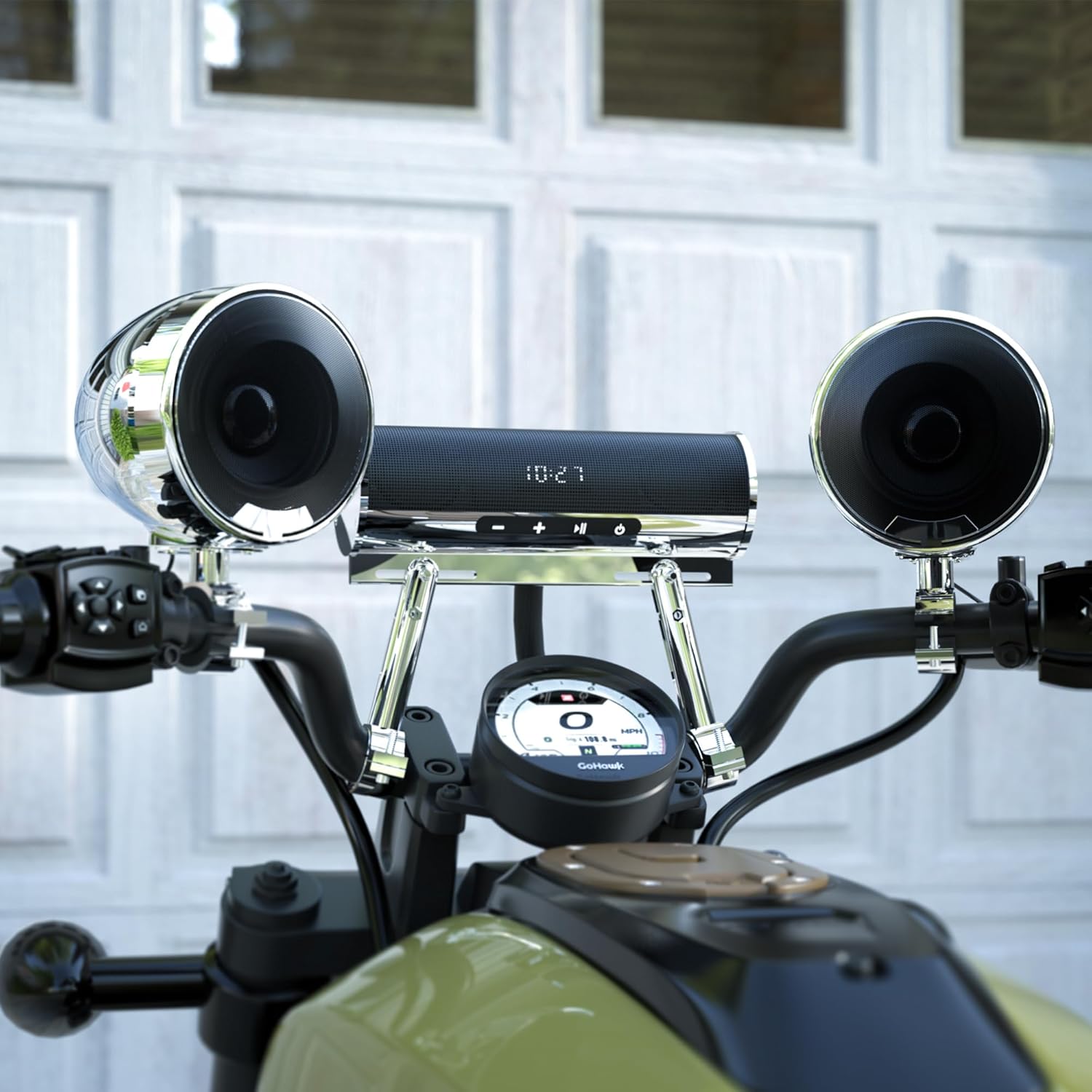
The main soundbar unit houses two 2.5-inch full-range speakers and a built-in amplifier. It features a hidden LED display for FM radio frequency and mode functions. The unit is constructed with a full aluminum housing in a chrome finish, providing durability and an IP56 water-resistant rating.
- Botóns de control:
- - Botón: Long Press for Volume Down, Single Click for Previous Track.
- Botón +: Long Press for Volume Up, Single Click for Next Track.
- Botón Reproducir/Pausa: Single Click for Play/Pause.
- Botón de alimentación / modo: Long Press for Power On/Off, Single Click for Mode selection (Bluetooth, FM, USB, AUX).
- Portos de conectividade: USB port (for music playback, not charging), 3.5mm AUX-IN jack, RCA outputs for slave speakers, SMA connection for FM antenna.
4.2 External Slave Speakers
The system includes two external 4.5-inch full-range slave speakers, also in a chrome finish, designed to enhance the overall audio output and provide a richer sound experience. These connect to the main soundbar via RCA outputs.
4.3 Características principais

Descrición da imaxe: This diagram visually represents the core features of the GoHawk RD8-X45 system. Icons and text indicate Bluetooth wireless connectivity, FM radio capability, a USB port for media, an AUX-in port, IP56 waterproof rating, SAE connector for power, RCA output for external speakers, and the durable aluminum housing.
- Bluetooth 5.0: For wireless music streaming from smartphones and other Bluetooth-enabled devices, with a range of up to 15 meters.
- Radio FM: Built-in FM tuner with external antenna for improved reception.
- Reprodución USB: Supports music playback from USB drives.
- AUX-IN: Conector de audio de 3.5 mm para conectar dispositivos de audio externos.
- Resistente á auga IP56: Designed to withstand dust and strong water jets.
- Full Aluminum Housing: Construción duradeira e robusta.
5. Configuración e instalación
Installation is straightforward with the included hardware. Ensure your vehicle's power is off before beginning.
5.1 Mounting the Soundbar and Slave Speakers
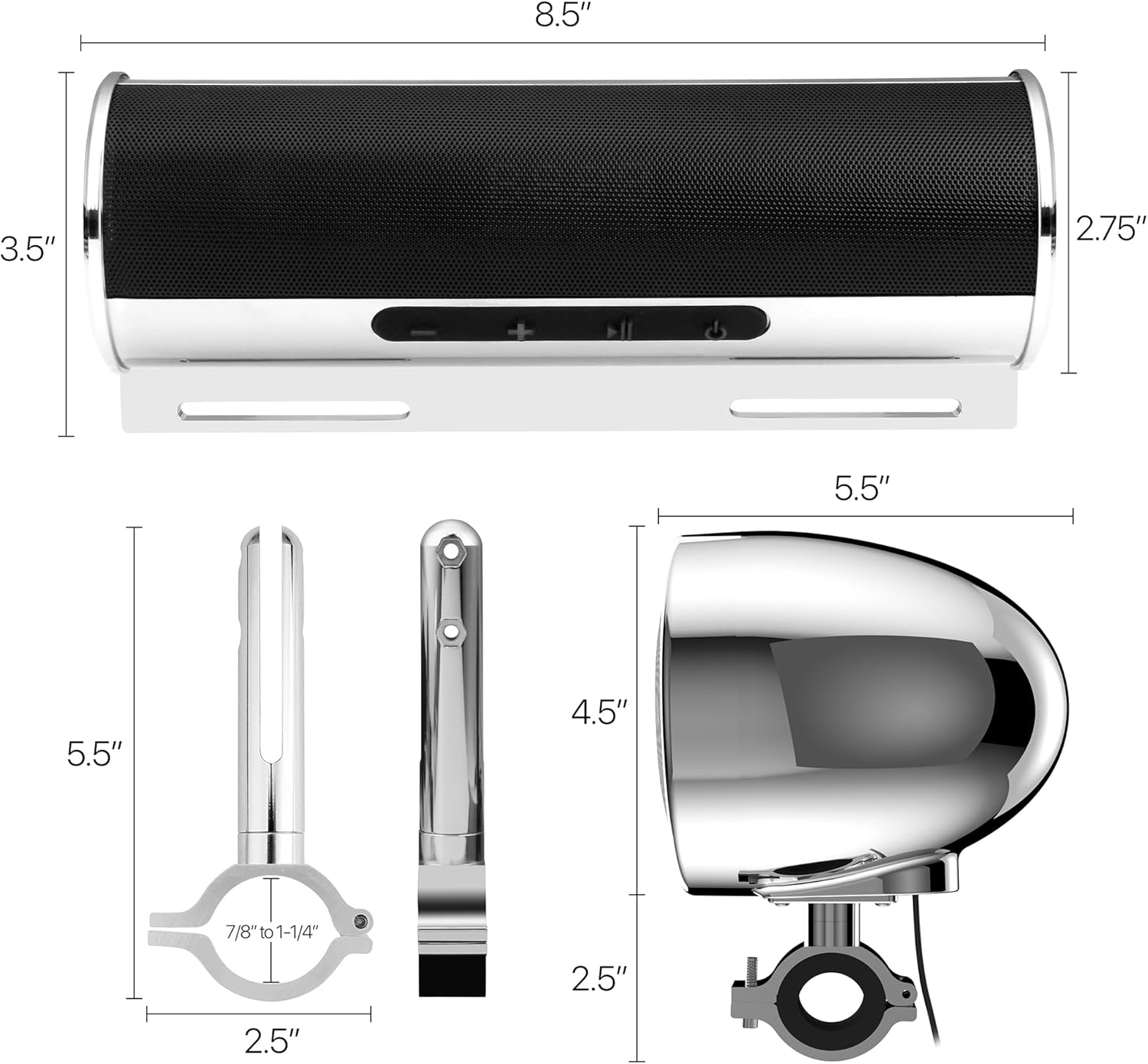
Descrición da imaxe: This image provides detailed dimensions for the GoHawk RD8-X45 soundbar and its external slave speakers. The soundbar measures 8.5 inches in length, 2.75 inches in diameter, and 3.5 inches in height including its mounting bracket. The slave speakers are 4.5 inches wide and 5.5 inches long, including their brackets. The mounting clamps are shown to support handlebars from 7/8 inches to 1.25 inches in diameter.
- Escolla lugar de montaxe: Select a suitable location on your motorcycle's handlebars for the soundbar and slave speakers. The soundbar mounting clamps support handlebars from 7/8" to 1.25" diameter.
- Montaxe Clamps: Secure the soundbar mounting clamps to the handlebars. The hardware allows for horizontal and vertical adjustment to fit various handlebar shapes.
- Barra de son de montaxe: Attach the soundbar to its mounting clamps using the provided screws. Ensure it is firmly secured and does not obstruct your view ou controis.
- Mount Slave Speakers: Attach the slave speaker mounting clamps to your desired locations, typically on the handlebars or crash bars. Secure the slave speakers to these clamps.
5.2 Conexións de cableado

Descrición da imaxe: This image includes a clear wiring diagram for the GoHawk RD8-X45. It illustrates how to connect the 78-inch SAE power cable (red to positive, black to negative), the 65-inch audio cables from the soundbar's RCA outputs to the external slave speakers, and the connections for the USB port, AUX-in, and SMA FM antenna.
- Conexión de alimentación:
- Connect the Red wire of the SAE power cable to the vehicle's positive (+12V) power source.
- Connect the Black wire of the SAE power cable to the vehicle's negative (ground) terminal.
- The SAE connector provides a plug-and-play connection to the soundbar.
- Slave Speaker Connection:
- Connect the RCA output cables from the main soundbar to the corresponding RCA inputs on the external slave speakers. Ensure left and right channels are correctly matched.
- Conexión da antena FM:
- Connect the external FM antenna to the SMA port on the soundbar. Position the antenna for optimal reception.
- Xestión de cables Route all cables neatly and securely, away from moving parts or heat sources. Use zip ties or cable clips if necessary. The soundbar features a braided cable for durability.
Descrición da imaxe: Esta imaxe ofrece información detallada view of the braided cable extending from the GoHawk RD8-X45 soundbar. The braided design indicates enhanced durability and protection for the internal wiring, crucial for outdoor motorcycle use.
6. Instrucións de funcionamento
6.1 Encendido/apagado
- Para acender: Mantén presionado Potencia/Modo button. The LED display will illuminate.
- Para apagar: Mantén presionado Potencia/Modo botón de novo.
6.2 Selección de modo
- Para cambiar o modo: Fai clic só en Potencia/Modo button to cycle through available modes: Bluetooth, FM Radio, USB, and AUX.
6.3 Control de volume
- Subir volume: Mantén presionado + botón.
- Baixar volume: Mantén presionado - botón.
6.4 Funcionamento Bluetooth

Descrición da imaxe: This image features a group of motorcyclists enjoying their ride, with a prominent graphic highlighting "Bluetooth 5.0" and "RANGE UP TO 15M (49FT)". This illustrates the wireless connectivity and range capability of the GoHawk system, allowing users to stream music from their devices.
- Emparejamento:
- Switch the system to Bluetooth mode. The LED display will show "BT" and flash, indicating it's in pairing mode.
- On your smartphone or Bluetooth device, search for "GoHawk" in the Bluetooth settings.
- Select "GoHawk" to connect. Once paired, the system will confirm the connection.
- Reprodución de música:
- Usa o Reproducir/Pausa button for playback control.
- Un só clic - for Previous Track, single click + for Next Track.
6.5 Funcionamento da radio FM
- Cambiar ao modo FM: Fai clic só en Potencia/Modo botón ata que apareza "FM" na pantalla.
- Escaneo automático: Mantén presionado Reproducir/Pausa botón para buscar e gardar automaticamente as emisoras de FM dispoñibles.
- Sintonización manual: Fai clic só en - or + buttons to manually tune to the previous or next station.
Reprodución por USB 6.6
- Inserir unha unidade USB: Open the waterproof cover and insert a USB drive containing MP3 music files no porto USB.
- Reprodución automática: The system will automatically switch to USB mode and begin playing music.
- Controis: Usa o Reproducir/Pausa, - (Anterior) e + (Next) buttons to control playback.
- Nota: The USB port is for music playback only and does not support device charging.
6.7 Entrada AUX
- Conectar dispositivo: Use the provided 3.5mm AUX cable to connect your external audio device (e.g., MP3 player) to the AUX-IN jack on the soundbar.
- Cambiar ao modo AUX: Fai clic só en Potencia/Modo botón ata que apareza "AUX" na pantalla.
- Reprodución: Control music playback directly from your connected audio device.
7. Mantemento
Proper maintenance will ensure the longevity and optimal performance of your GoHawk RD8-X45 system.
- Limpeza: Use un suave, damp cloth to clean the exterior of the soundbar and speakers. Avoid abrasive cleaners or solvents that could damage the chrome finish or electronic components.
- Resistencia á auga: Always ensure the USB port cover is securely closed when not in use to maintain the IP56 water-resistant rating.
- Inspección de cables: Periodically check all cables and connections for signs of wear, fraying, or corrosion. Replace any damaged cables immediately.
- Seguridade de montaxe: Regularly inspect all mounting hardware to ensure it remains tight and secure. Vibrations from riding can loosen fasteners over time.
- Almacenamento: If storing the vehicle for an extended period, consider disconnecting the stereo system from the power source to prevent battery drain.
8 Solución de problemas
If you encounter issues with your GoHawk RD8-X45 system, refer to the following common problems and solutions:
| Problema | Causa posible | Solución |
|---|---|---|
| Sen Poder | Incorrect wiring; Blown fuse; Loose power connection; Vehicle battery low. | Check red wire to +12V and black wire to ground. Inspect vehicle fuse. Ensure SAE connector is fully seated. Check vehicle battery voltage. |
| Sen son | Volume too low; Incorrect mode selected; Loose speaker connections; Damaged speakers. | Increase volume. Ensure correct mode (BT, FM, USB, AUX) is selected. Check RCA connections to slave speakers. Test with another audio source. |
| Bluetooth non se conecta | System not in pairing mode; Device too far; Bluetooth disabled on device; Interference. | Ensure system is in BT mode and flashing. Move device closer (within 15m). Enable Bluetooth on your device. Try pairing in a different location. |
| Mala recepción de FM | Antenna not connected; Poor antenna positioning; Weak signal area. | Ensure external FM antenna is securely connected to the SMA port. Adjust antenna position for better signal. Try auto-scanning for stations. |
| Problemas de reprodución USB | Non é compatible file format; USB drive not formatted correctly; Damaged USB drive. | Garantir a música files are MP3 format. Format USB drive to FAT32. Try a different USB drive. |
If the problem persists after trying these solutions, please contact GoHawk customer support for further assistance.
9. Especificacións
| Característica | Detalle |
|---|---|
| Nome do modelo | RD8-X45 Chrome |
| Marca | GoHawk |
| Tipo de altofalante | Speaker Systems (Soundbar with 2 internal, 2 external slave speakers) |
| Potencia de saída máxima do altofalante | 600 vatios |
| Vol. De entradatage | 12 voltios |
| Impedancia | 4 ohmios |
| Resposta en frecuencia | 20 KHz (typical range for audio systems) |
| Relación sinal-ruído | 80 dB |
| Tecnoloxía de conectividade | Bluetooth 5.0, USB, 3.5mm AUX, FM Radio |
| Alcance Bluetooth | Up to 15 Meters (49 Feet) |
| Nivel de resistencia á auga | IP56 (Protected against dust and strong jets of water) |
| Material | Aluminum, Plastic, Metal |
| Dimensións do produto (barra de son) | 8.5" L x 2.75" D x 3.5" H (with bracket) |
| Peso do elemento | 5 libras |
| Tipo de montaxe | Handlebar Mount (7/8" to 1.25" support) |
| Compoñentes incluídos | Soundbar, 2 Slave Speakers, Mounting Hardware, Power Cord, External FM Antenna, AUX Cable, User Manual |
10. Garantía e soporte
The GoHawk RD8-X45 Chrome Motorcycle Stereo System comes with a Garantía limitadaConsulta a tarxeta de garantía incluída no paquete para coñecer os termos e condicións específicos.
For technical support, troubleshooting assistance, or warranty claims, please contact GoHawk customer service:
- Websitio: Visit the official GoHawk websitio web con preguntas frecuentes e recursos de asistencia.
- Correo electrónico: Refer to your product packaging or the GoHawk website for customer support email address.
- Teléfono: Refer to your product packaging or the GoHawk websitio web para o número de teléfono de atención ao cliente.
Please have your model number (RD8-X45 Chrome) and purchase date ready when contacting support.