
Introdución
This manual provides comprehensive instructions for the ECONTROLLY EUR7729KE0 Replacement Remote Control. This remote is designed to function as a direct replacement for various Panasonic DVD HDD TV Recorders, offering full functionality without the need for complex programming.
Modelos compatibles:
- UR7729KE0
- EUR7721X10
- DMR-EH50
- DMR-E55K
- DMR-EH50S
- DMR-E55P9
- DMR-E55S
- DMR-ES10
- DMR-EH50P
- DMR-EH60
This replacement remote control covers all functions of the original remote, ensuring a seamless user experience.
Configuración
Instalación de baterías
The EUR7729KE0 remote control requires two AAA batteries (not included) for operation. Please follow these steps to install the batteries:
- Localice o compartimento da batería na parte traseira do control remoto.
- Slide the battery compartment cover downwards and lift it off.
- Insira dúas pilas AAA, asegurándose de que os terminais positivo (+) e negativo (-) estean aliñados correctamente coas marcas do interior do compartimento.
- Volva colocar a tapa do compartimento da batería deslizándoa de volta ao seu lugar ata que faga clic de forma segura.

Traseira view of the ECONTROLLY EUR7729KE0 remote control with the battery cover removed, showing the compartment for two AAA batteries.
Nota: Always replace both batteries at the same time with new ones. Do not mix old and new batteries, or different types of batteries.
Instrucións de funcionamento
To operate the remote control, point it directly at the infrared sensor on your Panasonic DVD HDD TV Recorder. Ensure there are no obstructions between the remote and the device.
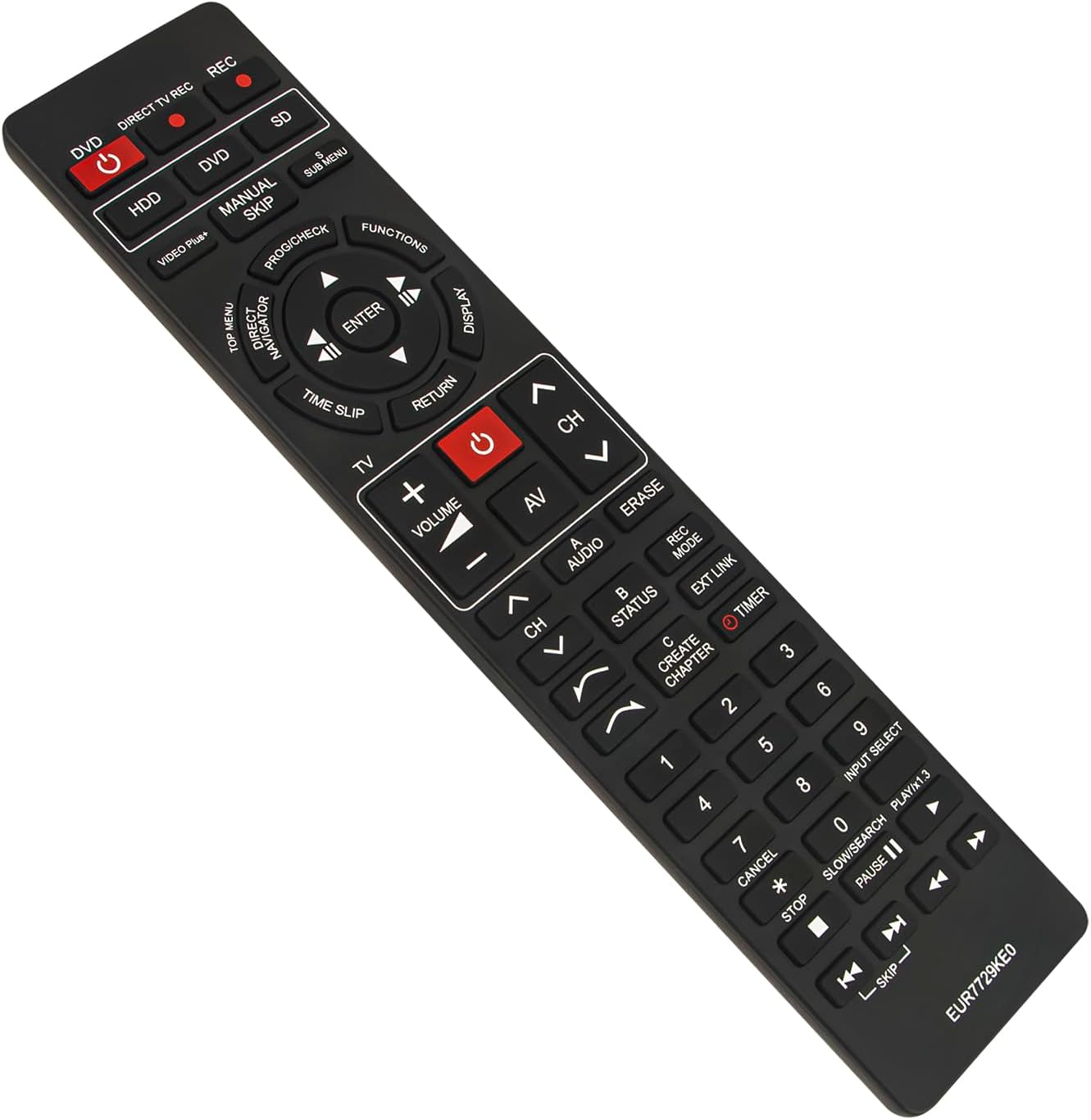
Fronte view of the ECONTROLLY EUR7729KE0 replacement remote control, showing all buttons and their labels.
Funcións clave superadasview:
- Power Buttons (DVD, HDD, DIRECT TV REC, REC, SD): Used to power on/off or select specific modes for the respective components.
- Botóns numéricos (0-9): For direct channel selection, inputting numbers, or menu navigation.
- Volume (+/-): Axusta o volume de audio.
- Channel (CH ^/v): Cambia de canle cara arriba ou cara abaixo.
- Teclado de navegación (Arriba, Abaixo, Esquerda, Dereita, INTRO): Úsase para navegar polos menús e confirmar as seleccións.
- Playback Controls (PLAY/x1.3, PAUSE, STOP, SKIP, SLOW/SEARCH): Controis estándar para a reprodución multimedia.
- MENU Buttons (TOP MENU, SUB MENU, DIRECT NAVIGATOR): Access various menu options for DVD, HDD, or TV functions.
- Special Function Buttons (PROG/CHECK, FUNCTIONS, DISPLAY, TIME SLIP, RETURN, AV, AUDIO, ERASE, STATUS, REC MODE, EXT LINK, CREATE CHAPTER, TIMER): These buttons provide access to advanced features specific to your Panasonic recorder, such as recording options, chapter creation, and display settings. Refer to your recorder's manual for detailed use of these functions.

Comparison image showing the ECONTROLLY EUR7729KE0 replacement remote control on the left and an original Panasonic remote control on the right, highlighting their similar button layouts.
Mantemento
Limpeza
Para limpar o mando a distancia, use un pano suave e seco. Para a sucidade persistente, dóreo lixeiramente.ampen the cloth with water or a mild cleaning solution. Avoid using abrasive cleaners, alcohol, or solvents, as these can damage the remote's surface or internal components.
Almacenamento
Garda o mando a distancia nun lugar fresco e seco, lonxe da luz solar directa e de temperaturas extremas. Se o mando a distancia non se vai usar durante un período prolongado, recoméndase retirar as pilas para evitar fugas e posibles danos.
Resolución de problemas
- O mando a distancia non responde:
- Comprobe se as pilas están inseridas correctamente coa polaridade correcta (+/-).
- Substitúe as pilas por outras novas.
- Ensure there are no obstructions between the remote control and the device's infrared sensor.
- Make sure you are pointing the remote directly at the device.
- Algúns botóns non funcionan:
- This remote is designed to replicate all functions of the original. If specific buttons are not working, ensure your device is in the correct mode (e.g., DVD mode for DVD functions).
- Clean the remote's surface, as dirt or debris might be interfering with button presses.
If the issue persists after following these steps, please refer to the support section for further assistance.
Especificacións
| Marca | DE CONTROL |
| Nome do modelo | EUR7729KE0 |
| Cor | Negro |
| Característica especial | Non se require programación |
| Dispositivos compatibles | DVD HDD TV Recorder (Panasonic DMR-EH50, etc.) |
| Tecnoloxía de conectividade | Infravermello |
| Tipo de controlador | Control de botón |
| Rango máximo | 33 pés |
| Peso do elemento | 1 onzas |
| Dimensións do artigo (L x W x H) | 5" de longo x 2" de ancho x 0.6" de alto (aprox. 22.4 cm x 5 cm x 1.5 cm) |

Image displaying the dimensions of the ECONTROLLY EUR7729KE0 remote control: approximately 22.4 cm (8.82 inches) in length and 5 cm (1.97 inches) in width.
Garantía e Soporte
This ECONTROLLY product has been tested to ensure proper functionality before shipping. As a replacement remote control, it is designed for immediate use without additional setup.
For further assistance, compatibility inquiries, or troubleshooting that is not covered in this manual, please contact ECONTROLLY customer support through the retailer's platform where the product was purchased. Provide your product model number (EUR7729KE0) and a detailed description of your issue for efficient support.