
1. Introdución
The BAKAJI Elliptical Exercise Bike is designed for home fitness, offering a comprehensive workout for various muscle groups including legs, abdomen, hips, back, and shoulders. This equipment supports cardiovascular health, improves endurance, and increases lung capacity. It features integrated heart rate sensors, 8 pre-set programs, and adjustable resistance levels to customize your training experience.

Figura 1.1: Fronte view of the BAKAJI Elliptical Exercise Bike.
2. Información de seguridade
Please read all instructions carefully before using this equipment. Keep this manual for future reference.
- Consulte a un médico: Before starting any exercise program, especially if you have pre-existing health conditions, consult your doctor.
- Vestimenta adecuada: Usa roupa deportiva e calzado deportivo axeitados. Evita roupa solta que poida quedar enganchada nas pezas móbiles.
- Comprobar equipos: Before each use, inspect the elliptical for any loose parts, damage, or wear. Do not use if damaged.
- Superficie estable: Place the elliptical on a flat, stable surface. Ensure adequate clear space around the equipment (at least 0.6 meters or 2 feet).
- Nenos e animais: Manteña os nenos e as mascotas lonxe do equipo durante o funcionamento. Este equipo non é un xoguete.
- Peso máximo: Non exceda o peso máximo do usuario de 100 kg (220 lb).
- Forma axeitada: Maintain proper posture and form during exercise to prevent injury. Stop immediately if you feel pain, dizziness, or discomfort.
- Pezas móbiles: Manteña as mans e os pés afastados de todas as partes móbiles.
3. Produto rematadoview e Compoñentes
Familiarize yourself with the main components of your BAKAJI Elliptical Exercise Bike:
- Manillares: Fixed and moving handlebars for upper body workout and support.
- Heart Rate Sensors: Integrated into the handlebars to monitor your pulse.
- Consola de visualización: Shows workout data such as time, distance, speed, calories, and pulse.
- Resistance Control Knob: Adjusts the magnetic resistance level (1-8).
- Pedais: Large, anti-slip pedals for secure foot placement.
- Asento axustable: Comfortable seat with backrest, adjustable for various user heights.
- Marco de aceiro: Durable stainless steel frame with powder coating.
- Rodas de transporte: Situado no estabilizador dianteiro para facilitar a recolocación.

Figure 3.1: Display console and handlebars with integrated heart rate sensors.

Figure 3.2: Close-up of the anti-slip foot pedals.
4. Configuración
Follow these steps to set up your elliptical exercise bike:
- Desempaquetar: Carefully remove all components from the packaging. Place them on a clean, flat surface.
- Base de montaxe: Attach the front and rear stabilizer bars to the main frame using the provided bolts and tools. Ensure they are securely tightened.
- Instalación de pedais: Attach the left and right foot pedals to their respective crank arms. Note that the left pedal is reverse-threaded. Tighten firmly.
- Fixar os manillares: Connect the moving handlebars and the fixed handlebars (with heart rate sensors) to the main frame. Secure with the appropriate hardware.
- Montar a consola: Connect the sensor wires from the main frame to the display console. Mount the console onto the handlebar post.
- Instalar o asento: Insert the seat post into the main frame and adjust to your desired height. Secure the seat with the adjustment knob.
- Verificación final: Antes do primeiro uso, comprobe dúas veces todos os parafusos e conexións para asegurarse de que estean axustados e seguros.
5. Instrucións de funcionamento
To begin your workout, follow these steps:
- Encendido: The display console will typically activate automatically when you start pedaling or press any button.
- Axustar o asento: Adjust the seat height and position to ensure a comfortable and ergonomic workout. Your knees should have a slight bend at the lowest pedal point.
- Axuste de resistencia: Usa o Botón de control de tensión (Figure 5.1) to select your desired resistance level from 1 (lowest) to 8 (highest). Turn clockwise for more resistance, counter-clockwise for less.

Figure 5.1: Resistance tension control knob.
- Start Exercising: Step onto the pedals and begin a smooth, elliptical motion. You can hold the fixed handlebars for stability or use the moving handlebars for an upper body workout.
- Monitor Heart Rate: Agarra o Sensores de frecuencia cardíaca (Figure 5.2) on the fixed handlebars to display your pulse on the console. Ensure both hands are firmly on the sensors for an accurate reading.

Figure 5.2: Heart rate sensors integrated into the handlebars.
- Using the Display Console: The console typically cycles through various metrics (Scan) or you can press the mode button to view specific data like Time, Distance, Speed, Calories, and Pulse.
- Programas predefinidos: This model includes 8 pre-set programs. Refer to the console's specific instructions (if available) for how to select and utilize these programs to vary your workout intensity and focus.
- Enfriamento: After your workout, gradually reduce your speed and resistance. Perform a cool-down and stretching routine.
6. Mantemento
Regular maintenance ensures the longevity and safe operation of your elliptical bike:
- Limpeza: Limpar o equipo con anunciosamp un pano despois de cada uso para eliminar a suor e o po. Evite produtos de limpeza ou solventes abrasivos.
- Comproba as conexións: Periodically check all bolts, nuts, and screws to ensure they are tight. Retighten as necessary.
- Lubricación: Moving parts may require occasional lubrication. Consult the specific product manual for recommended lubrication points and types.
- Almacenamento: Store the elliptical in a dry, cool place away from direct sunlight and extreme temperatures. Use the transport wheels (Figure 6.1) to move the unit carefully.
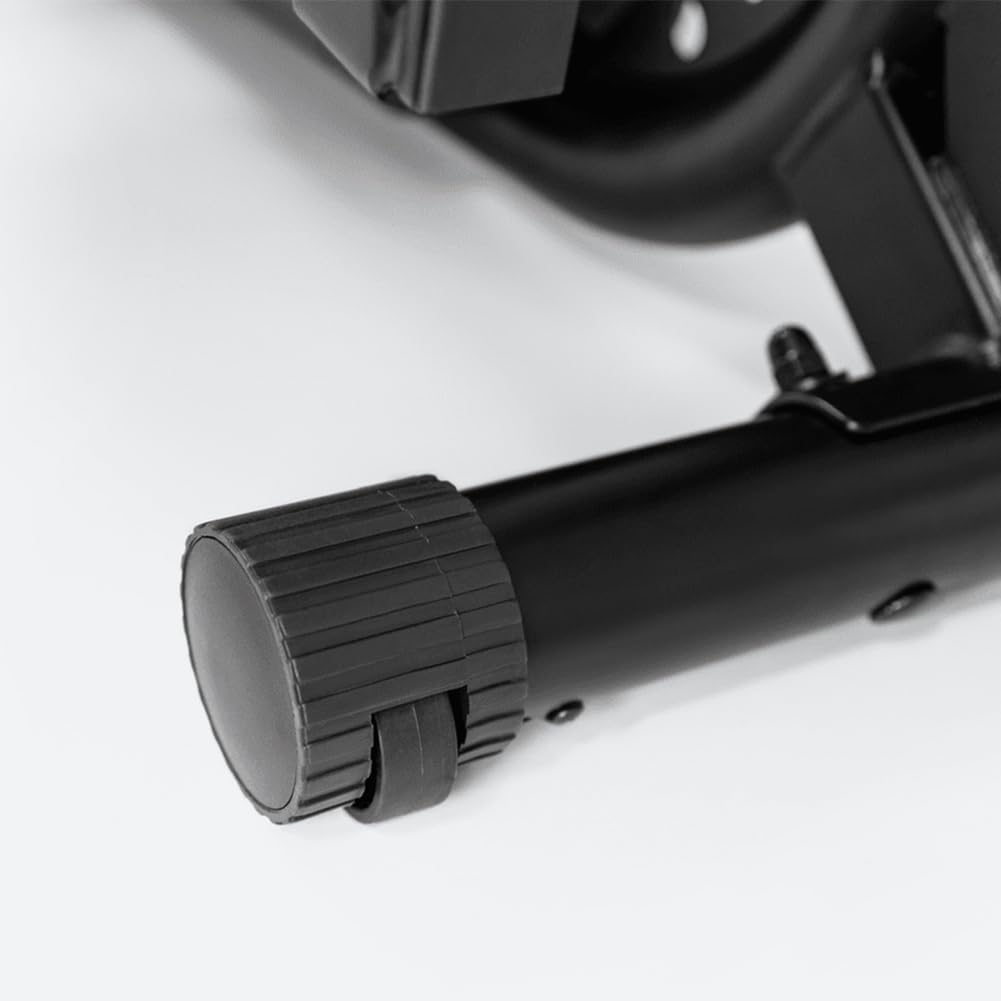
Figure 6.1: Transport wheels for convenient relocation.
7 Solución de problemas
If you encounter issues with your elliptical, try these common troubleshooting steps:
- Chirridos/Ruído: Check all bolts and connections for tightness. Lubricate moving joints if necessary. Ensure the equipment is on a level surface.
- A pantalla non funciona: Check battery installation and ensure batteries are fresh. Verify all cable connections to the console are secure.
- Heart Rate Reading Inaccurate: Ensure both hands are firmly gripping the sensors. Skin contact must be consistent. Readings can be affected by dry skin or excessive movement.
- Resistencia sen cambios: Check the resistance control knob for proper function. Ensure the internal cable (if applicable) is not disconnected or damaged.
- Unstable Operation: Ensure the elliptical is placed on a flat, stable surface. Adjust any leveling feet if present.
Se os problemas persisten, póñase en contacto co servizo de atención ao cliente.
8. Especificacións
| Característica | Detalle |
|---|---|
| Marca | BAKAJI |
| Nome do modelo | Bakaji |
| Número de modelo | 8054143043037 |
| Cor | Negro |
| Dimensións do produto (P x A x A) | 25P x 82L x 51H cm |
| Material | Aceiro inoxidable |
| Mecanismo de resistencia | Magnético |
| Número de niveis de resistencia | 8 |
| Lonxitude máxima da zancada | 82 cm |
| Peso do elemento | 25 kg |
| Recommended Maximum User Weight | 100 kg |
| Compoñentes incluídos | Sensores de frecuencia cardíaca |
| País de Orixe | China |
9. Información da garantía
Specific warranty details for your BAKAJI Elliptical Exercise Bike are typically provided with your purchase documentation. Please refer to the warranty card or contact your retailer for information regarding coverage, terms, and conditions.
10. Apoio
For technical assistance, spare parts, or any questions not covered in this manual, please contact your retailer or visit the official BAKAJI brand store: