
1. Introdución
This manual provides essential instructions for the safe and efficient use of your Meizu Note 21 Pro smartphone. Please read this manual thoroughly before operating the device and retain it for future reference.
2. Que hai na caixa
- Meizu Note 21 Pro Smartphone
- Adaptador de alimentación
- (Other accessories such as USB cable, SIM ejector tool, and documentation may vary by region.)
3. Disposición do dispositivo
Familiarize yourself with the physical components of your Meizu Note 21 Pro.
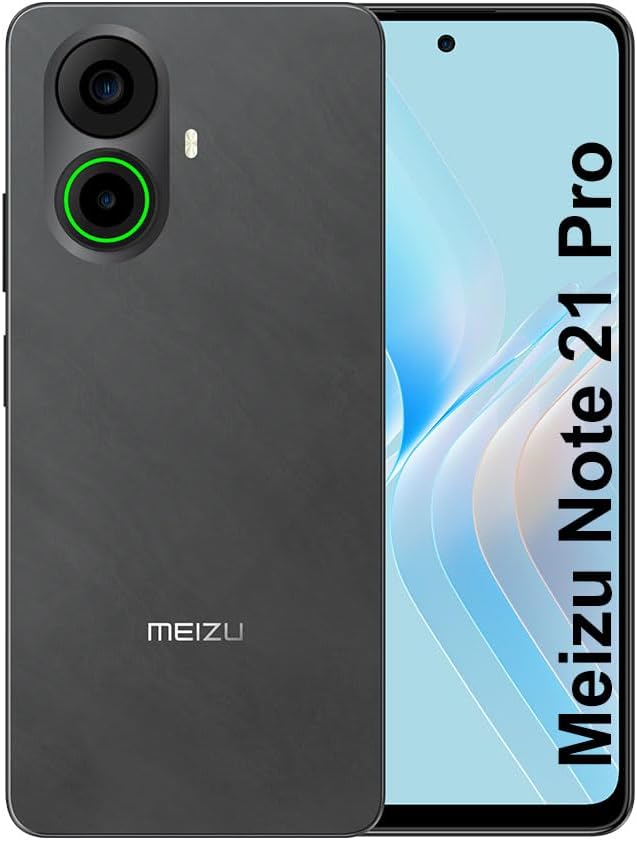
Imaxe 3.1: Fronte e traseiro view of the Meizu Note 21 Pro. The front displays the screen with a punch-hole camera. The rear shows the dual camera module with a green accent ring on one lens, a flash, and the "MEIZU" logo at the bottom.
- Pantalla frontal: 6.78-inch FHD+ screen with a 120Hz refresh rate.
- Cámara frontal: Situado na parte superior central da pantalla.
- Cámaras traseiras: Dual camera system, including a 64MP main camera.
- Sensor de impresión dixital lateral: Integrated for secure access.
- Porto USB: Para carga e transferencia de datos.
- Conector de audio de 3.5 mm: Para auriculares.
- Bandexa para tarxetas SIM/MicroSD: Supports Dual Nano SIM and MicroSD cards.
4. Configuración
4.1. Inserción de tarxetas SIM e MicroSD
- Localiza a bandexa da tarxeta SIM no lateral do teu dispositivo.
- Insira a ferramenta de expulsión da tarxeta SIM no pequeno orificio que hai xunto á bandexa e empurre suavemente ata que esta saia.
- Place your Nano SIM card(s) and/or MicroSD card into the designated slots on the tray. Ensure the gold contacts face downwards.
- Volva inserir a bandexa con coidado no dispositivo ata que encaixe no seu lugar.
4.2. Acendido e configuración iniciais
- Press and hold the Power button until the Meizu logo appears.
- Segue as instrucións na pantalla para seleccionar o idioma, conectarte a unha rede wifi e configurar a túa conta de Google.
- During setup, you will be guided to configure security features such as a PIN, pattern, or password.
4.3. Fingerprint Recognition Setup
- Navega ata Configuración > Seguridade e privacidade > Desbloqueo de impresión dixital.
- Follow the on-screen instructions to register your fingerprint by repeatedly touching the side-mounted sensor.
- Ensure your finger covers the entire sensor area during registration for optimal performance.
5. Funcionamento do teu dispositivo
5.1. Pantalla e navegación
- The 6.78-inch FHD+ display operates at a 120Hz refresh rate for smooth visuals.
- Navigate the Android 14 operating system using touch gestures: tap, swipe, pinch-to-zoom.
- Access quick settings by swiping down from the top of the screen.
5.2. Funcións da cámara
- Abre a aplicación Cámara desde a pantalla de inicio ou o caixón de aplicacións.
- The rear camera system features a 64MP main sensor for high-resolution photos and a 2MP depth-of-field camera for portrait effects.
- The 13MP front-facing camera is suitable for selfies and video calls.
- Tap on the screen to focus, and use the on-screen shutter button to capture images. Explore various modes like Portrait, Night, and Pro within the camera app.
5.3. Rendemento e almacenamento
- The MediaTek G99 Octa Core processor ensures efficient performance for applications and multitasking.
- The device comes with 256GB of internal storage and 8GB of RAM.
- Storage can be expanded using a MicroSD card (sold separately).
5.4. Batería e carga
- The Meizu Note 21 Pro is equipped with a 5000mAh battery.
- Use the provided Power Adapter for 30W fast charging.
- To charge, connect the USB cable to the phone's USB port and the power adapter, then plug the adapter into a wall outlet.
5.5. Conectividade
- 4G LTE: Supports various LTE FDD and TDD bands for cellular data. Note: This international version works on T-Mobile in the USA and globally with other carriers.
- Wi-Fi 5: Conéctate a redes sen fíos para acceder a internet.
- Bluetooth: Combínao con accesorios sen fíos como auriculares e altofalantes.
- NFC: Para pagamentos sen contacto e emparellamento rápido con dispositivos compatibles.
- GPS: Para servizos de localización e navegación.
6. Mantemento
- Limpeza: Usa un pano suave e sen fiapos para limpar a pantalla e o corpo do dispositivo. Evita produtos químicos agresivos ou materiais abrasivos.
- Coidado da batería: Avoid extreme temperatures. Do not fully discharge the battery frequently. For optimal battery longevity, keep the charge between 20% and 80%.
- Actualizacións de software: Comprobe e instale regularmente actualizacións do sistema para garantir un rendemento e unha seguridade óptimos. Vaia a Configuración > Sistema > Actualización do sistema.
7 Solución de problemas
| Problema | Posible Solución |
|---|---|
| O dispositivo non se acende | Ensure the battery is charged. Connect the device to the power adapter and try again. If unresponsive, press and hold the Power button for 10-15 seconds to force a restart. |
| Sinal de rede deficiente | Check if the SIM card is correctly inserted. Move to an area with better network coverage. Restart the device. Verify with your carrier that your plan is active. |
| As aplicacións son lentas ou fallan | Pechar aplicacións en segundo plano. Borrar a caché da aplicación (Configuración > Aplicacións > selecciona a aplicación > Almacenamento e caché > Borrar caché). Restart the device. Ensure sufficient storage space. |
| O sensor de impresión dixital non funciona | Ensure your finger and the sensor are clean and dry. Re-register your fingerprint in settings. |
8. Especificacións
- Modelo: Meizu Note 21 Pro
- Sistema operativo: Android 14
- Procesador: MediaTek G99 Octa Core (2.2GHz)
- Visualización: 6.78 inches FHD+ (1080 x 2160 resolution), 120Hz Refresh Rate
- RAM: 8 GB
- Almacenamento interno: 256 GB
- Cámara traseira: 64MP Main + 2MP Depth
- Cámara frontal: 13 MP
- Batería: 5000 mAh, carga rápida de 30 W
- Conectividade: 4G LTE (FDD:1,2,3,4,5,7,8,12,17,18,19,20,26,28,66; TDD:38,40,41), 3G WCDMA, 2G Quad Band, Wi-Fi 5, Bluetooth, NFC, GPS
- Conector de audio: 3.5 mm
- Dimensións: 6.64 x 2.96 x 0.33 polgadas
- Peso: 1.1 libras
9. Garantía e soporte
For warranty information and technical support, please refer to the warranty card included with your product or visit the official Meizu websitio. Garda o comprobante de compra para reclamacións de garantía.
For further assistance, you may contact Meizu customer service through their official channels.