
1. Introdución
Thank you for choosing the Socool D22 20000mAh Camping Fan with Light. This portable and versatile device is designed to provide cooling and illumination in various settings, including camping, outdoor activities, and during power outages. Please read this manual carefully before use to ensure proper operation and to maximize the product's lifespan.
2. Información de seguridade
- Non introduza os dedos nin ningún obxecto na grella do ventilador cando este estea en funcionamento.
- Manteña o ventilador lonxe da auga ou outros líquidos para evitar descargas eléctricas.
- Non desmontes, repares nin modifiques o ventilador ti mesmo. Ponte en contacto co servizo de atención ao cliente se precisas reparación.
- Manter fóra do alcance dos nenos.
- Use only the recommended charging cable and adapter to prevent damage to the battery.
- Avoid exposing the fan to extreme temperatures or direct sunlight for prolonged periods.
3. Contido do paquete
- Socool D22 CampVentilador con luz
- Control remoto
- Cable de carga USB-C
- Manual de usuario
4. Produto rematadoview
Familiarize yourself with the components of your Socool D22 Camping Fan:

Figura 1: Fronte view of the Socool D22 Camping Fan with Light, showing the fan blades, LED light ring, and control panel.
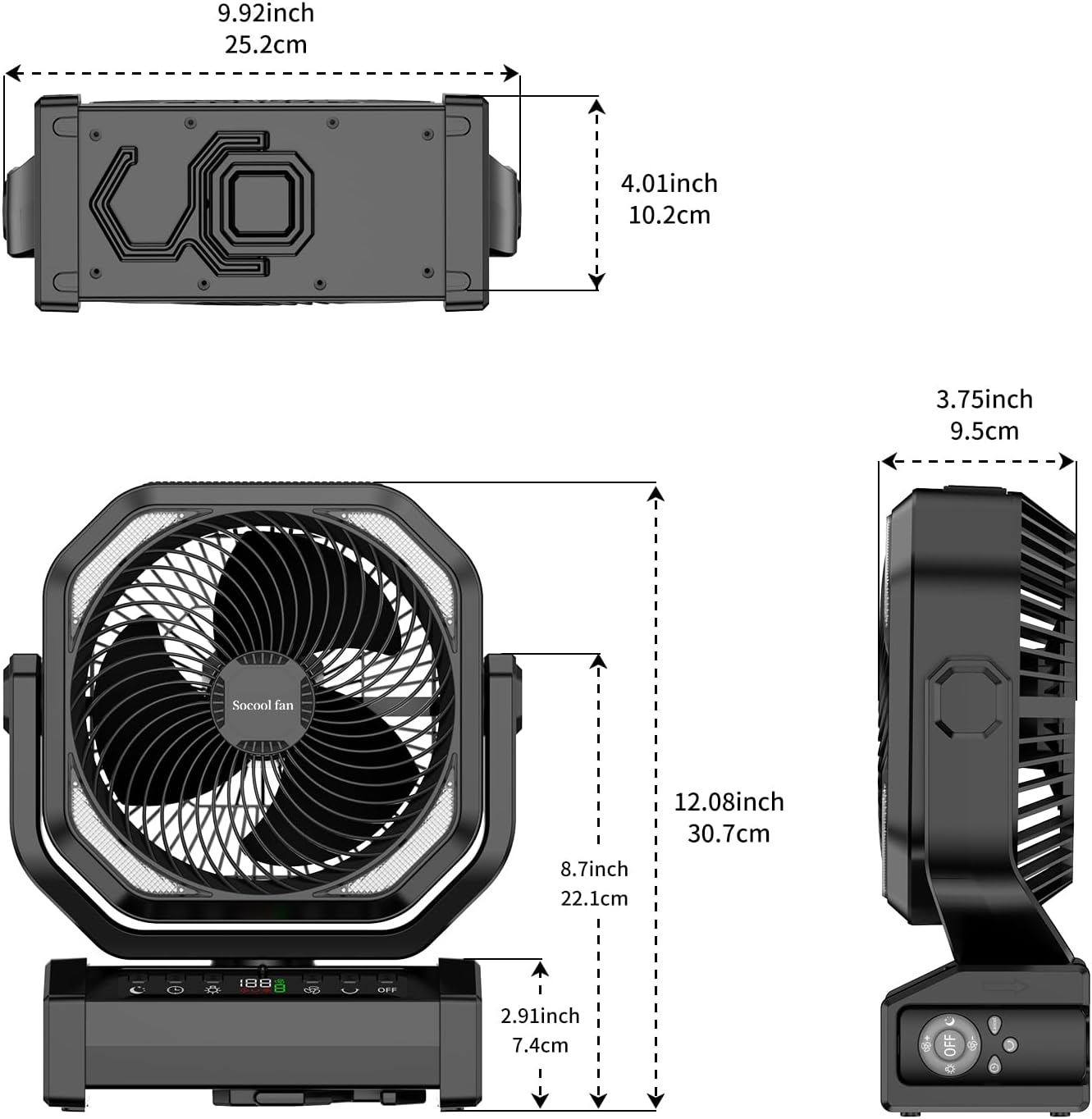
Figura 2: Dimensions of the Socool D22 Camping Fan, illustrating its compact and portable design.
Control Panel & Ports:
- Botón de encendido: Acende/apaga o ventilador.
- Botón de velocidade do ventilador: Adjusts between 9 wind speeds.
- Botón de oscilación: Activates 45°/90° auto oscillation.
- Botón de luz: Cycles through 3 brightness levels for the LED light.
- Botón do temporizador: Sets the timer for 1H, 2H, 4H, or 8H.
- Botón de modo de suspensión: Activates sleep mode, turning off the display and reducing fan noise.
- Pantalla dixital: Mostra o porcentaxe da bateríatage, fan speed, and timer settings.
- Porto de entrada/saída USB-C: For charging the fan (5V/3A) and charging external devices (5V/2A).
- Porto de saída USB-A: For charging external devices (5V/2A).
- Remote Control Slot: Convenient storage for the remote control.
- Gancho integrado: For hanging the fan in tents or other elevated positions.
- 270° Pivot: Allows manual adjustment of the fan head angle.
5. Configuración
5.1 Carga inicial
Before first use, fully charge the fan. Connect the provided USB-C cable to the fan's USB-C port and the other end to a compatible 5V/3A USB power adapter. The digital display will show the charging progress. A full charge can take approximately 9-10 hours.

Figura 3: The fan being charged via its Type-C port, highlighting its long-lasting battery and charging capabilities.
5.2 Opcións de colocación
- Libre Standing: Coloque o ventilador nunha superficie plana e estable.
- Colgado: Utilize the integrated hook to hang the fan from a tent ceiling, branch, or other suitable support.
- Asa portátil: Use the built-in handle for easy transport.
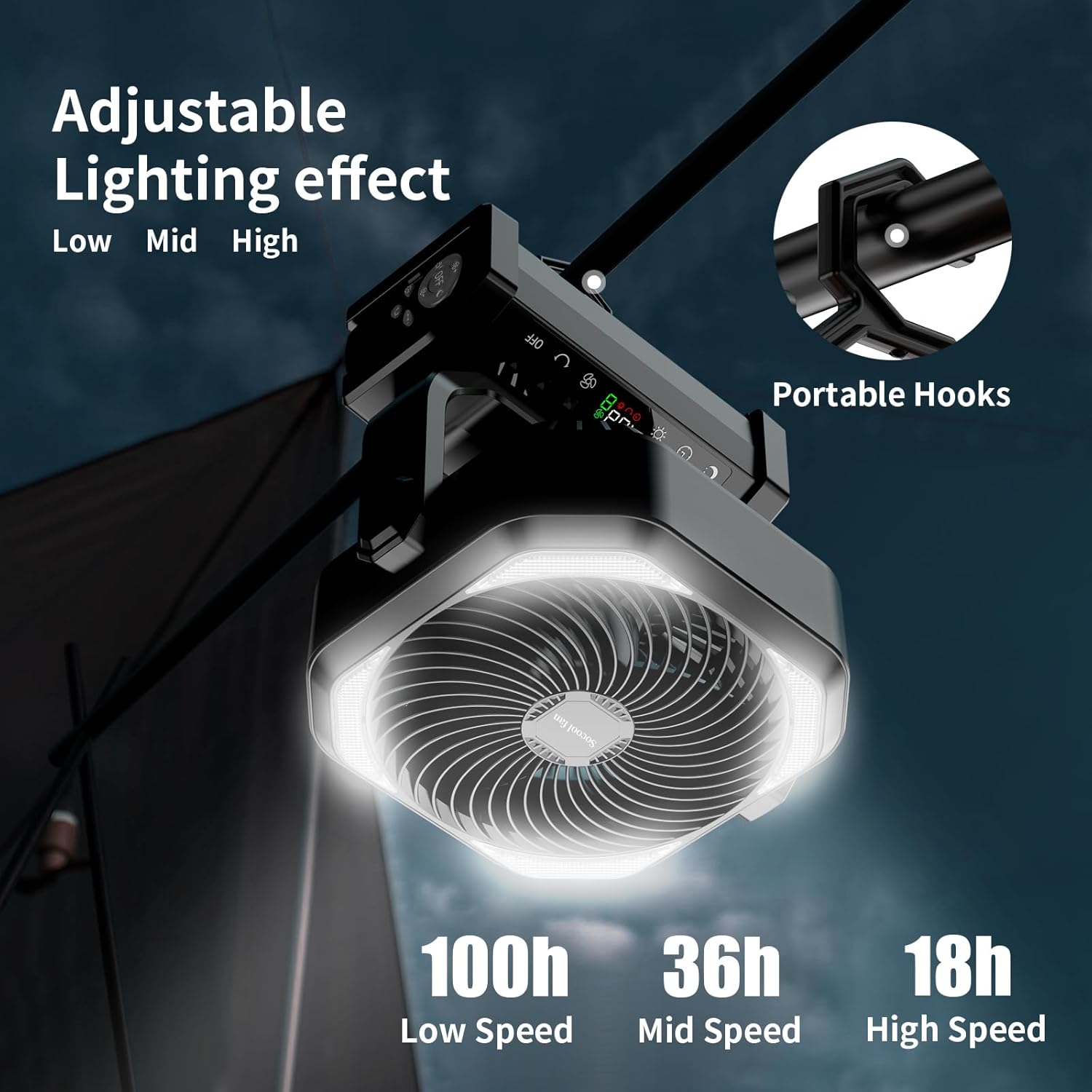
Figura 4: The fan demonstrating its portable hook for hanging, ideal for tent use.

Figura 5: The fan providing cooling and light inside a camping tenda.
6. Instrucións de funcionamento
6.1 Encendido/apagado
Preme o Botón de encendido on the control panel or remote control to turn the fan on or off.
6.2 Axustar a velocidade do ventilador
Preme o Botón de velocidade do ventilador repeatedly to cycle through 9 different wind speeds. The digital display will show the current speed level. Speed 9 simulates natural wind.

Figura 6: The fan operating at various speeds, indicating battery life at low, mid, and high settings.
6.3 Función de oscilación
Preme o Botón de oscilación to activate automatic oscillation. Press once for 45° oscillation, and press again for 90° oscillation. Press a third time to turn off oscillation. The fan head can also be manually pivoted up to 270° for precise airflow direction.
6.4 Control da luz LED
Preme o Botón de luz to turn on the LED light. Press repeatedly to cycle through 3 brightness settings (Low, Mid, High). Press a fourth time to turn off the light.
6.5 Configuración do temporizador
Preme o Botón do temporizador to set an automatic shut-off timer. Options include 1 hour, 2 hours, 4 hours, and 8 hours. The selected time will be displayed on the screen.
6.6 Modo de suspensión
Activar Modo de sono to reduce fan noise to below 30dB and turn off the digital display, ensuring an undisturbed rest. Press the Sleep Mode button to toggle this feature.
6.7 Control remoto
The included remote control allows convenient operation from a distance. Ensure the remote is pointed towards the fan's control panel. Store the remote in the designated slot on the fan base when not in use to prevent loss.

Figura 7: The fan being operated with its remote control, showing the remote control storage slot.
6.8 Carga de dispositivos externos
The fan features USB-C and USB-A output ports (5V/2A) to charge your mobile phone or other USB-powered devices. Connect your device to the appropriate port using its charging cable.
Vídeo 1: Demonstrates the various functions of the Socool D22 Camping Fan, including fan speeds, light settings, and charging capabilities.
7. Mantemento
7.1 Limpeza
- Asegúrese de que o ventilador estea apagado e desenchufado antes de limpar.
- Limpe o exterior do ventilador cun pano suave eamp pano. Non use produtos de limpeza ou disolventes abrasivos.
- Use a soft brush or vacuum cleaner to remove dust from the fan grille and blades.
7.2 Almacenamento
When not in use for an extended period, store the fan in a cool, dry place. Ensure the battery is partially charged (around 50%) before storage to prolong battery life. Recharge every 3-6 months if stored for long periods.
8 Solución de problemas
| Problema | Causa posible | Solución |
|---|---|---|
| O ventilador non se acende. | Batería baixa. | Carga o ventilador usando o cable USB-C fornecido. |
| Fan is not blowing strongly. | Axuste de baixa velocidade do ventilador. | Increase the fan speed using the Fan Speed Button. |
| LED light is dim or not working. | Batería baixa ou axuste de brillo incorrecto. | Charge the fan or adjust the light brightness using the Light Button. |
| O control remoto non funciona. | Remote battery depleted or not pointed correctly. | Ensure the remote is pointed at the fan. Replace remote battery if necessary. |
| Non se poden cargar dispositivos externos. | Fan battery is too low or device cable is faulty. | Asegúrate de que o ventilador teña carga suficiente. Proba cun cable de carga diferente para o teu dispositivo. |
9. Especificacións
| Característica | Detalle |
|---|---|
| Nome do modelo | D22 |
| Capacidade da batería | Polímero de litio de 20000 mAh |
| Max Run Time (Fan) | Ata 112 horas (velocidade máis baixa) |
| Velocidades do ventilador | 9 niveis |
| Velocidade do fluxo de aire | Up to 14.7 ft./s |
| Oscilación | Oscilación automática de 45°/90° |
| Ángulo de pivote | 270° Manual Rotation |
| Luz LED | 16 ultra-bright LED bulbs, 3 brightness settings (Max 400LM) |
| Configuración do temporizador | 1H, 2H, 4H, 8H |
| Nivel de ruído | <30dB (lowest speed) |
| Entrada/Saída (USB-C) | 5 V/3 A |
| Saída (USB-A) | 5 V/2 A |
| Dimensións do produto | 4" D x 12" W x 10" H |
| Peso do elemento | 1.9 libras |
| Método de control | Buttons, Remote Control |
| UPC | 751314746466 |
10. Garantía e soporte
The Socool D22 Camping Fan with Light comes with a standard manufacturer's warranty. For detailed warranty information, product support, or technical assistance, please refer to the warranty card included in your package or visit the official Socool fan website. You may also contact our customer service team directly via the contact information provided on our websitio.