
Introdución
This manual provides comprehensive instructions for the setup, operation, maintenance, and troubleshooting of your BPXX D463B Bluetooth Thermal Label Printer. Please read this manual thoroughly before using the printer to ensure proper function and longevity of the device.
Información de seguridade
- Use only the original power adapter provided with the printer.
- Non expoña a impresora á auga nin a humidade excesiva.
- Evite colocar a impresora baixo a luz solar directa ou preto de fontes de calor.
- Keep the printer away from dust and debris to prevent internal damage.
- Non intente desmontar nin reparar a impresora vostede mesmo. Póñase en contacto co servizo de atención ao cliente para obter axuda.
- Asegúrese de que haxa unha ventilación axeitada arredor da impresora durante o seu funcionamento.
Contido do paquete
Verifique que todos os elementos que se indican a continuación estean incluídos no seu paquete:
- BPXX D463B USB & Bluetooth Printer
- Cable USB
- Adaptador de alimentación
- Cable de alimentación
- U Disk (USB flash drive with drivers and guide)
- Adaptador OTG
- Labels (sampo rolo)
- Guía de inicio rápido

Image: Contents of the BPXX D463B Thermal Label Printer package.
Produto rematadoview
The BPXX D463B is a compact and efficient thermal label printer designed for various labeling needs, including shipping labels, product labels, and more. It features both Bluetooth and USB connectivity for versatile use across different operating systems.

Imaxe: Fronte view of the BPXX D463B Thermal Label Printer in operation.
Características principais:
- Impresión de alta calidade: 203dpi resolution for clear images, text, and barcodes.
- Conectividade dual: Supports Bluetooth for iOS, Android, and Windows, and USB for Windows, Mac OS, Linux, and ChromeOS.
- Ampla compatibilidade: Works with major e-commerce and shipping platforms like Amazon, Shopify, eBay, UPS, USPS, FedEx, and more.
- Velocidade de impresión rápida: Up to 152mm/s (72 sheets of 4x6 labels per minute).
- Detección automática de etiquetas: Automatically identifies label size for ease of use.
- Cabezal de impresión duradeiro: Features an aluminum alloy print head with smart temperature control for prolonged service life.
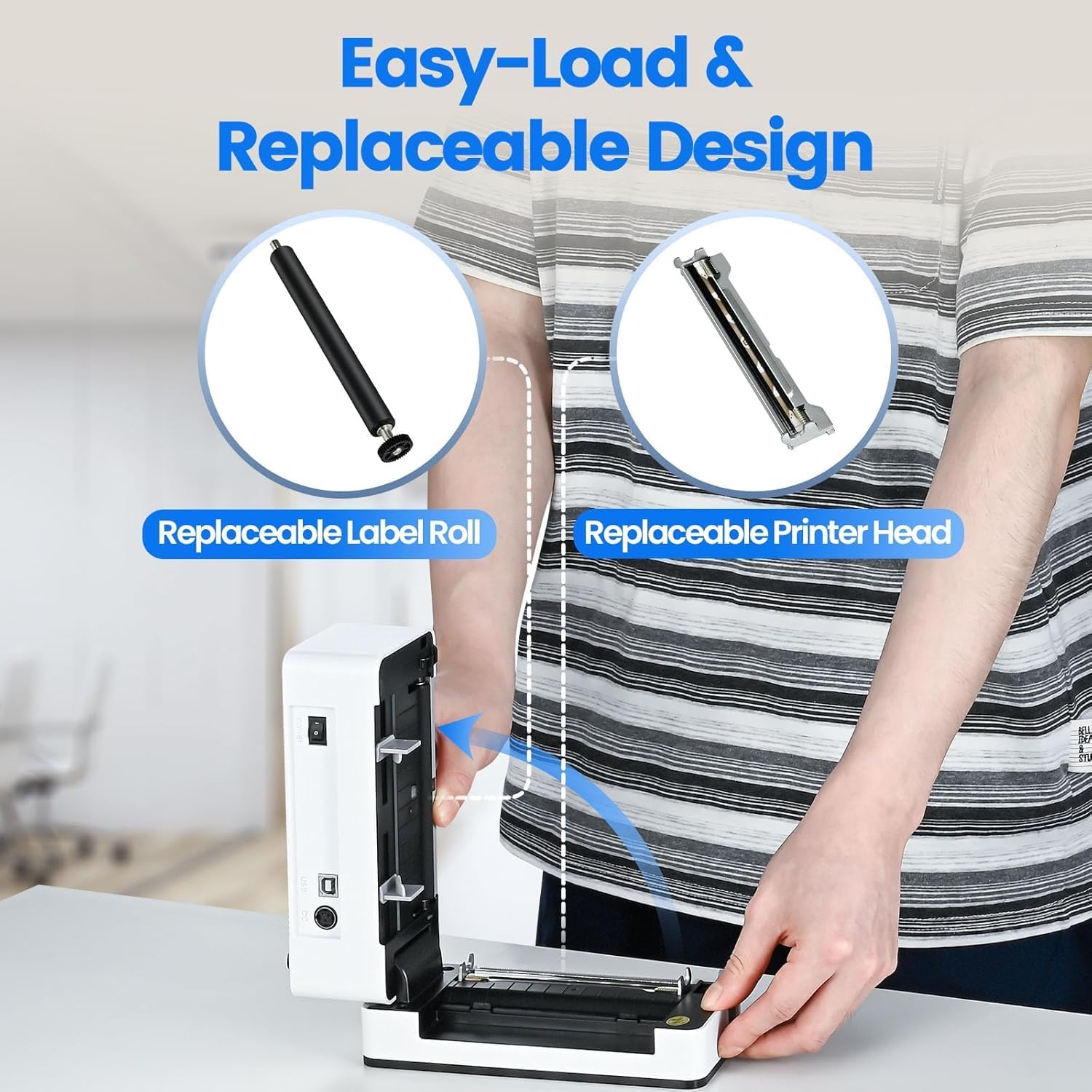
Image: The printer's aluminum alloy print head, designed for durability and extended service life.
Configuración
1. Cargar etiquetas
- Abra a tapa superior da impresora.
- Insert the thermal labels into the label compartment, ensuring the printable side is facing up.
- Adjust the label guides to fit the width of your labels snugly.
- Close the top cover. The printer will automatically detect the label size and feed a few labels to calibrate.

Image: Illustration of the easy-load label mechanism.
2. Conectando ao teu dispositivo
The D463B printer offers both Bluetooth and USB connectivity.

Image: Connectivity options for the BPXX D463B printer.
Bluetooth Connection (iOS, Android, Windows):
- Ensure the printer is powered on. The indicator light should be blue.
- Download the "4Barcode" APP from your device's app store (iOS/Android) or install the driver for Windows from the provided U Disk.
- Activa o Bluetooth no teu dispositivo móbil ou ordenador.
- Open the "4Barcode" APP or the printer driver software.
- Busca available Bluetooth devices and select "D463B" or a similar name.
- Pair the device. Once paired, you can begin printing wirelessly.
USB Connection (Windows, Mac OS, Linux, ChromeOS):
- Conecta un extremo do cable USB á impresora e o outro extremo ao teu ordenador.
- Insert the provided U Disk into your computer.
- Follow the instructions on the U Disk to install the appropriate printer drivers for your operating system. A detailed installation guide video is included on the U Disk.
- Once drivers are installed, the printer will be recognized by your computer and ready for use.
Funcionamento da impresora
Proceso de impresión
After successful setup and connection, you can print labels from various applications and platforms.

Image: Demonstrating the printer's high-speed and high-definition printing capabilities.
- Abrir o documento ou a etiqueta file you wish to print (e.g., a shipping label PDF).
- Select the print option within your application.
- Choose the "BPXX D463B" printer from the list of available printers.
- Ensure the correct label size is selected in the print settings (e.g., 4x6 inches). The printer supports various label sizes up to 4.1 inches in width.
- Confirm print settings and initiate printing.

Image: The printer's maximum 4.1-inch label width capability and auto-detection feature.
Compatibilidade da plataforma
The BPXX D463B is compatible with a wide range of e-commerce and shipping platforms, streamlining your workflow:
- Amazon
- Shopify
- eBay
- Shopee
- UPS
- USPS
- Shippo
- FedEx
- Etsy
- Estación Naval
- PayPal
- E moitos máis.

Image: The printer's compatibility with major e-commerce and shipping platforms.
Mantemento
Limpeza da impresora
Regular cleaning ensures optimal print quality and extends the life of your printer.
- Turn off the printer and unplug it from the power source before cleaning.
- Use un pano suave e sen pelusa dampEnxágüe con alcol isopropílico para limpar o cabezal de impresión. Déixeo secar completamente antes de usalo.
- Wipe down the exterior of the printer with a dry, soft cloth.
- Remove any dust or label debris from the label compartment.
Substitución de compoñentes
The BPXX D463B is designed for easy replacement of key components to maximize its lifespan.
Image: Easy-load and replaceable design for label roll and printer head.
Replacing the Label Roll:
Follow the "Loading Labels" instructions in the Setup section to replace an empty label roll.
Replacing the Printer Head:
While the aluminum alloy print head is designed for durability, it is replaceable if needed. Refer to the detailed instructions provided on the U Disk or contact customer support for guidance on replacing the print head.
Resolución de problemas
| Problema | Causa posible | Solución |
|---|---|---|
| Printer not powering on. | Cable de alimentación non conectado; problema coa toma de corrente. | Asegúrate de que o cable de alimentación estea conectado correctamente. Proba cunha toma de corrente diferente. |
| Non se pode conectar por Bluetooth. | Bluetooth not enabled; incorrect app/driver; printer not discoverable. | Ensure Bluetooth is on. Use the "4Barcode" APP. Restart printer and device. |
| Poor print quality (faded, unclear). | Print head dirty; incorrect label type; low-quality labels. | Clean the print head. Ensure you are using thermal labels. Try new labels. |
| As etiquetas non se alimentan correctamente. | Labels improperly loaded; label guides not adjusted. | Reload labels, ensuring they are straight and guides are snug. |
| Printer not recognized by computer (USB). | Drivers not installed; faulty USB cable/port. | Install drivers from the U Disk. Try a different USB cable or port. |
Especificacións
| Característica | Detalle |
|---|---|
| Nome do modelo | D463B |
| Tecnoloxía de impresión | Térmica |
| Tecnoloxía de conectividade | Bluetooth, USB |
| Resolución de impresión | 203 DPI (puntos por polgada) |
| Velocidade máxima de impresión (monocromo) | 152mm/s (72 sheets 4x6 labels/min) |
| Max Label Width | 4.1 polgadas |
| Compatible Label Sizes | 4"x6", 3"x2", 3"x1", 2"x1", 2-5/16" x 4" inches |
| Dispositivos compatibles | Laptops, PCs, Tablets, Smartphones |
| SO compatible | iOS, Android, Windows, Mac OS, Linux, ChromeOS |
| Dimensións do produto | 3.35" D x 3.35" W x 7.28" H |
| Peso do elemento | 3.12 libras |
| Fonte de enerxía | Adaptador de CA (incluído) |

Image: The compact size of the BPXX D463B printer.
Garantía
The BPXX D463B Thermal Label Printer comes with a garantía dun ano desde a data de compra. Esta garantía cobre defectos de fabricación e avarías en condicións de uso normal. Non cobre danos causados por mal uso, accidentes, reparacións non autorizadas ou desastres naturais.
Conserve o comprobante de compra para reclamacións de garantía.
Atención ao cliente
For any questions, technical assistance, or warranty claims, please contact BPXX customer support through the following channels:
- Correo electrónico: Refer to the contact information provided in your product packaging or on the official BPXX websitio.
- Soporte en liña: Visit the BPXX official websitio con preguntas frecuentes, controladores e recursos de asistencia.
When contacting support, please have your printer model (D463B) and purchase information ready.