
Introdución
Thank you for choosing the SGNICS X13 Bluetooth Earbuds. This manual provides detailed instructions on how to set up, operate, and maintain your new earbuds. Please read this manual carefully before use to ensure optimal performance and longevity of your device.
O que hai na caixa
- SGNICS X13 Bluetooth Earbuds (Left and Right)
- Estuche de carga
- Cable de carga USB-C
- Almofadas para os oídos (tamaños S, M, L)
Produto rematadoview
The SGNICS X13 earbuds feature an ergonomic design with secure ear hooks, a charging case with an LED display, and touch controls for easy operation.

Configuración
1. Carga dos auriculares e da funda
Before first use, fully charge the earbuds and the charging case. Place the earbuds into the charging case. Connect the USB-C charging cable to the charging port on the case and plug the other end into a USB power adapter (not included). The LED display on the case will show the charging status. A full charge for the case takes approximately 1.5 hours.

2. Emparejamento cun dispositivo Bluetooth
- Abre a caixa de carga. Os auriculares acenderanse automaticamente e entrarán no modo de emparellamento.
- No teu dispositivo (por exemplo, teléfono intelixente, tableta), activa o Bluetooth.
- Busca available Bluetooth devices and select "SGNICS X13" from the list.
- Unha vez conectado, escoitarás un ton de confirmación e as luces indicadoras dos auriculares apagaranse ou parpadearán lentamente.
Os auriculares volverán conectarse automaticamente ao último dispositivo emparellado ao sacalos da funda, se o Bluetooth está activado no dispositivo.
Usando os auriculares
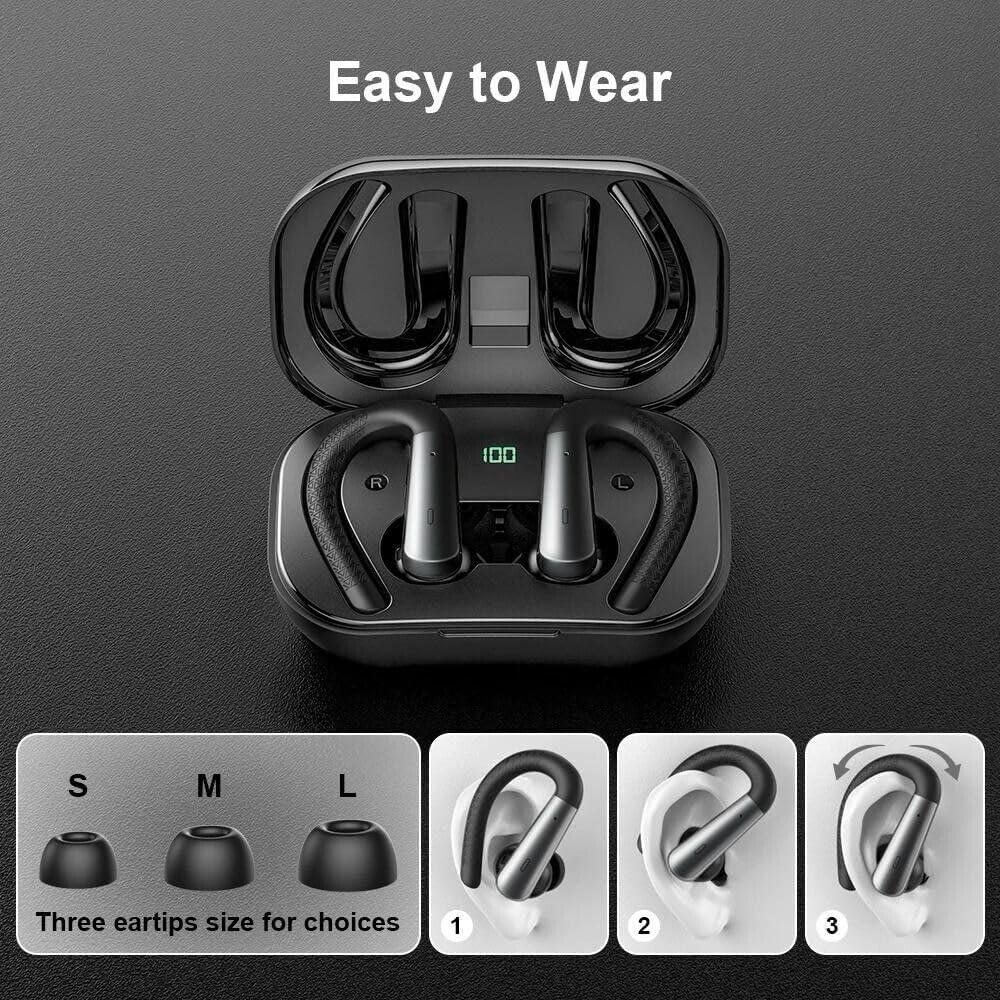
For optimal sound quality and comfort, choose the correct size ear tips (S, M, L) that provide a snug fit in your ear canal. The flexible ear hooks are designed to secure the earbuds during physical activity.
- Select the ear tip size that best fits your ears.
- Place the earbud into your ear canal.
- Adjust the ear hook over the top of your ear until it feels secure and comfortable.
Ask a question about this manual
Ask about setup, troubleshooting, compatibility, parts, safety, or missing instructions. Manuals+ will review the question and use this page’s manual context to help answer it.