
1. Introdución
This manual provides detailed instructions for the EKSA E5000 BT Wireless Gaming Headset. It covers setup, operation, maintenance, and troubleshooting to ensure optimal performance and user experience. Please read this manual thoroughly before using the headset.

Image 1.1: The EKSA E5000 BT Wireless Gaming Headset, showcasing o seu deseño e o dongle USB incluído.
2. Contido do paquete
Verifica que todos os elementos estean presentes no teu paquete:
- EKSA E5000 BT Wireless Gaming Headset
- Micrófono con cancelación de ruído extraíble
- 2.4GHz USB-A Wireless Transmitter
- USB-C to USB-A Adapter (integrated with 2.4GHz transmitter)
- Cable de audio de 3.5 mm
- Cable de carga USB (tipo C)
- Manual de usuario
- Carrying Pouch (if included with your specific model variant)
3. Produto rematadoview e Controis
Familiarízate cos compoñentes e controis dos auriculares.
Imaxe 3.1: Acabadoview of headset controls including volume wheel, microphone mute, power/light switch, Type-C interface, and microphone interface.
- Roda de volume: Axusta o nivel de saída de audio.
- Botón de silencio do micrófono: Activa/desactiva o micrófono.
- Power/Light Switching Button: Powers the headset on/off, controls RGB lighting modes, and manages play/pause functions in Bluetooth mode.
- Interface tipo C: Used for charging and 2.4GHz wireless connection (when the transmitter is plugged in).
- Interface de micrófono: Port for connecting the detachable microphone.
4. Modos de configuración e conexión
The EKSA E5000 BT headset supports three connection modes: 2.4GHz Wireless, Bluetooth 5.3, and 3.5mm Wired.

Image 4.1: Visual representation of the three available connection modes and their compatible devices.
Conexión sen fíos de 4.1 GHz
This mode provides a low-latency, lossless wireless connection for PC, PS5, PS4, Mac, and Nintendo Switch (docked mode).
- Plug the 2.4GHz USB-A wireless transmitter into an available USB port on your device (PC, PS5, PS4, Mac, Switch dock).
- If your device only has a USB-C port, use the integrated USB-C adapter on the transmitter.
- Acenda os auriculares premendo e mantendo premido o botón de acendido ata que se acenda o indicador luminoso.
- The headset will automatically pair with the transmitter. The indicator light will turn solid blue when connected.
- Asegúrate de que os auriculares estean seleccionados como dispositivo de entrada e saída de audio na configuración do sistema.
Note: The wireless transmitter chip is located inside the Type-C port of the dongle. The dongle must be plugged into a USB or Type-C port for the 2.4GHz connection to function.
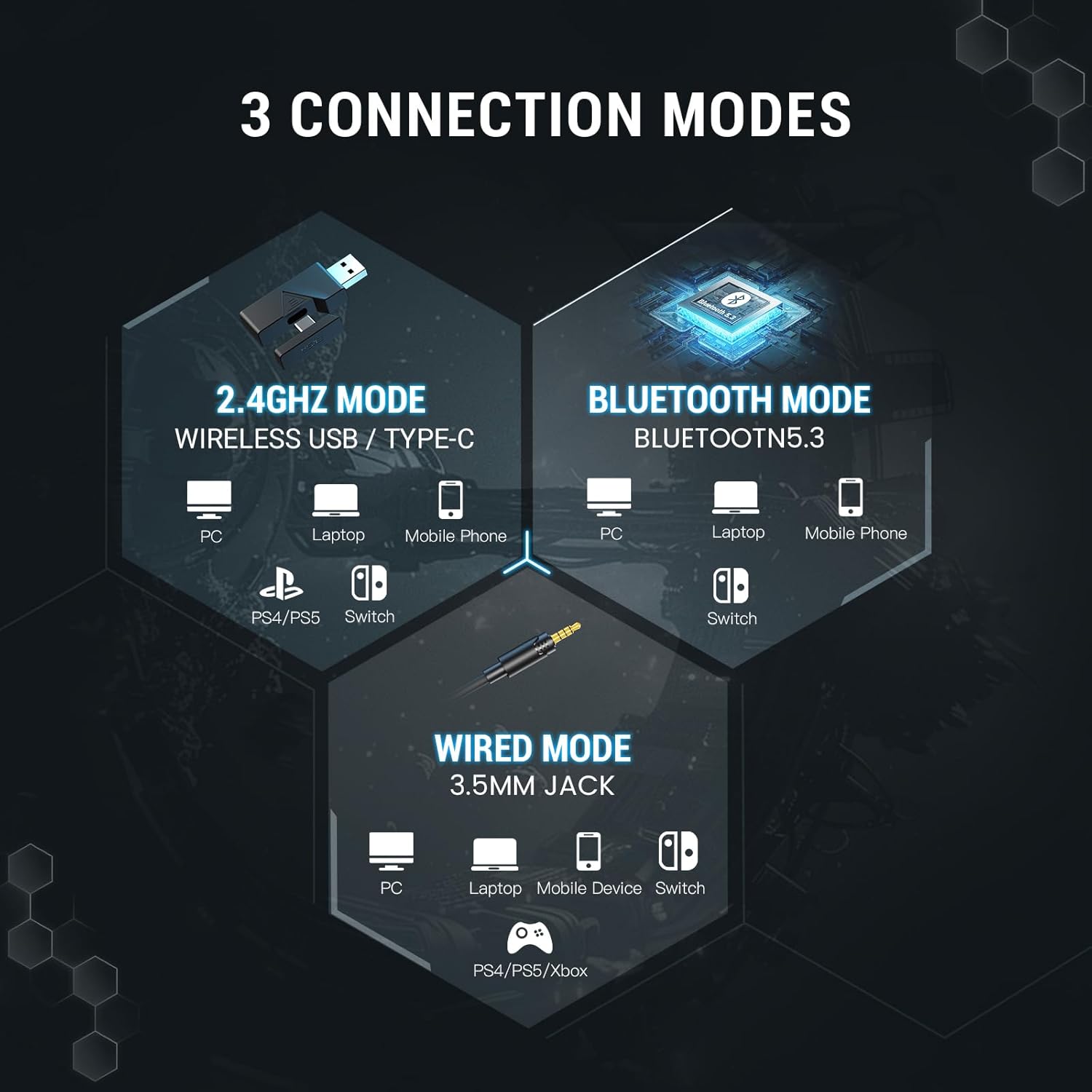
Image 4.2: The 2.4GHz wireless transmitter and its connection to the headset, highlighting stable, ultra-low latency technology.
4.2. Conexión Bluetooth 5.3
Connect wirelessly to Bluetooth-enabled devices such as PCs, laptops, mobile phones, and Nintendo Switch (undocked).
- Alimentación dos auriculares.
- Press and hold the Power/Light Switching button for approximately 5 seconds until the indicator light flashes blue and red, indicating pairing mode.
- On your device, go to Bluetooth settings and search for "EKSA E5000 BT".
- Select the headset to pair. The indicator light will turn solid blue upon successful connection.
4.3. 3.5mm Wired Connection
Use the 3.5mm audio cable for universal compatibility with devices like PC, laptops, mobile devices, Nintendo Switch, PS4, PS5, and Xbox Series X/S.
- Conecta un extremo do cable de audio de 3.5 mm á toma de 3.5 mm dos auriculares.
- Conecta o outro extremo ao porto de audio de 3.5 mm do teu dispositivo.
- The headset will operate in passive wired mode. Power is not required for basic audio.
Note: The Xbox Series consoles only support 3.5mm wired connections for this headset. RGB lighting will not function in wired mode.

Image 4.3: Detailed compatibility matrix showing headphone, microphone, and mute function support for various devices across Bluetooth, USB Dongle Wireless, Type-C Dongle Wireless, and 3.5mm Audio Wired connections.
5. Audio Features and Software
5.1 Son envolvente
The EKSA E5000 BT headset features 7.1 Surround Sound for an immersive audio experience, particularly beneficial for gaming. This feature is enabled through the EKSA SoundBase software.

Image 5.1: Visual representation of 7.1 Surround Sound technology enhancing the gaming experience.
- Descarga de controladores: To utilize 7.1 surround sound, download the EKSA 7.1 driver from the official EKSA websitio.
- Compatibilidade: The EKSA 7.1 surround sound driver is compatible only with Windows 10/11 operating systems.
- Activación: After installing the driver and ensuring the 2.4GHz transmitter is connected, select the 7.1 surround sound mode within the software.

Image 5.2: The EKSA SoundBase Software interface, offering sound customization options including 7.1 Surround Sound, Stereo Sound, and Mic ENC.
5.2. 50mm Neodymium Drivers
The headset is equipped with powerful 50mm neodymium magnet drivers that deliver clear audio, enhancing the perception of in-game sounds like footsteps and positional audio.

Imaxe 5.3: Detallada view of the 50mm magnetic neodymium driver, illustrating its role in delivering high-resolution audio and powerful low-frequency sound.
5.3. Dual Chamber Design
An innovative dual-chamber design processes low and high-frequency sounds separately. This optimization ensures enhanced bass effects and clear highs, contributing to a richer and more detailed sound experience.

Image 5.4: Cross-section diagram of the dual chamber drivers, showing separate chambers for high, mid, and bass frequencies to reduce distortion and enhance clarity.
5.4. Ultra-Low Latency
The headset features ultra-low latency (less than 30ms) in 2.4GHz wireless mode, ensuring precise synchronization between audio and visual cues for competitive gaming.
6. Detachable Noise-Canceling Microphone
The headset includes a high-performance detachable microphone with noise-canceling capabilities.
- Cancelación de ruído: Effectively filters out background noise, ensuring clear voice communication during gaming or calls.
- Flexibilidade: The microphone can be easily attached or removed as needed for convenience and storage.
- Uso: Insert the microphone into the dedicated microphone interface on the headset. Use the microphone mute button on the headset to toggle its active state.

Image 6.1: Illustration of the detachable noise-cancelling microphone, demonstrating its ability to suppress environmental sounds for clear voice pickup.
7. Características de confort e deseño
The EKSA E5000 BT headset is designed for extended comfort during long gaming sessions.
- Deseño ergonómico: Features soft ear pads and an adjustable headband.
- Glasses-Friendly: Specially designed ear pads reduce pressure for users wearing glasses.
- Diadema axustable: Easily adjust the headband height for a personalized fit.

Image 7.1: Features contributing to headset comfort, including adjustable height, memory foam earcups, 45-degree rotation, and a glasses-friendly design.
7.1. Iluminación RGB
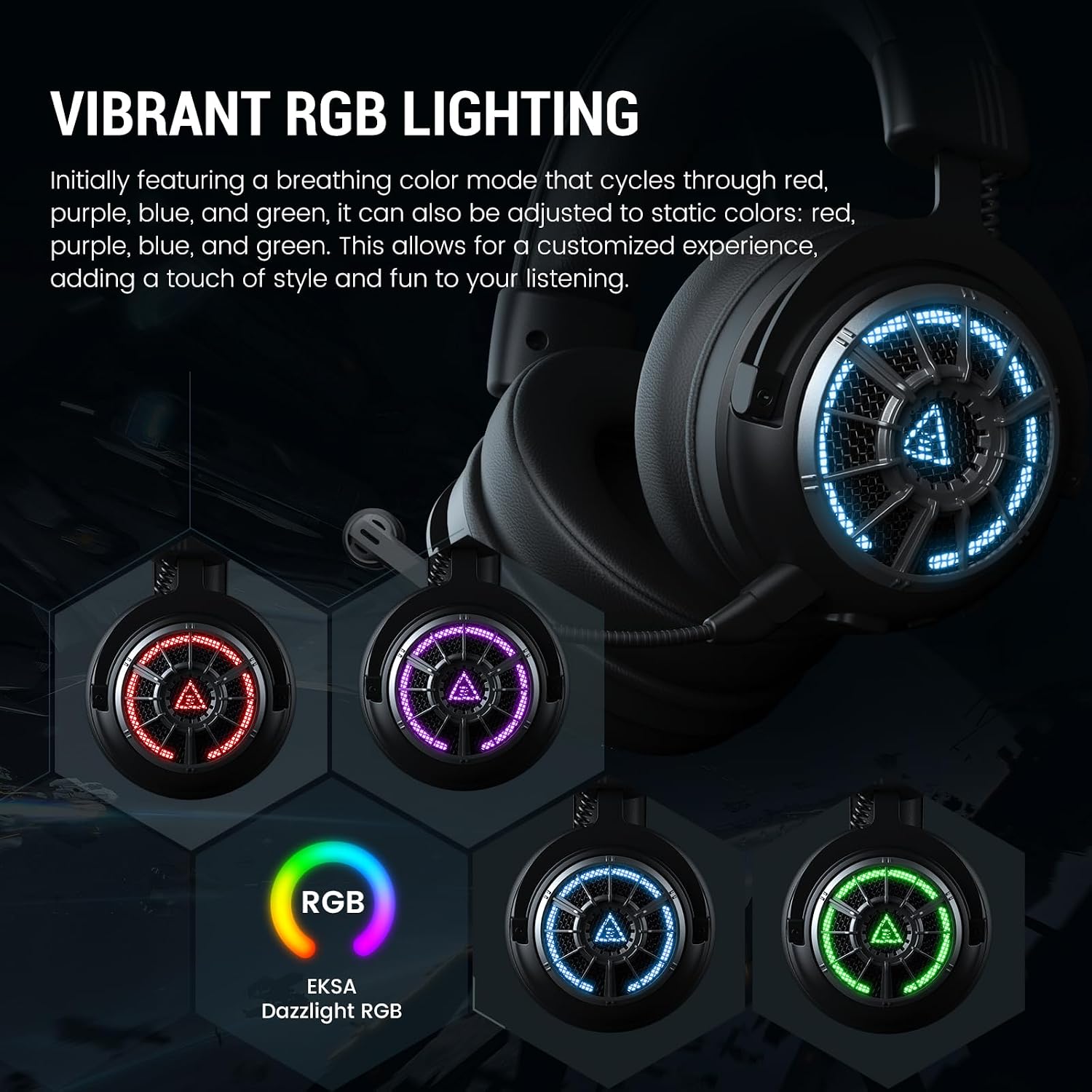
The headset features vibrant RGB lighting on the earcups.
- Modos: Initially features a breathing color mode that cycles through red, purple, blue, and green.
- Personalización: Can be adjusted to static colors (red, purple, blue, green) via the Power/Light Switching button.
- Nota: RGB lighting is not active in 3.5mm wired mode.

Image 7.2: The EKSA E5000 BT headset displaying its vibrant RGB lighting in different colors.
8. Instrucións de funcionamento
8.1. Acendido/apagado
- Encendido: Press and hold the Power/Light Switching button for 3 seconds.
- Apagado: Press and hold the Power/Light Switching button for 3 seconds.
8.2. Control de volume
- Xire o Roda de volume up to increase volume.
- Xire o Roda de volume down to decrease volume.
8.3. Silenciar o micrófono
- Preme o Botón de silencio do micrófono once to mute the microphone. The indicator light on the microphone will turn red.
- Press the button again to unmute. The indicator light will turn off.
8.4. RGB Light Switching
- Prema brevemente o Power/Light Switching Button to cycle through RGB lighting modes (breathing, static colors, off).
8.5. Batería e carga
The headset has a built-in rechargeable battery.
- Tempo de carga: Aproximadamente 2.5 horas para unha carga completa.
- Duración da batería: Up to 100 hours (Bluetooth, lights off) / 45 hours (Bluetooth, lights on); 80 hours (2.4GHz, lights off) / 25 hours (2.4GHz, lights on).
- Cargando: Connect the USB charging cable to the headset's Type-C port and a power source (e.g., computer USB port, USB wall adapter). The indicator light will show charging status.
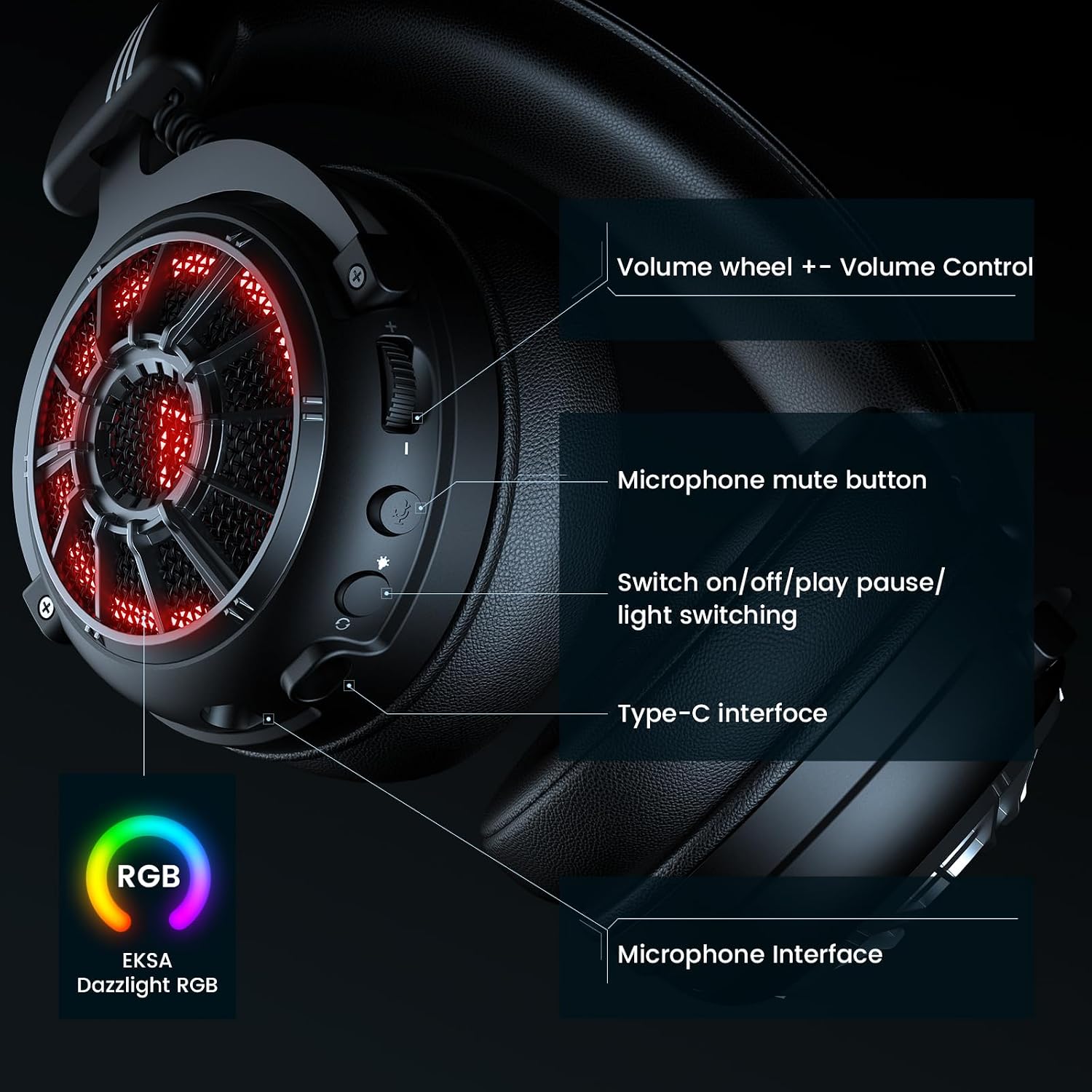
Image 8.1: Battery life specifications for 2.4GHz wireless and Bluetooth modes, with and without RGB lighting, and charging time.
9. Mantemento
Proper maintenance ensures the longevity and performance of your headset.
- Limpeza: Use a soft, dry cloth to clean the headset. Avoid harsh chemicals or abrasive materials.
- Almacenamento: Store the headset in a cool, dry place, away from direct sunlight and extreme temperatures. Use the provided carrying pouch for protection during travel or storage.
- Coidado do cable: Avoid sharply bending or twisting cables to prevent damage.
- Resistencia á auga: Os auriculares non son resistentes á auga. Evita a exposición a líquidos.
10 Solución de problemas
Se tes problemas cos auriculares, consulta as seguintes solucións habituais.
| Problema | Causa posible | Solución |
|---|---|---|
| Non hai son dos auriculares |
|
|
| O micrófono non funciona |
|
|
| Conexión sen fíos de 2.4 GHz inestable/non conecta |
|
|
| Problemas de vinculación Bluetooth |
|
|
| O son envolvente 7.1 non funciona |
|
|
For further assistance, please visit the official EKSA support websitio.
11. Especificacións
| Característica | Detalle |
|---|---|
| Nome do modelo | E5000 BT |
| Tecnoloxía de conectividade | Sen fíos de 2.4 GHz, Bluetooth 5.3, cable de 3.5 mm |
| Tipo de controlador de audio | Driver dinámico |
| Tamaño do controlador | Neodimio de 50 mm |
| Rango de frecuencias | 20 Hz - 20,000 Hz |
| Micrófono | Detachable, Noise-Canceling |
| Características especiais | 7.1 Surround Sound (PC only), Dual Chamber Design, Ultra-Low Latency, RGB Lighting, Adjustable Headband, Memory Foam Earcups |
| Duración da batería (luces apagadas) | Bluetooth: 100 hours, 2.4GHz: 80 hours |
| Duración da batería (luces acesas) | Bluetooth: 45 hours, 2.4GHz: 25 hours |
| Tempo de carga | 2.5 horas |
| Dispositivos compatibles | PC, PS5, PS4, Mac, Switch, Laptops, Desktops, Gaming Consoles, Tablets, Telephones, Smartphones |
| Peso | 2.12 libras |
| Cor | X-Black Wireless |
12. Garantía e soporte
EKSA products are designed for reliability and performance. For information regarding warranty coverage, technical support, or to register your product, please visit the official EKSA websitio.