
1. Produto rematadoview
The QRD Wireless Controller (Model: US-T5-JB02) is a high-performance replacement controller designed for Nintendo Switch, Switch Pro, Lite, and OLED models. It features advanced technologies such as Hall Effect joysticks for precise, drift-free control, dual vibration motors for immersive feedback, and a 6-axis gyroscope for accurate motion sensing. This controller also includes programmable back buttons and customizable LED backlighting, enhancing your gaming experience.
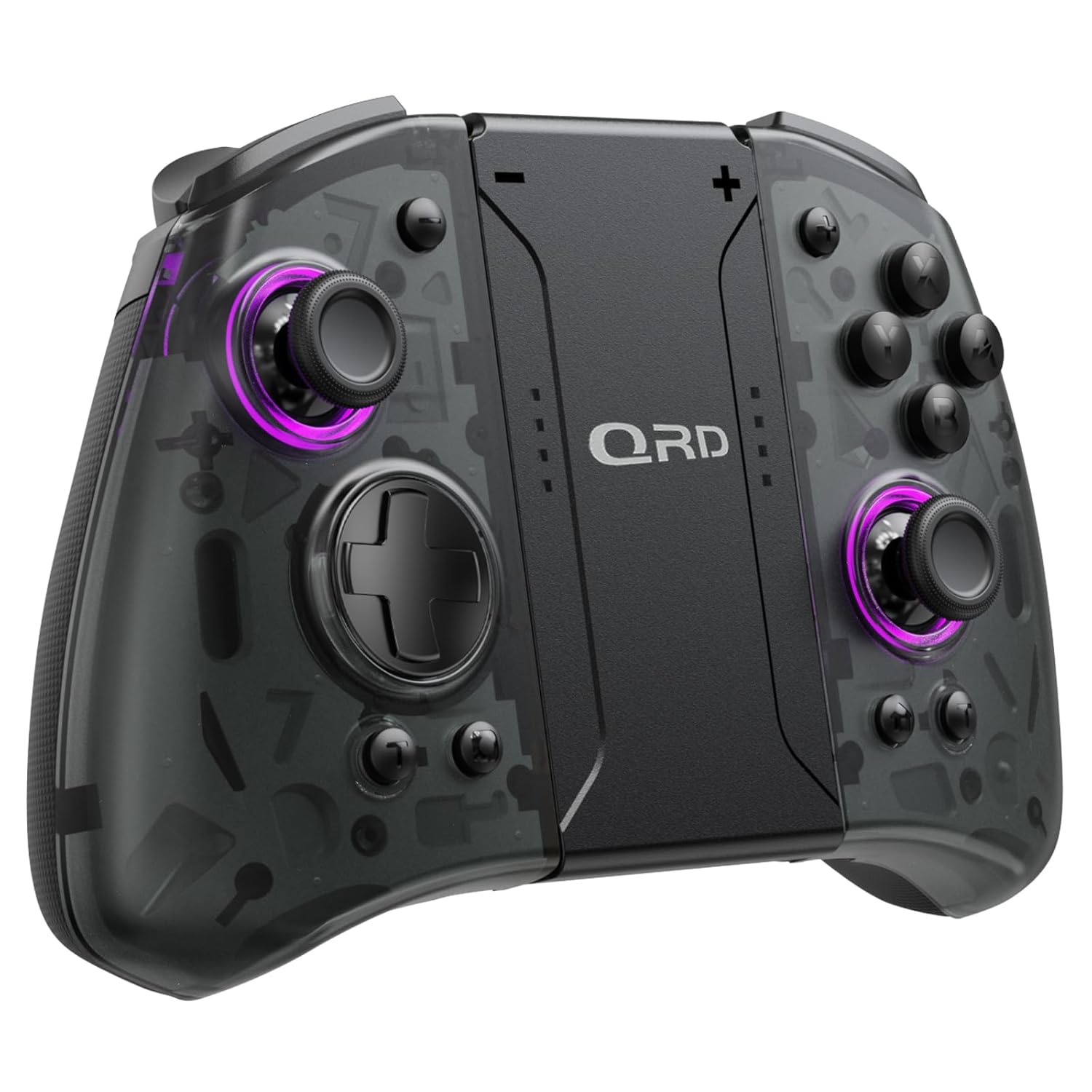
Imaxe 1.1: Fronte view of the QRD Wireless Controller, showcasino seu deseño ergonómico e a disposición dos botóns.
2. Características clave
- Conectividade sen fíos Bluetooth 5.3: Ensures stable, lag-free connection for seamless gameplay.
- Joysticks de efecto Hall: Provides 360° precise, drift-free control and extended lifespan.
- Motores de vibración dual: Offers 3 levels of adjustable vibration for enhanced tactile feedback.
- 6-Axis Gyroscope Motion Sensing: Enables accurate tilt detection for precise aiming and movement in compatible games.
- Botóns de retroceso programables: Customize controls with single or multiple mappings for efficient combo execution.
- Función Turbo: Allows for rapid firing of buttons.
- Retroiluminación LED: Features 8 different colors with static, breathing, and flashing modes for personalized aesthetics.
- Batería de longa duración: Up to 10 hours of uninterrupted gameplay on a single charge (2 hours charging time).
- Deseño ergonómico: Comfortable grip for extended gaming sessions, includes a screenshot function.

Image 2.1: Diagram highlighting key features such as Bluetooth 5.3, Dual Vibration, 6-Axis Gyro, Turbo, Macro Back Paddles, and Colorful Options.

Image 2.2: Illustration demonstrating the Hall Effect Joysticks, emphasizing drift-free and accurate control.
3. Configuración e conexión
3.1 Initial Pairing with Nintendo Switch
- Ensure your Nintendo Switch console is powered on and updated to the latest system version.
- No menú INICIO, selecciona "Controis" > "Cambiar agarre/orde".
- On the QRD Wireless Controller, press and hold the Botón HOME (usually located in the center) for 3-5 seconds until the LED indicators start flashing rapidly.
- Unha vez que o controlador estea emparellado correctamente, os LED do reprodutor correspondentes no controlador acenderanse de forma fixa.
- The controller can also be connected by sliding it into the Nintendo Switch Dock while the console is attached.
3.2 Reconnecting the Controller
To reconnect a previously paired controller, simply press the Botón HOME once. The controller will automatically attempt to connect to the last paired console.
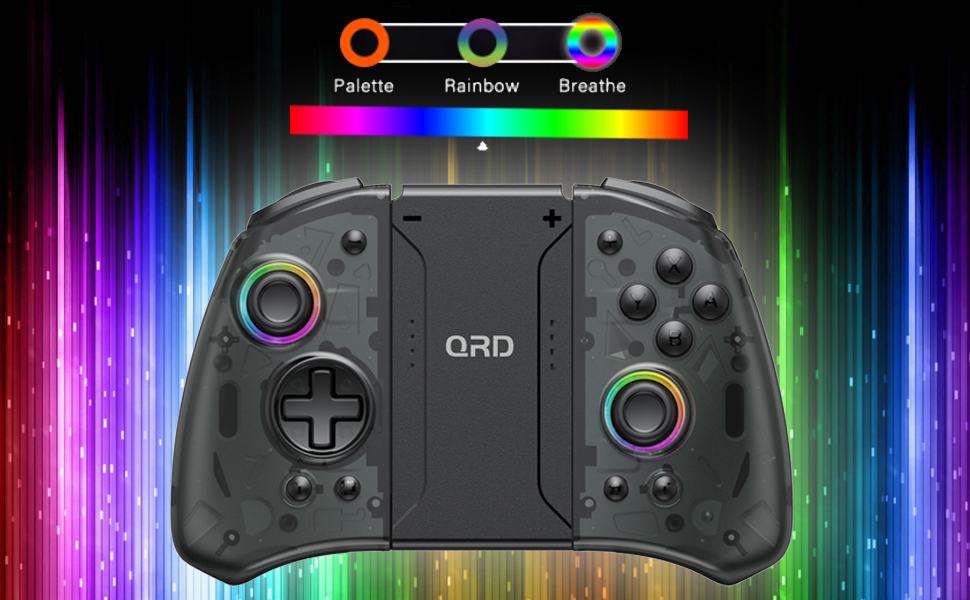
Image 3.1: Visual representation of controller compatibility with Nintendo Switch and Switch OLED models. Note: Not compatible with Switch Lite.
4. Instrucións de funcionamento
Disposición de 4.1 botóns
Familiarízate coa disposición dos botóns do controlador:
- Joystick esquerdo: Movement control.
- Joystick dereito: Cámara ou control de apuntamento.
- D-Pad: Entrada direccional.
- Botóns A/B/X/Y: Botóns de acción.
- Botóns E/D: Botóns de ombreiro.
- Botóns ZL/ZR: Botóns de disparo.
- Botón HOME: Returns to the HOME Menu, powers on/off the controller.
- Botón de captura de pantalla: Fai capturas de pantalla.
- Botóns +/-: Plus and Minus buttons for in-game functions.
- M1/M2 (Back Buttons): Programmable macro buttons.
4.2 Axuste da intensidade da vibración
The controller supports 3 levels of vibration intensity. To adjust, press and hold the Botón Turbo e, a continuación, prema D-Pad cara arriba or D-Pad cara abaixo to cycle through intensity levels (Low, Medium, High, Off).
4.3 Configuración da función Turbo
To set a button to Turbo mode:
- Manteña premido o Botón Turbo.
- While holding Turbo, press the desired action button (e.g., A, B, X, Y, L, R, ZL, ZR). The button will now continuously register input when held down.
- To clear Turbo for a specific button, repeat the process. To clear all Turbo settings, press and hold the Botón Turbo durante 5 segundos.
4.4 Programming Back Buttons (Macro)
The M1 and M2 back buttons can be programmed to execute a sequence of button presses (macro). Each macro can store up to 16 button presses.
- Manteña premido o M1 or M2 botón que desexe programar.
- While holding the M button, press the botón SET (refer to manual diagram for location, typically a small button on the back). The indicator light will flash slowly.
- Enter the desired sequence of button presses (e.g., A, B, X, Y, D-Pad directions).
- Preme o botón SET again to save the macro. The indicator light will stop flashing.
- To clear a macro, press and hold the programmed M button and then press the botón SET dúas veces.
4.5 LED Backlight Adjustment
The controller features customizable RGB lighting. To cycle through modes and colors:
- Preme o botón LED (refer to manual diagram for location) to change between static color, breathing, and flashing modes.
- In static mode, press the botón LED repeatedly to cycle through the 8 available colors.

Image 4.1: Display of the controller's LED backlight options, including Palette (static colors), Rainbow, and Breathe modes.
5. Carga e duración da batería
The QRD Wireless Controller is equipped with a built-in rechargeable Lithium Polymer battery. A 2.5m USB-C cable is included for charging.
- Connect the USB-C end of the cable to the controller's charging port and the USB-A end to a power source (e.g., Nintendo Switch Dock, USB wall adapter, computer USB port).
- A carga leva aproximadamente 2 horas para unha carga completa.
- Unha carga completa proporciona ata 10 horas de xogo continuo.
- The LED indicators on the controller will show charging status and battery level.
6. Mantemento
To ensure the longevity and optimal performance of your QRD Wireless Controller, follow these maintenance guidelines:
- Limpeza: Use un pano suave e seco para limpar o controlador. Para a sucidade persistente, dóreo lixeiramenteampEnxágüe o pano con auga. Evite o uso de produtos químicos agresivos, solventes ou produtos de limpeza abrasivos.
- Almacenamento: Garde o controlador nun lugar fresco e seco, lonxe da luz solar directa, de temperaturas extremas e de alta humidade.
- Manexo: Avoid dropping the controller or subjecting it to strong impacts. Do not disassemble the controller, as this may void the warranty and cause damage.
- Cargando: Do not leave the controller charging for excessively long periods after it is fully charged.
7 Solución de problemas
| Problema | Causa posible | Solución |
|---|---|---|
| O controlador non se conecta. | Batería baixa; Non emparellado; Interferencia. | Charge the controller; Re-pair the controller following Section 3.1; Move closer to the console or away from other wireless devices. |
| Input lag or disconnection during gameplay. | Wireless interference; Distance from console; Low battery. | Ensure no strong wireless signals are nearby; Reduce distance to console; Charge the controller. |
| Joysticks drift or are unresponsive. | Calibration issue; Physical debris. | Go to Switch System Settings > Controllers and Sensors > Calibrate Control Sticks. Clean around the joystick base. |
| Os botóns non responden. | Stuck button; Software glitch. | Ensure buttons are not physically stuck. Try resetting the controller (if a reset button is present, otherwise power cycle). |
| A vibración non funciona. | Vibration setting off; Game does not support vibration. | Adjust vibration intensity (Section 4.2). Verify game compatibility. |
8. Especificacións
| Característica | Detalle |
|---|---|
| Número de modelo | US-T5-JB02 |
| Conectividade | Bluetooth 5.3 |
| Compatibilidade | Nintendo Switch, Switch Pro, Switch OLED |
| Tipo de joystick | Efecto Hall |
| Vibración | Dual Motors, 3 adjustable levels |
| Control de movemento | Xiroscopio de 6 eixes |
| Botóns programables | Yes (Back Buttons) |
| Tipo de batería | Polímero de litio |
| Tempo de carga | Aprox. 2 horas |
| Tempo de xogo | Ata 10 horas |
| Porto de carga | USB-C |
| Dimensións | 7.95 x 5.51 x 2.36 polgadas (aprox.) |
| Peso | 12.35 onzas (aprox.) |
9. Garantía e soporte
9.1 Información da garantía
QRD products are manufactured with high-quality materials and undergo rigorous testing. This product comes with a standard manufacturer's warranty against defects in materials and workmanship. Please refer to the product packaging or the official QRD websitio web para coñecer os termos e a duración específicos da garantía.
9.2 Atención ao cliente
For technical assistance, troubleshooting, or warranty claims, please contact QRD Customer Support. Have your product model number (US-T5-JB02) and purchase information ready when contacting support.
- Soporte en liña: Visit the official QRD website for FAQs, updated manuals, and support contact forms.
- Soporte por correo electrónico: [Insert QRD Support Email Address Here - if available, otherwise omit]
- Asistencia telefónica: [Insert QRD Support Phone Number Here - if available, otherwise omit]
We are committed to providing excellent customer service and ensuring your satisfaction with QRD products.