
CHEREEKI STK-4006L
CHEREEKI Wireless Gamepad for PS-4
Model: STK-4006L
Manual de usuario
Introdución
Thank you for choosing the CHEREEKI Wireless Gamepad for PS-4. This controller is designed to enhance your gaming experience on PS-4, PS4 Slim, and PS4 Pro consoles, offering precise control, immersive feedback, and comfortable design. This manual provides detailed instructions on setting up, operating, maintaining, and troubleshooting your new gamepad.

Image: The CHEREEKI Wireless Gamepad in white, showcasino seu deseño ergonómico.
Produto rematadoview
Familiarize yourself with the various components and buttons of your CHEREEKI Wireless Gamepad.
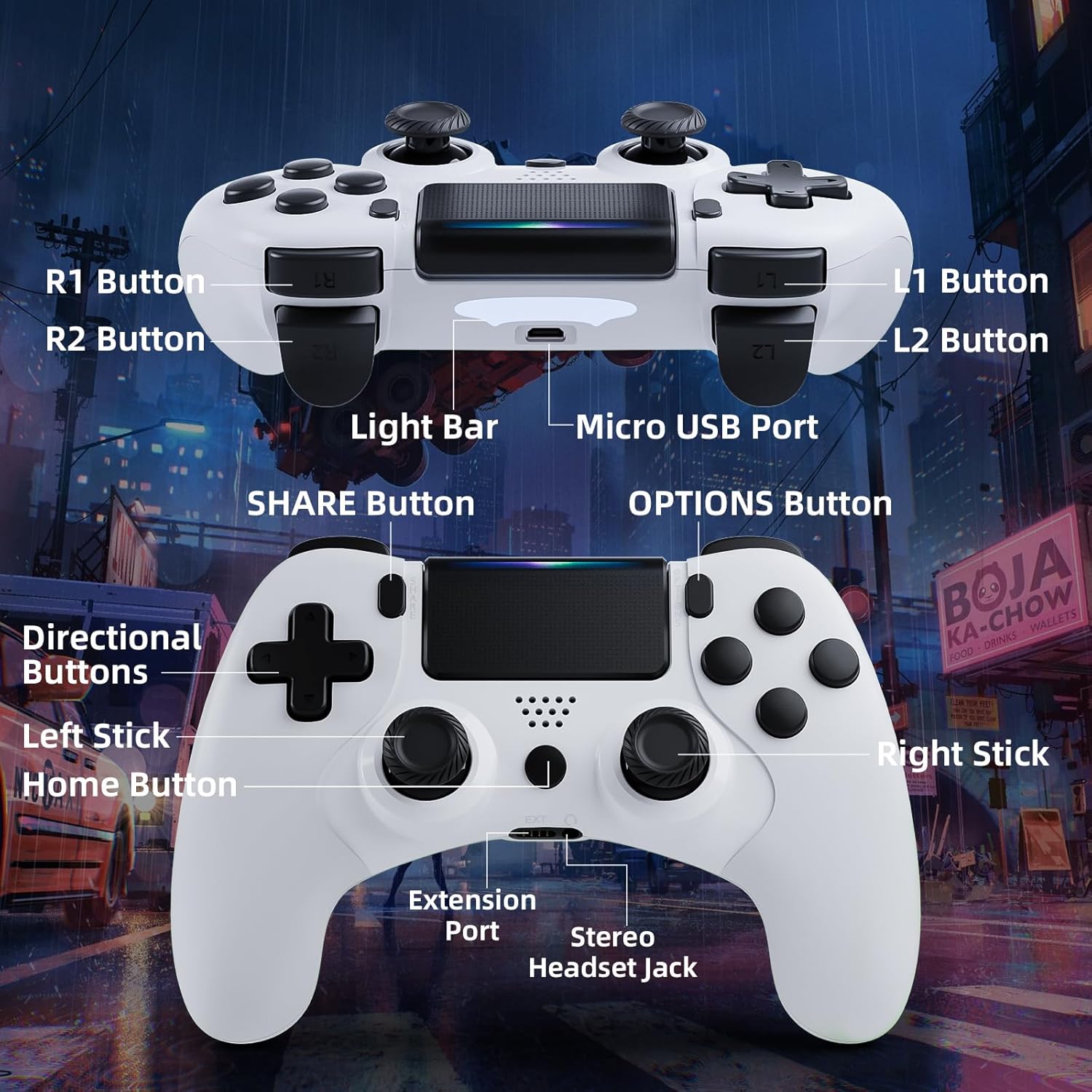
Image: Detailed diagram of the CHEREEKI Wireless Gamepad, highlighting its various buttons and ports for easy identification.
Compoñentes do controlador:
- Botón R1: Right shoulder button.
- Botón R2: Right trigger button.
- Botón L1: Left shoulder button.
- Botón L2: Left trigger button.
- Barra de luz: Indicates controller status and player number.
- Porto micro USB: For charging and initial wired connection.
- Botón COMPARTIR: For sharing gameplay videos and screenshots.
- Botón OPCIÓNS: Access in-game menus and options.
- Botóns direccionais (D-Pad): Para entrada direccional.
- Stick Esquerdo: Analog stick for movement.
- Botón de inicio: PS button, for turning on/off the console and accessing the PS menu.
- Stick dereito: Analog stick for camera control or aiming.
- Porto de extensión: For compatible accessories.
- Conector de auriculares estéreo: Para conectar uns auriculares.
Configuración
1. Initial Connection and Pairing
The controller must be connected via USB cable for the first time to pair with your PS-4 console. This establishes the connection for future wireless use.
- Ensure your PS-4 console is powered on.
- Connect the Micro USB cable to the controller's Micro USB Port and the other end to a USB port on your PS-4 console.
- Preme o Botón de inicio (PS button) on the controller. The light bar will flash and then glow steadily, indicating successful pairing.
- Once paired, you can disconnect the USB cable to use the controller wirelessly.
2. Cargar o GamePad
The CHEREEKI Wireless Gamepad features a built-in 600 mAh rechargeable battery.
- Connect the controller to your PS-4 console or a standard USB charger using the Micro USB cable.
- The light bar will slowly pulse orange while charging.
- A carga completa adoita tardar entre 2 e 3 horas.
- Once fully charged, the light bar will turn off.
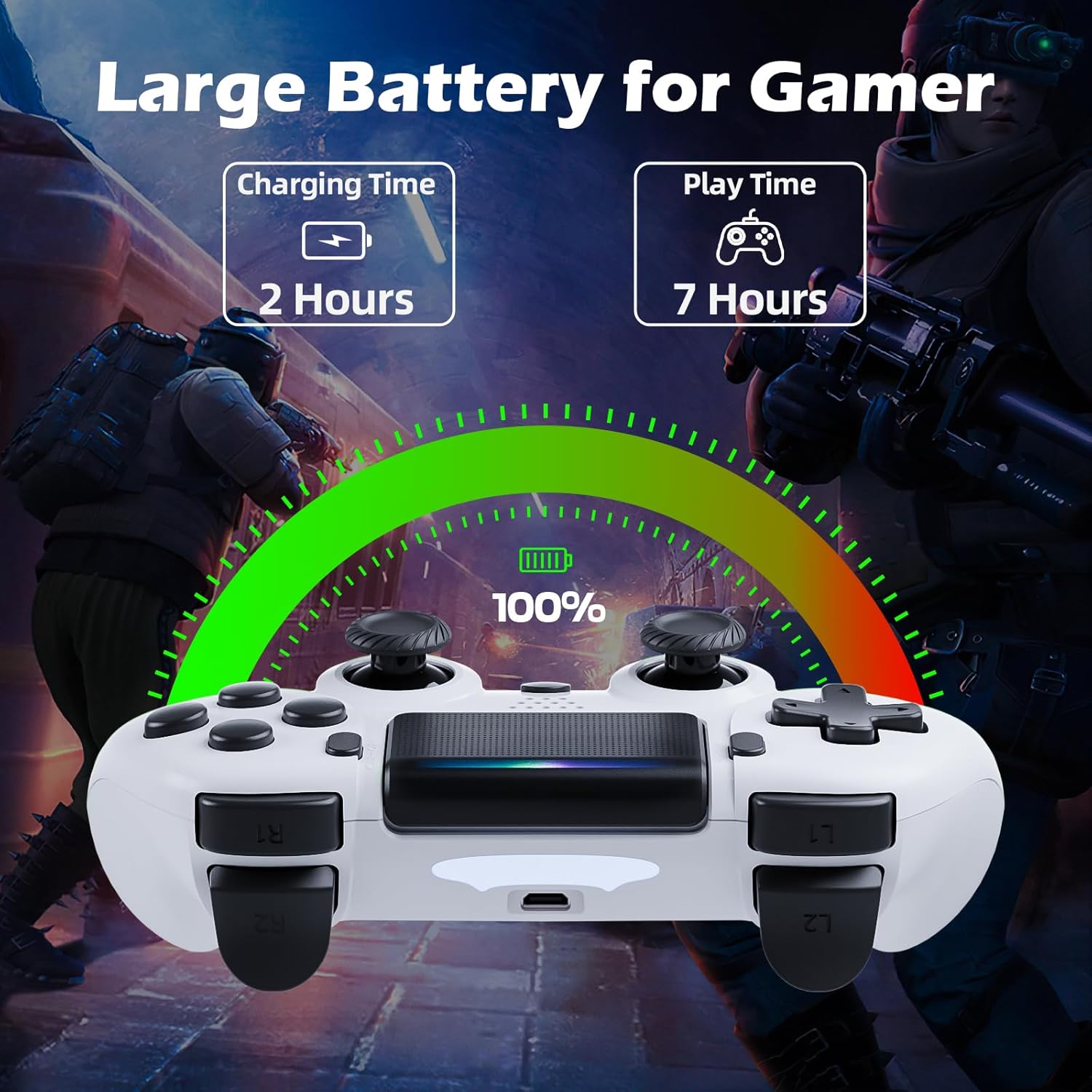
Image: Illustration showing the controller's charging time of 2 hours and play time of 7 hours on a full charge.
3. Compatibilidade
This controller is compatible with PS-4, PS4 Slim, and PS4 Pro consoles.

Image: Visual representation of the controller's wide compatibility with PS4, PS4 Slim, and PS4 Pro consoles.
Instrucións de funcionamento
1. Controis básicos
The gamepad features standard PS-4 button layouts for intuitive gameplay.
- Manetas analóxicas: Use the Left Stick for character movement and the Right Stick for camera control or aiming.
- Botóns direccionais (D-Pad): For precise directional input in menus or specific game actions.
- Botóns de acción (triángulo, círculo, cruz, cadrado): Perform in-game actions as defined by the game.
- Shoulder and Trigger Buttons (L1, L2, R1, R2): Used for various actions like shooting, aiming, or interacting.
2. Motion Sensor (Gyro) Control
The built-in 6-axis motion sensor allows for intuitive control by tilting and rotating the controller.
- In supported games, you can use motion control for actions like steering, aiming, or adjusting viewángulos de inflexión.
- Experiment with tilting the controller to achieve faster turns, adjust viewing angles, or aim more accurately.

Image: Illustration demonstrating the Gyro Motion Control feature, allowing for faster turning, viewing angle adjustment, and accurate aiming.
3. Double Vibration Feedback
Experience immersive gameplay with the dual motor vibration feature, providing tactile feedback for in-game events.
- The controller will vibrate to simulate impacts, explosions, and other in-game sensations.
- Vibration intensity may vary based on game design.

Image: Illustration of the Double Motor Vibration feature, showing the internal motors that provide immersive haptic feedback during gameplay.
4. Funcionalidade do panel táctil
The integrated touchpad allows for new ways to interact with games and navigate menus.
- Tap, swipe, or click the touchpad as required by specific games or system functions.
5. Botón COMPARTIR
The SHARE button allows you to easily share your gameplay moments.
- Preme o Botón COMPARTIR to access the Share menu, where you can upload screenshots or video clips to social media, or start a broadcast.
6. Stereo Headset Jack
Connect your compatible 3.5mm headset to the Stereo Headset Jack for in-game audio and voice chat.
- Plug your headset into the port located at the bottom of the controller.
- Adjust audio settings via the PS-4 system menu.
7. Deseño ergonómico
The controller is designed for comfort during extended gaming sessions.

Image: Depiction of the controller's ergonomic design, showing how it comfortably fits the shape of the hand for prolonged use.
Mantemento
Proper care will extend the life of your CHEREEKI Wireless Gamepad.
- Limpeza: Usa un pano suave e seco para limpar o controlador. Para a sucidade persistente, limpa lixeiramenteampEnxágüe o pano con auga. Evite produtos químicos agresivos ou produtos de limpeza abrasivos.
- Almacenamento: Garde o controlador nun lugar fresco e seco, lonxe da luz solar directa e de temperaturas extremas.
- Coidado da batería: To maintain battery health, avoid fully discharging the controller frequently. If storing for a long period, charge the battery to about 50% every few months.
- Manexo: Avoid dropping the controller or exposing it to excessive force, which can damage internal components.
Resolución de problemas
If you encounter issues with your gamepad, refer to the following common problems and solutions.
| Problema | Causa posible | Solución |
|---|---|---|
| Controller does not connect wirelessly or connection is unstable. | Not properly paired; too far from console; interference. |
|
| Controller does not charge or holds charge for a short time. | Faulty cable; power source issue; battery degradation. |
|
| Os botóns non responden ou están pegañentos. | Debris under buttons; physical damage. |
|
| Sen retroalimentación de vibración. | Vibration disabled in game/system settings; game does not support vibration. |
|
Especificacións
| Característica | Detalle |
|---|---|
| Número de modelo | STK-4006L |
| Compatibilidade | PS-4, PS4 Slim, PS4 Pro |
| Conectividade | Wireless (Bluetooth), Wired (Micro USB) |
| distancia wireless | Ata 8 metros |
| Tipo de batería | Ión de litio integrado |
| Capacidade da batería | 600 mAh |
| Tempo de carga | Aprox. 2-3 horas |
| Tempo de xogo | Ata 7 horas |
| Dimensións (L x W x H) | 17.4 x 13 x 7.6 cm (aprox. 6.85 x 5.12 x 2.99 polgadas) |
| Peso | 210 gramos (aprox. 0.46 libras) |
| Sensores | 6-axis motion sensor (gyroscope, accelerometer) |
| Vibración | Vibración de dobre motor |
| Entrada/Saída | Touchpad, Stereo Headset Jack, Extension Port |
Garantía e Soporte
For warranty information, please refer to the documentation included with your purchase or visit the official CHEREEKI websitio. Os termos e condicións da garantía poden variar segundo a rexión e o vendedor.
If you require technical support or have questions not covered in this manual, please contact the seller or CHEREEKI customer service through their official channels. Provide your model number (STK-4006L) and a detailed description of your issue for faster assistance.