
1. Produto rematadoview
The CAPOXO Wired 1080p Full HD Video Recording Camera is designed for discreet surveillance and recording. This device captures high-definition video with audio, features motion detection, and includes a night lamp for low-light conditions. It operates without Wi-Fi, storing recordings directly onto a memory card for easy access.
This manual provides detailed instructions for setting up, operating, and maintaining your CAPOXO camera to ensure optimal performance.
2. Contido do paquete
Verifica que todos os elementos estean presentes no teu paquete:
- CAPOXO Wired 1080p Full HD Video Recording Camera
- Cable USB
- Manual de usuario
Nota: A Micro SD card (16GB, 32GB, or 64GB Class 10 recommended) and a 5V/1A charger are not included and must be purchased separately.
3. Características do produto
- Full HD 1080p Video Recording: Captures clear, high-definition video footage.
- Gravación de audio: Grava audio xunto co vídeo.
- Detección de movemento: Automatically triggers video recording when motion is detected.
- Noite Lamp Capacidade: Equipped with white LED lights for recording in low-light or dark conditions.
- Gravación continua: Records directly to a Micro SD card (not included).
- Fácil configuración: Wired operation, no complex Wi-Fi configuration required.
- Deseño portátil: Compact and easy to carry or clip.
- Lente xiratoria: 90° rotatable lens for wider viewángulos de inflexión.

Image: The CAPOXO camera featuring its 90-degree rotatable lens, allowing for flexible recording angles.

Imaxe: Primeiro plano view of the CAPOXO camera's rotatable lens mechanism, highlighting its design for wider field of view.
4. Guía de configuración
4.1 Carga da cámara
- Before first use, charge the camera for at least 1 hour.
- Connect the camera to a 5V/1A charger (not included) using the provided USB cable.
- A luz indicadora de carga acenderase durante a carga e apagarase cando estea completamente cargada.
- A full charge provides up to 3 hours of continuous operation. The camera can also be used while charging for extended recording.
4.2 Inserción da tarxeta Micro SD
- Asegúrese de que a cámara estea apagada.
- Localiza a ranura para tarxetas Micro SD no lateral da cámara.
- Gently insert a Class 10 Micro SD card (16GB, 32GB, or 64GB) into the slot until it clicks into place.
- Para retirala, empurre a tarxeta con coidado de novo ata que saia de golpe.

Image: Diagram showing the CAPOXO camera's various components, including the Micro SD card slot, ON/OFF switch, and recording buttons.
5. Instrucións de funcionamento
5.1 Acendido/Apagado
- Para acender, deslice o botón ON/OFF switch to the "ON" position.
- Para apagar, deslice o botón ON/OFF interruptor á posición "OFF".

Image: A hand demonstrating how to operate the CAPOXO camera, highlighting the easy-to-use ON/OFF switch for one-button recording.
5.2 Gravación de vídeo
- Ensure the camera is powered on and a Micro SD card is inserted.
- Slide the "SAVE -> VIDEO" switch to the "VIDEO" position to start recording.
- The indicator light will flash to confirm recording is in progress.
- To stop recording, slide the "SAVE -> VIDEO" switch back to the "SAVE" position. The video file gardarase na tarxeta Micro SD.
5.3 Gravación de detección de movemento
The camera automatically records 1080p HD videos when motion is detected. This feature is active when the camera is powered on and in recording mode.
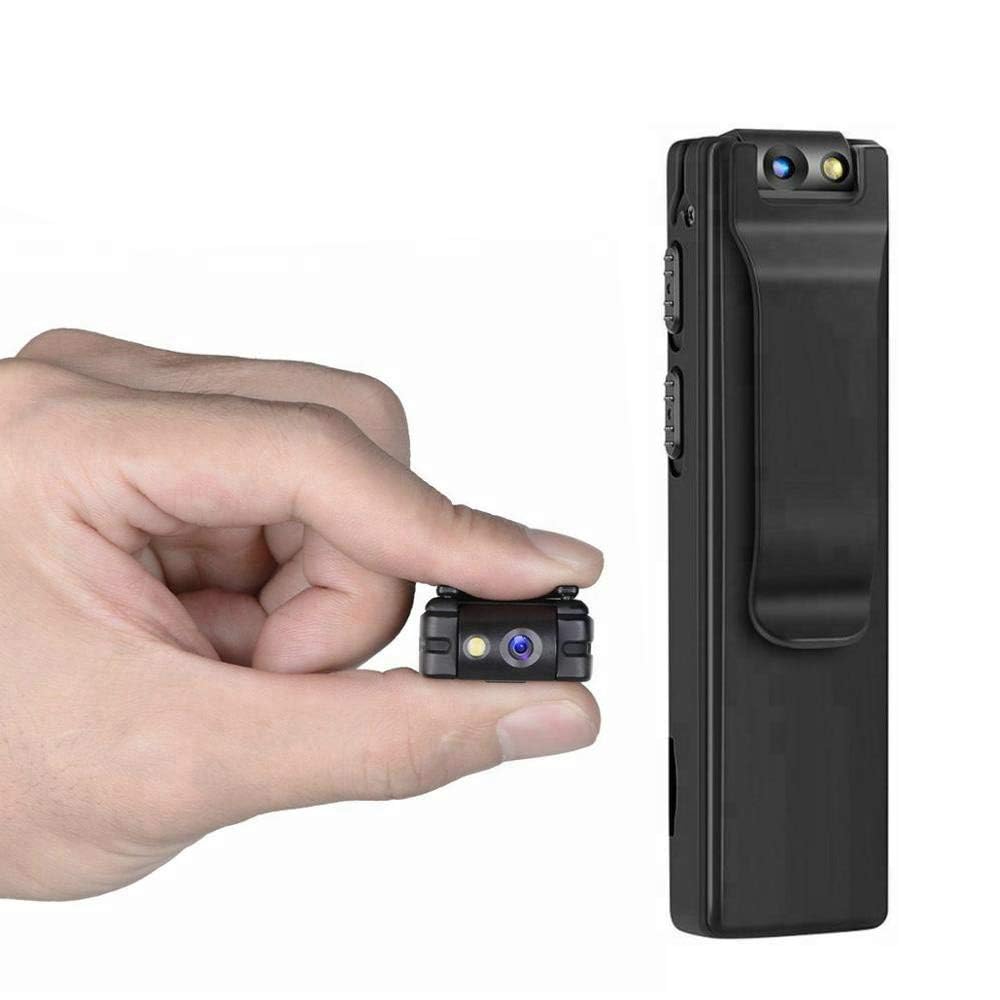
Image: Illustration of the CAPOXO camera's motion detection feature, showing it capturing activity in a room.
5.4 Night Lamp Modo
The camera is equipped with white LED lights to enhance visibility and recording quality in low-light or dark environments.
- To activate the night lamp, slide the "ON -> LAMP" switch to the "LAMP" position.
- To deactivate, slide the switch back to the "ON" position.
5.5 Facer fotos
- Asegúrate de que a cámara estea acendida.
- Press the "PHOTO" button once to take a still image. The indicator light may flash briefly.
- Photos are saved to the Micro SD card.
5.6 Viewgravacións
- Apague a cámara.
- Retire a tarxeta Micro SD da cámara.
- Insert the Micro SD card into a computer's card reader or a compatible device.
- Accede a files on the Micro SD card to view your recorded videos and photos.

Image: The CAPOXO camera shown in different usage environments, including an office, car, laboratory, and home, demonstrating its versatility.

Image: The CAPOXO camera depicted in diverse settings such as business meetings, family gatherings, children playing, and outdoor adventures, illustrating its broad application.
6. Mantemento
- Limpeza: Use a soft, dry cloth to clean the camera body. Do not use liquid cleaners or solvents.
- Coidado das lentes: Gently wipe the lens with a microfiber cloth designed for optics. Avoid touching the lens with bare fingers.
- Almacenamento: Garde a cámara nun lugar fresco e seco, lonxe da luz solar directa e de temperaturas extremas.
- Duración da batería: Para prolongar a duración da batería, evite descargala completamente con frecuencia. Cárguea regularmente, mesmo se non a usa durante períodos prolongados.
- Xestión da tarxeta SD: Regularly back up important recordings and format the Micro SD card periodically to maintain optimal performance and prevent data corruption.
7 Solución de problemas
A cámara non se acende
- Ensure the battery is charged. Connect the camera to a charger for at least 1 hour.
- Verify the ON/OFF switch is in the "ON" position.
Non se pode gravar o vídeo
- Check if a Micro SD card is properly inserted.
- Ensure the Micro SD card has sufficient free space.
- Verify the Micro SD card is Class 10 and within the supported capacity (16GB, 32GB, 64GB).
- Format the Micro SD card if it's a new card or if you encounter issues.
Poca calidade de vídeo
- Ensure the camera lens is clean and free from smudges or dust.
- Check lighting conditions. Use the night lamp en ambientes con pouca luz.
A detección de movemento non funciona
- Ensure the camera is powered on and in recording mode.
- Verify there are no obstructions blocking the camera's view.
Camera Unresponsive (Reset)
- If the camera becomes unresponsive, locate the "RESET" button (often a small pinhole).
- Use a thin object (like a paperclip) to gently press and hold the reset button for a few seconds.
- The camera should restart.
8. Especificacións
| Marca | CAPOXO |
| Número de modelo | Capoxo-A-Cctv-Camera |
| Resolución de captura de vídeo | Full HD 1080p |
| Tecnoloxía de conectividade | Wired (USB for charging/data transfer) |
| Tipo de memoria flash | Micro SD (supports 16GB, 32GB, 64GB Class 10) |
| Formato de captura de vídeo | AVI |
| Formato de audio compatible | AAC |
| Características especiais | Motion Detection, Night Lamp, HD Resolution, 90° Rotatable Lens |
| Duración da batería | Ata 3 horas (despois da carga completa) |
| Entrada de carga | 5V/1A (charger not included) |
| Dimensións (LxWxH) | 9 x 2.5 x 1 centímetros |
| Peso do elemento | 250 g |
| Compoñentes incluídos | Camera, USB Cable, Manual |
9. Garantía e soporte
For warranty information or technical support, please refer to the contact details provided with your purchase documentation or visit the official CAPOXO websitio.
Conserve o comprobante de compra para calquera reclamación de garantía.