
1. Introdución
This manual provides detailed instructions for the proper use, setup, operation, and maintenance of your EBTOOLS Bluetooth Headset. Please read this manual thoroughly before using the product to ensure optimal performance and longevity.
2. Produto rematadoview
2.1 Características principais
- Micrófono xiratorio: Easily adjust the microphone to the optimal angle for clear voice capture.
- Tecnoloxía Bluetooth 5.0: Ensures faster, more efficient, and stable wireless connectivity with compatible devices.
- Deseño cómodo: Single-ear design with padded ear cushion and flexible headband for extended wear without discomfort.
- Batería de longa duración: Up to 17 hours of talk time and 200 hours of standby time on a 2-hour charge.
- Compatibilidade universal: Works with laptops, cell phones, PCs, tablets, and other Bluetooth-enabled devices. Ideal for office, home, remote work, call centers, VoIP, and Skype.
2.2 Contido do paquete
Verifica que todos os elementos estean presentes no teu paquete:
- EBTOOLS Bluetooth Headset
- Base de carga
- Cable de carga micro USB
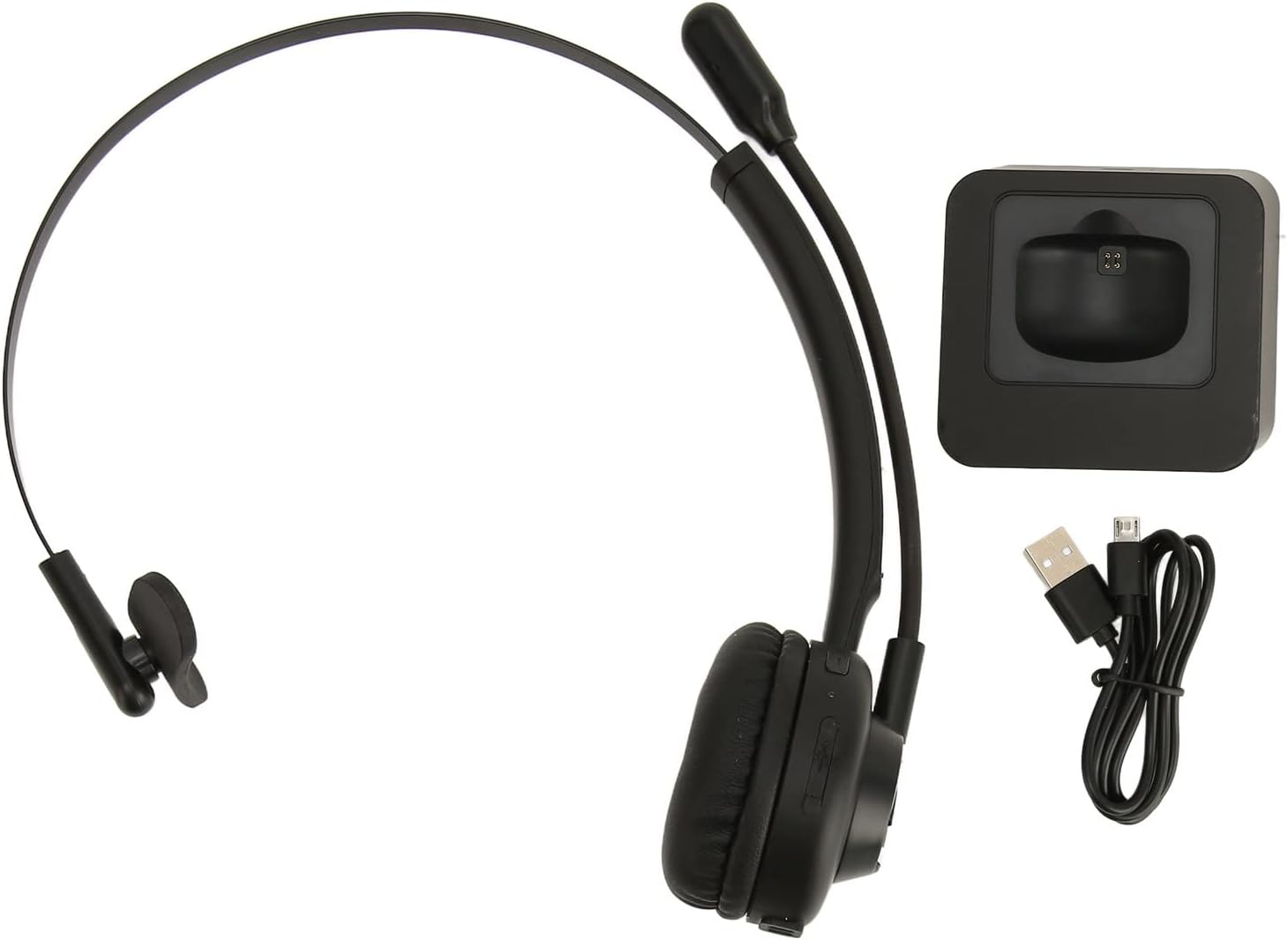
Image: The EBTOOLS Bluetooth Headset, its dedicated charging base, and a Micro USB charging cable, illustrating the complete package contents.
2.3 Headset Controls and Indicators

Image: A detailed diagram highlighting the Micro USB port, LED indicator, Volume Down button, Multifunctional button, and Volume Up button on the EBTOOLS Bluetooth Headset.
- Porto micro USB: For direct charging of the headset.
- Indicador LED: Displays power, charging, and pairing status.
- Botón de volume: Diminúe o volume de audio.
- Multifunctional Button: Controls power, pairing, call answer/end, and music playback.
- Botón Volume +: Aumenta o volume de audio.
3. Configuración
3.1 Carga dos auriculares
Before first use, fully charge the headset. You can charge it using the included charging base or directly via the Micro USB port.
- Connect the Micro USB cable to the charging base and a power source (e.g., computer USB port, USB wall adapter).
- Place the headset onto the charging base, ensuring the charging contacts align. The LED indicator on the headset will show charging status.
- Alternatively, connect the Micro USB cable directly to the headset's Micro USB port and a power source.
- A full charge typically takes approximately 2 hours. The LED indicator will change color or turn off once fully charged.

Imaxe: Primeiro plano view of the headset's earcup, showing the charging contacts designed to connect with the charging base.
3.2 Emparellamento cun dispositivo Bluetooth
To connect your headset to a device:
- Asegúrese de que os auriculares están apagados.
- Manteña premido o Botón multifuncional for approximately 5-7 seconds until the LED indicator flashes red and blue alternately, indicating pairing mode.
- On your device (phone, PC, tablet), enable Bluetooth and search for new devices.
- Select "EBTOOLS Headset" (or similar name) from the list of available devices.
- Once connected, the LED indicator on the headset will typically flash blue slowly or turn solid blue.
- Se se lle solicita un contrasinal, introduza "0000".
3.3 Como usar os auriculares
The headset is designed for comfort and flexibility.
- Adjust the flexible headband to fit comfortably over your head.
- The single ear design allows you to remain aware of your surroundings.
- Rotate the microphone boom to position it close to your mouth for optimal voice clarity. The microphone can be rotated 180 degrees to be worn on either the left or right ear.

Image: A person wearing the EBTOOLS Bluetooth Headset, demonstrating the comfortable fit and the adjustable, rotatable microphone positioned for clear communication.
4. Instrucións de funcionamento
4.1 Encendido/apagado
- Encendido: Manteña premido o Botón multifuncional for approximately 3 seconds until the LED indicator flashes blue.
- Apagado: Manteña premido o Botón multifuncional for approximately 3-5 seconds until the LED indicator flashes red and then turns off.
4.2 Axuste do volume
- Preme o Volume + Botón to increase the listening volume.
- Preme o Volume - Botón para diminuír o volume de audición.
4.3 Xestión de chamadas
- Responder chamada: Prema brevemente o Botón multifuncional when an incoming call rings.
- Finalizar a chamada: Prema brevemente o Botón multifuncional durante unha chamada.
- Rexeitar a chamada: Manteña premido o Botón multifuncional for approximately 2 seconds when an incoming call rings.
- Volver a marcar o último número: Prema dúas veces o Botón multifuncional cando non estea nunha chamada.
4.4 Music Playback (if supported by device)
- Reproducir/Pausa: Prema brevemente o Botón multifuncional.
- Próxima pista: Manteña premido o Volume + Botón.
- Pista anterior: Manteña premido o Volume - Botón.
4.5 Uso do micrófono
The rotatable microphone ensures your voice is captured clearly.
- Adjust the microphone boom to be approximately 1-2 inches from your mouth.
- The microphone can be rotated 180 degrees to allow wearing the headset on either the left or right ear.

Imaxe: Primeiro plano view of the EBTOOLS headset's flexible microphone boom, highlighting its design for optimal voice pickup.
5. Mantemento
5.1 Limpeza
- Limpe os auriculares cun pano suave, seco ou lixeiramente húmidoamp pano.
- Non use produtos químicos agresivos, disolventes de limpeza ou deterxentes fortes.
- Evite a entrada de humidade en calquera abertura.
5.2 Coidado coa batería
- Cargue os auriculares regularmente, mesmo se non os usa con frecuencia, para manter a batería en bo estado.
- Evite descargar completamente a batería con frecuencia.
- Garde os auriculares nun lugar fresco e seco, lonxe de temperaturas extremas.
6 Solución de problemas
Se tes problemas cos auriculares, consulta as seguintes solucións habituais:
| Problema | Posible Solución |
|---|---|
| Os auriculares non se acende. | Ensure the headset is charged. Connect it to the charging base or directly via USB. |
| Non se pode emparellar co dispositivo. | Ensure the headset is in pairing mode (LED flashing red/blue). Turn off and on your device's Bluetooth. Delete previous pairings on your device and try again. Ensure the headset is within range (typically 10 meters). |
| Sen son ou volume baixo. | Increase volume on both the headset and your connected device. Ensure the headset is selected as the audio output device on your computer or phone. Re-pair the headset. |
| O micrófono non funciona. | Ensure the microphone is positioned correctly. Check microphone settings on your connected device to ensure the headset is selected as the input device. |
| Conexión intermitente. | Move closer to your connected device. Avoid obstacles between the headset and device. Reduce interference from other wireless devices. |
7. Especificacións
| Característica | Detalle |
|---|---|
| Nome da marca | EBTOOLS |
| Número de modelo | EBTOOLSrsgvuyg5fc |
| Tecnoloxía de conectividade | Bluetooth 5.0 |
| Peso do elemento | 11.6 onzas |
| Dimensións do paquete | 7.09 x 6.69 x 2.36 polgadas |
| Tempo de conversa | Ata 17 horas |
| Tempo de espera | Ata 200 horas |
| Tempo de carga | Aproximadamente 2 horas |
8. Garantía e soporte
For warranty information or technical support, please refer to the documentation included with your purchase or contact EBTOOLS customer service through the retailer where the product was purchased. Keep your proof of purchase for warranty claims.