
1. Introdución
This manual provides detailed instructions for the installation, operation, and maintenance of your Leadfan 9-inch car radio stereo. This unit is designed to enhance your driving experience with advanced features such as wireless CarPlay, Android Auto, GPS navigation, Bluetooth connectivity, and a high-definition touchscreen. Please read this manual thoroughly before installation and use to ensure proper functionality and safety.
2. Compatibilidade
This car radio stereo is specifically designed for Mazda 3 models manufactured between 2009 and 2013. It includes a CANBUS system for seamless integration with your vehicle's electronics.
Nota importante:
- Before installation, verify your car's model, year, and the shape of the center console to ensure compatibility.
- This car radio is not compatible with vehicles equipped with premium sound systems such as J.B.L, SO.NY Amplifier, or B.ose Speakers.

Confirm your car's version. The image displays compatible and incompatible Mazda 3 center console designs for installation.
3. Contido do paquete
The following items are included in your Leadfan car radio stereo package:
- 9-inch Touchscreen Head Unit
- GPS Module/Antenna
- WiFi Connection Module
- Módulo Bluetooth 5.1
- Antena de radio FM
- Cámara de respaldo AHD
- Steering Wheel Control Interface (CANBUS)
- 2 x portos USB
- Cables de entrada/saída RCA
- External Microphone Jack in RCA Cable
- Cable de alimentación
- Manual de usuario

Detallado view of the head unit dimensions, rear connections, and all included accessories.
4. Configuración e instalación
The Leadfan car radio stereo is designed for a plug-and-play installation for compatible Mazda 3 models. However, professional installation is recommended to ensure correct wiring and functionality, especially for the CANBUS and backup camera connections.
4.1 Comprobacións previas á instalación
- Asegúrese de que o contacto do vehículo estea apagado e a batería desconectada antes de comezar a instalación.
- Confirm all included components are present as per the package contents list.
- Review your vehicle's existing wiring and dashboard layout.
4.2 Pasos de instalación (guía xeral)
- Carefully remove the original car radio and dashboard trim. Refer to your vehicle's service manual for specific instructions.
- Connect the main power harness, RCA cables, USB cables, GPS antenna, and FM radio antenna to the new Leadfan head unit.
- Connect the CANBUS decoder to the vehicle's wiring harness. This enables steering wheel control functionality.
- Install the AHD backup camera (if applicable) and route its video cable to the head unit's reverse input.
- Mount the new 9-inch head unit into the dashboard opening.
- Reconnect the vehicle's battery and test all functions before fully reassembling the dashboard trim.

The Leadfan car radio seamlessly integrated into a compatible Mazda 3 dashboard.
5. Instrucións de funcionamento
5.1 Acendido/apagado e navegación básica
- Preme o botón de acendido para acender ou apagar a unidade.
- Navigate through menus and applications using the 9-inch capacitive touchscreen.
5.2 CarPlay sen fíos e Android Auto
A unidade admite Apple CarPlay sen fíos e Android Auto para unha integración sen fisuras cos teléfonos intelixentes.
- Asegúrate de que o Bluetooth e o Wi-Fi do teu teléfono estean activados.
- On the car stereo, open the CarPlay or Android Auto application.
- Follow the on-screen prompts to pair your smartphone via Bluetooth. Once paired, the system will automatically establish a Wi-Fi connection for CarPlay/Android Auto.
- Use voice control (Siri for CarPlay, Google Assistant for Android Auto) for hands-free operation of navigation, music, calls, and messages.
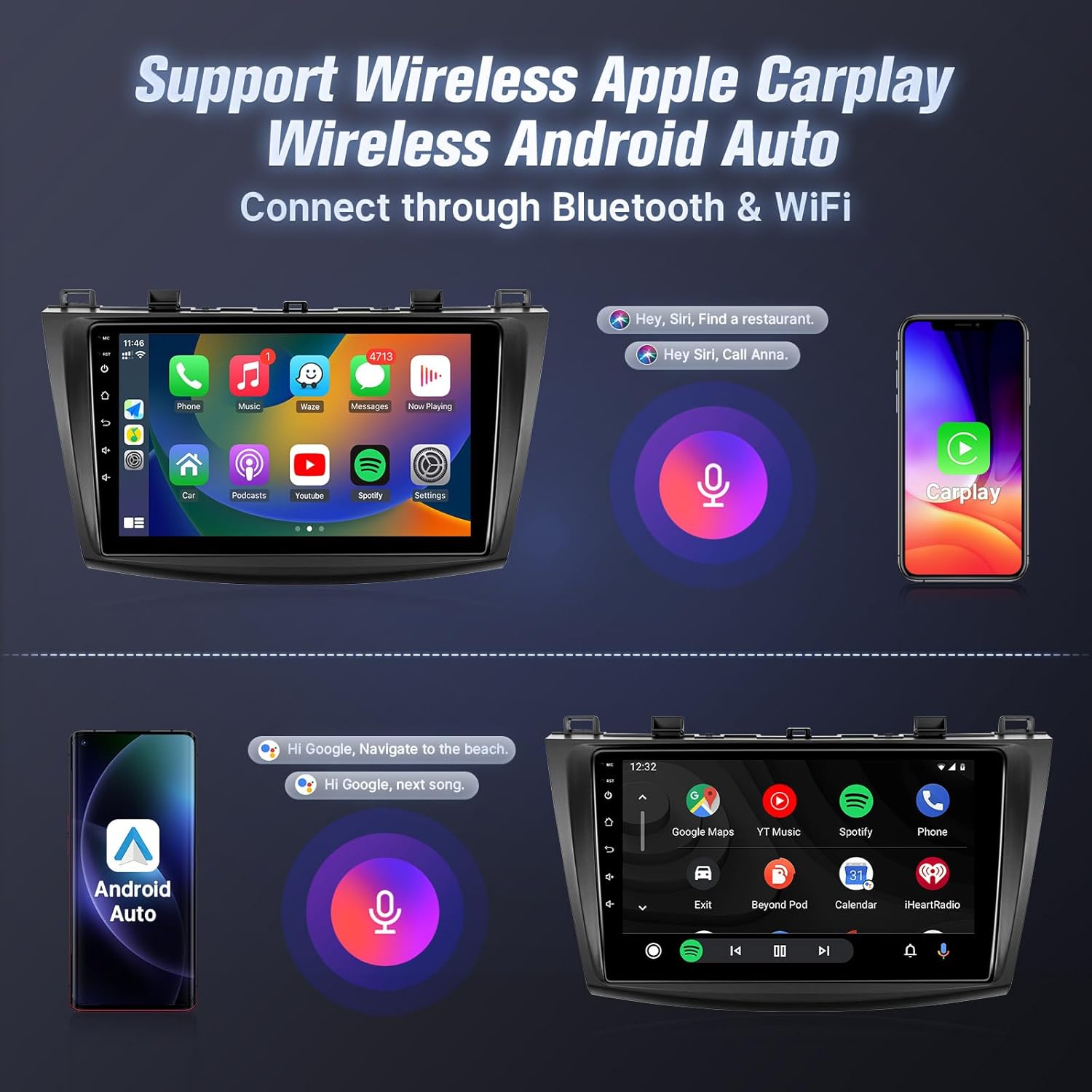
Wireless Apple CarPlay and Android Auto interfaces with voice control.
5.3 Ligazón de espello
Mirror Link allows you to display your smartphone's screen on the car stereo.
- Para dispositivos iOS: Supports one-way wireless connection via Wi-Fi.
- Para dispositivos Android: Supports two-way wired (USB cable) or wireless (Wi-Fi) connection.
- Follow the instructions within the Mirror Link application on the head unit to connect your device.
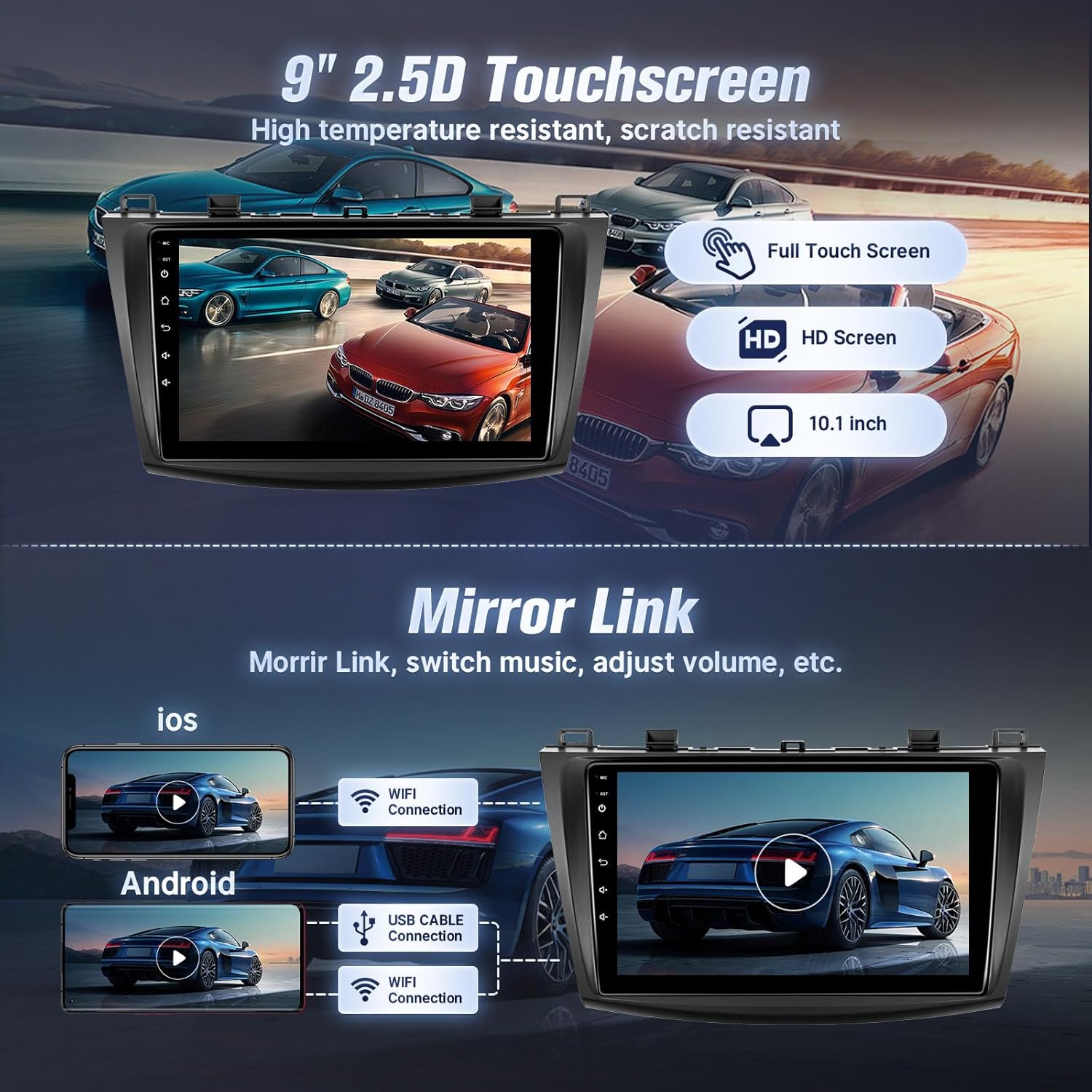
Mirror Link functionality for both iOS and Android devices.
5.4 Conectividade Bluetooth
Conecta o teu teléfono por Bluetooth para facer chamadas mans libres e reproducir música en streaming.
- Go to the Bluetooth settings on the car stereo.
- Activa o Bluetooth no teu smartphone e busca os dispositivos dispoñibles.
- Select the car stereo from your phone's Bluetooth list and confirm pairing.
- Once connected, you can make/receive calls and play music directly from your phone.

Bluetooth interface for calls and music streaming.
5.5 GPS Navigation and Wi-Fi
The unit features built-in GPS for navigation and Wi-Fi for internet access.
- GPS: The stereo comes with a GPS antenna and supports both online and offline map files. You can use pre-installed navigation apps or download others from the app store.
- Wi-Fi: Connect to the internet via your mobile hotspot or a Wi-Fi device to browse online, download apps, and use online navigation services.
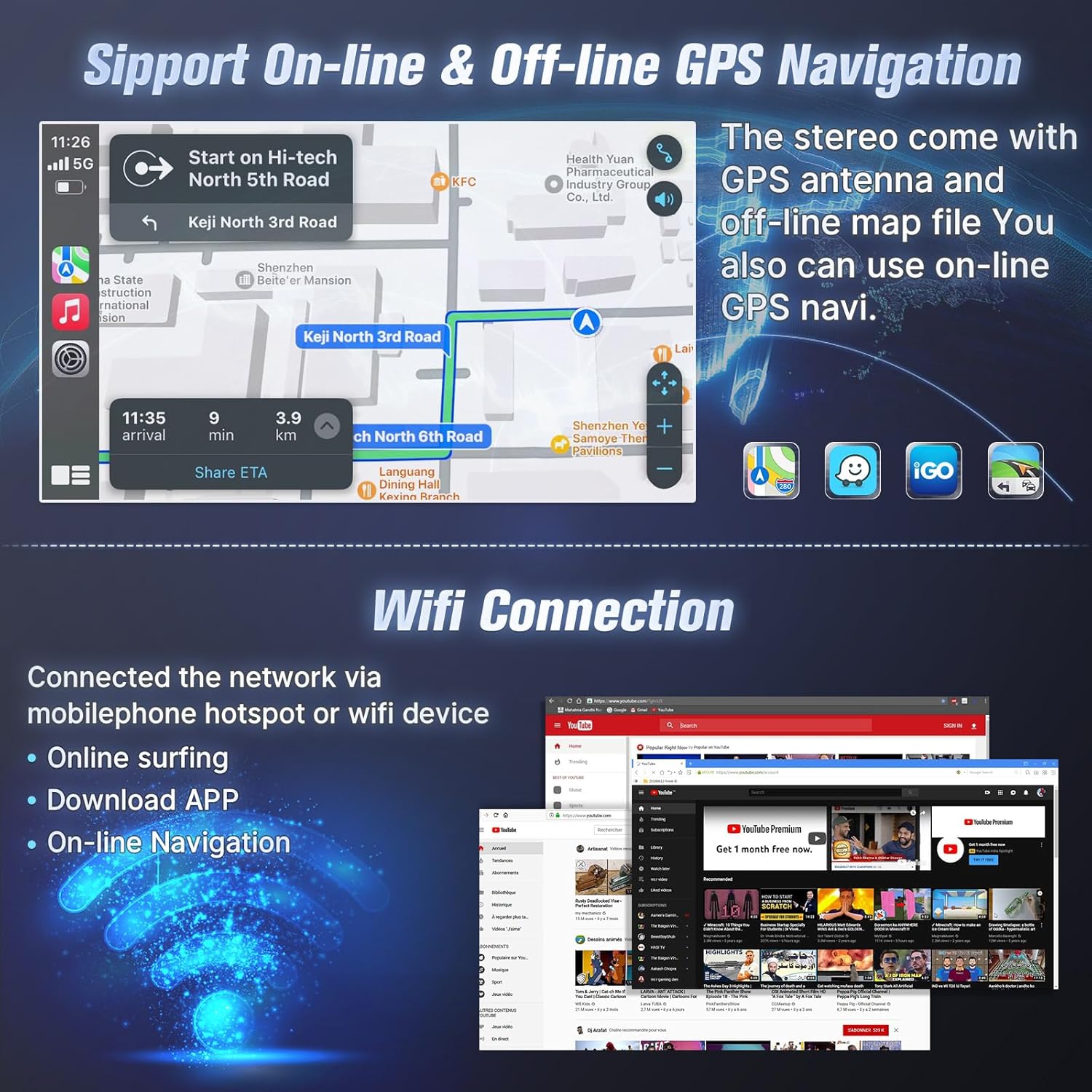
GPS navigation with online/offline map support and Wi-Fi connection for internet access.
5.6 Radio FM
Access local radio stations with the built-in FM tuner.
- Open the FM Radio application.
- Scan for stations automatically or manually tune to your desired frequency.
- Garda as túas emisoras favoritas como predefinicións para acceder a elas rapidamente.

FM Radio interface with tuning and preset options.
5.7 Control do volante (SWC)
After correct CANBUS setup, you can control the car stereo using your vehicle's steering wheel buttons.
- Access the SWC settings in the unit's system menu.
- Follow the on-screen instructions to map your steering wheel buttons to specific functions (e.g., volume up/down, track skip, mode change).

Steering wheel control setup interface.
5.8 EQ Audio Adjustment and UI Themes
- EQ Audio: The unit offers 10-band EQ audio adjustment to customize sound output to your preference. Access this feature in the audio settings.
- Temas da interface de usuario: Choose from 38 different user interface themes to personalize the display's appearance.
5.9 AHD Backup Camera
The included AHD backup camera provides a clear view ao dar marcha atrás.
- When the vehicle is shifted into reverse gear, the screen will automatically display the camera feed.
- The camera features night vision for improved visibility in low-light conditions.

Cámara de respaldo view and physical camera unit.
5.10 Modo de pantalla dividida
The split-screen feature allows you to run two applications simultaneously on the display.
- While an application is open, long-press the recent apps button or drag an app to one side of the screen (depending on the Android version) to activate split-screen mode.
- Select a second application to run alongside the first.

Voice control and split-screen mode in operation.
6. Mantemento
To ensure the longevity and optimal performance of your Leadfan car radio stereo, follow these maintenance guidelines:
- Limpeza: Use a soft, dry cloth to clean the touchscreen and exterior. Avoid abrasive cleaners or solvents that could damage the screen or finish.
- Actualizacións de software: Periodically check for available software updates to ensure the system runs efficiently and has the latest features. Updates can typically be found through the system settings or the manufacturer's websitio.
- Temperatura: Avoid exposing the unit to extreme temperatures. Prolonged exposure to direct sunlight or very cold conditions can affect performance and lifespan.
- Conexións: Ensure all cables and connections remain secure. Loose connections can lead to intermittent issues.
7 Solución de problemas
If you encounter issues with your car radio stereo, refer to the following troubleshooting tips:
| Problema | Causa posible | Solución |
|---|---|---|
| A unidade non se acende | Loose power connection, blown fuse, incompatible wiring. | Check power cables and fuse. Ensure correct wiring. Consult a professional installer if needed. |
| Sen saída de son | Volume too low, incorrect audio source, loose speaker wires, incompatible premium sound system. | Increase volume. Select correct audio source. Check speaker connections. Confirm car does not have a premium sound system. |
| CarPlay/Android Auto non se conecta | Bluetooth/Wi-Fi off on phone, incorrect pairing, phone software issue. | Ensure phone's Bluetooth/Wi-Fi is on. Re-pair the device. Restart phone and head unit. |
| Sinal GPS perdido ou impreciso | GPS antenna obstruction, loose antenna connection, outdated maps. | Asegúrate de que a antena GPS teña unha visión clara view of the sky. Check antenna connection. Update map data if necessary. |
| Backup camera not displaying | Loose video cable, incorrect wiring to reverse trigger, faulty camera. | Check camera video cable connection. Verify reverse trigger wire is correctly connected. Test camera functionality. |
| Bluetooth/Internet connection unstable | Interference, weak signal, device compatibility. | Move away from sources of interference. Ensure strong Wi-Fi/hotspot signal. Re-pair Bluetooth device. |
If the problem persists after attempting these solutions, please contact Leadfan customer support for further assistance.
8. Especificacións
- Tamaño da pantalla: 9 polgadas
- Resolución: 1080*600 (IPS Touchscreen)
- Sistema operativo: Android 12
- RAM: 2 GB
- ROM: 32 GB
- Procesador: CPU de 4 núcleos
- Conectividade: Bluetooth 5.1, Wi-Fi
- GPS: Built-in, supports online and offline maps (North America map type)
- Características especiais: Wireless CarPlay, Android Auto, Mirror Link, FM Radio, AHD Backup Camera (waterproof, night vision), Steering Wheel Control, Split Screen, 10-band EQ Audio Adjustment, Multiple UI Themes, Dual USB ports, RCA Input/Output, External Microphone Jack.
- Peso do artigo: 3.1 libras
- Dimensións do produto: 10.9 x 3.8 x 13.5 polgadas
- Tipo de montaxe: Montaxe do panel de control

Internal specifications including processor, RAM, and ROM.
9. Garantía e soporte
Leadfan provides comprehensive support for your car radio stereo:
- Garantía: 12 months after-sales support and replacement available within 12 months.
- Garantía de devolución do diñeiro: 30 days money back service.
- Soporte técnico: 24-hour after-sales technical support to assist with installation and operation problems.
Como contactar co servizo de asistencia:
For installation or technical assistance, please follow these steps:
- Vaia á páxina do produto en Amazon.
- Click on the 'Leadfan' store link.
- Click the 'Ask a question' button.
- Provide details of your installation or operation questions, including pictures or videos if helpful.
The Leadfan support team aims to respond within 24 hours.

Steps to contact Leadfan customer support for assistance.