
XIAOMI X20 Pro EU (BHR8859EU)
Xiaomi Robot Vacuum X20 Pro EU
Manual de usuario
Introdución
The Xiaomi Robot Vacuum X20 Pro EU is an intelligent all-in-one cleaning solution designed to simplify home maintenance. It combines powerful suction with high-speed rotating mops and advanced obstacle avoidance technology to effectively remove dust, dirt, and spills. This manual provides essential information for setting up, operating, maintaining, and troubleshooting your robot vacuum to ensure optimal performance and longevity.
Información de seguridade
Siga sempre as seguintes precaucións de seguridade para evitar lesións ou danos no dispositivo:
- Lea atentamente todas as instrucións antes do primeiro uso.
- Do not allow children or pets to operate the robot vacuum.
- Ensure the charging station is placed on a flat, stable surface against a wall, with clear space around it.
- Manteña o cabelo, a roupa solta, os dedos e todas as partes do corpo lonxe das aberturas e das partes móbiles.
- Do not use the robot vacuum to pick up large objects, sharp objects, or burning/smoking materials.
- Emprega só o adaptador de corrente e a estación de carga orixinais que se inclúen co dispositivo.
- Do not expose the robot vacuum or charging station to water or other liquids.
- Regularly clean the brushes and sensors to maintain optimal performance.
Produto rematadoview
Familiarize yourself with the main components of your Xiaomi Robot Vacuum X20 Pro EU and its smart base station.

Robot Vacuum and Smart Base Station: The complete system, showing the robot docked in its all-in-one base station. The base station handles automatic mop cleaning, air drying, and dust collection.

Smart Base Station Functionality: An illustration highlighting the internal mechanisms of the smart base station, demonstrating how it cleans the robot's mop pads and empties the dustbin.
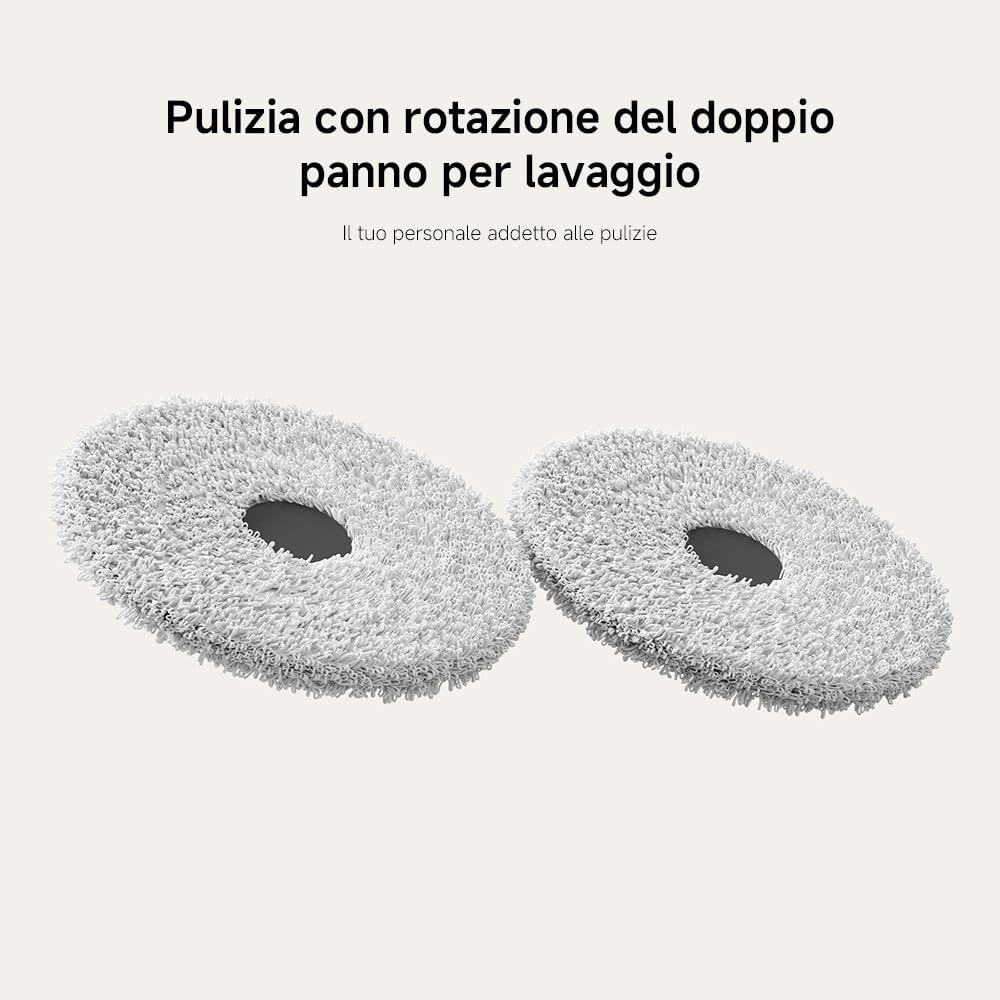
Dual Rotating Mop Pads: Primeiro plano view of the two high-speed rotating mop pads, designed for effective scrubbing and cleaning of hard floors.

Powerful Suction System: Unha parte inferior view of the robot, illustrating the main brush and the powerful 7000Pa suction fan that efficiently collects dust and debris.
Configuración
Desembalaxe:
Carefully remove all components from the packaging. Ensure all accessories are present, including the robot vacuum, smart base station, power cord, and cleaning tools.
Colocación da estación de carga:
Place the smart base station against a wall on a hard, level surface. Ensure there is at least 0.5 meters (1.6 feet) of clear space on both sides and 1.5 meters (4.9 feet) in front of the station for optimal robot navigation and docking.
Carga inicial:
Connect the power cord to the smart base station and plug it into a power outlet. Place the robot vacuum onto the charging contacts of the base station. The robot will automatically begin charging. For first-time use, it is recommended to fully charge the robot before operation.
App Connection (Mi Home/Xiaomi Home App):
- Download the Mi Home/Xiaomi Home app from your device's app store.
- Abre a aplicación e crea ou inicia sesión na túa conta de Xiaomi.
- Toca a icona "+" na esquina superior dereita para engadir un dispositivo.
- Select the Xiaomi Robot Vacuum X20 Pro EU from the list of available devices or scan the QR code on the robot.
- Follow the in-app instructions to connect the robot to your Wi-Fi network. This will enable remote control and advanced features.

Remote App Control: A visual representation of the Mi Home/Xiaomi Home app interface, demonstrating how users can view the cleaning map and control the robot remotely.
Instrucións de funcionamento
Your robot vacuum offers various intelligent features for efficient cleaning.
Starting and Stopping Cleaning
- Comeza a limpeza: Press the power button on the robot or use the Mi Home/Xiaomi Home app to initiate a cleaning cycle. The robot will automatically return to its base station upon completion.
- Pausa / Reanudar: Press the power button once during cleaning to pause. Press again to resume.
- Deixar de limpar: Press and hold the power button for a few seconds to stop the current cleaning cycle and send the robot back to its base station.
Modos de limpeza
The robot supports multiple cleaning modes to suit different needs, configurable via the app.

Catro modos de limpeza: An image depicting the robot vacuum in different operational scenarios, illustrating its versatility across various cleaning requirements.
- Só aspiradora: Para a recollida de residuos secos.
- Só fregona: For wet cleaning with the rotating mop pads.
- Aspirar e fregar: Aspiración e fregado simultáneos para unha limpeza completa.
- Custom Zones: Define specific areas for cleaning or no-go zones within the app.
Cartografía e navegación
Equipped with LDS laser navigation and advanced obstacle avoidance, the robot efficiently maps your home and plans optimal cleaning routes.

Navegación láser SUD: A diagram illustrating the robot's 360° laser scanning capability to create precise maps of your home for efficient path planning.

High-Precision Obstacle Avoidance: The robot demonstrating its ability to detect and navigate around objects, ensuring thorough cleaning without collisions.

Intelligent Carpet Recognition: The robot automatically lifts its mop pads by 10mm when detecting carpets, preventing wetting and increasing suction power for deep carpet cleaning.
Control de voz
Integrate your robot vacuum with smart home assistants for convenient voice commands.

Works with Amazon Alexa or Google Assistant: A user interacting with the robot vacuum using voice commands, demonstrating seamless integration with popular smart home platforms.
The Xiaomi Robot Vacuum X20 Pro EU is compatible with Amazon Alexa and Google Assistant. Link your device through the respective app settings to enable voice commands such as "Start cleaning" or "Return to dock."
Mantemento
Regular maintenance ensures your robot vacuum operates at peak efficiency.
Recollida automática de po

Recollida automática de po: An illustration showing the robot vacuum's dustbin being automatically emptied into the base station's dust bag, allowing for up to 75 days of hands-free operation.
The smart base station features dual auto-emptying ducts that transfer dust from the robot's dustbin to a large 2.5L dust bag in the station. This allows for up to 75 days of hands-free dust disposal. Replace the dust bag when full.
Lavado e secado automáticos de mopas

Automatic Mop Washing and Hot Air Drying: The base station's internal mechanism for automatically washing the mop pads with a powerful water flow and then drying them with hot air to prevent mold and odors.
The base station automatically washes the mop pads during and after cleaning cycles. After washing, it uses hot air drying to prevent mold and odors. Ensure the clean and dirty water tanks are properly maintained.
Xestión de tanques de auga

Depósito de auga grande de 4 l: The large capacity clean water tank within the base station, which automatically refills the robot's water tank, enabling it to clean up to 120 m² on a single fill.
The base station features a 4L clean water tank and a 3.8L dirty water tank. Regularly empty the dirty water tank and refill the clean water tank to ensure continuous mopping functionality. The large capacity allows for cleaning up to 120 m² per refill.
Removable Cleaning Tray

Removable Cleaning Tray: The easily detachable cleaning tray from the base station, designed for simple cleaning and maintenance to prevent residue buildup.
The cleaning tray within the base station is removable for easy cleaning. Regularly remove and rinse the tray to prevent dirt and bacteria buildup, ensuring a hygienic cleaning process.
General Cleaning and Replacement
- Cepillo principal: Remove and clean the main brush regularly to remove tangled hair and debris. Replace every 6-12 months depending on usage.
- Cepillo lateral: Check for wear and tear. Replace if damaged or excessively worn.
- Filtros: Clean the dustbin filter frequently. Replace the filter every 3-6 months.
- Sensores: Wipe all sensors (cliff sensors, wall sensors, LDS sensor) with a clean, dry cloth to ensure accurate navigation.
- Contactos de carga: Clean the charging contacts on both the robot and the base station with a dry cloth.
Resolución de problemas
| Problema | Causa posible | Solución |
|---|---|---|
| O robot non arranca nin responde. | Batería baixa; interruptor de alimentación apagado; robot atascado. | Charge the robot; ensure power switch is on; clear any obstructions. |
| O robot non pode volver á estación de carga. | Charging station obstructed; robot too far; dirty charging contacts. | Clear area around station; manually place robot closer; clean contacts. |
| Mal rendemento de limpeza. | Full dustbin; tangled brushes; dirty filters; worn mop pads. | Empty dustbin; clean brushes; clean/replace filters; replace mop pads. |
| O robot quédase atascado con frecuencia. | Too many obstacles; dark surfaces; dirty sensors. | Clear clutter; use virtual walls/no-go zones; clean sensors. |
| As fregonas non limpan eficazmente ou deixan raias. | Dirty water tank full; clean water tank empty; worn mop pads. | Empty dirty water tank; refill clean water tank; replace mop pads. |
Especificacións
| Característica | Detalle |
|---|---|
| Marca | XIAOMI |
| Número de modelo | BHR8859EU |
| Cor | Branco |
| Dimensións (L x W x H) | 41 x 65 x 43 cm (Base Station); 34L x 42W x 56.3H cm (Robot) |
| Peso | 12.3 quilogramos |
| Potencia de succión | 7000 Pa |
| Duración da batería | Up to 160 minutes (Standard mode) |
| Capacidade da batería | 5200 mAh |
| Capacidade do depósito de auga limpa | 4 litros |
| Capacidade do depósito de auga sucia | 3.8 litros |
| Dust Bag Capacity (Base Station) | 2.5 litros (ata 75 días mans libres) |
| Nivel de ruído | 60 dB |
| Tipo de navegación | Navegación láser SUD |
| Características especiais | Automatic Dust Collection, Automatic Mop Washing & Drying, Intelligent Mop Lifting, Obstacle Avoidance, Multi-floor Mapping |
| Compatibilidade | Mi Home/Xiaomi Home App, Amazon Echo, Google Home |

Long-Lasting 5200 mAh Battery: An image emphasizing the robot's powerful 5200 mAh battery, capable of managing large homes with extended cleaning sessions.
Garantía e Soporte
Your Xiaomi Robot Vacuum X20 Pro EU comes with a manufacturer's warranty. Please refer to the warranty card included in your product packaging for specific terms and conditions.
- Dispoñibilidade de pezas de reposición: Spare parts are available for at least 2 years from the date of purchase.
- Soporte técnico: For technical assistance, troubleshooting beyond this manual, or warranty claims, please contact Xiaomi customer support through their official website or the Mi Home/Xiaomi Home app.
- Recursos en liña: Visita o Xiaomi oficial website for updated FAQs, video tutorials, and the latest software updates for your device.
Ask a question about this manual
Ask about setup, troubleshooting, compatibility, parts, safety, or missing instructions. Manuals+ will review the question and use this page’s manual context to help answer it.