
M5Stack M5StickC Plus2
M5Stack M5StickC PLUS2 User Manual
Modelo: M5StickC Plus2
Marca: M5Stack
1. Introdución
The M5Stack M5StickC PLUS2 is a compact and versatile IoT development kit, featuring the ESP32-PICO-V3-02 chip. Designed for rapid prototyping and integration into various projects, it offers robust BLE and WiFi connectivity, making it ideal for applications in IIoT, home automation, smart retail, and STEM education. This manual provides essential information for setting up, operating, and maintaining your M5StickC PLUS2 device.

Figure 1.1: M5StickC PLUS2 Development Kit with Watch Accessories. The image displays the main M5StickC Plus2 unit, a USB-C cable, a watch strap, and two types of mounting brackets (Wall and Brick).
2. Contido do paquete
Verifica que todos os elementos estean presentes no teu paquete:
- 1 x M5StickC PLUS2 Unit
- 1 x Watch Strap
- 1 x USB-C Cable (50cm)
- 1 x WALL Mounting Bracket
- 1 x BRICK Mounting Bracket

Figure 2.1: Detailed breakdown of M5StickC PLUS2 Watch Kit components. Labels indicate M5StickC Plus2, USB-C 50CM cable, Watch Belt, BRICK mount, WALL mount, and key internal components like ESP32-PICO-V3-02, 8M FLASH, 2M PSRAM, CH9102, MPU6886, RTC BM8563, ST7789V2-1.14" display, built-in buzzer, IR transmitter, 200mAh battery, and SPM1423-PDM MIC.
3. Configuración
3.1 Carga inicial
Before first use, fully charge the M5StickC PLUS2 using the provided USB-C cable. Connect the cable to the device's USB-C port and the other end to a standard USB power adapter (5V @ 500mA recommended) or a computer's USB port. The device has a 200mAh battery.
3.2 Conectando a un ordenador
To program or configure the M5StickC PLUS2, connect it to your computer using the USB-C cable. You may need to install appropriate drivers (e.g., CP210X or CH9102 drivers, depending on the specific USB-to-serial chip) for your operating system to recognize the device.
3.3 Configuración do software
The M5StickC PLUS2 supports various development environments, including Arduino IDE, MicroPython (UIFlow), and ESP-IDF. Refer to the official M5Stack documentation for detailed instructions on setting up your preferred development environment and flashing firmware.
- Arduino IDE: Install the ESP32 board package and M5Stack libraries.
- UIFlow (MicroPython): Use the M5Burner tool to flash the UIFlow firmware, then program via the UIFlow web IDE.
- ESP-IDF: For advanced users, follow Espressif's ESP-IDF setup guide.
4. Operating the M5StickC PLUS2
4.1 Funcionamento básico
The M5StickC PLUS2 features a 1.14-inch TFT screen and multiple buttons for interaction. The exact functionality of these buttons and the display will depend on the firmware loaded onto the device.
- Encendido/apagado: Typically, a long press of the main button (usually the side button) will power the device on or off.
- Navegación: Short presses of the buttons can be used for menu navigation or triggering specific functions as defined by your program.
4.2 Conectividade
The device supports Wi-Fi and Bluetooth Low Energy (BLE) for wireless communication.
- Wi-Fi: Connect to local Wi-Fi networks to access the internet, communicate with cloud services, or create a local web servidor.
- Bluetooth/BLE: Establish connections with other Bluetooth-enabled devices for data exchange or control.
4.3 Wearable Use
With the included watch accessories, the M5StickC PLUS2 can be worn as a wrist device, enabling portable IoT applications and data collection.

Figure 4.1: M5StickC PLUS2 configured as a wearable device. The image shows the device attached to the orange watch strap and worn on a person's wrist, demonstrating its compact size and portability.

Figure 4.2: Wearable Devices application. This image emphasizes the M5StickC PLUS2's small size and low power consumption, making it suitable for wearable technology.
4.4 Escenarios de aplicación
The M5StickC PLUS2 is versatile and can be used in various applications:
- Sports Activity Monitoring: Utilize its sensors (e.g., MPU6886 6-axis IMU) for tracking movement.
- IoT Controller: Act as a central hub or node in smart home or industrial IoT systems.
- DIY Creation: A flexible platform for custom electronic projects and rapid prototyping.

Figure 4.3: Scope of Application for M5StickC PLUS2. The image illustrates three primary uses: Sports Activity Monitoring (person tying shoelaces), IoT Controller (smart building), and DIY Creation (electronic components on a breadboard).
5. Mantemento
To ensure the longevity and optimal performance of your M5StickC PLUS2, follow these maintenance guidelines:
- Limpeza: Usa un pano suave e seco para limpar o dispositivo. Evita o uso de líquidos ou produtos de limpeza abrasivos.
- Almacenamento: Garde o dispositivo nun lugar fresco e seco, lonxe da luz solar directa e de temperaturas extremas.
- Coidado da batería: Do not expose the battery to high temperatures or puncture it. If the device will not be used for an extended period, charge it to about 50% before storing.
- Evitar danos físicos: Protect the device from drops, impacts, and excessive force.
- Actualizacións de firmware: Regularly check the M5Stack official websitio para actualizacións de firmware e garantir que tes as últimas funcións e correccións de erros.
6 Solución de problemas
If you encounter issues with your M5StickC PLUS2, try the following troubleshooting steps:
- O dispositivo non se acende:
- Ensure the battery is charged. Connect to a power source and wait a few minutes.
- Proba cun cable USB-C ou adaptador de corrente diferente.
- O ordenador non recoñece o dispositivo:
- Install the necessary USB-to-serial drivers (e.g., CP210X or CH9102).
- Proba cun porto USB diferente no teu ordenador.
- Ensure the USB-C cable supports data transfer, not just charging.
- Fallo na carga do firmware:
- Verify that the correct board and port are selected in your IDE.
- Asegúrate de que ningunha outra aplicación estea a usar o porto serie.
- Try holding the boot button (if applicable) while initiating the upload.
- Problemas de conectividade Wi-Fi/Bluetooth:
- Check your code for correct Wi-Fi credentials or Bluetooth pairing procedures.
- Ensure the device is within range of the Wi-Fi router or Bluetooth device.
- Restart the M5StickC PLUS2 and the target network/device.
- Pantalla non se mostra:
- Comprobe se o dispositivo está acendido.
- Verify that your program is correctly initializing and writing to the display.
For more detailed troubleshooting or specific technical support, please visit the official M5Stack documentation or community forums.
7. Especificacións

Figure 7.1: M5StickC PLUS2 Technical Specifications. This image presents a table detailing the resources and parameters of the device, including MCU, Flash, PSRAM, Power input, Buttons, MEMS, Buzzer, and Battery.
| Característica | Parámetro |
|---|---|
| Marca | M5Stack |
| Nome do modelo | M5StickC Plus2 |
| MCU | ESP32-PICO-V3-02 |
| Flash | 8 MB |
| PSRAM | 2 MB |
| Mostrar | 1.14-inch TFT (ST7789V2) |
| IMU | MPU6886 (6-Axis) |
| RTC | BM8563 |
| Zumbador | Integrado |
| Transmisor IR | Si |
| Micrófono | SPM1423-PDM MIC |
| Batería | 200mAh @ 3.7V (Nonstandard Battery) |
| Entrada de enerxía | 5V @ 500mA (USB-C) |
| Conectividade | Wi-Fi, Bluetooth, BLE, HY2.0-4P, 8P@2.54mm |
| Peso do elemento | 2.39 onzas |
| Dimensións do paquete | 4.88 x 2.6 x 0.91 polgadas |
| País de Orixe | China |
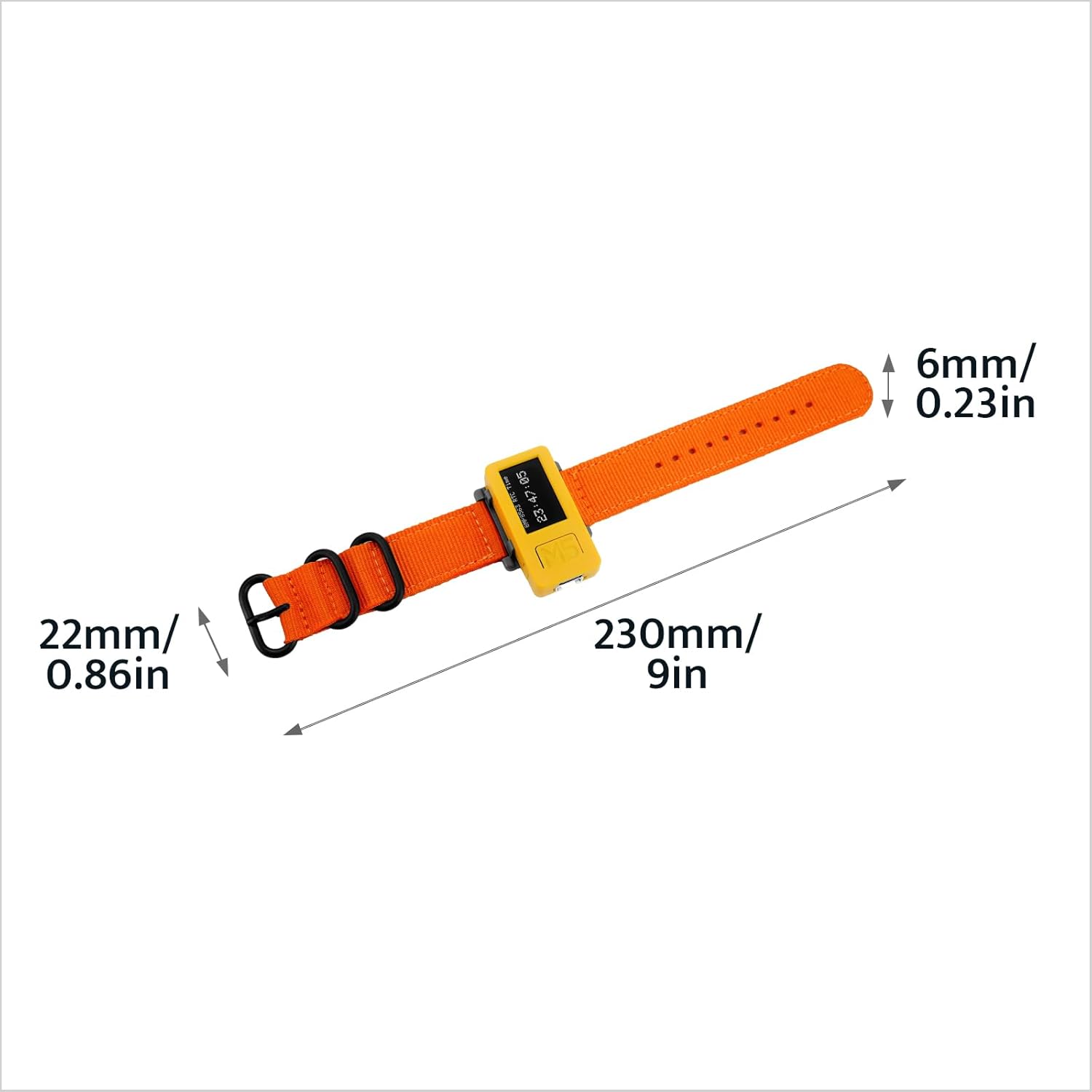
Figure 7.2: Watch Strap Dimensions. The image shows the watch strap with measurements: 6mm/0.23in width, 22mm/0.86in buckle width, and 230mm/9in total length.

Figure 7.3: M5StickC PLUS2 Weight. The device, attached to its watch strap, is shown on a digital scale displaying a weight of 28.8 grams.
8. Garantía e soporte
M5Stack products typically come with a standard manufacturer's warranty. For specific warranty terms and conditions, please refer to the official M5Stack websitio ou póñase en contacto co seu servizo de atención ao cliente.
For technical support, documentation, and community forums, please visit the official M5Stack resources:
- Official M5Stack Websitio: www.m5stack.com
- M5Stack Store on Amazon: Visit M5Stack Store
M5Stack is committed to providing modular, open-source IoT development solutions, empowering innovation and rapid prototyping.
Ask a question about this manual
Ask about setup, troubleshooting, compatibility, parts, safety, or missing instructions. Manuals+ will review the question and use this page’s manual context to help answer it.