
LIECTROUX X6
LIECTROUX X6 Robotic Vacuum Cleaner and Mop User Manual
Modelo: X6
Introdución
This manual provides essential information for the safe operation, maintenance, and troubleshooting of your LIECTROUX X6 Robotic Vacuum Cleaner and Mop. Please read this manual thoroughly before using the product and retain it for future reference. The LIECTROUX X6 is designed to provide efficient and comprehensive cleaning for various floor types, utilizing advanced navigation and smart features.
Produto rematadoview
Características clave
- Poder de limpeza profunda: 6500Pa suction for efficient cleaning of hard floors, pet hair, and carpets.
- LSD LIDAR Navigation: Precise navigation and mapping for systematic cleaning.
- Precision Mapping: Customizable cleaning routes and schedules for personalized cleaning.
- Conectividade Wi-Fi: Control and schedule cleanings remotely through the app or voice assistants.
- Control de voz: Compatible with voice assistants for hands-free control.
- Sistema de filtración avanzado: Captures 99.97% of dust, dirt, and allergens for cleaner air.
- Control remoto e aplicación: Schedule cleanings, adjust settings, and monitor progress remotely.
- Pet Hair and Allergy Friendly: Effectively picks up pet hair, dust, and allergens for a cleaner environment.
Compoñentes incluídos
- 1 x Robotic Vacuum
- 1 x Base de carga
- 1 x adaptador de carga
- 1 x Cubo de lixo e depósito de auga 2 en 1
- 2 x Pairs of Side Brushes
- 2 x Re-usable Wet Mopping Cloth
- 1 x Almofada de fregona
- 1 x cepillo de limpeza
- 2 x filtro HEPA
- 1 x Manual de usuario
Visuais do produto
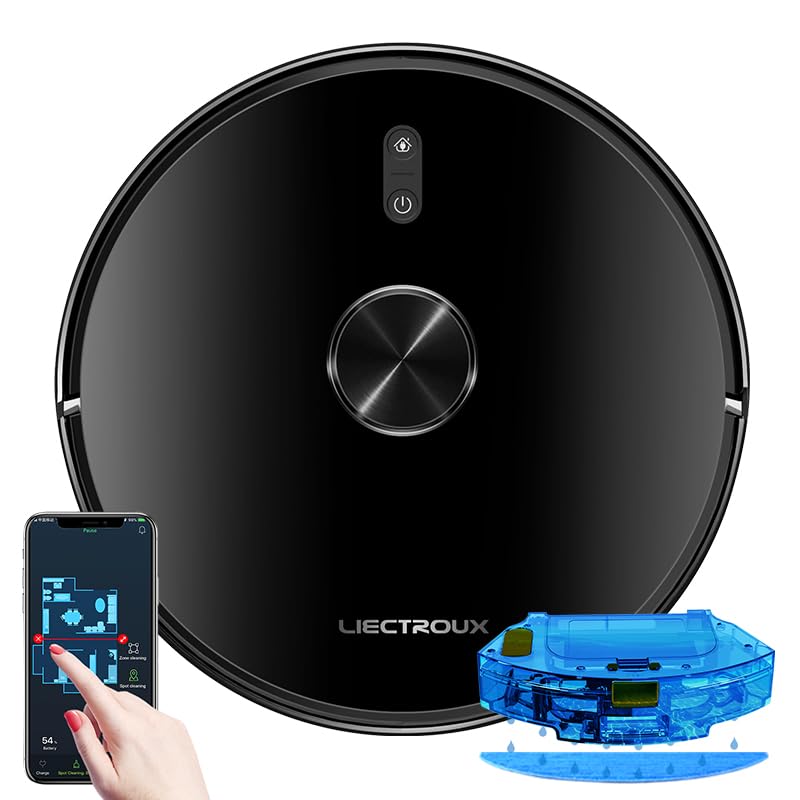
Figure 1: The LIECTROUX X6 Robotic Vacuum Cleaner and Mop, showcasing its sleek design, the accompanying mobile app interface for control, and the integrated water tank for mopping functionality.

Figure 2: Illustration of the integrated dust box and water tank system, highlighting the 400ml large dust box and 235ml large water tank, designed for effortless and worry-free cleaning. It also shows the sweeping, vacuuming, and mopping functions.

Figure 3: The LDS laser radar metering system in action, demonstrating its capabilities for LDS laser navigation, precision mapping, multi-layer map management, Y-routed floor mopping, and custom deep cleaning.

Figure 4: The mobile application interface displaying visual maps for whole house cleaning, including features like house-wide cleaning, routed cleaning, specified-area cleaning, scheduled cleaning tasks, and suction level adjustment.

Figure 5: Depiction of multiple custom cleaning modes for efficient and thorough cleaning, such as Selective Areas Cleaning, Cleaning Order, Restricted Zone Setting, Palm Virtual Blocker, and Areas Cleaning Frequency.

Figure 6: Illustration of the comprehensive breakthrough in Micro Electric Control and Air Pump Water Tank technology, showing different levels of wet mopping: Basic (Low), Normal (Medium), and Deep (High).
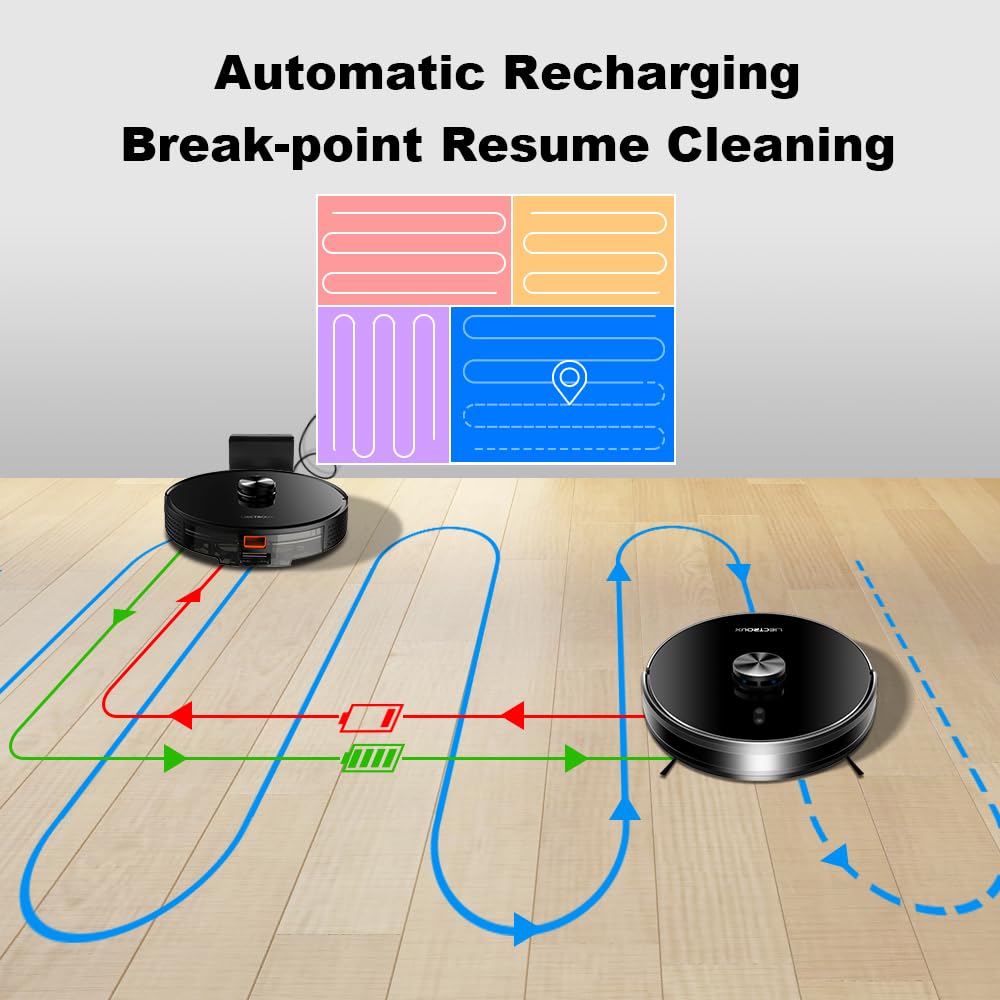
Figure 7: Diagram illustrating the automatic recharging feature and breakpoint resume cleaning, where the robot returns to its charging dock when battery is low and resumes cleaning from where it left off once sufficiently charged.

Figure 8: Visual representation of the Y-routed cleaning pattern, designed for repeated mopping and sweeping, imitating artificial kneeling-type cleaning for thorough stain removal.

Figure 9: Depiction of the multi-layer map management feature, allowing for areas segmentation, areas consolidation, recovering partition, and areas naming across multiple floors (1F to 6F shown).

Imaxe 10: Primeiro plano view of key internal components, including the dustbin with double filters, the Japan-imported brushless motor, and the floating V-shaped roller brush, designed for efficient debris collection.
Configuración
1. Desembalaxe
Carefully remove all components from the packaging. Ensure all included items listed in the "Included Components" section are present. Remove any protective films or packing materials from the robot and charging dock.
2. Colocación da base de carga
- Place the charging dock against a wall on a hard, level surface.
- Ensure there is at least 0.5 meters (1.6 feet) of clear space on both sides of the dock and 1.5 meters (4.9 feet) in front of it.
- Keep the area free of obstacles, such as furniture or power cords, that could obstruct the robot's return to the dock.
- Conecta o adaptador de corrente á base de carga e conéctao a unha toma de corrente.
3. Cargo inicial
Place the robot onto the charging dock, ensuring the charging contacts align. The robot will begin charging automatically. For optimal battery life, fully charge the robot before its first use. The indicator light on the robot will show charging status.
4. Instalación e conexión da aplicación
- Download the official LIECTROUX app from your mobile device's app store (iOS or Android).
- Open the app and follow the on-screen instructions to create an account and add your LIECTROUX X6 robot.
- Asegúrate de que a túa rede Wi-Fi sexa de 2.4 GHz, xa que pode que o robot non sexa compatible con redes de 5 GHz.
- A aplicación guiarache a través da conexión do robot á túa rede wifi doméstica.
Instrucións de funcionamento
1. Comezar un ciclo de limpeza
- Do robot: Prema o botón de acendido do robot unha vez para iniciar un ciclo de limpeza automática.
- Desde a aplicación: Open the LIECTROUX app, select your robot, and tap "Start Cleaning" or choose a specific cleaning mode.
- Control de voz: If connected to a voice assistant (e.g., Amazon Alexa, Google Assistant), use voice commands like "Alexa, tell [Robot Name] to start cleaning."
2. Modos de limpeza
- Limpeza automática: O robot navega e limpa de forma intelixente toda a área accesible.
- Limpeza de manchas: Directs the robot to clean a specific small area intensively. Ideal for spills or concentrated dirt.
- Limpeza de zonas: Use the app to define specific zones on the map for the robot to clean.
- Limpeza programada: Set up recurring cleaning times and days through the app.
- Restricted Zones/Virtual Walls: Use the app to draw virtual boundaries or restricted zones on the map to prevent the robot from entering certain areas.
3. Función de fregado
- Fill the water tank with clean water. Do not use cleaning solutions that are not approved by LIECTROUX.
- Attach the mopping cloth to the water tank.
- Insert the 2-in-1 dustbin and water tank into the robot.
- Select a mopping mode or a combined vacuuming and mopping mode via the app. Adjust water flow levels (Low, Medium, High) as needed.
4. Pausing and Resuming
Press the power button on the robot or use the app to pause a cleaning cycle. Press again to resume. If the robot returns to the charging dock due to low battery, it will automatically resume cleaning from where it left off once sufficiently charged.
5. Returning to Charging Dock
The robot will automatically return to its charging dock when the battery is low or when a cleaning cycle is complete. You can also manually send it back via the app or by pressing and holding the power button on the robot.
Mantemento
Regular maintenance ensures optimal performance and extends the lifespan of your LIECTROUX X6. Always power off the robot before performing any maintenance.
1. Baleirar o colector de lixo
- Press the dustbin release button and pull out the 2-in-1 dustbin and water tank.
- Abre a tapa do colector de lixo e baleira o seu contido nun colector de lixo.
- Frequency: After each use or when full.
2. Limpeza dos filtros
- Retire o filtro HEPA e o filtro de esponxa do colector de po.
- Tap the filters gently to remove dust. Do not wash HEPA filters with water.
- The sponge filter can be rinsed with water and air-dried completely before reinstallation.
- Frequency: Weekly, replace HEPA filter every 3-6 months.
3. Limpeza do cepillo principal
- Flip the robot over and remove the main brush cover.
- Lift out the main brush. Use the provided cleaning tool to remove hair and debris tangled around the brush.
- Frequency: Weekly.
4. Limpeza dos cepillos laterais
- Inspect side brushes for damage or tangled hair.
- If necessary, remove the side brushes (they usually snap on/off) and clean them. Replace if worn.
- Frequency: Monthly, replace every 3-6 months.
5. Limpeza de sensores e contactos de carga
- Wipe the cliff sensors (located on the bottom of the robot), wall sensors, and charging contacts on both the robot and the charging dock with a clean, dry cloth.
- Frequency: Monthly.
6. Cleaning the Mopping Cloth
- Remove the mopping cloth after each mopping cycle.
- Rinse it thoroughly with water and allow it to air dry completely before storing or reattaching.
- Frequency: After each mopping use.
Resolución de problemas
If your LIECTROUX X6 encounters an issue, refer to the following common problems and solutions:
| Problema | Causa posible | Solución |
|---|---|---|
| O robot non se acende nin carga. | Battery is completely depleted; charging contacts are dirty; power adapter not connected. | Ensure robot is properly seated on the charging dock. Clean charging contacts on both robot and dock. Check power adapter connection. |
| O robot quédase atascado con frecuencia. | Obstacles (cables, rugs); cliff sensors dirty; robot stuck on high thresholds. | Clear obstacles from cleaning path. Clean cliff sensors. Use virtual walls/restricted zones for problematic areas. |
| Mal rendemento de succión. | Dustbin full; filter clogged; main brush tangled; suction inlet blocked. | Empty dustbin. Clean/replace filters. Clean main brush and side brushes. Check suction inlet for blockages. |
| O robot non pode conectarse á wifi. | Contrasinal wifi incorrecto; rede de 5 GHz; robot demasiado lonxe do router. | Ensure correct 2.4GHz Wi-Fi network is selected. Re-enter password carefully. Move robot closer to router during setup. |
| Mopping function is not working. | Water tank empty; mopping cloth not attached; water outlet clogged. | Fill water tank. Ensure mopping cloth is properly attached. Check water outlets for blockages. |
For issues not listed here, please refer to the comprehensive troubleshooting section in the full user manual or contact customer support.
Especificacións
| Característica | Detalle |
|---|---|
| Marca | LIECTROUX |
| Nome do modelo | X6 |
| Potencia de succión | 6500 Pa |
| Tipo de navegación | LSD Laser Navigation, Precision Mapping |
| Capacidade do colector de po | 400 ml |
| Capacidade do depósito de auga | 235 ml |
| Tipo de filtro | HEPA |
| Duración da batería | Ata 120 minutos |
| Método de control | Control de aplicacións, control de voz |
| Dimensións do produto | 33L x 33W x 6H Centímetros |
| Peso do elemento | 4 kg |
| Cor | Negro |
Garantía e Soporte
Your LIECTROUX X6 Robotic Vacuum Cleaner and Mop comes with a standard manufacturer's warranty. Please refer to the warranty card included in your product packaging for specific terms and conditions, including warranty period and coverage details.
For technical support, service, or warranty claims, please contact LIECTROUX customer service. Contact information can typically be found on the official LIECTROUX websitio web ou na embalaxe do produto.
It is recommended to register your product online to receive updates and support.
Documentos relacionadosX6


Ask a question about this manual
Ask about setup, troubleshooting, compatibility, parts, safety, or missing instructions. Manuals+ will review the question and use this page’s manual context to help answer it.