
Introdución
Thank you for choosing the GGSTOPWATER Open Ear Headphones, Model JM13. These headphones are designed to provide a comfortable listening experience while maintaining awareness of your surroundings. Featuring Bluetooth 5.4 connectivity and an IPX5 waterproof rating, they are suitable for various activities including sports, gaming, and driving.
Please read this manual carefully to ensure proper use and to maximize the performance and lifespan of your device.
Contido do paquete
Verifica que todos os elementos estean presentes no teu paquete:
- True Wireless Bluetooth Headphones (2 units)
- Headset Charging Compartment (1 unit)
- Cable de carga tipo C (1 unidade)
- Manual de usuario (1 unidade)
- Silicone Lanyard (1 unit)

Produto rematadoview
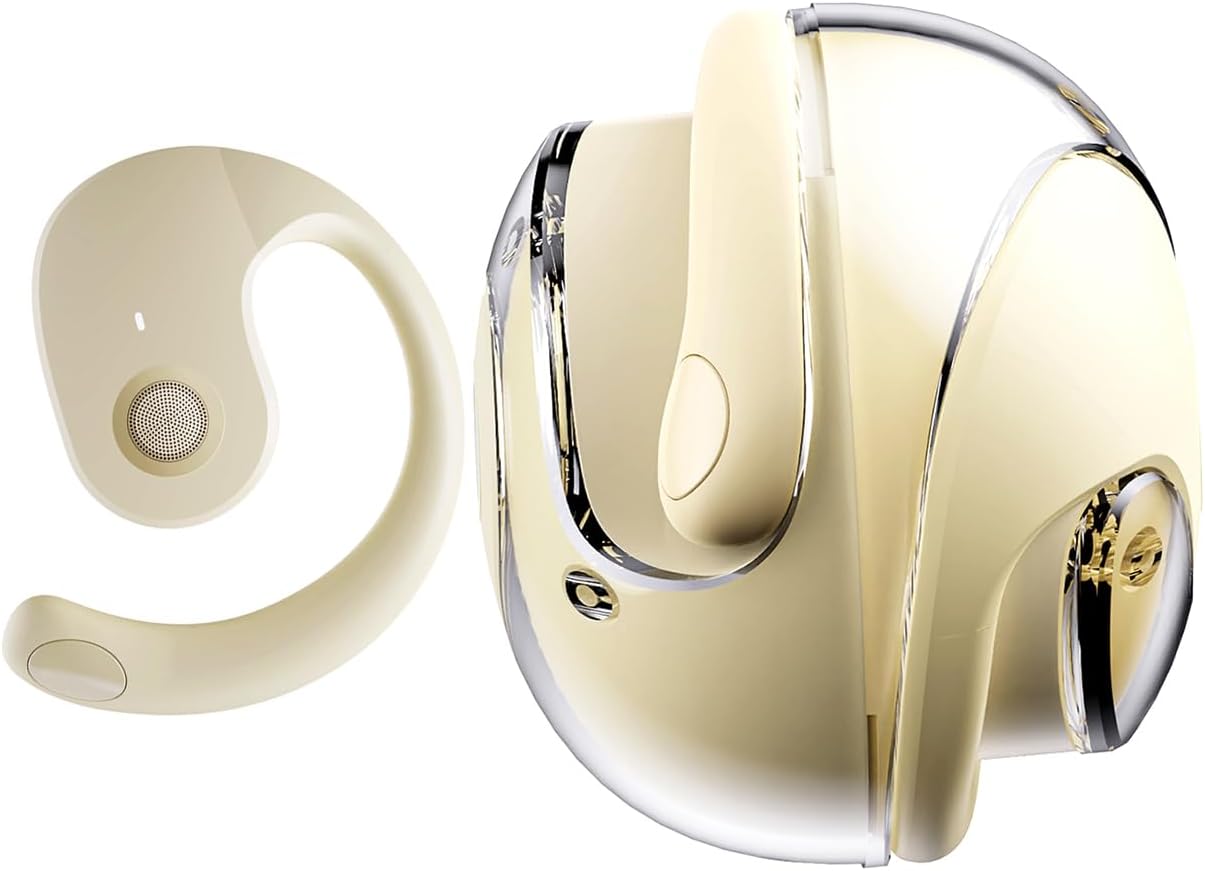
The GGSTOPWATER JM13 headphones feature an open-ear design with ear hooks for a secure and comfortable fit. The charging case is designed for portability and convenience.
Configuración
1. Carga dos auriculares e da funda
Before first use, fully charge the headphones and the charging case. Place the headphones into the charging case. Connect the Type-C charging cable to the charging port on the case and plug the other end into a USB power source.
- Tempo de carga: Aproximadamente 1.5 horas para unha carga completa.
- Headset Usage Time: Ata 4 horas cunha única carga.
- Tempo de espera: Ata 120 horas.


2. Usar os auriculares
The open-ear design with ear hooks ensures a stable and comfortable fit without entering the ear canal.
- Pick up the headset from the charging case.
- Wear it along the back of your ear, positioning the speaker over your ear canal.
- Gently adjust the headphones to a comfortable and secure position.

3. Emparellamento Bluetooth
The headphones utilize Bluetooth 5.4 for a stable and fast connection. They support multi-device linking and are compatible with iOS, Android, and Windows systems.
- Asegúrate de que os auriculares estean cargados e acendidos.
- Abre a configuración de Bluetooth no teu dispositivo (teléfono intelixente, tableta, portátil).
- Busca available devices and select "JM13" from the list.
- Once connected, you will hear a confirmation tone, and the device will show as 'Connected'.

Instrucións de funcionamento
Controis táctiles
The headphones feature intuitive touch controls for managing calls and music playback.

| Acción | Function (Telephone Mode) | Función (Modo de música) |
|---|---|---|
| Prema longamente 2s | Rexeitar a chamada | N/A |
| Fai clic | Responder a chamada entrante | N/A |
| Fai clic de novo | Colgar chamada | N/A |
| Double touch (L) | N/A | Reproducir a canción anterior |
| Double touch (R) | N/A | Xoga a seguinte canción |
| Toco único | N/A | Reproducir/Pausa |
| Prema longamente 3s | Encendido/apagado | Encendido/apagado |
| Three touch (L) | N/A | Baixa o volume |
| Three touch (R) | N/A | Subir o volume |
Conexión de varios puntos
The headphones support connecting to multiple devices simultaneously. This allows you to seamlessly switch between, for example, your smartphone and laptop without needing to re-pair each time. Ensure both devices are paired with the headphones. The headphones will prioritize audio from the active device.
Mantemento
Limpeza
Unha limpeza regular axuda a manter a calidade do son e a hixiene:
- Use a soft, dry, lint-free cloth to wipe the headphones and charging case.
- Non use produtos químicos agresivos, disolventes de limpeza ou deterxentes fortes.
- Evite a entrada de humidade en calquera abertura.
Almacenamento
Cando non os uses, garda os auriculares na súa funda de carga para protexelos do po e doutros danos. Gardaos nun lugar fresco e seco, lonxe de temperaturas extremas.
Resistencia á auga (IPX5)
The headphones are rated IPX5 water-resistant, meaning they can withstand splashes of water and sweat. This makes them suitable for workouts and light rain exposure. However, they are not designed for submersion in water or for use during heavy rain or showering. Ensure the charging port is dry before charging.
Resolución de problemas
If you encounter issues with your GGSTOPWATER JM13 headphones, please refer to the following common solutions:
- Sen enerxía: Asegúrate de que os auriculares e a caixa de carga estean completamente cargados.
- Non se pode emparellar:
- Ensure Bluetooth is enabled on your device and the headphones are within range.
- Turn off and then turn on the headphones.
- Delete "JM13" from your device's Bluetooth list and attempt to re-pair.
- If only one earbud connects, try placing both back in the case, closing it, and then reopening to reset.
- Sen son ou volume baixo:
- Check the volume level on both your connected device and the headphones using the touch controls.
- Ensure the headphones are properly seated on your ears.
- Confirm that the headphones are connected to the correct audio output on your device.
- Controis táctiles que non responden:
- Asegúrate de ter os dedos limpos e secos ao usar os controis táctiles.
- Restart the headphones by placing them in the charging case and taking them out again.
- Problemas de carga:
- Verifica que o cable de carga estea conectado de forma segura tanto á caixa como á fonte de alimentación.
- Try a different Type-C cable and power adapter.
- Ensure the charging contacts on the headphones and inside the case are clean and free of debris.
Se estes pasos non resolven o problema, ponte en contacto co servizo de atención ao cliente.
Especificacións
| Característica | Detalle |
|---|---|
| Nome do modelo | JM13 |
| Marca | GGSTOPAUGA |
| Tecnoloxía de conectividade | Sen fíos (Bluetooth) |
| Versión Bluetooth | 5.4 |
| Colocación do oído | Orella aberta |
| Forma do auricular | Gancho para orella |
| Nivel de resistencia á auga | IPX5 (Water Resistant, Sweatproof) |
| Control de ruído | Cancelación activa de ruído |
| Tipo de controlador de audio | Controlador dinámico (16 mm) |
| Rango de frecuencias | 20 Hz - 20,000 Hz |
| Impedancia | 32 ohmios |
| Método de control | Remote (Touch) |
| Tipo de batería | Polímero de litio |
| Peso do elemento | 4.6 onzas |
| Material | Silicona |
| Dispositivos compatibles | Laptops, Tablets, Cellphones (iOS, Android, Windows) |
Garantía e Soporte
GGSTOPWATER products are manufactured to high-quality standards. For information regarding warranty coverage, please refer to the warranty card included in your product packaging or contact your retailer. Keep your purchase receipt as proof of purchase.
Atención ao cliente
If you have any questions, concerns, or require technical assistance, please contact GGSTOPWATER customer support through the retailer's platform or the official GGSTOPWATER website. Please have your product model (JM13) and purchase details ready when contacting support.