
1. Introdución
Thank you for choosing the LONPOO LP42M Active Bookshelf Speakers. These speakers are designed to deliver high-quality audio with versatile connectivity options, suitable for various home audio setups. This manual provides essential information for safe and efficient use of your new speakers.
2. Información de seguridade
Lea atentamente todas as instrucións de seguridade antes de usar o produto. Garde este manual para futuras consultas.
- Fonte de enerxía: Use só o adaptador de corrente fornecido. Asegúrese de que o volumetage coincide coa súa fonte de alimentación local.
- Ventilación: Non bloquee ningunha abertura de ventilación. Manteña espazo suficiente arredor dos altofalantes para unha correcta circulación do aire.
- Auga e humidade: Do not expose the speakers to water, rain, or moisture. Avoid placing liquid-filled objects on or near the speakers.
- Calor: Keep the speakers away from heat sources such as radiators, heat registers, stoves, or other heat-producing appliances.
- Limpeza: Unplug the speakers from the power outlet before cleaning. Use a soft, dry cloth. Do not use liquid cleaners or aerosol cleaners.
- Servizo: Non intente atender este produto vostede mesmo. Remita todo o servizo a persoal de servizo cualificado.
3. Contido do paquete
Verifica que todos os elementos estean presentes no paquete:
- LONPOO LP42M Active Bookshelf Speaker Pair (1 powered speaker, 1 passive speaker)
- Control remoto x 1
- Speaker Wire (6.56ft / 2m) x 1
- Optical Cable (4.92ft / 1.5m) x 1
- AC Power Cord (3.94ft / 1.2m) x 1

4. Produto rematadoview
The LONPOO LP42M speakers feature a classic wooden design with advanced audio components and multiple connectivity options.
4.1 Front Panel (Powered Speaker)
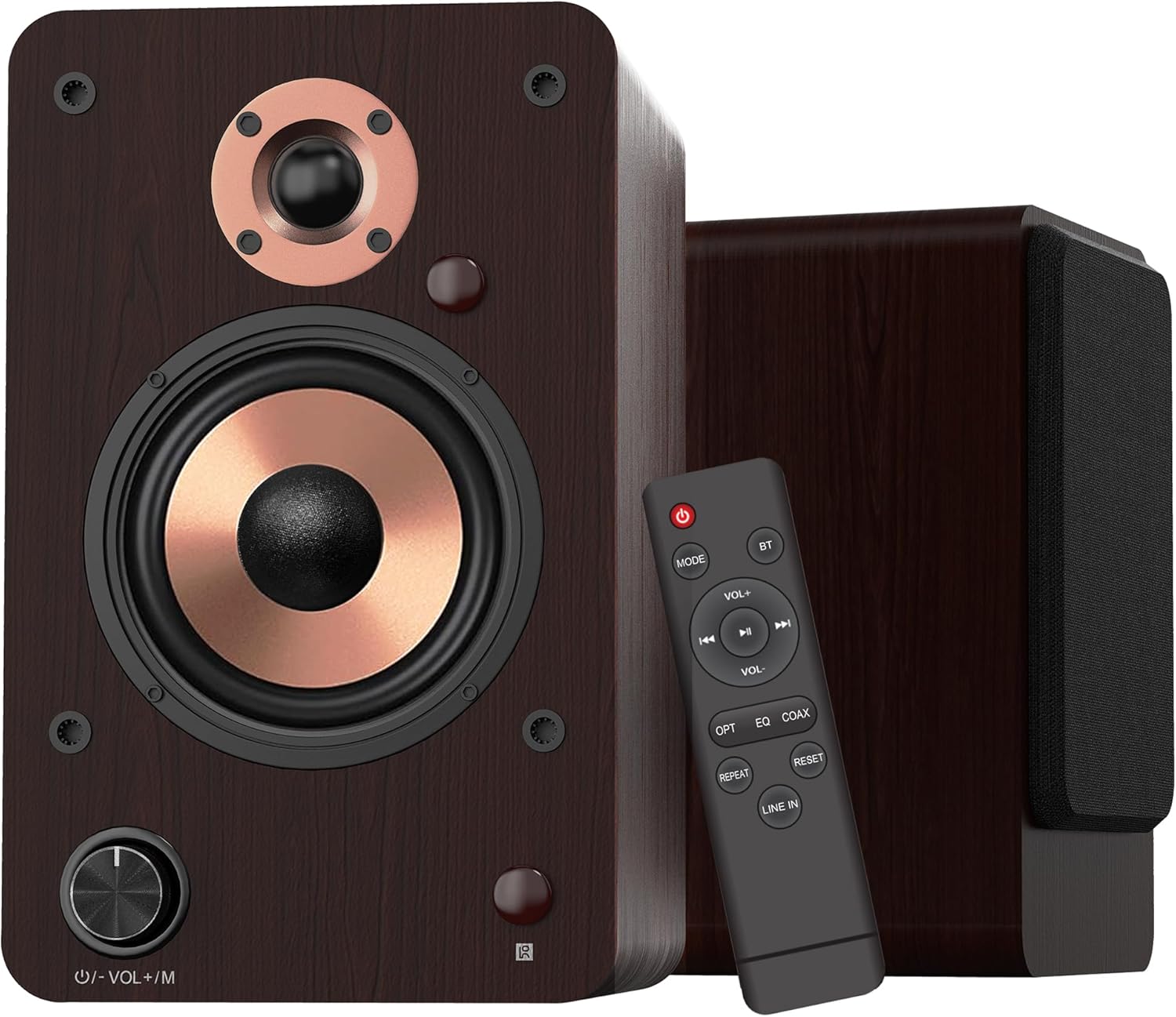
- Volume/Mode Knob: Rotate to adjust volume. Press to cycle through input modes.
- Indicador LED: Displays the current input mode (Red: Standby, Blue: Bluetooth, Green: Optical, Purple: Coaxial/USB, Yellow: AUX, Light Blue: Line-in).
4.2 Compoñentes do altofalante

- 1-inch Silk Dome Tweeter: Delivers crisp and clear high frequencies.
- 4-inch Aluminum Cone Woofer: Provides rich and powerful bass.
- 12mm MDF Wood Cabinet: Ensures solid construction and minimizes resonance for improved audio clarity.
4.3 Rear Panel (Powered Speaker)

- TREBLE Button: Adjusts high-frequency output.
- Botón BASS: Adjusts low-frequency output.
- Interruptor POWER: Activa ou desactiva o sistema de altofalantes.
- AC PORT: Connects to the AC power cord.
- ORADOR: Connects to the passive speaker using the provided speaker wire.
- LINE IN (RCA L/R): For connecting devices with RCA audio output (e.g., turntables, CD players).
- AUX IN: For connecting devices with a 3.5mm audio output.
- ÓPTICO: For connecting devices with optical audio output (e.g., TVs, game consoles).
- COAXIAL: For connecting devices with coaxial audio output.
- ENTRADA USB: For connecting USB flash drives for audio playback or connecting to a PC.
5. Configuración
5.1 Desembalaxe
Retire con coidado todos os compoñentes da embalaxe. Garde a embalaxe para futuros transportes ou almacenamentos.
5.2 Colocación de altofalantes
For optimal sound quality, place the speakers on a stable surface, such as a bookshelf or speaker stands. Position them along a wall or near a corner of the room to enhance bass response. Ensure the speakers are equidistant from your listening position for a balanced stereo image.
5.3 Conexión dos altofalantes
Connect the powered speaker to the passive speaker using the provided speaker wire. Ensure the red wire connects to the red terminal and the white/black wire connects to the black terminal on both speakers.

5.4 Conexión a fontes de audio
The LP42M speakers offer multiple input options:
- Bluetooth: Para conexión sen fíos a teléfonos intelixentes, tabletas ou outros dispositivos con Bluetooth.
- USB: Connect a USB flash drive for direct audio playback or connect to a PC using a USB cable.
- Óptica: Use the optical cable to connect to TVs, game consoles, or other digital audio sources.
- Coaxial: Use a coaxial cable to connect to compatible digital audio sources.
- RCA (Line In): Use RCA cables to connect to devices like turntables, CD players, or DVD players.
- Entrada AUX: Use a 3.5mm audio cable to connect to devices with a headphone jack.


5.5 Conexión de alimentación
Connect the AC power cord to the AC port on the rear of the powered speaker, then plug the other end into a wall outlet.
6. Instrucións de funcionamento
6.1 Encendido/apagado
Xire o POTENCIA switch on the rear panel of the powered speaker to the 'ON' position to turn on the speakers. Flip it to 'OFF' to power down.
6.2 Selección de entrada
Preme o Volume/Mode Knob on the front of the powered speaker or the 'MODE' button on the remote control to cycle through the available input modes: Bluetooth, Optical, Coaxial, RCA (Line In), USB, and AUX-in. The LED indicator will change color to reflect the selected mode.

6.3 Control de volume
Xire o Volume/Mode Knob on the front of the powered speaker clockwise to increase volume and counter-clockwise to decrease volume. Alternatively, use the 'VOL+' and 'VOL-' buttons on the remote control.
Control de 6.4 tons
Usa o TREBLE e Bass knobs on the rear panel of the powered speaker to adjust the high and low frequencies to your preference.

6.5 Emparejamento Bluetooth
- Switch the speaker to Bluetooth mode (blue LED indicator).
- On your device (smartphone, tablet), enable Bluetooth and search for 'LP42M'.
- Select 'LP42M' to pair. Once connected, the blue LED will remain solid.
Reprodución por USB 6.6
Insira unha unidade flash USB que conteña son MP3/WMA files into the USB port. The speaker will automatically switch to USB mode and begin playback. Use the remote control for playback functions (play/pause, next/previous track).
6.7 Funcións de control remoto

- Botón de encendido: Turns the speakers on/off (standby).
- MODO: Cycles through input modes.
- BT: Directly switches to Bluetooth mode.
- VOL + / VOL-: Axusta o volume.
- Play/Pause, Next/Previous: Controls audio playback (USB/Bluetooth).
- OPTAR: Directly switches to Optical mode.
- EQ: Cycles through sound equalization presets.
- COAXIAL: Directly switches to Coaxial mode.
- REPETIR: Repeats current track or playlist (USB).
- RESET: Restablece a configuración.
- LIÑA EN: Directly switches to Line In (RCA) mode.
7. Mantemento
Un mantemento axeitado garante a lonxevidade e o rendemento dos seus altofalantes.
- Limpeza: Use a soft, dry, lint-free cloth to clean the speaker cabinets. Do not use abrasive cleaners, waxes, or solvents.
- Po: Regularly dust the speaker grilles and surfaces to prevent dust buildup.
- Ambiente: Avoid placing speakers in direct sunlight, near heat sources, or in areas with high humidity.
8 Solución de problemas
Se tes algún problema, consulta os seguintes problemas e solucións comúns:
| Problema | Causa posible | Solución |
|---|---|---|
| Sen son | Power not connected; incorrect input mode; volume too low; cables loose. | Ensure power is on; select correct input mode; increase volume; check all cable connections. |
| Bluetooth non se conecta | Speaker not in Bluetooth mode; device too far; already paired with another device. | Switch speaker to Bluetooth mode; ensure device is within 10m range; disconnect from other devices and try pairing again. |
| Audio distorsionado | Volume too high; poor source quality; loose cable connection. | Reduce volume on speaker and source; try a different audio source; check cable connections. |
| O control remoto non funciona | Batteries dead; obstruction between remote and speaker; remote not pointed at sensor. | Replace batteries; remove obstructions; ensure remote is pointed at the speaker's sensor. |
9. Especificacións
| Característica | Especificación |
|---|---|
| Tipo de altofalante | Altofalantes activos de estantería |
| Potencia de saída | 100 W (50 W x 2) |
| Diámetro do woofer | 4 inches (Aluminum Cone) |
| Diámetro do tweeter | 1 inch (Silk Dome) |
| Resposta en frecuencia | 40 Hz-20 kHz |
| Impedancia | 4 ohmios |
| Relación sinal a ruído (S/N) | 80 dB |
| Conectividade | Bluetooth 5.3, Optical, Coaxial, RCA (Line In), USB, AUX-in (3.5mm) |
| Alcance Bluetooth | Ata 10 metros (33 pés) |
| Método de control | Control remoto, botóns no altofalante |
| Material do armario | Madeira MDF de 12 mm |
| Dimensións (cada altofalante) | 9.84" (H) x 7.07" (W) x 6.1" (L) / 25cm (H) x 18cm (W) x 15.5cm (L) |
| Peso (par) | 5.05 kg (11.13 libras) |
| Cor | marrón |
10. Vídeos oficiais de produtos
Watch these official videos for additional setup and feature demonstrations:
LONPOO Premium Bookshelf Speakers LP-42M
Vídeo: Un funcionario acabouview of the LONPOO LP-42M Premium Bookshelf Speakers, showcasing their design and key features.
Active Bookshelf Speaker 100W
Video: A short demonstration highlighting the active features and 100W power output of the bookshelf speakers.
11. Garantía e soporte
The LONPOO LP42M speakers come with a Limited Warranty. Please refer to the warranty card included in your package for detailed terms and conditions.
For technical support, troubleshooting assistance, or warranty claims, please contact LONPOO customer service through the official websitio ou o seu distribuidor.