
LIECTROUX M7S PRO
Manual de usuario do aspirador robot LIECTROUX M7S Pro
Model: M7S Pro
1. Introdución
Grazas pola compraasing the LIECTROUX M7S Pro Robot Vacuum Cleaner. This manual provides essential information for the safe operation, maintenance, and troubleshooting of your device. Please read this manual thoroughly before using the product and retain it for future reference.
Instrucións de seguridade
- Asegúrese de que o robot estea completamente cargado antes do primeiro uso.
- Non opere o robot en ambientes húmidos nin preto de líquidos.
- Keep loose cables, curtains, and small objects out of the robot's path to prevent entanglement.
- Supervise os nenos e as mascotas mentres o robot estea en funcionamento.
- Do not use the robot to pick up large debris, sharp objects, or burning materials.
- Empregue só a base de carga e o adaptador de corrente orixinais que se inclúen co robot.
- Turn off the robot and unplug it from the charging dock before performing any maintenance.
2. Contido do paquete
Verifica que todos os elementos estean presentes no paquete:
- LIECTROUX M7S Pro Robot Vacuum Cleaner
- Base de carga
- Adaptador de alimentación
- Cepillos laterais (conxunto)
- HEPA Filter (pre-installed or spare)
- Ferramenta de limpeza
- Control remoto
- Manual de usuario
3. Produto rematadoview
Familiarize yourself with the components of your LIECTROUX M7S Pro robot vacuum cleaner.

Figura 3.1: The LIECTROUX M7S Pro robot vacuum cleaner, showcasing its sleek black design, along with its remote control and a smartphone displaying the cleaning map via the app.
Compoñentes principais:
- Panel superior: Power button, Wi-Fi indicator, charging indicator.
- Parachoques dianteiro: Obstacle detection sensors.
- Cepillos laterais: Collect dust and debris from edges and corners.
- Rodas motrices: Allow movement across various floor types.
- Basura: Collects dry debris.
- Water Tank (for mopping): Holds water for wet cleaning.
- Contactos de carga: Connects with the charging dock.
- Sensores de acantilado: Detects drops and prevents falls.
4. Configuración
4.1 Colocación da base de carga
Coloca a base de carga contra unha parede nunha zona aberta, asegurándote de que non haxa obstáculos a menos de 1 metro (3 pés) aos lados e a 2 metros (6 pés) diante da base. Conecta o adaptador de corrente á base de carga e conéctao a unha toma de corrente.
4.2 Carga inicial
Place the robot onto the charging dock, ensuring the charging contacts align. The robot will begin charging automatically. For first use, allow the robot to charge completely (approximately 4-5 hours) before operation.

Figura 4.1: The robot vacuum cleaner automatically returning to its charging dock when its battery is low, ensuring it is always ready for the next cleaning cycle.
4.3 App Connection (TUYA App)
- Download the "TUYA Smart" app from your smartphone's app store (iOS or Android).
- Register or log in to your TUYA account.
- Ensure your robot is charged and powered on.
- Follow the in-app instructions to add your LIECTROUX M7S Pro robot vacuum cleaner. This typically involves pressing and holding a button on the robot to enter pairing mode and connecting to your home Wi-Fi network.
- Unha vez conectado, podes controlar o robot, view cleaning maps, and set schedules via the app.
4.4 Integración do asistente de voz
The LIECTROUX M7S Pro supports voice control via Amazon Alexa and Google Home. Refer to the respective app (Alexa app or Google Home app) for instructions on how to link your TUYA Smart account and control your robot with voice commands.
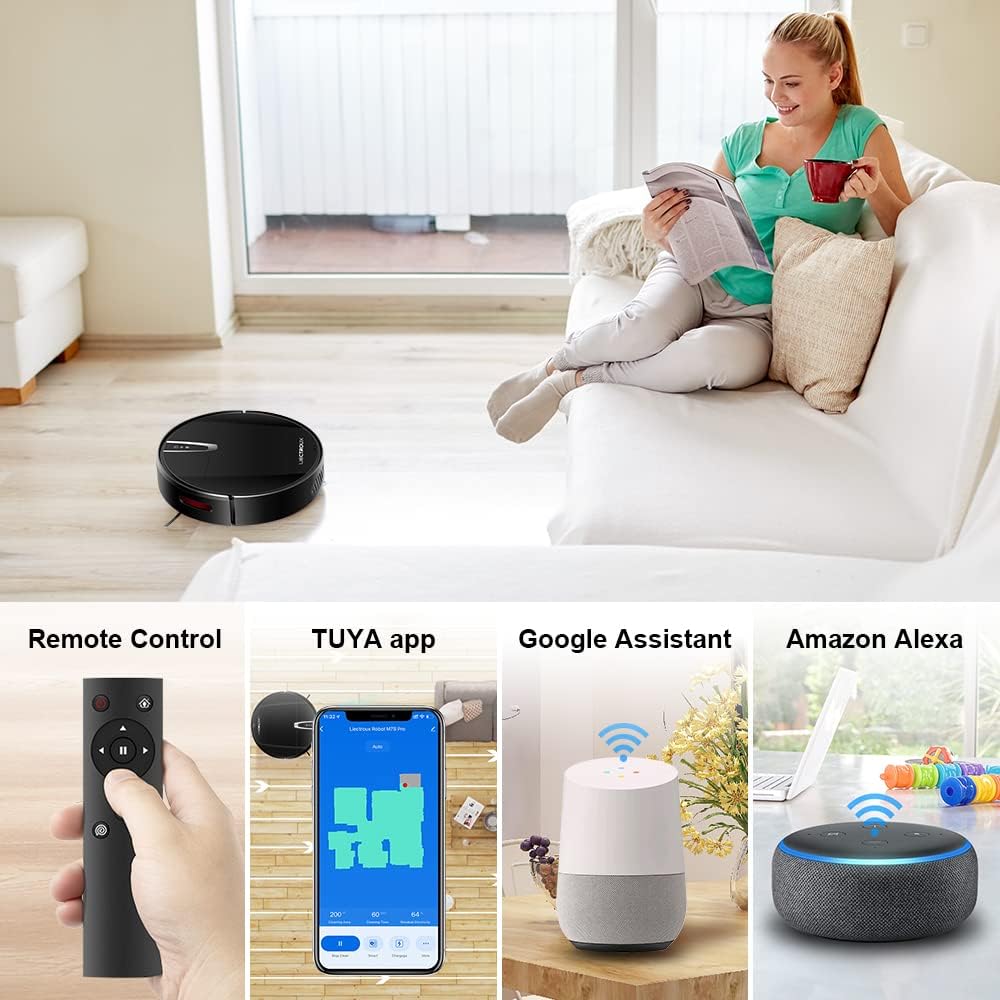
Figura 4.2: Various control methods for the robot vacuum, including a physical remote control, the TUYA smartphone application displaying a cleaning map, and integration with voice assistants like Google Assistant and Amazon Alexa.
5. Instrucións de funcionamento
5.1 Modos de limpeza
The robot offers multiple cleaning modes to suit different needs, accessible via the app, remote control, or voice commands:
- Limpeza automática: O robot navega e limpa de forma intelixente toda a área do chan.
- Limpeza de manchas: Céntrase nunha zona sucia específica, limpando en espiral.
- Limpeza de bordes: Limpa ao longo de paredes e bordos de mobles.
- Modo de fregado: For wet cleaning, attach the water tank and mopping cloth.

Figura 5.1: The robot vacuum cleaner operating on a floor with scattered debris, illustrating its powerful suction and various cleaning modes: Scheduled Cleaning, Auto Cleaning, Edge Cleaning, and Spot Cleaning.
5.2 Navegación e cartografía
The M7S Pro utilizes smart gyroscope navigation to create a 2D map of your environment, allowing for precise positioning and efficient route planning. This ensures comprehensive coverage and minimizes missed spots.

Figura 5.2: The robot vacuum cleaner navigating a room, with a grid overlay illustrating its smart gyroscope navigation system for precise positioning and thorough cleaning.

Figura 5.3: A visual comparison showing the efficient, systematic cleaning path generated by the LIECTROUX M7S Pro's gyroscope navigation versus a less organized common route planning method, highlighting intelligent route planning.
5.3 Recarga automática
When the battery level is low or a cleaning task is complete, the robot will automatically return to its charging dock to recharge. Ensure the charging dock is always powered on and accessible.
5.4 Anti-Drop System
The robot is equipped with cliff sensors to detect stairs and elevated surfaces, preventing it from falling. It also intelligently detects different floor types and adjusts its direction within 10 milliseconds.
6. Mantemento
Un mantemento regular garante un rendemento óptimo e prolonga a vida útil do teu robot aspirador.
6.1 Baleirar o colector de lixo
Empty the dustbin after each cleaning cycle or when the 'full' indicator appears. Open the top cover, remove the dustbin, and dispose of the collected debris.
6.2 Limpeza do filtro
The HEPA filter should be cleaned regularly (e.g., weekly) using the provided cleaning tool or a soft brush. Replace the HEPA filter every 3-6 months, depending on usage, to maintain suction efficiency.
6.3 Limpeza dos cepillos laterais
Inspect and clean the side brushes regularly. Remove any tangled hair or debris. If brushes are worn or damaged, replace them with new ones.
6.4 Limpeza de sensores e contactos de carga
Wipe the cliff sensors and charging contacts on both the robot and the charging dock with a clean, dry cloth to ensure proper function and charging.
6.5 Brush-less Suction Nozzle
The M7S Pro features an advanced brush-less suction nozzle designed to minimize hair entanglement, reducing the frequency of cleaning the main suction path.

Figura 6.1: An illustration of the robot vacuum's underside, highlighting the advanced brush-less suction nozzle designed to prevent hair entanglement and ensure consistent cleaning performance.
7 Solución de problemas
Se tes problemas co teu robot aspirador, consulta os seguintes problemas e solucións comúns:
| Problema | Causa posible | Solución |
|---|---|---|
| O robot non se acende. | Batería baixa; interruptor de alimentación apagado. | Charge the robot; ensure the main power switch is on. |
| O robot non carga. | Charging contacts dirty; charging dock not powered. | Clean charging contacts; ensure charging dock is plugged in. |
| O robot quédase atascado con frecuencia. | Obstacles (cables, rugs); narrow spaces. | Clear the cleaning area; use virtual walls if available. |
| Mal rendemento de limpeza. | Dustbin full; filter clogged; brushes tangled. | Empty dustbin; clean/replace filter; clean brushes. |
| Problemas de conexión coa aplicación. | Incorrect Wi-Fi password; robot not in pairing mode; 5GHz Wi-Fi network. | Verify Wi-Fi details; re-enter pairing mode; ensure 2.4GHz Wi-Fi is used. |
8. Especificacións
| Característica | Detalle |
|---|---|
| Marca | LIECTROUX |
| Nome do modelo | M7S PRO |
| Cor | Negro |
| Dimensións do produto | 32 L x 32 W x 7.8 H cm |
| Peso do elemento | 4 quilogramos |
| Potencia máxima de succión | 4000 Pa |
| Capacidade da batería | 2500mAh ión de litio |
| Tempo de execución | Ata 120 minutos |
| Tipo de filtro | HEPA |
| Tipo de controlador | App Control, Touchpad Control, Voice Control |
| Compatibilidade do asistente de voz | Google Home, Amazon Alexa |
| Tipo de navegación | Gyroscope Navigation (2D Map) |
| Característica especial | Anti-drop system, Brush-less suction nozzle |
| Recomendación de superficie | Low-pile carpet, hard floors, ceramic tiles |
9. Garantía e soporte
The LIECTROUX M7S Pro Robot Vacuum Cleaner comes with a standard manufacturer's warranty. Please refer to the warranty card included in your package for specific terms and conditions, including the warranty period and coverage details.
For technical support, troubleshooting assistance, or warranty claims, please contact the seller or LIECTROUX customer service. Contact information can typically be found on the product packaging, the seller's website, or within the TUYA Smart app.
When contacting support, please have your product model number (M7S Pro) and purchase details readily available.
Ask a question about this manual
Ask about setup, troubleshooting, compatibility, parts, safety, or missing instructions. Manuals+ will review the question and use this page’s manual context to help answer it.