
1. Produto rematadoview
The Machenike Machcreator Mini Desktop, Model 4762H, is a compact and powerful computing solution designed for various applications, from business to everyday use. It features a 13th Gen Intel Core i7-13620H processor, 16GB DDR5 RAM, and a 512GB PCIe M.2 SSD, providing high-speed performance and efficient multitasking capabilities. This mini PC supports 4K dual monitor output and comes pre-installed with Windows 11 Pro.
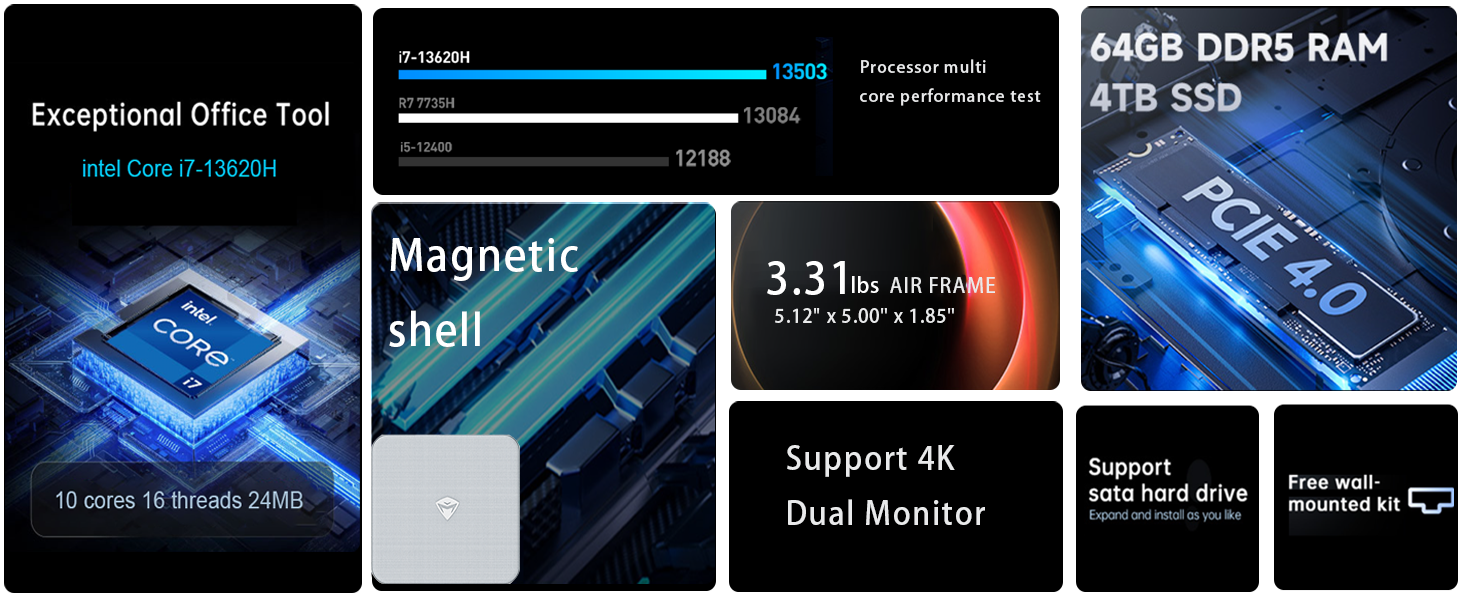
Imaxe: Máis deview of the Intel Core i7 processor, highlighting 10 Cores, 16 Threads, 4.90 GHz Max Turbo Frequency, and 24 MB L3 Cache.
Características principais:
- Procesador: Intel Core i7-13620H (10 Cores, 16 Threads, up to 4.9 GHz)
- Memoria: 16GB DDR5 SODIMM RAM (expandable up to 64GB)
- Almacenamento: 512GB PCIe M.2 Solid State Drive (supports dual M.2 expansion)
- Sistema operativo: Windows 11 Pro
- Gráficos: Integrated Intel UHD Graphics, supporting 4K dual monitor output via HDMI 2.0 and DisplayPort 1.4
- Conectividade: Wi-Fi 6, Bluetooth, 2 x RJ45 Ethernet, USB 3.2 Gen2 Type-A, USB Type-C
- Sistema de refrixeración: Twin turbine cooling fan with deluxe all-copper radiator
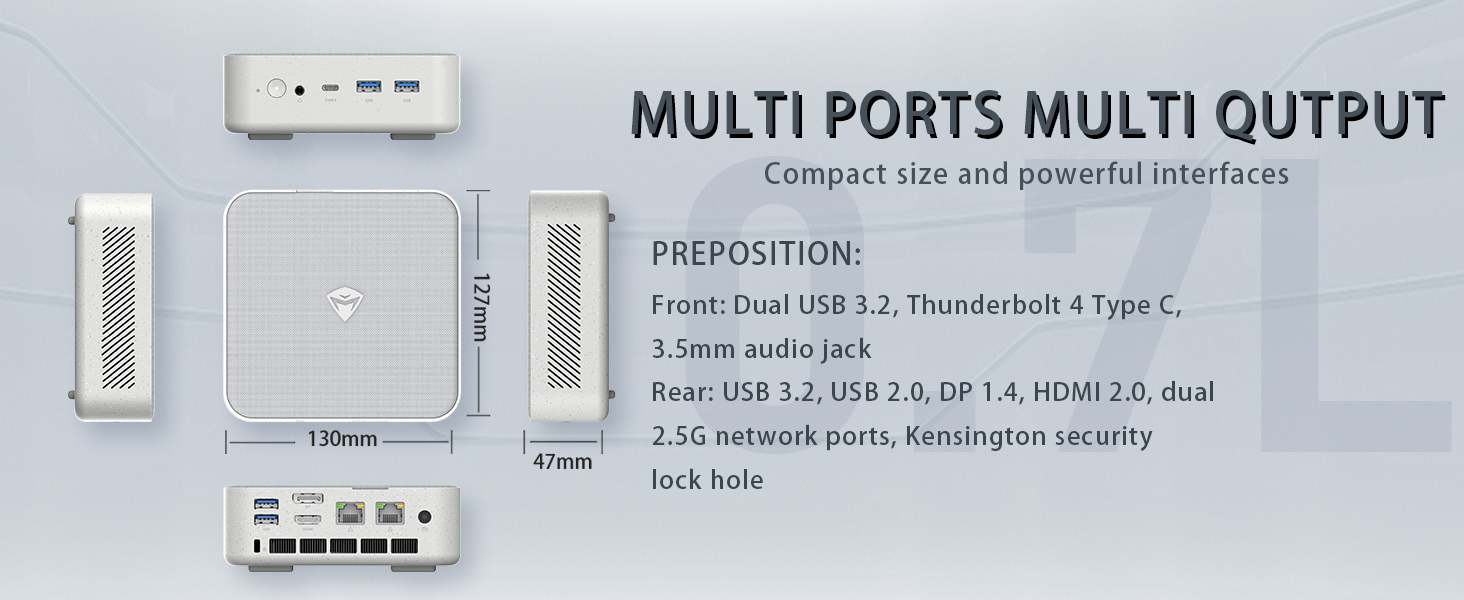
Image: Illustration of PCIe 4.0 SSD and memory slots, indicating support for up to 64GB DDR5 RAM and up to 4TB PCIe SSD expansion.
2. Guía de configuración
2.1 Desembalaxe do dispositivo
Retire con coidado todos os compoñentes da embalaxe. Asegúrese de que estean presentes os seguintes elementos:
- Machenike Machcreator Mini Desktop (Model 4762H)
- Adaptador de alimentación
- Manual de usuario (este documento)
- (Optional) VESA Mount Kit
2.2 Conexión de periféricos
Antes de acender, conecte os periféricos esenciais:
- Visualización: Connect your monitor(s) to the HDMI 2.0 or DisplayPort 1.4 ports on the rear of the mini PC. The USB Type-C port also supports video output.
- Teclado e rato: Connect your USB keyboard and mouse to any of the available USB 3.2 Gen2 Type-A ports.
- Rede: For a wired connection, connect an Ethernet cable to one of the RJ45 ports. For wireless, ensure your Wi-Fi network is available.
- Potencia: Connect the power adapter to the DC-in port on the mini PC, then plug the adapter into a power outlet.
Imaxe: Detallada view of the mini PC's front and rear ports, including USB 3.2 Gen2 Type-A, USB Type-C, 3.5mm Audio Jack, HDMI 2.0, DisplayPort 1.4, and RJ45 Ethernet ports. Dimensions are also shown.
2.3 Initial Boot-up and Windows 11 Pro Setup
- Press the power button located on the front of the mini PC.
- The system will boot into the Windows 11 Pro setup wizard. Follow the on-screen instructions to configure your language, region, network, and user account.
- Once setup is complete, your mini PC is ready for use.
3. Instrucións de funcionamento
3.1 Encendido/apagado
- Encendido: Preme o botón de acendido unha vez.
- Apagar: Fai clic no botón Inicio en Windows e, a seguir, selecciona Enerxía > Apagar.
- Reiniciar: Fai clic no botón Inicio en Windows e, a seguir, selecciona Enerxía > Reiniciar.
- Durmir: Fai clic no botón Inicio en Windows e, a seguir, selecciona Enerxía > Suspensión.
3.2 Configuración da pantalla
The mini PC supports up to two 4K displays simultaneously. To configure display settings:
- Fai clic co botón dereito no escritorio e selecciona "Configuración da pantalla".
- Here you can detect multiple displays, arrange them, change resolution, and adjust scaling.
3.3 Conectividade de rede
- Wi-Fi: Click the network icon in the taskbar, select your Wi-Fi network, enter the password, and connect.
- Ethernet: If an Ethernet cable is connected, the system should automatically establish a wired network connection.
3.4 Cooling System Modes
The mini PC features an advanced cooling system with adjustable modes via the BIOS to optimize performance and noise levels. These modes include:
- Modo silencio: Prioritizes quiet operation, suitable for light tasks.
- Modo de equilibrio: Offers a good balance between performance and noise.
- Modo de rendemento: Maximizes performance (up to 65W power release), ideal for demanding applications.
To change these settings, access the BIOS during startup (typically by pressing Del or F2 repeatedly after powering on) and navigate to the relevant power or performance settings.
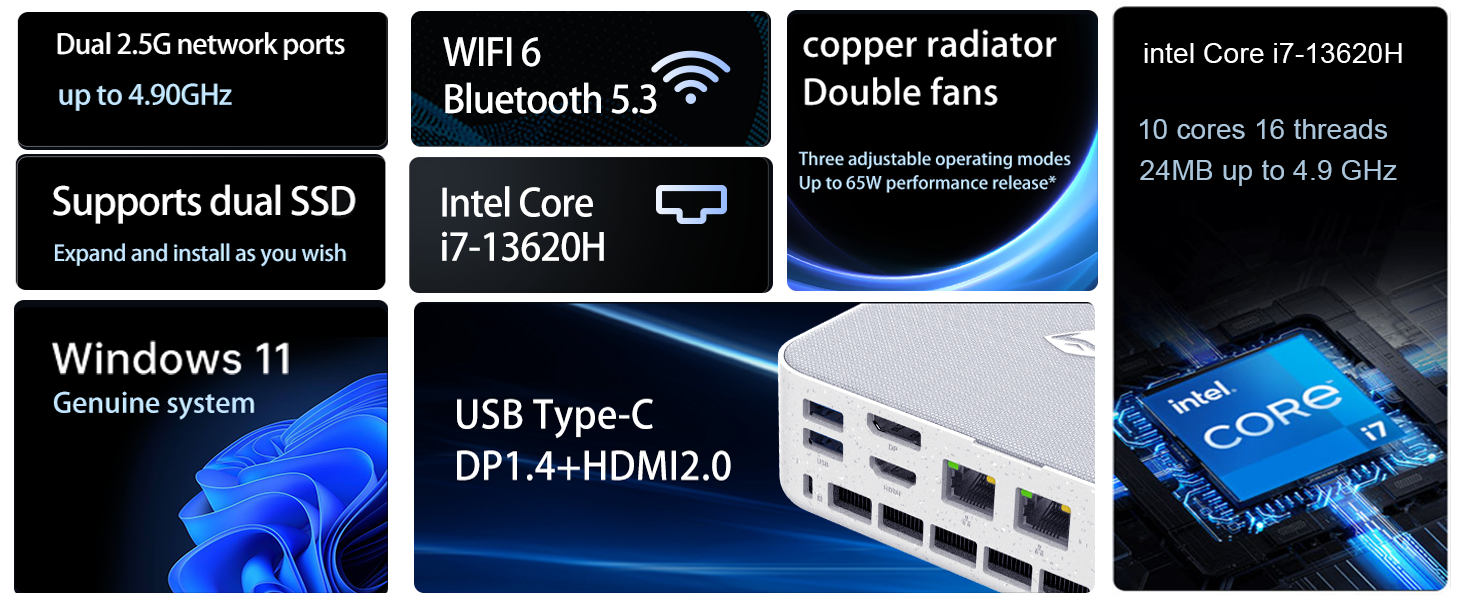
Image: Illustration of the twin turbine cooling fan and deluxe all-copper radiator, explaining how it prevents slowdowns due to overheating and offers silence, balance, and performance modes.
4. Mantemento
4.1 Limpeza do dispositivo
To ensure optimal performance and longevity, regularly clean your mini PC:
- Power off the device and disconnect it from the power outlet.
- Use un pano suave e seco para limpar o exterior.
- Use compressed air to gently clear dust from ventilation openings. Do not insert any objects into the vents.
4.2 Actualizacións de software
Keep your Windows 11 Pro operating system and drivers updated to ensure security and performance:
- Actualizacións de Windows: Go to Start > Settings > Windows Update and check for updates.
- Actualizacións de controladores: Visit the Machenike official website for the latest drivers for your specific model.
4.3 Expansión de almacenamento e memoria
The Machenike Machcreator Mini Desktop supports upgrades for both RAM and storage:
- RAM: The device has 2 SODIMM slots and supports up to 64GB DDR5 RAM.
- Almacenamento: It supports dual PCIe M.2 SSDs, allowing for significant storage expansion up to 4TB.
Nota: Opening the device for upgrades may void your warranty. Consult a qualified technician or refer to specific upgrade guides from Machenike if available.
5 Solución de problemas
Esta sección aborda problemas comúns cos que podes atoparte. Para problemas máis complexos, ponte en contacto co servizo de atención ao cliente.
5.1 Sen enerxía
- Asegúrate de que o adaptador de corrente estea conectado correctamente tanto ao mini PC como a unha toma de corrente que funcione.
- Verifica que a toma de corrente funcione conectando outro dispositivo.
- Comprobe se o adaptador de corrente presenta algún dano visible.
5.2 Sen saída de pantalla
- Confirm that the monitor is powered on and the correct input source is selected.
- Ensure the HDMI or DisplayPort cable is securely connected to both the mini PC and the monitor.
- Proba cun cable de pantalla ou monitor diferente se estás dispoñible.
- If using multiple displays, try connecting only one display at a time.
5.3 Problemas de conectividade de rede
- Cableado (Ethernet): Check if the Ethernet cable is properly connected to both the mini PC and the router/modem. Verify router/modem status.
- Sen fíos (Wi-Fi): Ensure Wi-Fi is enabled in Windows settings. Restart your router/modem. Check if other devices can connect to the Wi-Fi network.
- Run Windows Network Troubleshooter (Start > Settings > Network & internet > Advanced network settings > Network troubleshooter).
6. Especificacións
Detailed technical specifications for the Machenike Machcreator Mini Desktop, Model 4762H:
| Característica | Especificación |
|---|---|
| Marca | Machenike |
| Número de modelo | 4762H |
| Sistema Operativo | Windows 11 Pro |
| Modelo CPU | Intel Core i7-13620H |
| Velocidade da CPU | Up to 4.9 GHz (Max Turbo Frequency) |
| Tamaño da memoria RAM instalada | 16 GB DDR5 (Expandable to 64 GB) |
| Velocidade do reloxo da memoria | 4800 MHz |
| Slots de memoria dispoñibles | 2 |
| Capacidade de almacenamento da memoria | 512 GB PCIe M.2 SSD (Supports dual M.2, up to 4TB) |
| Coprocesador gráfico | Gráficos Intel UHD (integrados) |
| Interface de saída de vídeo | HDMI 2.0, DisplayPort 1.4, USB Type-C |
| Resolución de visualización máxima | 3840x2160 (4K) |
| Interface de hardware | 3.5mm Audio, Bluetooth, DisplayPort, Ethernet (2x RJ45), HDMI, USB, USB Type C |
| Conectividade sen fíos | Wi-Fi 6 (802.11ax), Bluetooth |
| Dimensións do artigo (LxWxH) | 5.12 x 5 x 1.85 polgadas |
| Peso do elemento | 49.8 libras (Note: This weight may be a data entry error; actual weight for a mini PC is typically much less.) |
| UPC | 193200587317 |
7. Garantía e soporte
7.1 Información da garantía
Machenike products typically come with a limited manufacturer's warranty. Please refer to the warranty card included with your purchase or visit the official Machenike website for detailed warranty terms and conditions specific to your region and product model. Keep your proof of purchase for warranty claims.
7.2 Atención ao cliente
For technical assistance, troubleshooting beyond this manual, or warranty inquiries, please contact Machenike customer support:
- Soporte en liña: Visita o sitio oficial de Machenike websitio (www.machenike.com - exampligazón, a ligazón real pode variar) e vaia á sección de soporte.
- Soporte por correo electrónico: Consulta a documentación do produto para obter o enderezo de correo electrónico de asistencia específico.
- Asistencia telefónica: Check the Machenike websitio web para números de teléfono de asistencia rexional.
When contacting support, please have your product model number (4762H) and serial number ready.