
Apple MXEF3LL/A
Apple Watch SE (2nd Gen) GPS 40mm Smartwatch User Manual
Model: MXEF3LL/A
1. Introdución
The Apple Watch SE (2nd Generation) is a versatile smartwatch designed to help you stay connected, active, and safe. It features advanced sensors for health monitoring, robust fitness tracking capabilities, and essential safety features like Crash Detection and Emergency SOS. This manual provides detailed instructions for setting up, operating, maintaining, and troubleshooting your device.

Figure 1: Apple Watch SE (2nd Gen) with Starlight Aluminum Case and Starlight Sport Band.
2. Que hai na caixa
Upon unboxing your Apple Watch SE, verify that all components are present:
- Apple Watch SE (2nd Generation, 2024) - GPS Only
- Small / Medium Sport Band - fits 130-180mm wrists
- Cable de carga magnético de 1 m

Figure 2: Included items: Apple Watch SE, Sport Band, and USB-C Magnetic Charging Cable.
3. Configuración
3.1 Carga inicial
Before first use, fully charge your Apple Watch SE. Connect the magnetic charging cable to the back of your watch and plug the USB-C end into a compatible power adapter (sold separately) or a USB-C port. The watch will display a charging indicator.
3.2 Pairing with iPhone
- Ensure your iPhone is updated to the latest iOS version and has Bluetooth and Wi-Fi enabled.
- Acende o teu Apple Watch mantendo premido o botón lateral ata que apareza o logotipo de Apple.
- Place your Apple Watch near your iPhone. A pairing screen will appear on your iPhone. Tap 'Continue'.
- Position your iPhone so the Apple Watch appears in the viewfinder. This will pair the devices.
- Follow the on-screen instructions on both devices to complete the setup, including setting up a passcode, installing apps, and configuring features.
4. Instrucións de funcionamento
4.1 Navegación básica
- Coroa dixital: Rotate to scroll, zoom, or adjust values. Press to go to the watch face or app list. Double-press to switch between recent apps.
- Botón lateral: Press to open the Dock (recent apps), access Apple Pay, or use Emergency SOS. Double-press for Apple Pay. Press and hold for power options or Emergency SOS.
- Pantalla táctil: Tap to select, swipe to navigate, force touch for additional options (context-dependent).
4.2 Comunicación
With your Apple Watch SE, you can make and receive calls, send and receive text messages, and use Siri directly from your wrist when connected to your iPhone or Wi-Fi.

Figure 3: Call and text functionality on Apple Watch SE.
4.3 Seguimento da aptitude física e da saúde
The Apple Watch SE provides comprehensive tracking for your daily activity, workouts, sleep, and heart health.
- Activity Rings: Track your Move, Exercise, and Stand goals throughout the day.
- Workout App: Choose from a variety of workout types to track metrics like duration, distance, calories burned, and heart rate.
- Seguimento do sono: Monitorea o teu sonotages and duration to gain insights into your sleep patterns.
- Monitorización da frecuencia cardíaca: Continuously monitors your heart rate and can provide notifications for irregular heart rhythms, unusually high, or low heart rates.
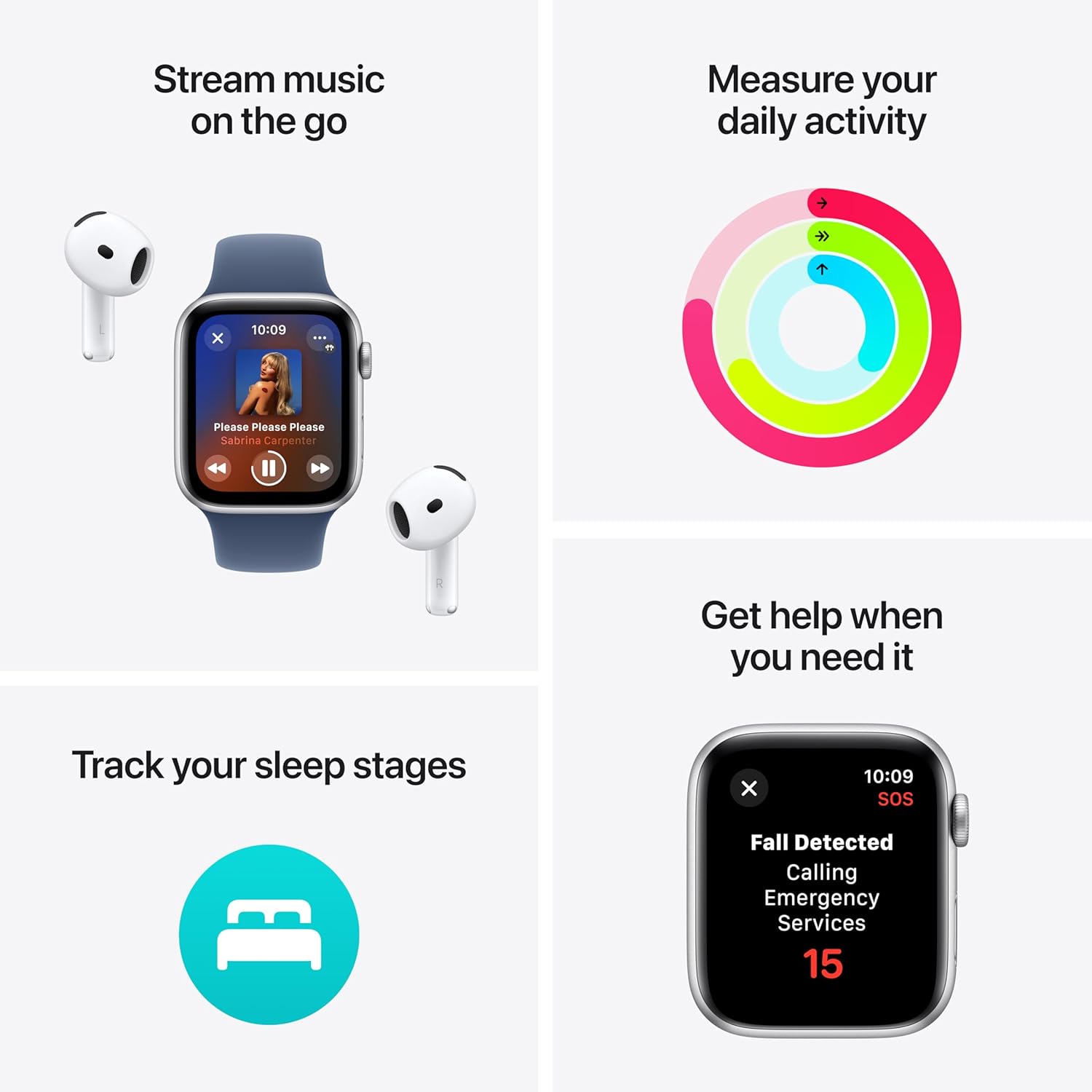
Figura 4: Máisview of key features including activity, music, safety, and sleep tracking.

Figure 5: Health insights display, showing heart rate and sleep stages.
5. Health and Safety Features
The Apple Watch SE is equipped with critical safety features:
- Detección de caídas: Automatically detects hard falls and can initiate a call to emergency services if you are unresponsive.
- Detección de accidentes: Can detect a severe car crash and automatically connect you with emergency services, providing your location to dispatchers.
- SOS de emerxencia: Permite chamar rapidamente aos servizos de emerxencia mantendo premido o botón lateral.
- Irregular Heart Rhythm Notifications: Can alert you to potential signs of atrial fibrillation (AFib).
6. Personalización
Personalize your Apple Watch SE to match your style and preferences:
- Correas de reloxo: Easily swap out watch bands to change the look and feel of your device.
- Ver caras: Customize watch faces with different complications, colors, and styles to display information relevant to you.
7. Compatibilidade
The Apple Watch SE is designed to work seamlessly within the Apple ecosystem:
- Requires an iPhone 8 or later with the latest version of iOS.
- Integrates with Apple services such as Apple Pay, Find My, and Fitness+.
- Can automatically unlock your Mac when nearby.
8. Mantemento
8.1 Limpeza
To clean your Apple Watch SE, wipe it with a soft, lint-free cloth. If necessary, lightly dampen the cloth with fresh water. Do not use soaps, cleaning products, abrasive materials, or compressed air.
8.2 Resistencia á auga
The Apple Watch SE has a water resistance rating of 50 meters under ISO standard 22810:2010. This means it may be used for shallow-water activities like swimming in a pool or ocean. However, it should not be used for scuba diving, waterskiing, or other activities involving high-velocity water or submersion below shallow depth.
8.3 Coidado coa batería
For optimal battery life, avoid exposing your Apple Watch to extreme temperatures. Charge the device regularly and avoid fully draining the battery frequently.
9 Solución de problemas
If you encounter issues with your Apple Watch SE, consider the following common solutions:
- Ver Non responde: Force restart by holding the Digital Crown and side button simultaneously for at least 10 seconds until the Apple logo appears.
- Problemas de emparellamento: Ensure Bluetooth is enabled on your iPhone and both devices are charged. Try unpairing and re-pairing the watch.
- A aplicación non funciona: Try restarting the app or restarting the Apple Watch. Ensure the app is updated.
- Lecturas inexactas: Ensure the watch is worn snugly on your wrist. Clean the back of the watch to ensure sensor contact.
For more complex issues, refer to the Apple Support websitio web ou póñase en contacto co servizo de atención ao cliente de Apple.
10. Especificacións
| Característica | Especificación |
|---|---|
| Número de modelo | MXEF3LL/A |
| Mostrar | Retina Display, 40mm Screen Size |
| Conectividade | GPS, 802.11n Wi-Fi, Bluetooth |
| Capacidade de almacenamento | 32 GB |
| Sistema Operativo | watchOS |
| Sensores | Heart Rate Monitor, Accelerometer, Gyroscope, Ambient Light Sensor |
| Resistencia á auga | 50 metros |
| Batería | 1 batería de iones de litio (incluída) |
| Dimensións | 24 x 7.7 x 3 polgadas |
| Peso do elemento | 4.3 onzas |
| Fabricante | Apple |
11. Garantía e soporte
Your Apple Watch SE is covered by Apple's standard limited warranty. For detailed warranty information, including terms and conditions, please visit the official Apple website or consult the warranty card included with your purchase.
For technical support, software updates, and additional resources, please visit the Apple Support websitio (soporte.apple.com/watch) or contact Apple customer service directly.
Ask a question about this manual
Ask about setup, troubleshooting, compatibility, parts, safety, or missing instructions. Manuals+ will review the question and use this page’s manual context to help answer it.